Two searches in, you can already tell something is off. You wanted your own code to read Alpari prices, fire orders and check positions while you did something else with your afternoon. What came back was a US broker called Alpaca with immaculate REST documentation, a commercial bank that shares the name, and forum threads about a London entity that stopped trading a decade ago. Nothing on the first page tells you what your Alpari account actually exposes.
This page is the map. By the end you will know which company you are integrating with, what a working Alpari integration can and cannot do, which of the routes people casually call "the Alpari API" fits your build, what account tier and checks stand between you and access, how to ask for it in a way that gets a real answer, and the limits worth knowing before you spend a fortnight on plumbing instead of strategy.
Key Takeaways
"Alpari API" is not one product but a handful of access routes - and the search results for it constantly confuse Alpari with Alpaca Markets and with an unrelated bank of the same name.
The routes that need no application are the MetaTrader ones: an Expert Advisor, or MetaQuotes' MetaTrader 5 Python module attached to your running terminal.
FIX-class connectivity is arranged through Alpari's professional or institutional channel, gated on account tier and client classification, not issued as a self-serve key.
Budget for the real limits first: no public reference to read up front, a terminal that must stay alive, MetaTrader's own pacing rules, and broker-specific symbol names.
Table of Contents (21 min read)Contents
What "Alpari API" Actually Means (and What It Doesn't)
The query is ambiguous before Alpari even enters the picture. Three unrelated organisations compete for it:
Alpari — the retail forex and CFD broker trading under alpari.com and a family of regional sites. This is the one holding your account.
Alpaca Markets — a US broker built API-first, with public REST documentation and an official Python client. Its docs are genuinely excellent, which is precisely why they outrank almost everything for a name one vowel away from theirs.
Alpari Bank — a commercial bank sharing the name. No connection to trading automation whatsoever.
There is a second layer of confusion, and it catches readers who already know Alpaca is a different company. "Alpari" is a brand that several legal entities have operated, across different countries and different eras. Alpari (UK) Limited — the entity behind the institutional connectivity that most surviving alpari direct api threads describe — stopped trading in 2015. The Russian-facing business sat with a separate entity under a separate regulatory regime, which is why an alpari.ru api search returns material that never described what alpari.com offers today. The international arm has also changed operating entity and licensing jurisdiction more than once in recent years. Documentation for one Alpari is not documentation for yours, and a support answer from 2013 is archaeology, not guidance.
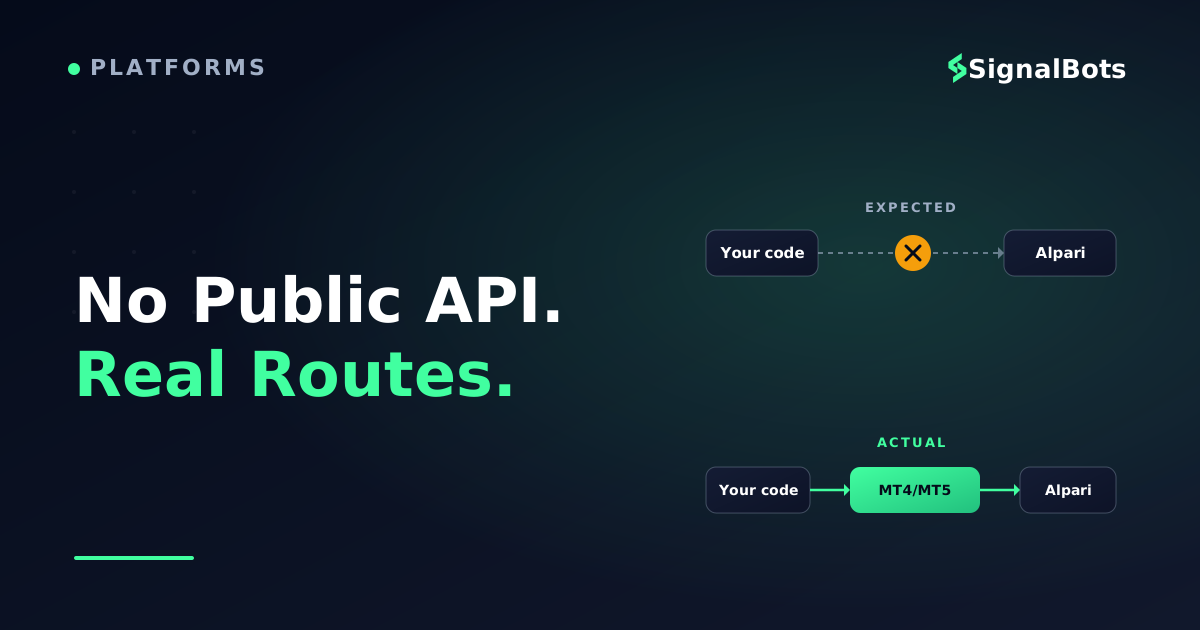
With the name settled, separate two questions that readers usually fuse into one. A broker API in general is any programmatic interface that lets software do what you would otherwise do by hand in a platform: pull quotes, send orders, read positions. The far more useful question is what your Alpari entity actually exposes — and there the honest answer is narrower than the query implies. Alpari's documented, supported path for driving an account programmatically runs through MetaTrader. There is no self-serve developer portal where you issue yourself a key, read an endpoint reference over coffee and call it from a cloud function.
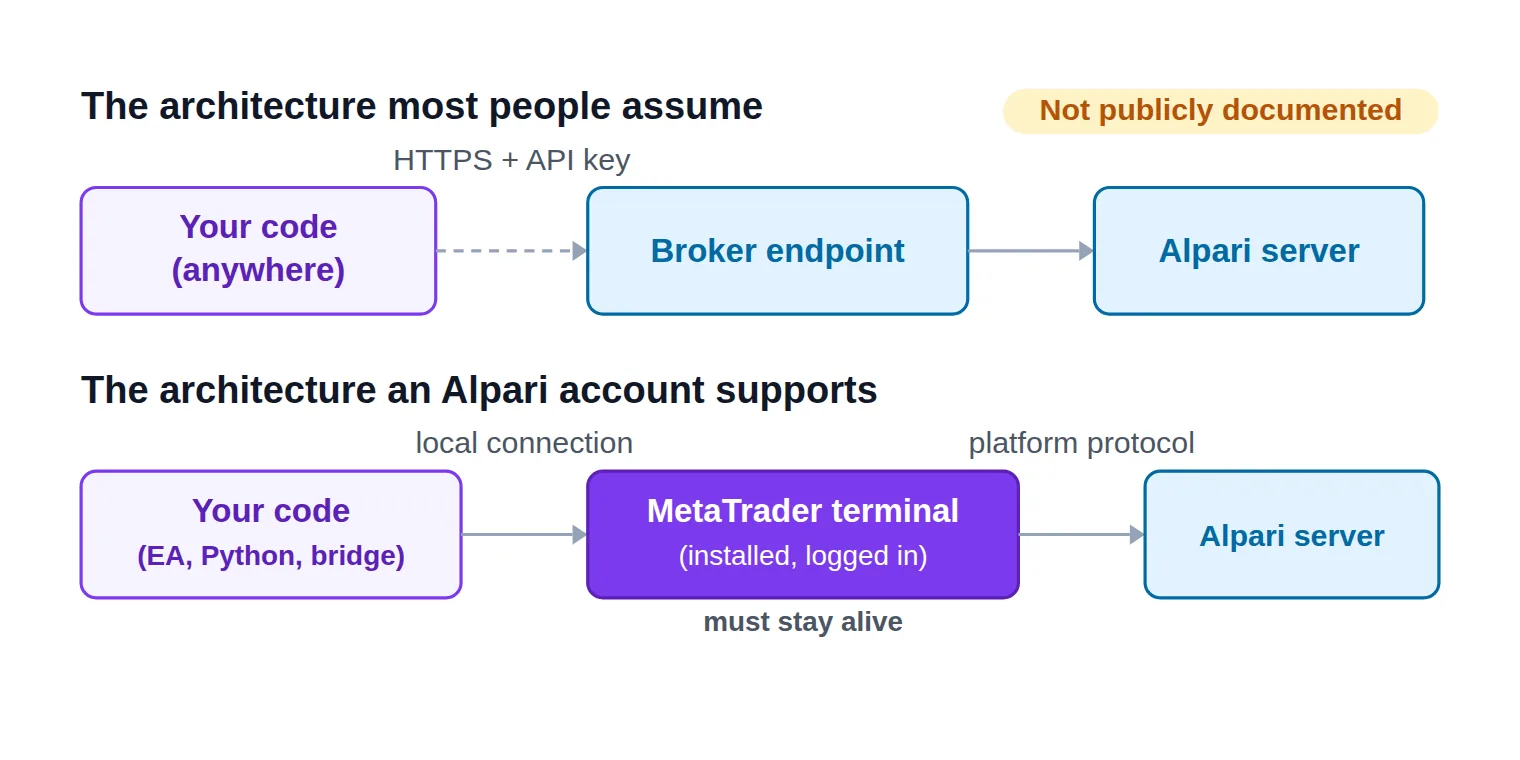
That distinction is easiest to see as two wiring diagrams side by side. In the figure below, the upper lane is the architecture almost everyone pictures when they search for a broker API; the lower lane is the one an Alpari account actually supports, with a MetaTrader terminal sitting in the middle of every hop.
The assumed path and the real one: on an Alpari account a running MetaTrader terminal sits in the middle of every hop.
None of this is a knock on the broker. It is the ordinary shape of a MetaTrader-first business: the platform already ships a complete algorithmic trading stack — a language, an editor, a strategy tester, a scripting bridge — so there is little reason to build and maintain a second one alongside it. It simply means "the Alpari API" names a small set of access routes with different owners and different gates, rather than one product with one signup button.
What You Can Actually Automate on an Alpari Account
Strip the protocols away and every piece of broker automation reduces to three jobs. Knowing which of them you genuinely need is what stops you from over-engineering the other two.
Market data — live bid and ask quotes for the symbols you trade, plus historical bars for research and backtesting. Pulling Alpari historical data into MT4 or MT5 for that research is its own exercise, with its own quirks around bar depth and server-side history.
Order execution — sending market and pending orders, modifying stop-loss and take-profit levels, closing or part-closing a position, and reading back what actually filled at what price.
Account state — balance, equity, free margin, open positions and deal history, so your code knows what it already owns before it opens anything new.
On an Alpari account, all three arrive through the MetaTrader server rather than an HTTP endpoint you call from anywhere. Your code talks to a terminal; the terminal talks to Alpari. That one sentence explains most of the surprises further down this page — the hosting bill, the pacing limits, the symbol names, the reason a serverless design has to be redrawn.
What you do not get is a documented public endpoint with a key you issue yourself, callable from any machine, with nothing of the platform's running on your side. If your architecture assumed exactly that — a function that wakes on a webhook, authenticates and fires an order — you will need to redesign around a persistent terminal, or around a session that Alpari grants you directly.
Which Alpari Automation Route Fits Your Build?
Five different things get called "the Alpari API" in conversation, and they are not interchangeable. Choose by what your build actually needs: how fast, in which language, and how much approval you are willing to chase.
Professional or ECN tier, plus a desk conversation
Latency-sensitive, high-volume execution
Python
MetaQuotes' module talking to a running terminal
A live or demo MT5 account, nothing more
Research, backtesting and quant workflows
Java and other languages
No first-party SDK; you build or buy a bridge
A live or demo MT4 or MT5 account
Wiring Alpari into an existing codebase
MT4/MT5 Expert Advisor
Your logic running inside the terminal itself
An account with algo trading switched on
Rule-based strategies that trade unattended
The five routes people call the Alpari API - what each one really is, and what it costs you to get there.
REST — the route most people assume exists
A REST API is the shape every modern developer reaches for first: call an endpoint over HTTPS, get JSON back, move on. It is also where expectation and reality part company here, because no public Alpari REST API is documented for retail clients to sign up for and call.
Two honest workarounds exist, and you should know which one you are choosing. The first keeps the HTTP call on your side: a program inside the terminal calls out to a service you control, using MetaTrader's outbound request function, which only fires for hosts you have added to the terminal's WebRequest whitelist. The second is a third-party bridge that accepts an inbound webhook — a TradingView alert webhook, typically — and pushes the resulting order into your MetaTrader account on your behalf. Both give you REST-shaped ergonomics; neither is an Alpari REST API, and only the first keeps your credentials in your own hands. Whichever HTTP layer ends up in the middle, plan for its API rate limiting rather than the broker's.
FIX — the professional route, and the source of the "Alpari Direct" trail
A FIX API is a persistent, session-based protocol built for institutions: your engine logs into a session, streams prices and sends orders as tagged messages, with no graphical platform anywhere in the path. It is the fastest route on offer and the one where execution speed genuinely repays the engineering.
It is also what the "Alpari Direct" keyword trail is really pointing at. Alpari Direct and Alpari Direct Pro were ECN offerings from the brand's institutional era, connected through a third-party liquidity platform, and they are why FIX and Alpari still appear together in older material. Treat all of it as history. Today, FIX-class connectivity is something you arrange through Alpari's professional or institutional channel — an approved account and a conversation with a desk — not a toggle in your client area. Any page promising you a self-serve Alpari FIX endpoint with a public specification is describing something that is not publicly documented.
Python — the closest thing to a real Alpari API for most readers
If you write Python and you are on MetaTrader 5, this is the pragmatic answer, and it is available today with no application at all. MetaQuotes publishes a Python module that connects to an MT5 terminal running on the same machine and exposes exactly the three jobs above: copy rates and ticks, read account and position state, send and manage orders. Because it attaches to your logged-in terminal, it inherits your Alpari account automatically — nothing to request, nobody to convince.
Two constraints ride along with it. The terminal must be installed, logged in and running, which makes this a Windows-first arrangement in practice; and the module is a client library for that terminal, not a hosted service, so uptime is entirely your problem. For most people searching for alpari api trading in Python, the trade is worth it: a notebook that reads live Alpari prices and places a test order on demo is an afternoon of work, not a procurement exercise.
Java and everything else — bridges, not SDKs
There is no first-party Alpari SDK for Java, C#, Go or anything else. What exists is a pattern: run something inside the terminal that speaks to the outside world, then write your real application in whatever language you like against that. In practice that means a program written in MQL4 / MQL5 acting as a local server — a socket listener, a message-queue client, or a file-based handoff — with your service on the other end of it.
The pattern works and it is widely used. Just be clear about what you are signing up for: a second moving part, a serialisation format between the two halves, and the failure mode where one side is alive and the other quietly is not. If you want a Java route because your firm's stack is Java, budget for the bridge, not only for the strategy.
MT4/MT5 Expert Advisors — the route with no gate at all
An Expert Advisor is a program that runs inside the terminal, attached to a chart, trading by rules you or someone else wrote. No registration, no key, no tier: if your account can open a chart, it can run one, provided algo trading permission is enabled in the terminal and your account is not restricted from automated strategies.
For a large share of readers who arrive at "Alpari API", this is the honest answer to what they were actually trying to do. You wanted rules executed without you at the screen, and this route delivers that with the least ceremony and the fewest dependencies. Whether you write that logic yourself or run an off-the-shelf forex robot on the account is a separate decision, and it turns on how you judge someone else's strategy rather than on how you reach the broker.
Eligibility: The Account Tier and Checks That Gate Access
Two very different bars apply depending on the route you picked, and conflating them is why people assume access is harder than it is.
For the MetaTrader routes — Expert Advisors, the Python module, any bridge you build yourself — the bar is simply a working Alpari MT4 or MT5 account. A demo account clears it outright. A live account additionally needs the ordinary Know Your Customer verification any regulated broker runs before it funds you: identity document, proof of address, the usual questionnaire. Automation adds no extra step.
For professional or FIX-class connectivity, the bar rises on three axes at once:
Account type. Expect it to start from an ECN-style account — at Alpari, the Pro ECN tier — rather than an entry-level one, with a correspondingly higher funding threshold. Read the current requirement on Alpari's own account comparison rather than trusting a figure quoted in any blog post, this one included.
Client classification. Direct protocol access is commonly reserved for clients categorised as professional or institutional. That categorisation is a formal process rather than a preference you tick, and in some jurisdictions it changes the protections attached to your account.
Jurisdiction. Alpari does not serve residents of every country, and the list moves. If you are building for clients rather than for yourself, confirm coverage before you write a line.
There is no published eligibility page for programmatic access specifically, and that absence is itself the finding: eligibility is assessed in a conversation, not against a checklist you can read in advance. The image below is the mental model to hold — a building with no public lobby and one intercom by a service door. There is no published eligibility page for programmatic access - the requirements are assessed in a conversation, not read off a checklist.
How to Request Alpari API Access, Step by Step
Because there is no developer portal, "applying" means writing a good request to the right desk. The sequence below is short, and doing it in order keeps you from being bounced between teams.
The access path
Requesting programmatic access to an Alpari account
1
Confirm which Alpari entity you are with
Your client area and account agreement name the operating entity. Platforms, terms and support routes differ between them.
2
Match the account tier to the route
Any live or demo MT4/MT5 account covers the EA and Python routes. Professional connectivity starts from a Pro ECN-class account.
3
Write the access request
Ask support or the institutional desk directly, naming your protocol, expected volume, strategy type and the entity you trade under.
4
Clear verification and classification
Expect identity checks, and for professional connectivity a client-classification step, before any credentials get discussed.
5
Prove it on demo before real money
Point the integration at a demo account and confirm fills, symbol names, reconnects and error handling before funding anything.
There is no signup form - access is a short, ordered conversation, and step one is knowing which Alpari you are talking to.
Two details separate a useful reply from a template response. Be specific about protocol and volume. "I want the API" invites a link to the MetaTrader download page; "I need a FIX session for an automated strategy on major FX pairs, at roughly this monthly volume, on an account with this entity" reaches somebody who can actually answer it. And ask for the answer in writing, conditions included, so you can plan against a document rather than a half-remembered phone call.
If the answer is no, that is information rather than a dead end. It means your route is one of the MetaTrader ones — and those you can start building this afternoon.
The Real Limits You Should Know Before You Build
None of these is a dealbreaker alone. Together they are the difference between a two-day integration and a two-month one.
There is no public reference to read before you commit. With an API-first broker you evaluate the documentation and then decide. Here you decide and then find out. Absorb that uncertainty by prototyping on the MetaTrader routes first, since they need nobody's permission, before you plan a roadmap around FIX.
Something has to keep a terminal alive. Every route except FIX depends on a MetaTrader terminal being logged in and connected. A closed laptop lid is an outage, and a home connection dropping at 2am is a position nobody is managing. That is what a VPS for EA hosting is for, and it belongs in the cost model from day one rather than as a surprise in week three.
The throughput ceiling is not an HTTP rate limit. MetaTrader enforces its own pacing. The terminal serialises trade operations, so a burst of orders meets a trade context busy condition rather than a tidy queue, and the platform applies a server request ceiling to how often you may poll. Retry logic and sane pacing are not optional polish; they are the difference between an order sent and an order silently dropped.
Symbol names will not match your assumptions. Broker servers routinely append suffixes to instrument names, and the exact string can differ between account types on the same broker. Hard-coding a symbol is the single most common reason a strategy that worked on demo places nothing on live, so build symbol mapping in from the first commit.
Risk sizing stays your code's job. Nothing in any of these routes converts a risk percentage into a lot size for you, and nothing stops a mistyped volume from reaching the market. Work the arithmetic out on paper first, then encode it, then test the encoding on demo against numbers you calculated by hand.
A third-party bridge asks for your credentials. Any hosted service that trades your MetaTrader account needs your login. Understand the difference between an investor and a master password before you hand anything over: the investor password is read-only, while a service holding the master password can place trades on your account. That is a counterparty decision, not a technical one.
Binary contracts sit outside all of this. MetaTrader order automation covers CFD-style instruments. Binary-style products have historically lived on their own platform surface, separate from MT4/MT5 order flow, and what Alpari offers there has changed over the years — none of the routes above will place one for you.
Pre-build
Before you write a line of Alpari integration code
0 / 7
Confirm which Alpari entity holds your account, and which platforms and terms apply to it.
Confirm your account tier supports the route you picked - EA and Python need only MT4/MT5, FIX needs professional connectivity.
Check that algo trading is enabled in the terminal and that your strategy type is permitted on your account.
Decide where the terminal will run around the clock, and what restarts it when it dies.
Note the exact symbol names on your Alpari server, suffixes included, and map them in code rather than hard-coding them.
Send a written access request and get the answer in writing before you budget engineering time.
Run the whole pipeline against a demo account until fills, rejections and reconnects all behave predictably.
★
Checklist complete — you’re cleared to proceed.
Tick all seven before you write integration code - each unticked line is a week you can lose later.
Don't Want to Build the Integration Yourself?
Add up what the routes above genuinely cost. A working integration is a small piece of infrastructure: a machine that never sleeps, a terminal that reconnects, symbol mapping, retry logic, and possibly an access conversation you do not win on the first attempt. That is a reasonable investment when the edge lives in your code. It is a poor one when what you actually wanted was to know when a setup appears.
If you are in the second group, our free live forex signals feed publishes entry, stop and target levels with reward-to-risk context, and reading it requires no API integration at all. Concretely, the EUR/USD long your integration was going to hunt for arrives already expressed as the three numbers you were planning to compute — an entry level, a stop level and a take-profit level — which you can act on by hand or type into the terminal you already have open.
Be clear about the boundary. A signal feed is something you read and act on; it is not a programmatic order gateway. If your requirement is your own code placing its own orders on your own logic, a feed does not replace Alpari's access route and the conversation above is still ahead of you. And whichever path you take, trading these markets carries a genuine risk of loss — our risk warning sets out what that means in practice.
Where This Leaves You
"The Alpari API" turns out to be a question with several honest answers, and the one that applies to you is decided almost entirely by how fast you need to be and how much approval you are prepared to chase. Most readers land on MetaTrader — an Expert Advisor or the Python module — and can start this week without asking anyone. A minority genuinely need FIX, and for them the next move is a written request rather than another search.
You arrived
“searching for an Alpari API and landing on another broker's documentation”
and you leave with
a map of the routes that exist and the one conversation that unlocks the rest.
The Alpari API is a set of access routes, not a single product
The routes split cleanly. Expert Advisors and the MetaTrader 5 Python module need nothing but an account and a machine that stays awake, so that is where every prototype should start. A bridge buys you your own language at the price of a second moving part. FIX buys you latency at the price of an account tier, a classification and an approval. Decide which of those costs your strategy actually justifies, then go one level deeper on that single route instead of reading all of them.
There is no product called "the Alpari API" carrying a price tag. The MetaTrader routes cost nothing beyond your account and whatever you pay to keep a terminal running — the Python module and the MQL tooling are both free parts of the platform. Professional connectivity such as FIX is negotiated rather than listed, and any conditions attached depend on your account tier, volume and classification, so ask the desk directly instead of assuming a published rate exists.
Can I test it on a demo account?
Yes, and you should. A demo account gives you the same MetaTrader server surface, the same order functions and the same symbol conventions as a live one, which is enough to build and debug an entire integration before any money is involved. The two things demo cannot rehearse are a FIX session you have not been granted, and how your strategy behaves under real fills — demo execution is friendlier than the real thing.
Does Alpari support Python?
In practice yes, through MetaQuotes' MetaTrader 5 Python module rather than an Alpari-branded SDK. It connects to a terminal running on the same machine, so you need MT5 installed, logged into your Alpari account and left running. Within those constraints you get live and historical prices, account and position state, and order placement from ordinary Python code, with no application to file and no key to request.
Is alpari.ru's offering different from Alpari International's?
Treat them as different brokers that share a brand. The entities, regulators, platform lineups and support channels differ, so an answer you find in a Russian-language forum may describe something your account cannot use — and the reverse holds just as firmly. Confirm the operating entity named in your own client area first, then take every access question to that entity's support channel.
Does the API cover binary options?
No. Every route on this page drives MetaTrader order flow, which covers CFD-style instruments rather than binary payoffs. Binary-style contracts have historically been offered on a separate platform surface with no documented programmatic access, and what is available has changed over time — verify what your entity currently offers before designing anything around it.
Sources & Further Reading
Want to go deeper? These independent, authoritative sources shaped this guide — each one is worth reading in full:
The Forex Desk is the SignalBots editorial team responsible for our currency-market coverage. We research and write the guides, explainers and reference articles on how the majors, minors and crosses actually trade — sessions, spreads, swaps and the macro releases that move price.




Discussions 0
Leave a comment