You get the alert, then lose the entry re-typing it into a different app. A built-in signal only helps if you can act on it where you saw it.
MT
MetaTrader 4 / MT5 app— the native default
Signals and one-tap orders live in one app
Push alerts hit your phone in seconds
Runs on almost every forex broker
Alerts can trigger an automated bot
Best all-round native app
Our take
#2Broker apps + AutochartistSignals in-chart
#3TradingView + broker linkBest charts
#4Dedicated signal appsRead-only alerts
Judged on one thing: how fast a signal becomes a live order.See the full comparison →
The best forex app for signals is the one where the alert and the order button share a screen.
Key Takeaways
A "built-in signal" only helps if you can act on it in the same app — otherwise you're just copy-pasting entries between tabs while the price moves.
Three real options exist: broker apps with embedded analytics (Autochartist, Trading Central), MetaTrader push notifications, and a signal feed wired straight into execution.
The deciding question is delivery-to-action lag, not how pretty the alert looks — judge an app by how fast a signal becomes a live order.
The fastest setup separates the two jobs: a low-latency signal source plus a broker/connector that turns it into a trade automatically.
Table of Contents (14 min read)Contents
What Does "Built-In Signals" Actually Mean?
Most app-store listings that promise "forex signals" hand you a feed and nothing else. You open the app, read "Buy EUR/USD at 1.0840, stop 1.0815, target 1.0895", and then you switch to a different app to place the trade. By the time you've typed the entry, set the stop, and confirmed, the price has moved. The signal was fine; the workflow lost you the entry.
That is the real question behind "best forex app with built-in signals." You are not shopping for another notification. You are shopping for an app where the trading signal and the order ticket live in the same place, so a suggestion becomes a live position in one or two taps instead of a tab-switch.
So let's define "built-in" honestly. A signal is genuinely built in when three things are true:
The alert arrives inside the trading app you already use — not a separate feed you have to reconcile.
Acting on it is native: the entry, stop, and target are one tap away, pre-loaded, on the same screen.
The delivery channel is fast enough that the price you saw is close to the price you get.
Strip any of those and you're back to copy-pasting. Everything below is graded against those three, because that is what the intent behind this search actually needs.
Signal to fill
sequenceDiagram
    autonumber
    participant You
    participant App
    participant Broker
    Note over You,Broker: Native app — signal and order share one screen
    App->>You: Signal alert (entry, SL, TP)
    You->>App: Tap to open pre-filled ticket
    App->>Broker: Send order
    Broker-->>You: Filled near the alert price
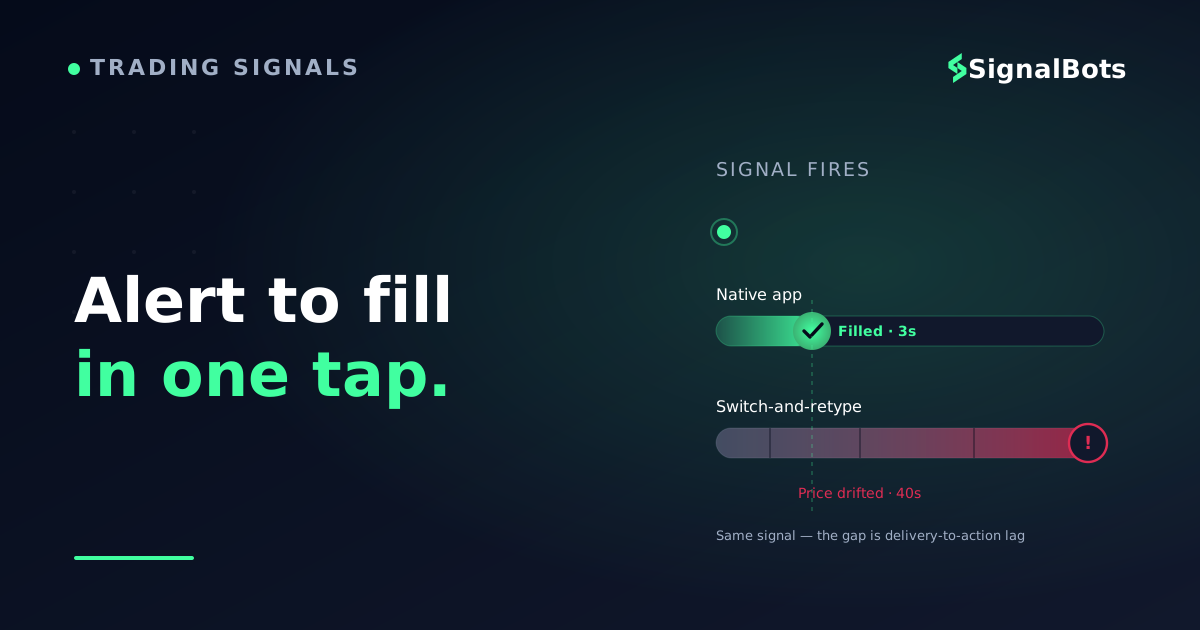
When the alert and the order live in the same app, a signal becomes a live trade in seconds — no re-typing, no tab-switch, no drift.The whole value of a built-in signal is collapsing these three steps into one screen.
The Three Ways a Forex App Delivers Signals
Once you look past the marketing, every forex app that claims built-in signals falls into one of three real patterns. Each trades off differently between quality of the signal and speed of acting on it.
1. Broker apps with embedded analytics
Several broker apps bake a signal engine directly into the chart. The two you'll see most often are Autochartist and Trading Central — pattern-recognition and analyst tools that overlay setups, support/resistance, and directional bias right on the price you're watching. Brokers such as IC Markets, FP Markets, FxPro, Eightcap, and HFM ship one or both inside their own or their MetaTrader offering.
The appeal is obvious: the signal appears on the chart in the app you trade in, so acting is immediate. The limit is that these tools are broad market-scan engines, not a curated, low-latency feed. They're excellent for confirmation and idea generation, less so for a fast, opinionated entry.
2. MetaTrader push notifications
This is the closest thing forex has to a universal native-signal system, and it's why MetaTrader is our top pick for acting fast. MetaTrader 4 and MetaTrader 5 can fire a push notification alert to your phone the instant a price level, indicator condition, or an attached bot's logic triggers — and because the same app holds your live account, you tap the alert and you're one screen from the order.
The setup is a one-time job: enable push notifications on desktop MT4/MT5, then pair the mobile app's MetaQuotes ID. After that, price alerts, Expert Advisor events, and custom-indicator triggers all reach you as native alerts. It runs on almost every forex broker, which is why it's the default answer for most traders.
3. A signal feed wired straight into execution
The third pattern is the one that actually closes the gap for serious signal traders: keep a fast, dedicated signal provider as your source, but connect its output directly to your MetaTrader account so the entry, stop, and target are placed for you. No re-typing, no tab-switch — the signal notification and the order become the same event.
This is what SignalBots is built around. Our forex signals are delivered with sub-10ms latency, and our MT4/MT5 connector turns each one into a pre-filled or fully automated order on your own broker account. You get the curated-feed quality of option 3 with the act-in-one-place speed of option 2. For a broader view of live setups, the forex trading signals hub shows what's firing across the major pairs right now.
Compare the Delivery Patterns Side by Side
Here is how the three patterns stack up on the things that decide whether a "built-in signal" actually helps you act. Read it as a decision aid, not a leaderboard — the right choice depends on whether you value idea-generation, universality, or speed-to-order.
Decision aid
What matters
Broker app analytics
MetaTrader push
Feed wired to execution
Where the signal appears
On the chart in the broker app
Native phone push alert
As a placed/pending order
Steps from alert to live order
A few taps, same app
One tap, same app
Zero — placed for you
Signal style
Broad market scan
Your alerts / your bot
Curated low-latency feed
Works across brokers
Only where offered
Almost every broker
Any MT4/MT5 account
Best for
Idea generation, confirmation
DIY alerts, universal reach
Hands-off, act-fast trading
None of these is 'best' in the abstract — pick the row that matches how you actually want to trade.
Notice the pattern: as you move right, the number of steps between the alert and a live order shrinks. That is the whole game. A gorgeous in-chart signal that still needs manual entry can lose you more to slippage than a plain alert that fires an order automatically.
Why Delivery Speed Beats Signal Prettiness
Beginners tend to grade signal apps on the alert: the chart, the confidence label, the write-up. Experienced signal traders grade them on the lag between seeing and doing. Here's why that flip matters.
Suppose two apps send you the same EUR/USD long at 1.0840. App A shows a beautiful annotated chart, but you have to open your broker app, type the entry, set a stop and target, and confirm — call it 40 seconds. App B fires a one-tap native order and you're filled in three. In a fast forex move, those 37 seconds are the difference between the entry you were promised and a worse one — or a stale signal you skip entirely.
This is also why signal latency — the time from the market event to the alert reaching you — is a real selection criterion, not marketing garnish. A slow feed hands you a price that no longer exists. The apps worth using treat delivery speed as a first-class feature, not an afterthought, because a late signal and a slow-to-act app fail the reader in exactly the same way: the price you get isn't the price you saw.
A quick honesty note on grading: no responsible app promises "risk-free" or "guaranteed" entries — be wary of any that do. Judge apps on delivery speed, execution quality, and a transparent track record, and always weigh setups by their reward-to-risk ratio.
Where Our Own Forex Feed Fits This Test
With those delivery patterns weighed, it is worth naming our own surface plainly, because it is built around exactly the criterion this guide grades on: native, fast delivery. Our free forex signal feed sends each setup to you as a native push alert on your phone, so there is no separate feed to reconcile and the signal reaches you the moment it fires. From there you can act on it in your MetaTrader app in a tap or two, or hand it to a connector to place the order for you.
Be clear about its limit, though: it is a signal-delivery surface, not a brokerage or an order-execution terminal. You still bring your own MT4/MT5 broker account, and it will not hold your funds or route orders on its own. If that fit matches how you want to trade, the forex signals mobile app is the fastest way to receive it on the phone you already carry, and activating the VIP tier is a free lifetime license, no card required.
What Should You Check Before Trusting an App's Signals?
Before you commit to any forex app because it advertises built-in signals, verify it actually collapses the gap between alert and order. Tick these off — if an app fails two or more, its "signals" are really just notifications.
Before you commit
Signal-to-action readiness check
0 / 7
The signal alert appears inside the same app I place trades in
Entry, stop-loss, and take-profit are pre-loaded, not re-typed
Push notifications reach my phone in seconds, not minutes
I can act on a signal in one or two taps from the alert
The app works on my broker's MT4 or MT5 account
The provider shows a transparent, verifiable track record
Optional automation exists so alerts can place orders for me
★
Checklist complete — you’re cleared to proceed.
Two or more misses means the app delivers notifications, not actionable signals.
That last item is the quiet upgrade path. If an app supports automation, you can move from "see the alert, tap to trade" to "the signal places the trade," which is the endgame for anyone who can't watch the phone all day. If you want the setup where the feed is the execution layer, our MT4/MT5 forex connector is designed for exactly that.
FAQ
Do forex apps really have signals built in, or is it a separate service?
Both exist, and the difference matters. Some apps embed a genuine signal engine — broker apps with Autochartist or Trading Central, and MetaTrader's own alert/EA system. Many "signal apps," though, are just read-only feeds: they show you an entry but can't place it. The ones worth calling "built-in" let you act on the signal without leaving the app.
Which forex app is best for acting on signals quickly?
For most traders, the MT4/MT5 mobile app, because the signal (a price alert, indicator, or bot event) and your live order share one screen, so acting is a single tap. If you'd rather the signal place the trade for you, pair a low-latency feed with an MT4/MT5 connector so entry, stop, and target are set automatically.
How do MetaTrader push notifications for signals work?
You enable push notifications in desktop MT4/MT5 (Tools → Options → Notifications), then paste in the MetaQuotes ID from your phone's app. After that, price alerts, custom-indicator triggers, and Expert Advisor events fire as native phone alerts — and because the app holds your account, you're one tap from the order ticket.
Are the signals inside broker apps reliable?
Tools like Autochartist and Trading Central are legitimate pattern-recognition and analyst engines, useful for confirmation and idea generation. But they scan the whole market broadly rather than delivering a curated, opinionated feed, so treat them as one input, not a standalone system — and always weigh any setup by its reward-to-risk ratio, never a promised outcome.
Can a signal place the trade for me automatically?
Yes — that's the fastest pattern. With a signal source connected to your MetaTrader account through a connector, each alert can be turned into a pre-filled or fully automated order on your own broker, so there's zero re-typing and near-zero delay between the signal and the fill.
The bottom line
You came in
“losing the entry every time you re-typed a signal into another app”
and the fix is
an app where the alert and the order share one screen.
The best forex app for signals is the one you can act in
SB
SignalBots feed + MT4/MT5 connector
Curated forex signals delivered with sub-10ms latency, wired straight into your own broker account so each alert becomes a pre-filled or automated order — the act-in-one-place speed of MetaTrader with a low-latency feed behind it.
Prefer to keep it simple and manual? The forex signals hub shows what's firing right now, and MetaTrader's own push alerts stay one tap from the order.
Sources & Further Reading
Want to go deeper? These independent, authoritative sources shaped this guide — each one is worth reading in full:
The Forex Desk is the SignalBots editorial team responsible for our currency-market coverage. We research and write the guides, explainers and reference articles on how the majors, minors and crosses actually trade — sessions, spreads, swaps and the macro releases that move price.
Want to use the bot without paying? Message our 24/7 support team via Telegram or Viber. Our experts will guide you step-by-step on how to unlock your free lifetime license through our exclusive broker partnership program.



Discussions 0
Leave a comment