You have the credential. What you do not have is a map.
That is the specific gap this page fills. The access application is behind you, there is an Alpari trading API key (or a login that mints a token) sitting in your password manager, and everything you need next is mechanical: which host to hit, which header carries the key, what the JSON for a market order looks like, and what to do when the server answers 429 instead of 201.
One honest note before the mechanics, because it changes how you should read everything below. Alpari does not publish an open, self-serve REST reference the way an API-first broker does — its public platform surface is MetaTrader 4 and MetaTrader 5. REST access to an Alpari account therefore reaches you one of two ways: as a specification handed over with a professional connectivity arrangement, or through a REST gateway running in front of your MetaTrader account. Either way, the document that defines your exact paths ships with your access. Treat every route on this page as a shape, not a literal.
The shape is worth learning, because broker REST gateways converge hard. The same two authentication patterns. The same four endpoint families. Near-identical JSON field names, give or take a suffix. The same short list of ways a call fails. Learn it once and the specification attached to your credentials becomes a ten-minute read instead of a week of guessing.
Key Takeaways
Alpari publishes no open REST developer portal — your exact base URL, paths and field names arrive with your access, so learn the shape every broker gateway shares and read your own specification against it.
Authentication is either a static key header or a short-lived bearer token; refresh on a timer rather than on a 401, and keep the secret out of your source tree.
Endpoints sort into four families — account, market data, orders/positions and history — and a 200 from the gateway is never proof of a fill.
Attach a unique client order id to every order so an ambiguous timeout can never become two positions.
Table of Contents (30 min read)Contents
What Calling Alpari Over REST Actually Gets You
A REST integration replaces the click path, not the market. A REST API is an HTTP interface where every call is self-contained — it carries its own credential, its own parameters, and everything the server needs to answer it — and that property is what makes it easy to drive from any language you already write.
Four capabilities come out of it:
Account state on demand. Balance, equity, used and free margin, open positions and working orders, read as JSON whenever your logic needs them — including a moment before you size a trade.
Prices when you ask for them. The current quote for a symbol, and historical candles for whatever your model consumes.
Order actions. Open, modify and close positions from your own code, on your own trigger conditions.
A closed-trade record. The deal history your reconciliation, journal or performance report reads from.
What REST does not give you is a stream. It is pull, not push: you ask, the server answers, the exchange ends. Nothing arrives unless you request it. That single property shapes almost every design decision later on this page — how you poll quotes, how you confirm a fill, and why a retry loop can quietly become a rate-limit problem.
The reason to build any of this is algorithmic trading in the plain sense: rules that execute identically at 03:00 and at 15:00, without a human deciding to be patient today. REST is a sequence of self-contained round trips, not an open connection - which is why polling never becomes a stream.
What You Need in Place Before the First Call
Four things. Only the first sits outside this page.
Granted access.Getting Alpari API access approved — the account tier that qualifies, the paperwork, who to ask — is a separate process with its own requirements, and this page assumes it is already done.
A credential with the rights you think it has. Read-only and trading-enabled credentials look identical in a config file. The distinction is the same one MetaTrader draws between an investor and a master password: one shows you the account, the other can move money in it. Confirm which you were issued before you debug a 403 for an hour, and confirm that automated trading is permitted on the account at all.
The symbol list, pulled once and cached. Broker symbol strings are not universal. EURUSD, EURUSD.m, EURUSD-ECN and EUR/USD are four different keys to four different servers, and getting this wrong is the single most common first-day failure. Fetch the instrument list from the API itself and treat it as the source of truth — never hardcode a guess. This is symbol mapping, and it is worth a proper lookup table in your code.
Your account's position model. Whether the account is hedging or netting decides what a second BUY on the same symbol actually does — open a second ticket, or add to one aggregate position. Your close logic depends entirely on the answer.
Alpari API authentication follows one of the two patterns every broker API uses. Read your specification for which one you have; the mechanics of each are below.
Pattern one — the static key header. You are issued a long random string and you present it on every request in a custom header, typically X-API-Key or apikey. There is no login step and no expiry: the key is the session. Simple to implement, and correspondingly dangerous if it leaks.
Pattern two — the token exchange. You POST a credential pair (an account id and secret, or a login and password) to a token route, receive a short-lived bearer token, and present that token on every subsequent call as Authorization: Bearer <token>. Slightly more code, materially safer, and the pattern you should expect on anything issued recently.
bashauthenticate.sh
# Pattern two: exchange credentials for a short-lived bearer token.
curl -sS -X POST "https://api.example-gateway.com/v1/auth/token" \
  -H "Content-Type: application/json" \
  -d '{"account_id":"5012345","secret":"'"$ALPARI_API_SECRET"'"}'

# Response
# {
#   "access_token": "eyJhbGciOiJIUzI1NiIsInR5cCI6IkpXVCJ9...",
#   "token_type": "Bearer",
#   "expires_in": 3600
# }

# Every later call carries the token, never the secret.
curl -sS "https://api.example-gateway.com/v1/account" \
  -H "Authorization: Bearer $ACCESS_TOKEN"
The host and paths are illustrative — substitute the ones in your own specification. The header shape is the part that travels.
Three rules make the difference between an integration that runs for months and one that dies at 4am:
Refresh on a timer, not on failure. If expires_in says 3600 seconds, refresh at around 2800 — proactively, in the background. Waiting for a 401 means your first refresh happens during a live order.
Retry a 401 exactly once. Refresh the token, replay the call, and if it fails again stop. A refresh loop against an authentication failure is how you earn a rate-limit ban.
Keep the secret out of your source tree. Environment variables or a secrets manager, separate credentials per environment, and a rotation you have actually tested. A key in a committed config file is a key in every clone of that repository, forever.
sequenceDiagram
    autonumber
    participant Script as Your script
    participant API as REST gateway
    participant Server as Trading server
    Script->>API: POST credentials
    API-->>Script: Access token
    Note over Script,API: Token is short lived. Cache it and refresh on a timer.
    Script->>API: POST order with bearer token
    API->>Server: Route the order request
    alt Accepted
        Server-->>API: Ticket and fill price
        API-->>Script: 201 with ticket id
    else Rejected
        Server-->>API: Reject reason
        API-->>Script: 4xx with error code
    end
Two hops, not one: the gateway answers your HTTP call, but the trading server decides whether the order lives. A 200 from the gateway is not yet a fill.
Demo, Live and Version: Three Ways to Reach the Wrong Server
Every broker REST gateway separates practice from production, and the separation is rarely just a flag. Expect all three of these to differ:
The host or path prefix. Something like api-demo. versus api., or a /demo/ segment. One character apart in a config file, an entire universe apart in consequence.
The credentials. A demo account key almost never authenticates against live, which is the good news — the failure is loud. The bad news is the reverse case, where a live key happily authenticates and your test suite starts placing real orders.
The symbol strings. Demo servers frequently carry a different instrument set and different suffixes. Re-fetch the symbol list per environment rather than assuming it carried over.
Version drift is the quieter version of the same problem. Most gateways version in the path (/v1/, /v2/) or in a header. Pin the version explicitly in your client and treat a version bump as a code change with its own test pass — not as something that just happens to you. Two habits keep this manageable: put base URL, version and credential in one configuration object that the rest of your code reads from, and make the environment name appear in every log line you write. When something goes wrong at speed, the first question is always "which server was that?"
Run your first live call read-only. A GET on the account endpoint tells you the credential works, the environment is right and the JSON parses, and it cannot cost you anything if all three are wrong.
The Endpoint Map: Four Families, One Base URL
Almost every set of Alpari API endpoints you will be handed sorts into four groups. The names differ, the grouping does not — once you can see which family a need belongs to, finding the exact route in your own documentation takes seconds.
Endpoint reference
What you want to do
Route shape
Method
What comes back
Read account state
/account, /account/summary
GET
Balance, equity, used and free margin
List what is open
/positions, /orders
GET
Array of live tickets and working orders
Get a price
/quotes/{symbol}, /candles
GET
Bid, ask, timestamp, or an OHLC array
Send, change or close
/orders, /orders/{id}
POST, PATCH, DELETE
Ticket id plus the fill result
Pull closed trades
/history/deals
GET
Paged list of closed deals
Four families, one base URL. Match your need to a row first, then find that row's exact path in the specification that came with your credentials.
Account and Balance Endpoints
The account family is the cheapest call in the API and the one your risk logic should lean on hardest. A single GET returns the numbers that decide whether the next order is even sensible: balance, equity, margin used, free margin, and the account currency every other figure is denominated in.
Two of those are not interchangeable. The gap between balance and equity is your open floating profit and loss, so a script that sizes positions off balance while three trades run against it is sizing off a number that no longer exists. Read equity and free margin, not balance, before you send.
This is also the natural home for a hard stop. Poll the account endpoint on a schedule, compare equity against a floor you set in configuration, and refuse to send new orders below it. That check costs one request and prevents the failure mode where a bug and a bad session compound each other overnight.
Market Data and Quote Endpoints
The quote family answers a narrow question well: what is the price right now. Expect a payload with a bid and an ask, a server timestamp, and often the symbol's digits and minimum volume — useful metadata to cache rather than hardcode.
The trap here is architectural. REST quotes are snapshots, and snapshots tempt people into building a tick feed out of a polling loop. Do not. A loop hammering /quotes/EURUSD every 200 milliseconds gives you stale data and a rate-limit problem, and it still misses everything that happened between polls. If your strategy genuinely needs continuous prices, that is what WebSocket streaming exists for — and if your gateway does not offer it, that limitation is a real input into the REST-or-FIX decision further down this page.
REST market data is the right tool for a different job: fetching candles on a closed bar, checking a spread before you send, or confirming a price is inside your tolerance at the moment of execution.
Order and Position Endpoints
This is where the money moves, and where the mental model matters most. A POST to the order endpoint submits an intention. The HTTP response tells you the gateway accepted the message; whether the trading server filled it, filled part of it, or rejected it is carried in the response body — or, on some gateways, only discoverable by re-reading the ticket.
So write your code to answer three questions in order, every time:
Did the request reach the server? That is the HTTP status.
Did the server accept the order? That is the business status inside the body.
What actually filled? That is the fill price and filled volume, which may not match what you asked for — a partial fill on a thin symbol is a normal outcome, not an error.
Modifying is usually a PATCH or PUT on /orders/{ticket} carrying only the fields you are changing, and closing is either a DELETE on the ticket or a POST of an opposing order, depending on whether your account nets positions. Check which your gateway means. Sending an opposing order on a hedging account when you meant to close leaves you flat in exposure but holding two tickets, two spreads and two swap charges.
Trade History Endpoints
History routes are paged, and paging is where naive implementations lose trades. Expect a time window (from and to, almost always UTC) plus either an offset or a cursor. Three habits keep the record honest: request in UTC and store in UTC, overlap your windows slightly and de-duplicate on ticket id rather than assuming clean boundaries, and treat the ticket id — not the array position — as the primary key you reconcile against.
Request and Response Shapes You Can Copy
Four calls cover most of what a first integration does. Authentication was the first, above. Here are the other three, written the way you would actually run them from a shell before you commit them to code.
Note margin_free, not balance — that is the number a sizing routine should read. Figures shown are illustrative.
Now the call that matters. A market order with protective levels attached, followed by the two lifecycle calls you will need within a day of shipping it.
bashplace_order.sh
# 3. Place a market order with stop and target attached.
curl -sS -X POST "https://api.example-gateway.com/v1/orders" \
  -H "Authorization: Bearer $ACCESS_TOKEN" \
  -H "Content-Type: application/json" \
  -d '{
        "symbol": "EURUSD",
        "side": "BUY",
        "type": "MARKET",
        "volume": 0.10,
        "stop_loss": 1.08050,
        "take_profit": 1.09250,
        "deviation": 20,
        "client_order_id": "sb-2026-0412-0007",
        "comment": "trend-pullback-v3"
      }'

# {
#   "ticket": 384512207,
#   "client_order_id": "sb-2026-0412-0007",
#   "status": "FILLED",
#   "fill_price": 1.08521,
#   "filled_volume": 0.10,
#   "server_time": "2026-04-12T09:31:04Z"
# }

# Move the stop to break-even on the ticket you were given back.
curl -sS -X PATCH "https://api.example-gateway.com/v1/orders/384512207" \
  -H "Authorization: Bearer $ACCESS_TOKEN" \
  -H "Content-Type: application/json" \
  -d '{"stop_loss": 1.08521}'

# Close it.
curl -sS -X DELETE "https://api.example-gateway.com/v1/orders/384512207" \
  -H "Authorization: Bearer $ACCESS_TOKEN"
The ticket returned by the POST is the handle for every later action on that trade. Persist it before you do anything else.
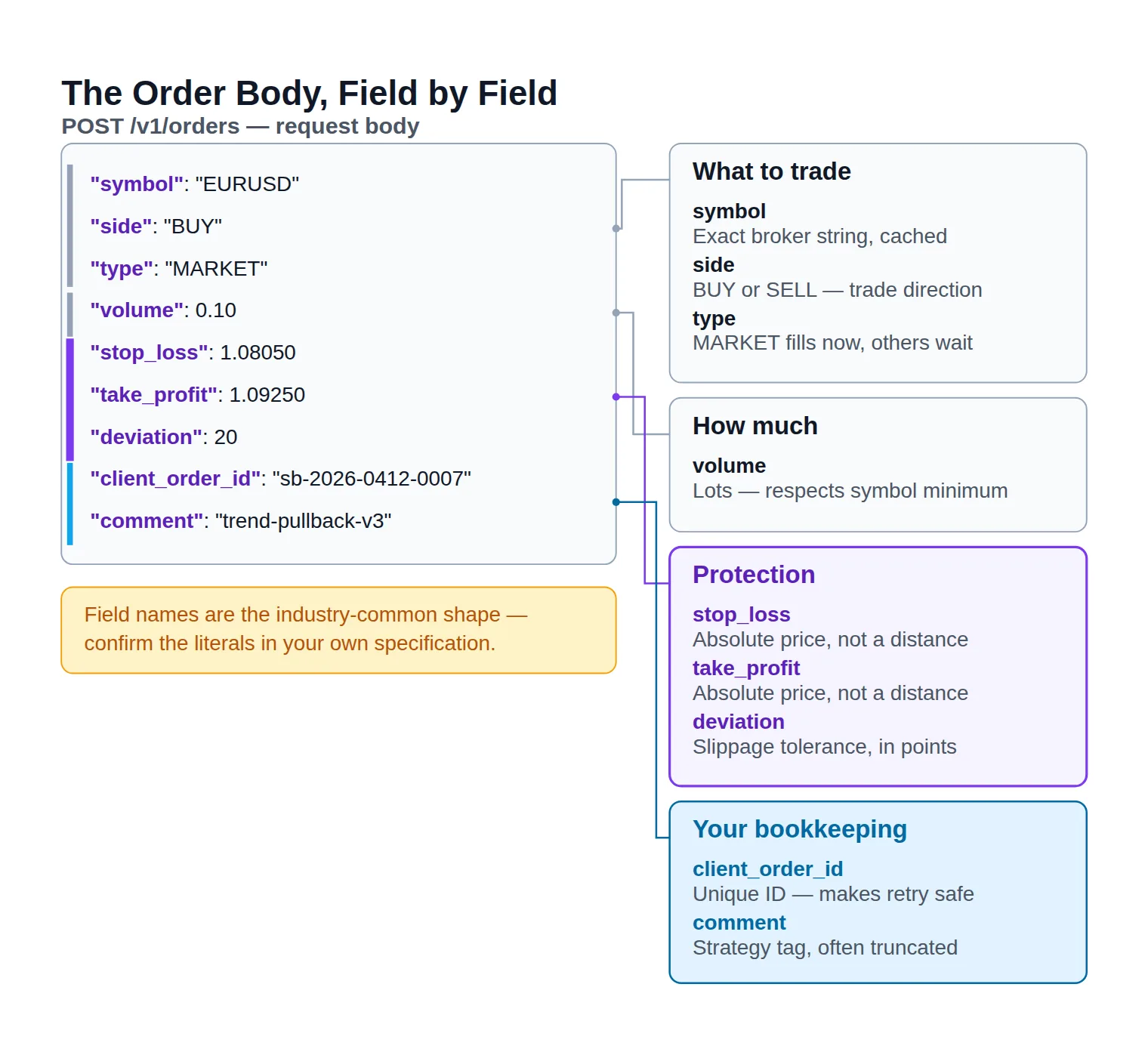
The order body, field by field - the three protection fields and the client order id are where most first integrations go wrong.
The order body is where undocumented assumptions hide, so here is what each field is actually doing:
symbol — the broker's exact instrument string, taken from the symbol list you cached, never typed from memory.
side — BUY or SELL. On a netting account this is direction of exposure, not necessarily a new ticket.
type — MARKET fills now at whatever is available; LIMIT and STOP sit as pending instructions until price reaches them. If the distinction between the four is fuzzy, the order types reference covers it properly.
volume — position size in lots, subject to the symbol's minimum and step. This is the field a bad calculation destroys an account through; work the number out first with a forex position size calculator and have your code assert the result against volume_min before it sends.
stop_loss — an absolute price, not a distance, on most gateways. Sending 20 when the server expects 1.08050 is a rejection at best. The stop-loss level also has to respect the symbol's minimum stop distance.
take_profit — the same rules in the other direction; see take-profit for how the level interacts with the spread on exit.
deviation — your slippage tolerance in points. Too tight and volatile moments reject you; too loose and you accept fills you would not have chosen. Set it deliberately per symbol.
client_order_id — your own unique reference, echoed back in the response. This is the most important optional field in the payload, for reasons the next section makes painfully concrete.
comment — a free-text label, usually truncated by the server. Tag the strategy version here; your reconciliation will thank you.
When a Call Fails: Status Codes, Retries and Rate Limits
Every broker REST gateway fails in three distinct ways, and conflating them is what turns a script into a liability:
Transport failures — timeouts, resets, 5xx. The request may or may not have arrived. Retry, carefully.
Protocol failures — bad JSON, expired token, unknown route. Deterministic. Fix the request; retrying it unchanged is pointless.
Trading failures — the request was perfect and the server said no. Insufficient margin, market closed, stop too close. Never blind-retry these; route them to your risk logic.
Here is what the wire looks like when the middle and last cases hit.
bashfailures.txt
# Rate limited. The header is the instruction, not a suggestion.
HTTP/1.1 429 Too Many Requests
Retry-After: 2
X-RateLimit-Limit: 120
X-RateLimit-Remaining: 0

{"error":"rate_limit_exceeded","message":"Too many requests"}


# A perfectly valid request the trading server refused.
HTTP/1.1 422 Unprocessable Entity

{
  "error": "insufficient_margin",
  "message": "Not enough free margin for 1.00 lots on EURUSD",
  "client_order_id": "sb-2026-0412-0011"
}
A 429 is a scheduling bug in your code. A 422 is a trading decision your risk logic has to make. Treat them as completely different events.
Troubleshooting
Status
What it means
Typical cause
What your code should do
400
Malformed request
Wrong field name, bad JSON, volume below the symbol minimum
Fix the payload. Never retry it unchanged.
401
Not authenticated
Token expired or header missing
Refresh the token once, replay the call once.
403
Authenticated but not permitted
Read-only credential, or trading disabled on the account
Stop and check the credential's rights.
404
Unknown route or symbol
Symbol string does not match the broker's list
Re-fetch the symbol list. Do not guess suffixes.
409 / 422
Valid request, refused by the trading server
Insufficient margin, market closed, stop too close
Surface it to your risk logic, not a retry loop.
429
Request ceiling hit
A polling loop with no backoff
Honour Retry-After, then back off exponentially.
5xx / timeout
Gateway or server-side failure
Trading-server hiccup or a dropped connection
Retry with the same client order id, then reconcile.
The status code tells you which of the three failure classes you are in — and each class has exactly one correct response.
The one habit that prevents duplicate trades
A timeout is the genuinely dangerous failure, because it is ambiguous: your request may have reached the trading server and filled before the connection died. Retry it naively and you own two positions.
The fix is a client order id — a unique string you generate and attach to every order. On a retry you send the same id, and a gateway that honours it either returns the original ticket or rejects the duplicate. If your gateway does not support it, fall back to a reconciliation step: before retrying an order that timed out, GET your open positions and search for the trade you were trying to place. Never retry an order without one of those two protections.
Living inside the rate limit
Every gateway enforces a server request ceiling, usually as a rolling window with a per-endpoint weight. Three design choices keep you comfortably underneath it:
Cache the things that do not change. Symbol lists, contract specifications and account currency get fetched once at startup, not once per loop.
Poll on the cadence your strategy actually needs. A system trading closed 15-minute bars does not need a quote every second; it needs one just before it acts.
Back off exponentially with jitter. On a 429, honour Retry-After first, then double the wait on each subsequent failure and add a random offset. Without jitter, every one of your worker processes retries in lockstep and re-triggers the same limit.
The rejections that are not bugs
Some failures are the market answering, not your code misbehaving. An order rejection for insufficient margin means your sizing was wrong for the account state at that instant. A price-moved rejection means your deviation was tighter than the moment. And on gateways that sit in front of a MetaTrader terminal, you can meet a trade context busy condition — the terminal handling one trade request at a time — which needs a short queue on your side rather than a hammering retry.
Log every rejection with its reason code, the payload you sent and the account state at that moment. The reason code alone tells you almost nothing three days later.
Should You Use REST or FIX for Your Alpari Integration?
If your gateway offers both, the decision is genuinely about workload rather than sophistication.
REST over HTTPS vs a FIX session
REST over HTTPS
One request, one response, nothing to keep alive between calls
Any language with an HTTP client; a working prototype in an afternoon
Prices are snapshots you poll, not a stream that arrives
Connection and authentication overhead on every single call
Debuggable with curl and a log file
Right when an external signal drives a modest number of orders.
VS
FIX session
A persistent, sequenced session held open to the broker
Streaming quotes and execution reports pushed to you as they happen
Heavier to build, certify and monitor day to day
Built for order flow where each millisecond carries a cost
Session and sequencing mechanics are a discipline of their own
Right when streaming depth and execution timing are the whole point.
Neither is the upgrade of the other. Pick by how your orders are generated, not by which sounds more professional.
The axis that decides it is execution speed — and specifically whether the milliseconds you lose to per-request overhead change your outcome. For a system acting on closed bars, or one taking entries from a signal generated elsewhere, they do not; REST's overhead is invisible next to the time your logic already spends deciding. For a scalping or arbitrage system where the edge lives inside the spread, that overhead is the entire game, and the FIX API route with its persistent session is the honest answer.
Two practical tie-breakers. If you need continuously streaming prices and your REST gateway has no WebSocket channel, REST alone will not get you there regardless of preference. And if your team has never operated a session-based protocol, factor in the monitoring: a REST integration that breaks returns an error code, while a FIX session that breaks can sit silently disconnected. The full session mechanics — logon, sequence numbers, heartbeats, tag dictionaries — are a separate subject from this reference and worth reading before you commit.
Where to Take Your REST Feed Next
By this point you can authenticate, find the right endpoint, shape a valid order body and handle the call when it fails. What the protocol cannot supply is the content of that body: something has to decide side, stop_loss and take_profit before the request means anything.
That is a data problem, not a protocol one, and it is worth naming the shape of the answer. Whatever produces your trade parameters has to hand your script three values in a form it can parse — a direction, an entry reference, and the two protective levels — with enough time left before the setup expires for your code to act. Our free live Forex signal feed publishes each signal's entry, stop and target levels, which is exactly the set of values the order body above is waiting for: side from the direction, stop_loss and take_profit from the published levels, and volume from your own sizing rule applied to the distance between them.
Be clear about what that is and is not. It is a data feed — it does not write the REST call for you, route your orders, or replace the error handling on this page. Your script still owns execution entirely. A trader who wants automation without writing any of this should not be reading an API reference at all; the MT4/MT5 connectors exist for exactly that reader. And no signal source removes the risk in an automated position, which is why every parameter you take from any feed still passes through your own sizing and stop discipline — the risk warning is worth reading before your first live order, not after it.
Quick Reference Recap
The five things worth keeping in front of you as you build:
Your specification wins. Every path here is a pattern; the literals live in the document that came with your credentials.
Authenticate on a timer, not on failure, and keep the secret out of the repository.
Read equity and free margin before sizing, never balance.
A 200 is not a fill. Read the business status and the filled volume, and persist the ticket.
Attach a client order id to every order, so an ambiguous timeout can never become two positions.
You arrived with
“a working credential and no map of what to call”
and you leave with
a request pattern that transfers to any broker gateway.
The protocol is no longer the hard part
Authentication, four endpoint families, a valid order body and a failure taxonomy cover the whole surface of a REST integration. What is left is engineering discipline rather than protocol knowledge: idempotent retries, a cached symbol table, an equity floor your code refuses to trade below, and logs detailed enough to answer "what did we send?" three days later. Build those before you build features.
Does Alpari publish public REST API documentation?
Not as an open, self-serve developer portal. Alpari's publicly marketed platform surface is MetaTrader 4 and MetaTrader 5, so a REST specification reaches you either as part of a professional connectivity arrangement or from a gateway product running in front of your MetaTrader account. The practical consequence is the one this page is built around: your exact base URL, paths and field names come from the document attached to your access, and the value of a reference like this one is teaching you the shape those documents share.
Can I test the REST API on a demo account?
Almost always yes, and you should. Expect a separate host or path prefix, separate credentials, and potentially a different symbol list — verify all three rather than assuming your live configuration carries over with one flag flipped. Run the full lifecycle on demo first: authenticate, read the account, place a small order, modify it, close it, and pull it back from history. If any of those five steps surprises you, it is far cheaper to find out there.
Which authentication header does the Alpari REST API use?
One of two, depending on what you were issued. A static key is presented in a custom header such as X-API-Key; a token-based gateway has you exchange credentials at a token route and then send Authorization: Bearer <token> on every call. Your specification names which. If it offers both, prefer the token flow — a leaked short-lived token expires, a leaked static key does not.
How do I stop a timeout from creating two positions?
Generate a unique client order id for every order and send the same one on any retry. A gateway that supports it will either return the original ticket or reject the duplicate outright. Where that field is not supported, make your retry path conditional: fetch open positions first, look for the order you were trying to place, and only resend if it genuinely is not there.
Can I stream live prices over a REST connection?
No — REST is request/response by design, so nothing arrives unless you ask for it. Polling more aggressively does not turn it into a stream; it produces stale data and rate-limit errors at the same time. If you need continuous prices, look for a WebSocket channel alongside the REST endpoints, and if there is none, treat that as a genuine argument for the FIX route rather than something to engineer around.
Do I need MetaTrader installed for a REST integration?
It depends on which of the two access routes you are on. A broker-side connectivity arrangement is independent of the terminal. A gateway product that translates HTTP into MetaTrader trade requests usually needs a terminal logged in somewhere and running continuously — which changes your deployment picture considerably, since the terminal becomes a component you have to keep alive and monitor rather than a program you open when you feel like trading.
Sources & Further Reading
Want to go deeper? These independent, authoritative sources shaped this guide — each one is worth reading in full:
The Binary Options Desk is the SignalBots editorial team for fixed-time and OTC trading coverage. We research and write the guides that explain expiry timing, payout structure and disciplined entry across the major brokers.




Discussions 0
Leave a comment