You have an Alpari account, a working knowledge of Python, and a strategy you are tired of clicking manually. So you search for an "alpari python api", expect to find a pip install alpari package with a client.place_order() method — and find nothing of the sort. That dead end is where most people give up.
The good news is that a Python bridge to your Alpari account absolutely exists, it is officially maintained, and it is free. It just does not look like the REST client you were picturing. This page takes you from an empty file to a script that logs in, reads live prices, sends a real order, checks whether the server accepted it, closes the position, and repeats — with the credential handling and failure paths that tutorials usually leave out.
Key Takeaways
There is no branded Alpari Python SDK; the working route is the official MetaTrader5 package talking to a locally running, logged-in Alpari MT5 terminal on 64-bit Windows.
initialize() returns True/False instead of raising, so always read mt5.last_error() — code -6 is a wrong login/password/server triple and -8 means algorithmic trading is switched off.
An order is a plain dict passed to order_send(); only result.retcode == 10009 confirms a fill, and type_filling read from symbol_info().filling_mode prevents the most common silent rejection.
Automation is the guard rails, not the loop: a closed-bar gate, a magic-number position cap, an equity floor, a reconnect path and credentials loaded from the environment.
Table of Contents (28 min read)Contents
What actually connects Python to your Alpari account?
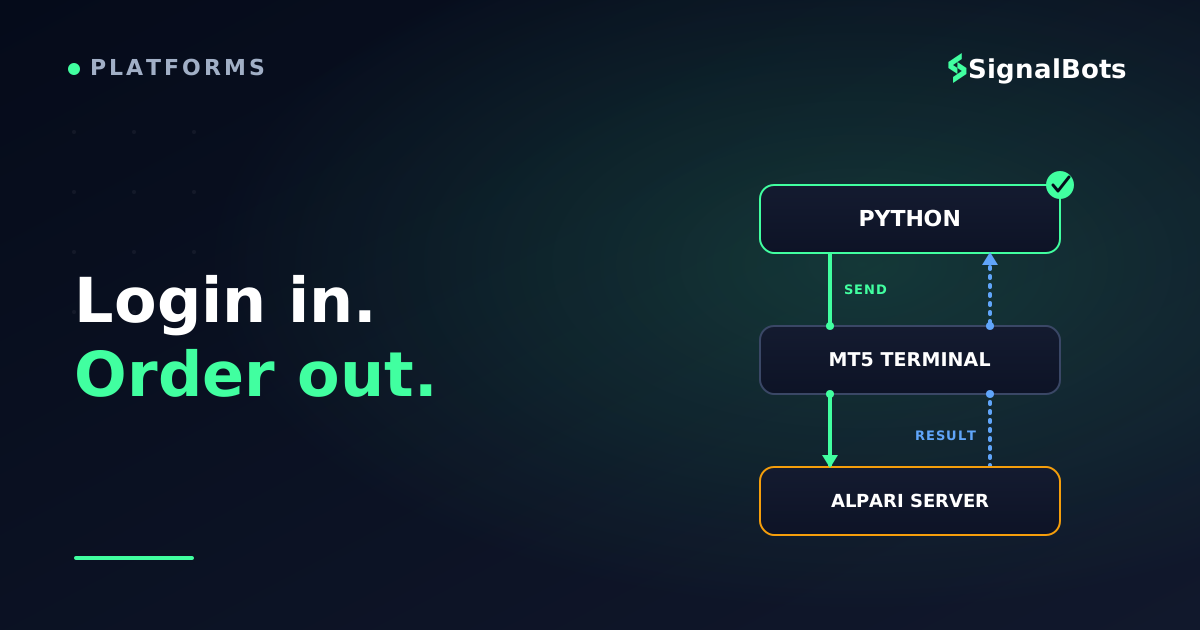
The connector is the MetaTrader5 Python package, published by MetaQuotes, the company that builds the terminal software Alpari runs on. Your script does not talk to Alpari over the internet at all. It talks — over local inter-process communication — to a copy of the MetaTrader 5 terminal running on the same machine, and that terminal holds the authenticated session with Alpari's trade server.
Once you internalise that one sentence, every quirk in this article stops being mysterious:
The terminal must be installed, running and logged in. If it is closed, your script has nothing to talk to. There is no cloud endpoint standing in for it.
It is Windows x86-64 only. The package ships as 64-bit Windows wheels. Your Python build and your terminal build both have to be 64-bit.
It speaks to MT5, not MT4. If your Alpari account is a MetaTrader 4 account, this specific bridge will not reach it — you would need an MT5 account, or a socket/DLL bridge written in MQL4.
It does not reach Alpari's fixed-contract (binary) products. Those run on a separate platform outside the MT5 terminal, so nothing in this article applies to them.
Your round-trip time includes a hop through the terminal. For discretionary and swing automation that is irrelevant; for latency-sensitive work it is the reason server-side protocols exist. Python never reaches Alpari directly — it talks to a terminal on your desk, and the terminal holds the broker session.
Here is where this route sits against the other ways to automate an MT5 account, so you can confirm it is the one you want before installing anything:
Choosing a route
Route
Where the logic runs
What you write
Best when
Python + MetaTrader5 package
Your own Windows machine, beside a logged-in terminal
Python
You already think in Python and want pandas, your own models and your own libraries inside the decision
MQL5 Expert Advisor
Inside the terminal itself
MQL5
You want no external process at all, plus the built-in Strategy Tester
REST API
Broker side, over HTTPS
Any language
Your account tier actually provides one and you need a connection with no terminal in the path
FIX API
Broker side, over a persistent session
Any language, FIX messages
Institutional-grade flow where the terminal hop is genuinely too slow
The Python bridge trades a little latency for the entire Python ecosystem — pandas, your own models, your own logging.
Nearly every "it returns False and I don't know why" post traces back to one of these being unticked. Work through them first; it takes five minutes and saves an evening.
Pre-flight
Before your first line of Python
0 / 8
Open an Alpari MT5 account and note its login number, password and exact server name
Install the MT5 desktop terminal and log in to that account manually at least once
Confirm the terminal is the 64-bit build (terminal64.exe) and note its full path
Install 64-bit Python 3.8 or newer — 32-bit and ARM builds cannot install the package
In the terminal, open Tools then Options then Expert Advisors and tick 'Allow algorithmic trading'
Confirm the AutoTrading button in the terminal toolbar is switched on, not just the option
Open Market Watch, right-click, Show All, and copy the exact spelling of the symbol you will trade
Start on a practice account so your first order_send() costs nothing but time
★
Checklist complete — you’re cleared to proceed.
Every item here is a real cause of a silent connection failure. Tick them before your first initialize() call.
Three of these deserve a note.
The server name is a literal string and it must match exactly. Alpari's MT5 servers are typically named along the lines of Alpari-MT5 for live accounts and Alpari-MT5-Demo for practice accounts, but the authoritative value is whatever your own terminal shows in its Navigator tree beside your account number — copy it from there rather than from any article, including this one.
"Allow algorithmic trading" is the toggle that matters; "Allow DLL imports" is not. The algo-trading permission checkbox is what the Python bridge checks. DLL imports exist for Expert Advisors that call external libraries and are irrelevant here — leaving that box unticked is the safer default.
The symbol name may carry a suffix. Depending on your account type, EUR/USD may be listed as EURUSD, EURUSD.m, or something else entirely. This is ordinary symbol mapping, and getting it wrong produces a None from symbol_info() rather than a helpful error. Read it out of Market Watch, do not assume it.
Finally, use a demo account for everything up to and including your first successful order_send(). The code path is identical; only the consequences differ.
Installing the Python trading library
Two packages cover everything in this tutorial — the bridge itself and pandas for handling candle data.
Verify the install before you write anything real:
importMetaTrader5asmt5print(mt5.__version__)# the Python package versionprint(mt5.__author__)
If pip answers with "Could not find a version that satisfies the requirement MetaTrader5", the package is not broken — your interpreter is the wrong shape. Run python -c "import platform, struct; print(platform.machine(), struct.calcsize('P') * 8)". You need AMD64 and 64. A 32-bit interpreter, an ARM64 build, or a Linux/macOS interpreter will all fail at exactly that line.
Connecting and logging in from Python
initialize() does three jobs in one call: it finds (or launches) the terminal, attaches to it, and optionally logs a specific account in. Pass all four arguments explicitly the first time, so nothing silently falls back to whichever account the terminal used last.
initialize() returns a bare True or False. It never raises. If you do not check the return value, every later call fails with a None and you debug the wrong line.
mt5.last_error() returns a (code, description) tuple. Read it immediately after the failure, before any other library call overwrites it.
The path is a raw string.r"C:\Program Files\..." — without the r, \P and \t become escape sequences and the path silently points nowhere.
shutdown() releases the connection. Call it in a finally block in real code, so an exception does not leave a dangling handle.
To switch accounts on an already-attached terminal, call login() separately:
The error codes are terse, but each one maps to a specific physical cause on an Alpari terminal.
last_error() code
Library meaning
What it usually is on your machine
-2
Invalid arguments
The login was passed as a string; it must be an int
-5
Invalid version
Terminal build too old for the installed package — update the terminal
-6
Authorization failed
The login / password / server triple does not match; the server string is the usual culprit
-8
Auto-trading disabled
"Allow algorithmic trading" is unticked, or the AutoTrading toolbar button is off
-10003 / -10004
IPC init or connection failure
Terminal not running, wrong path, or a 32-bit/64-bit mismatch between Python and the terminal
-10005
Internal timeout
The terminal is busy syncing history — raise timeout, or let it finish and retry
-4
No history
You asked for candles the terminal has not downloaded yet; scroll that chart back once manually
One habit prevents most of these entirely: before blaming the code, place a single manual trade in the terminal. If the terminal itself cannot trade, no Python call will change that.
Reading account and market data
With the connection alive, you have three data calls to learn. Together they cover almost everything a strategy needs.
Account state comes from account_info(), which returns a named tuple. This is where the distinction between balance and equity becomes concrete — your automation should size positions off free margin, not off balance.
Live prices come from symbol_info_tick(), but only after the symbol is visible in Market Watch. A symbol that is not selected returns data inconsistently, so make selection part of your startup routine:
SYMBOL="EURUSD"info=mt5.symbol_info(SYMBOL)ifinfoisNone:raiseSystemExit(f"{SYMBOL} not found - check the exact name in Market Watch")ifnotinfo.visible:mt5.symbol_select(SYMBOL,True)tick=mt5.symbol_info_tick(SYMBOL)spread_points=round((tick.ask-tick.bid)/info.point)print(f"bid {tick.bid} ask {tick.ask} spread {spread_points} points")
Candles come from copy_rates_from_pos(), which returns a NumPy structured array that drops straight into pandas. This is standard OHLCV data, with one trap worth knowing:
The third argument is the start position, and passing 1 instead of 0 is deliberate. Index 0 is the bar currently forming — its close changes on every tick, so a condition tested against it flickers on and off within a single candle. Starting at 1 gives you only closed bars, which is what a bar-based rule should evaluate. The timestamps, meanwhile, are the broker's server time, not your local clock and not necessarily UTC; treat them as an internal ordering key rather than a wall-clock reading.
Sending your first live order
An order in this API is a plain dictionary handed to order_send(). Nothing is hidden — which means nothing is defaulted for you either.
LOT=0.10MAGIC=20260812info=mt5.symbol_info(SYMBOL)tick=mt5.symbol_info_tick(SYMBOL)price=tick.askrequest={"action":mt5.TRADE_ACTION_DEAL,# execute now at market"symbol":SYMBOL,"volume":LOT,# in lots, not units"type":mt5.ORDER_TYPE_BUY,"price":price,# ask to buy, bid to sell"sl":price-200*info.point,"tp":price+400*info.point,"deviation":20,# max slippage, in points"magic":MAGIC,# your bot's fingerprint"comment":"python-demo","type_time":mt5.ORDER_TIME_GTC,"type_filling":mt5.ORDER_FILLING_IOC,}result=mt5.order_send(request)ifresultisNoneorresult.retcode!=mt5.TRADE_RETCODE_DONE:print(f"rejected: {getattr(result,'retcode',mt5.last_error())} "f"{getattr(result,'comment','')}")else:print(f"filled {result.volume} at {result.price}, ticket {result.order}")
Field by field, the ones people get wrong:
volume is in lots.0.10 is a mini lot, not ten units. If you are not certain what that translates to in currency risk on your account, work it out with a forex position-size calculator before you automate it — and respect info.volume_min and info.volume_step, because a volume that is not a clean multiple of the step is rejected outright. Getting lot size wrong is the most expensive typo in this file.
price must be the correct side of the book. Buy at the ask, sell at the bid. Sending a buy at the bid invites a rejection or a worse fill.
deviation is your slippage tolerance in points. Too tight and fast markets requote you; too loose and you accept fills you did not intend.
magic is how your script recognises its own trades. Every position carries it. Filtering positions by magic number is what keeps an automated loop from closing a trade you opened by hand.
type_filling is the single most common silent rejection. Not every symbol accepts every filling mode. Read what the symbol allows instead of hardcoding it:
There is also a dry run. mt5.order_check(request) validates the request and returns the margin it would consume and the equity it would leave, without sending anything. A retcode of 0 from order_check() means the request is well-formed. Running it before every live send costs one call and catches malformed dictionaries before the server does.
Order round-trip
sequenceDiagram
    autonumber
    participant Script as Python
    participant Term as MT5 Terminal
    participant Srv as Alpari Server
    Script->>Term: order_send(request dict)
    Note over Script,Term: Local IPC on your own machine
    Term->>Srv: Market order, symbol, volume
    alt Accepted
        Srv-->>Term: Deal executed at fill price
        Term-->>Script: retcode 10009 DONE
    else Rejected
        Srv-->>Term: Reject reason
        Term-->>Script: retcode 10004, 10014 or 10030
    end
Your script never hears from Alpari directly — every result reaches you through the terminal, which is why the retcode is the only source of truth about a fill.
Never treat a returned result object as a fill.order_send() returns a result whether the trade happened or not. The only thing that confirms execution is result.retcode == mt5.TRADE_RETCODE_DONE (numerically 10009). Everything else is an order rejection wearing a friendly-looking object.
Managing, closing and recovering a trade
Opening is the easy half. A script that can open but not close is not automation — it is an accident with a schedule.
Find your own positions with positions_get(), filtered by magic number:
Modify a stop or target with a TRADE_ACTION_SLTP request. Note that it carries the position ticket, not a symbol-and-volume — you are amending an existing position, not placing a new order:
Close a position by sending the opposite deal with the position ticket attached. This is the step tutorials skip, and it is where the hedging versus netting account distinction bites: on a hedging account, an opposite deal without "position": ticket opens a second, opposing position instead of closing the first.
defclose_position(position,deviation=20):tick=mt5.symbol_info_tick(position.symbol)is_long=position.type==mt5.POSITION_TYPE_BUYreturnmt5.order_send({"action":mt5.TRADE_ACTION_DEAL,"symbol":position.symbol,"volume":position.volume,# smaller value = partial close"position":position.ticket,# the line that makes it a close"type":mt5.ORDER_TYPE_SELLifis_longelsemt5.ORDER_TYPE_BUY,"price":tick.bidifis_longelsetick.ask,"deviation":deviation,"magic":position.magic,"comment":"python-close","type_time":mt5.ORDER_TIME_GTC,"type_filling":filling_mode(position.symbol),})
Passing a smaller volume than the position holds performs a partial close, which is how you take profit in stages without unwinding the whole trade.
The retcodes you will actually meet
When something is rejected, the number tells you precisely what to fix. These are the ones that show up in practice:
Retcode
Constant
What went wrong
What to change
10004
TRADE_RETCODE_REQUOTE
Price moved between your read and your send
Re-read the tick and resend, or widen deviation
10006
TRADE_RETCODE_REJECT
Server declined the request
Read result.comment — it usually names the reason
10013
TRADE_RETCODE_INVALID
The request dict is malformed
A missing or misspelled key; run order_check()
10014
TRADE_RETCODE_INVALID_VOLUME
Volume below minimum or off the step
Clamp to volume_min and round to volume_step
10015
TRADE_RETCODE_INVALID_PRICE
Stale or wrong-side price
Re-read symbol_info_tick() immediately before sending
10016
TRADE_RETCODE_INVALID_STOPS
SL/TP too close to price
Respect symbol_info().trade_stops_level
10018
TRADE_RETCODE_MARKET_CLOSED
Instrument outside its session
Gate the loop on trading hours
10019
TRADE_RETCODE_NO_MONEY
Not enough free margin
Reduce volume; check order_check() first
10021
TRADE_RETCODE_PRICE_OFF
No quotes available to process it
Wait for the feed; common at rollover
10024
TRADE_RETCODE_TOO_MANY_REQUESTS
You are hammering the server
Add a sleep; this is the modern cousin of the old MT4 trade context busy error
10027
TRADE_RETCODE_CLIENT_DISABLES_AT
AutoTrading is off in the terminal
Switch the toolbar button back on
10030
TRADE_RETCODE_INVALID_FILL
Filling mode not supported for this symbol
Use the filling_mode() helper above
10031
TRADE_RETCODE_CONNECTION
Terminal lost the trade server
Reconnect and retry with backoff
Log retcode, comment, request.volume and request.price on every rejection. Without them you are guessing, and rejections cluster exactly when the market is moving.
Turning it into an automated loop
Everything so far is one-shot. Algorithmic trading begins when those calls run on a schedule with guard rails around them.
A loop that runs unattended needs five things beyond the trading condition itself:
A new-bar gate — act once per closed candle, not once per poll, or you will fire the same signal thirty times.
A position cap — a max open trades limit, filtered by magic number so it counts only your script's trades.
An equity floor — a kill switch that halts the loop when equity drops below a threshold you set before the session, not during it.
A reconnect path — terminal_info() returning None means the bridge is gone; shut down, pause, reinitialise.
A clean exit — a finally block that closes the script's open positions and calls shutdown(), so Ctrl+C never orphans a trade.
Loop lifecycle
stateDiagram-v2
    [*] --> Connecting
    Connecting --> Scanning: initialize returned True
    Connecting --> Halted: auth or IPC error
    Scanning --> Scanning: same bar, nothing to do
    Scanning --> InTrade: new closed bar and condition met
    InTrade --> Scanning: stop or target hit
    Scanning --> Reconnecting: terminal_info returned None
    Reconnecting --> Connecting: retry after a pause
    Scanning --> Halted: equity floor breached
    InTrade --> Halted: equity floor breached
    Halted --> [*]
The transition most scripts are missing is Scanning to Reconnecting — without it, a terminal restart leaves the loop spinning against a dead bridge.
Here is the loop body those five rules produce. connect(), open_trade() and my_positions() are the helpers from the sections above, written out in full in the next section:
importtimePOLL,MAX_POSITIONS,EQUITY_FLOOR=15,1,0.90start_equity,last_bar=mt5.account_info().equity,NonewhileTrue:ifmt5.terminal_info()isNone:mt5.shutdown();time.sleep(5);connect();continueifmt5.account_info().equity<start_equity*EQUITY_FLOOR:print("equity floor hit - stopping");breakbars=mt5.copy_rates_from_pos(SYMBOL,mt5.TIMEFRAME_M15,1,60)ifbarsisNoneorlen(bars)<60:time.sleep(POLL);continuebar_time=int(bars[-1]["time"])ifbar_time==last_bar:# nothing new has closedtime.sleep(POLL);continuelast_bar=bar_timecloses=pd.Series(bars["close"])fast,slow=closes.tail(10).mean(),closes.tail(30).mean()iffast>slowandlen(my_positions(SYMBOL))<MAX_POSITIONS:open_trade(mt5.ORDER_TYPE_BUY)time.sleep(POLL)
Be clear about what that moving-average comparison is: a placeholder so the loop has something to fire on. It is not an edge, and you should not run it live expecting one. The scaffolding around it — the bar gate, the caps, the floor, the reconnect — is the part worth keeping.
One more expectation to set. Because every call crosses into the terminal before it reaches Alpari, your execution speed here is bounded by that hop plus your poll interval. On a fifteen-minute bar strategy that is noise. If your idea needs sub-second reaction, the terminal bridge is the wrong architecture, and no amount of tightening the sleep will fix it.
Keeping your credentials out of the script
Every code block above has a password in it. That was for clarity, and it is exactly how tutorial scripts end up on GitHub with live account credentials inside them. The credentials belong in the environment; the script should only ever read them.
Move them into the environment before you write anything else. Create a .env file beside your script:
Read it at startup and let the script fail loudly if anything is missing:
importosfromdotenvimportload_dotenvload_dotenv()LOGIN=int(os.environ["ALPARI_LOGIN"])# KeyError if absent - goodPASSWORD=os.environ["ALPARI_PASSWORD"]SERVER=os.environ["ALPARI_SERVER"]TERMINAL=os.environ.get("ALPARI_TERMINAL")orNone
Then four habits that cost nothing:
Add .env to .gitignore on the first commit, not after the leak. Commit a .env.example with empty values so the next person knows what is expected.
Use the investor password for anything read-only. MT5 accounts issue a second, read-only password. A dashboard or reporting script never needs the trading password.
Keep separate .env files for practice and live, and make the script print which server it connected to on startup. The cheapest safeguard against a live order you thought was a demo order is seeing the server name in your own logs.
Never log the password, including inside exception handlers that dump the whole config dict.
The complete script
Everything above, assembled into one file you can copy, fill in a .env for, and run. It connects, guards, scans closed bars, opens at most one position, closes cleanly on exit, and reports every rejection.
Copy and run
pythonalpari_bot.py
"""Connect to an Alpari MT5 terminal and trade one symbol, unattended."""
import os, time
import MetaTrader5 as mt5
import pandas as pd
from dotenv import load_dotenv

load_dotenv()
LOGIN    = int(os.environ["ALPARI_LOGIN"])
PASSWORD = os.environ["ALPARI_PASSWORD"]
SERVER   = os.environ["ALPARI_SERVER"]
TERMINAL = os.environ.get("ALPARI_TERMINAL") or None

SYMBOL, TIMEFRAME, LOT = "EURUSD", mt5.TIMEFRAME_M15, 0.10
MAGIC, DEVIATION, POLL = 20260812, 20, 15
SL_POINTS, TP_POINTS   = 200, 400
MAX_POSITIONS, EQUITY_FLOOR = 1, 0.90


def connect():
    if not mt5.initialize(path=TERMINAL, login=LOGIN, password=PASSWORD,
                          server=SERVER, timeout=60_000):
        raise SystemExit(f"initialize failed: {mt5.last_error()}")
    info = mt5.symbol_info(SYMBOL)
    if info is None:
        raise SystemExit(f"{SYMBOL} is not in Market Watch")
    if not info.visible:
        mt5.symbol_select(SYMBOL, True)
    print(f"connected: {mt5.account_info().login} on {mt5.account_info().server}")


def filling(symbol):
    allowed = mt5.symbol_info(symbol).filling_mode
    if allowed & 1:
        return mt5.ORDER_FILLING_FOK
    if allowed & 2:
        return mt5.ORDER_FILLING_IOC
    return mt5.ORDER_FILLING_RETURN


def my_positions():
    return [p for p in (mt5.positions_get(symbol=SYMBOL) or []) if p.magic == MAGIC]


def open_trade(side):
    info, tick = mt5.symbol_info(SYMBOL), mt5.symbol_info_tick(SYMBOL)
    is_long = side == mt5.ORDER_TYPE_BUY
    price   = tick.ask if is_long else tick.bid
    sign    = 1 if is_long else -1
    req = {"action": mt5.TRADE_ACTION_DEAL, "symbol": SYMBOL, "volume": LOT,
           "type": side, "price": price,
           "sl": price - sign * SL_POINTS * info.point,
           "tp": price + sign * TP_POINTS * info.point,
           "deviation": DEVIATION, "magic": MAGIC, "comment": "py-bot",
           "type_time": mt5.ORDER_TIME_GTC, "type_filling": filling(SYMBOL)}
    r = mt5.order_send(req)
    if r is None or r.retcode != mt5.TRADE_RETCODE_DONE:
        print("rejected:", getattr(r, "retcode", mt5.last_error()),
              getattr(r, "comment", ""))
        return None
    print(f"filled {r.volume} at {r.price}, ticket {r.order}")
    return r


def close_position(pos):
    tick    = mt5.symbol_info_tick(pos.symbol)
    is_long = pos.type == mt5.POSITION_TYPE_BUY
    return mt5.order_send({
        "action": mt5.TRADE_ACTION_DEAL, "symbol": pos.symbol,
        "volume": pos.volume, "position": pos.ticket,
        "type": mt5.ORDER_TYPE_SELL if is_long else mt5.ORDER_TYPE_BUY,
        "price": tick.bid if is_long else tick.ask,
        "deviation": DEVIATION, "magic": MAGIC, "comment": "py-close",
        "type_time": mt5.ORDER_TIME_GTC, "type_filling": filling(pos.symbol)})


def run():
    connect()
    start_equity, last_bar = mt5.account_info().equity, None
    try:
        while True:
            if mt5.terminal_info() is None:
                mt5.shutdown(); time.sleep(5); connect(); continue
            if mt5.account_info().equity < start_equity * EQUITY_FLOOR:
                print("equity floor hit - stopping"); break

            bars = mt5.copy_rates_from_pos(SYMBOL, TIMEFRAME, 1, 60)
            if bars is None or len(bars) < 60:
                time.sleep(POLL); continue
            if int(bars[-1]["time"]) == last_bar:
                time.sleep(POLL); continue
            last_bar = int(bars[-1]["time"])

            closes = pd.Series(bars["close"])
            if closes.tail(10).mean() > closes.tail(30).mean() \
                    and len(my_positions()) < MAX_POSITIONS:
                open_trade(mt5.ORDER_TYPE_BUY)
            time.sleep(POLL)
    except KeyboardInterrupt:
        print("stopped by user")
    finally:
        for p in my_positions():
            close_position(p)
        mt5.shutdown()


if __name__ == "__main__":
    run()
The full lifecycle in one file: connect, guard, scan, order, close, shut down. Swap the moving-average block for your own condition.
Run it against a practice account for a full session before you change a single parameter. Watch the log, not the equity — you are testing the plumbing, not the idea.
Putting real signals behind your automation
Look at what that script is missing. It has authentication, data, execution, position management, guard rails and a clean shutdown. What it does not have is a reason to trade. The two-moving-average line is a stand-in, and swapping it for a slightly different indicator does not change that.
This is the point where most people either start building their own research pipeline or start reading somebody else's levels. If you want the second path, our free live forex signal feed is one place to read them from: each published signal carries an entry, a stop and a target, which map directly onto the three fields you have already wired up — price, sl and tp in the request dictionary. You can open our live forex signals, take one signal, and hand-run your open_trade() function against its levels to see the whole chain work end to end before you automate the reading of them.
Be clear on what that is and is not. It is a feed of levels to read — not an execution engine, not a plug-and-play connector, and not something that pushes orders into your terminal. Your script still owns every decision about whether a given signal fits your account, how much to risk on it, and whether to act at all. If you would rather your automation act only on conditions you derived yourself, ignore this section entirely; nothing else in the article depends on it.
Where to go next: REST, FIX, EAs and staying online
You now have the complete terminal-bridge route: an Alpari MT5 account, the MetaTrader5 package, a login that fails loudly instead of silently, live data, an order lifecycle with real retcode handling, a loop with guard rails, and credentials that live outside your source file. That is the whole of what an "alpari python api" realistically means for a retail account today.
Four directions open up from here, each a different article's worth of detail:
The Alpari REST API — if your account tier provides one, a REST API removes the terminal from the path entirely and lets your code run anywhere, not just on a Windows desktop.
The Alpari FIX API — a FIX API session is the low-latency, institutional end of the same idea, and a genuinely different engineering problem.
Expert Advisors in MQL5 — the same strategy written as an Expert Advisor runs inside the terminal with no Python process at all, and gains the built-in Strategy Tester. Choosing an Alpari forex robot off the shelf instead of writing one is a separate decision with its own checklist.
Start on a demo account, keep the guard rails, and read every retcode. The scripts that survive contact with a live market are the boring ones that log everything and refuse to trade when something looks wrong — and because automated orders are still leveraged orders, read our risk warning before the practice account becomes a live one.
Not in the sense of a branded, pip-installable Alpari SDK with documented HTTPS endpoints. The supported and officially maintained way to reach an Alpari MT5 account from Python is the MetaTrader5 package from MetaQuotes, which connects to a locally running, logged-in terminal. Institutional REST and FIX access are separate arrangements with different requirements, and they are not what a standard retail account gives you out of the box.
Does this work with an Alpari MT4 account?
No. The MetaTrader5 package speaks only to MT5 terminals. If your account is MT4, your options are to open an MT5 account, or to build a bridge on the MT4 side — typically an MQL4 Expert Advisor that exposes a socket or writes to a file your Python process reads. Both are more work than switching platforms.
Can I run the script on Linux or macOS?
The package publishes 64-bit Windows wheels only, so pip install MetaTrader5 fails outright on a native Linux or macOS interpreter. People do run the whole stack — terminal and Python — inside a Windows virtual machine or a Wine prefix, but you are then debugging two environments instead of one. A small Windows VPS is usually the simpler answer.
Why does my order keep returning retcode 10030?
10030 is TRADE_RETCODE_INVALID_FILL: the type_filling value in your request is not one the symbol accepts. Hardcoding ORDER_FILLING_IOC works on some symbols and fails on others. Read symbol_info(symbol).filling_mode and pick a supported mode at runtime, as the filling_mode() helper in this article does.
Do I have to keep the MT5 terminal open while the script runs?
Yes. The terminal holds the authenticated session and does all the actual talking to Alpari; your script only issues local calls to it. If the terminal closes, logs out, or the machine sleeps, the bridge dies and terminal_info() starts returning None — which is exactly why the loop above checks for that and reconnects.
Should I test on a demo account first?
Yes, and for longer than feels necessary. The code path against a practice account is byte-for-byte identical, so everything you learn transfers. A full session on demo surfaces the failures that only appear over time: session closes, rollover gaps, weekend disconnects, and the reconnect logic you thought you had right.
How is a Python script different from writing an Expert Advisor?
An Expert Advisor is compiled MQL4/MQL5 code that runs inside the terminal, needs no external process, and can be run through the built-in Strategy Tester. A Python script runs beside the terminal and gives you the entire Python ecosystem — pandas, scikit-learn, your own database, your own web dashboard — at the cost of an extra process to keep alive and no native backtester. Choose Python when the decision logic is the hard part; choose an EA when self-containment and testing matter more.
Sources & Further Reading
Want to go deeper? These independent, authoritative sources shaped this guide — each one is worth reading in full:
The Forex Desk is the SignalBots editorial team responsible for our currency-market coverage. We research and write the guides, explainers and reference articles on how the majors, minors and crosses actually trade — sessions, spreads, swaps and the macro releases that move price.





Discussions 0
Leave a comment