Your strategy makes a decision, and somewhere between that decision and the fill, milliseconds disappear. If you have already ruled out clicking a terminal and you are working out how to wire an Alpari account into your own execution logic, the question is no longer whether you can automate it. It is which transport carries an order fastest, and which one tells you the most about what happened to it afterwards.
That is the question the FIX protocol answers. It is the message grammar the institutional side of the market has used for order flow for decades, and it is deliberately unglamorous: plain key-value pairs over a socket you open once and keep alive all session.
Set one expectation before the mechanics, because it shapes how you read everything below. Alpari does not publish an open FIX specification on its public site. Its documented platform surface is MetaTrader 4 and MetaTrader 5, and even the institutional-grade account tiers it advertises list those platforms rather than a FIX gateway. Where FIX connectivity exists at a broker like this, it is arranged privately: you ask, you are assessed, and the host, port and CompID values arrive with your approval. So no Alpari endpoint is invented on this page. What follows is the genuinely universal part — the FIX 4.2 and 4.4 session and order-flow mechanics every broker gateway implements the same way — which is enough to build and test the entire client side before a single credential exists.
Key Takeaways
Alpari publishes no public FIX specification — host, port, CompIDs and symbol strings arrive with approved access, so build the engine-side scaffolding that stays identical whatever those values turn out to be.
A FIX session lives or dies on sequence numbers: persist them to disk, recover a gap with a ResendRequest, and never use ResetSeqNumFlag to paper over a gap you do not understand.
Two tags carry the whole order story — 150 ExecType says what just happened, 39 OrdStatus says where the order stands now; reading only one of them is the classic integration bug.
Most controllable latency is not on the wire: gateway proximity, TCP_NODELAY and keeping disk I/O off the send path move the number far more than anything in the message itself.
Table of Contents (30 min read)Contents
What FIX Actually Is, and Why You Would Reach for It
FIX — the Financial Information eXchange protocol — is two things stacked together. Underneath is a session layer: a long-lived TCP connection with strictly sequenced messages in both directions, so that neither side can ever silently lose one. On top is an application layer: a vocabulary of message types for orders, cancels, executions, quotes and positions.
Every message is a flat list of tag=value pairs joined by a single non-printing byte (SOH, 0x01). Logs and documentation render that byte as a pipe, so a message reads like 35=D|55=EUR/USD|54=1. There is no JSON, no schema negotiation and no HTTP verb. Tag 35 says what kind of message this is; the rest of the tags carry its content.
Three properties are why this matters for order flow, and none of them are about the wire format:
The session is already open. You pay the connection and TLS cost once, at logon, not once per order. Every subsequent order is a few hundred bytes written to a socket that is already warm.
Execution state is pushed to you. You do not poll to find out whether you were filled. The gateway sends an ExecutionReport the moment anything happens to your order, which is what makes real-time tracking of every fill and your fill rate possible without hammering an endpoint.
Nothing is allowed to go missing. Every message carries a sequence number. If one is skipped, both sides know immediately and there is a defined recovery procedure. That auditability is the reason FIX is what direct market access desks and liquidity providers speak to each other.
Here is the whole conversation you are about to build, end to end. Everything after this section is an unpacking of one of these arrows.
Session and order flow
sequenceDiagram
    autonumber
    participant C as Your engine
    participant G as FIX gateway
    participant L as Liquidity
    C->>G: Logon 35=A with your CompIDs
    G-->>C: Logon 35=A echoed back
    Note over C,G: Session live, sequence numbers agreed
    C->>G: Heartbeat 35=0 on the agreed interval
    G-->>C: Heartbeat 35=0
    C->>G: NewOrderSingle 35=D
    G-->>C: ExecutionReport 150=0 order accepted
    G->>L: Route the order
    L-->>G: Fill
    G-->>C: ExecutionReport 150=F trade
    alt Order fails a check
        G-->>C: ExecutionReport 150=8 rejected
    end
    C->>G: Logout 35=5 at session end
Two message types carry almost all the work: 35=D goes out once, and 35=8 comes back as many times as the order's state changes.
Notice that the acknowledgement and the fill are the same message type. FIX does not have a separate "order accepted" response and "you were filled" event — it has one ExecutionReport that arrives repeatedly, each time describing a new stage of the order's life. Internalising that early saves a lot of confused parsing later.
Do You Need FIX Instead of REST or an Expert Advisor?
Be honest about this before you spend a month on it. FIX is a genuinely heavier build than the alternatives, and the payoff is narrow and specific.
There are three realistic ways to drive an Alpari account from code, and they are not ranked — they suit different problems.
An Expert Advisor runs inside the MetaTrader 5 terminal. There is no external transport at all: the strategy and the order function live in the same process as the chart. It is by far the shortest path to a working automated system, and for a strategy that reads bars and places a handful of trades a day it is usually the correct answer, not a compromise.
A REST API is an HTTP interface where each call stands alone, carrying its own credential and parameters. You can drive it from any language in an afternoon. The cost is structural: a fresh request cycle for every order, and polling for anything the server wants to tell you.
FIX inverts both of those trade-offs. It costs you real engineering — a session state machine, sequence-number persistence, reconnect logic — and in return it gives you the lowest per-order overhead available to a client-side integration and a push feed of order state. A FIX session is one channel held open, with orders going out and executions coming back over the same connection.
FIX earns its complexity when at least one of these is true of your build:
Order rate is high enough that per-request overhead is a real cost, not a rounding error — algorithmic trading that works a book rather than firing occasional entries.
Your edge decays fast. If a strategy's profitability is materially different at 20 milliseconds than at 200, the transport is part of the strategy. This is the ordinary condition in high-frequency trading and much of short-horizon market making.
You route to more than one venue. One message grammar across several brokers is worth more than several convenient but incompatible SDKs.
You need a complete, ordered audit trail of every state your orders passed through, reconstructable from a log.
If none of those describe you, FIX will make your system slower to build and harder to operate for a latency improvement you will never observe.
Arranged with access, or via a gateway in front of MT
Available on a standard account
Best fit
High-rate or latency-sensitive automated order flow
Portfolio tooling, dashboards, moderate order rates
Chart-driven strategies and single-account automation
The honest read: FIX buys you latency and order-state fidelity, and charges you in operational complexity.
Getting FIX Access at Alpari
FIX is not a self-serve product anywhere. At every broker that offers it, access is granted after a review that looks at your account tier, your expected volume, your regulatory status and, often, a commercial conversation. Expect ECN-style or professional account classification to be a precondition rather than an afterthought.
The application itself — which form, which desk, what documentation — is covered in depth on our Alpari API access guide, and there is no point re-deriving it here. What is worth preparing before you make contact is the FIX-specific list of things you must have answered before you can write a single line of session code:
Which FIX version the gateway speaks — 4.2 and 4.4 differ in required fields and in how repeating groups are laid out, and building against the wrong one wastes days.
Your SenderCompID and TargetCompID, for UAT and for production. These differ between environments and they are case-sensitive.
Host and port for both environments, plus how the connection is secured — native TLS on the FIX port, a TLS tunnel, or an IP-whitelisted VPN.
Whether price and trade run on separate sessions. Many gateways split market data and order entry into two connections with two sets of CompIDs.
The exact symbol strings.EUR/USD, EURUSD and EURUSD.pro are three different tag-55 values, and symbol mapping is the single most common cause of a first-day rejection.
Supported order types and time-in-force values. Not every gateway accepts every combination.
Message throttle limits — messages per second, and what happens when you exceed them.
Drop-copy availability, if you want an independent stream of your own executions for reconciliation.
The session schedule, including the weekly maintenance window and when sequence numbers reset.
Ask for those in your first message. A broker's connectivity desk will recognise the list as coming from someone who has done this before, and it shortens the onboarding materially.
Setting Up the Session: CompIDs, Logon and Heartbeats
A FIX session is a named, sequenced conversation between exactly two parties. Before any order exists, you have to establish it, and almost every first-connection failure happens in this layer rather than in the trading layer.
Identity is the CompID pair.SenderCompID (49) is you; TargetCompID (56) is the gateway. In every message the gateway sends you, the two are swapped. They are issued by the broker, they are case-sensitive, and a single character wrong produces a logon reject with a message that rarely says so plainly.
BeginString (8) pins the version — FIX.4.2 or FIX.4.4 — and it is the first tag of every message. BodyLength (9) and CheckSum (10) wrap it; your engine computes both, and you should never be writing them by hand.
MsgSeqNum (34) is the spine of the protocol. It starts at 1 and increments by exactly one per message, per direction, per session. It is not a request ID and it is not per-order. Both sides track the other's expected number, and any disagreement is treated as a serious event rather than something to shrug off.
SendingTime (52) must be accurate UTC in YYYYMMDD-HH:MM:SS.sss form. Gateways reject messages whose timestamp falls outside a tolerance window, so run NTP on the host and treat clock drift as a production defect, not a nuisance.
The Logon message itself carries the parameters that govern everything after it:
Sample message
fixlogon.fix
# Client to gateway. The | character stands in for SOH (0x01).
8=FIX.4.4|9=124|35=A|49=CLIENT01|56=BROKERFX|34=1|52=20260812-09:15:02.311|98=0|108=30|141=Y|553=1234567|554=********|10=203|

  8   BeginString       FIX.4.4                protocol version, agreed in advance
  9   BodyLength        124                    computed by your engine
  35  MsgType           A                      Logon
  49  SenderCompID      CLIENT01               you, exactly as issued
  56  TargetCompID      BROKERFX               the gateway, exactly as issued
  34  MsgSeqNum         1                      first message of this session
  52  SendingTime       20260812-09:15:02.311  UTC, to the millisecond
  98  EncryptMethod     0                      none at the FIX layer; TLS sits below it
  108 HeartBtInt        30                     heartbeat interval, in seconds
  141 ResetSeqNumFlag   Y                      both sides restart counting at 1
  553 Username          1234567                only where the gateway wants it in-band
  554 Password          ********               never write this to a log
  10  CheckSum          203                    computed by your engine
A logon is a handshake, not an authentication call: the gateway echoes the same message type back, and the session is live from that moment.
Once the gateway echoes a 35=A back, the session is established and the heartbeat contract starts. HeartBtInt (108) is the number of seconds either side may stay silent. If you have sent nothing for that long, send a Heartbeat (35=0). If you have received nothing for that long plus a small grace margin, send a TestRequest (35=1) carrying a TestReqID (112) and expect a Heartbeat back echoing it. If the echo does not come, the session is dead regardless of what the TCP socket claims — this is exactly the half-open connection case that heartbeats exist to catch.
Two practical notes. First, do not write your own FIX engine. Mature implementations already handle framing, checksums, sequence persistence and resend logic, and every hour you spend re-implementing that is an hour not spent on your strategy; QuickFIX and its language ports are the usual starting point. Second, if the broker splits price and trade into separate sessions, they have independent sequence numbers, independent heartbeats and independent failure modes. Treat them as two services.
Core Tags for Order Flow: NewOrderSingle to ExecutionReport
With a live session, sending an order is a single message. Reading what happened to it is where the real learning is.
NewOrderSingle (35=D) is the order. The tags that carry it:
11 ClOrdID — your unique identifier for this order. Never reuse one, ever, including across restarts. This is your client order ID and it is what makes an ambiguous timeout recoverable instead of a coin flip.
1 Account — which account the order belongs to, where the gateway serves more than one.
55 Symbol — the instrument, in the gateway's exact string.
54 Side — 1 buy, 2 sell. (In FIX these are plain integers; the BUY and SELL colouring you see in a terminal is a UI convention layered on top.)
38 OrderQty — the quantity. Read your specification carefully here: FX gateways commonly express this in units of the base currency, not lots. An order for one standard lot of EUR/USD is 38=100000, not 38=1. If you think in lots, convert deliberately — our forex lot size calculator will do the arithmetic while you build the mapping.
40 OrdType — 1 market, 2 limit, 3 stop, 4 stop limit. These are the same order types you know from a terminal, expressed as one character.
44 Price for a limit, 99 StopPx for a stop.
59 TimeInForce — 0 day, 1 good-till-cancel, 3 immediate-or-cancel, 4 fill-or-kill. This is order duration and, on a fast-moving pair, choosing IOC over day is a risk decision rather than a formality.
60 TransactTime — when you created the order, which is not the same as 52 SendingTime.
21 HandlInst — where required, 1 means automated execution with no broker intervention.
ExecutionReport (35=8) is the answer, and it arrives more than once. The fields that carry the state:
37 OrderID — the gateway's identifier for the order, which is what you quote in support tickets.
11 ClOrdID — your identifier, echoed back. This is how you match the report to your own record.
17 ExecID — a unique id for this event.
150 ExecType — what just happened: 0 new, F trade, 4 cancelled, 5 replaced, 8 rejected, C expired.
39 OrdStatus — where the order stands now: 0 new, 1 partially filled, 2 filled, 4 cancelled, 8 rejected.
32 LastQty and 31 LastPx — the size and price of this particular fill.
151 LeavesQty, 14 CumQty, 6 AvgPx — how much is still working, how much has traded in total, and at what average.
58 Text and 103 OrdRejReason — why, when something was refused.
Sample messages
fixorder-and-fill.fix
# 1. You send a limit order for one standard lot of EUR/USD.
8=FIX.4.4|9=158|35=D|49=CLIENT01|56=BROKERFX|34=17|52=20260812-09:20:44.107|
11=SB-20260812-000431|1=1234567|55=EUR/USD|54=1|38=100000|40=2|44=1.09150|
59=1|60=20260812-09:20:44.100|21=1|10=118|

  11  ClOrdID       SB-20260812-000431   yours, unique forever
  55  Symbol        EUR/USD              the gateway's exact string
  54  Side          1                    buy
  38  OrderQty      100000               base-currency units, not lots
  40  OrdType       2                    limit
  44  Price         1.09150              the limit price
  59  TimeInForce   1                    good-till-cancel

# 2. The gateway acknowledges. Nothing has traded yet.
8=FIX.4.4|...|35=8|34=22|37=ORD-88213|11=SB-20260812-000431|17=EXEC-5511|
150=0|39=0|55=EUR/USD|54=1|38=100000|151=100000|14=0|10=094|

# 3. Sixty thousand units trade. The rest is still working.
8=FIX.4.4|...|35=8|34=23|37=ORD-88213|11=SB-20260812-000431|17=EXEC-5512|
150=F|39=1|55=EUR/USD|54=1|38=100000|32=60000|31=1.09150|151=40000|14=60000|
6=1.09150|10=201|

  150 ExecType   F   this event is a trade
  39  OrdStatus  1   the order overall is partially filled
  32  LastQty    60000    filled on this event
  151 LeavesQty  40000    still working in the market
Tags 150 and 39 answer different questions — what just happened, versus where the order now stands. Reading only one of them is the classic integration bug.
Three habits will save you real money here.
Treat 150 and 39 as separate facts. A partial fill arrives as 150=F with 39=1, and a cancel of the remainder arrives as 150=4 with 39=4. Code that reads only 39 will miss the individual fills; code that reads only 150 will lose track of the order as a whole.
Never treat silence as a rejection. An order rejection is an explicit 150=8 message with a reason. If no report arrives at all, your order may well be live in the market — that is precisely the case your ClOrdID and a status query exist to resolve.
Learn the cancel path before you need it. OrderCancelRequest is 35=F and carries 41 OrigClOrdID (the order you are cancelling) plus a new11 ClOrdID for the cancel itself. Cancel/replace is 35=G with the same pattern. When a cancel is refused you get OrderCancelReject (35=9), not an ExecutionReport — a distinction that trips up almost every first implementation.
Cutting Latency: Where the Milliseconds Actually Go
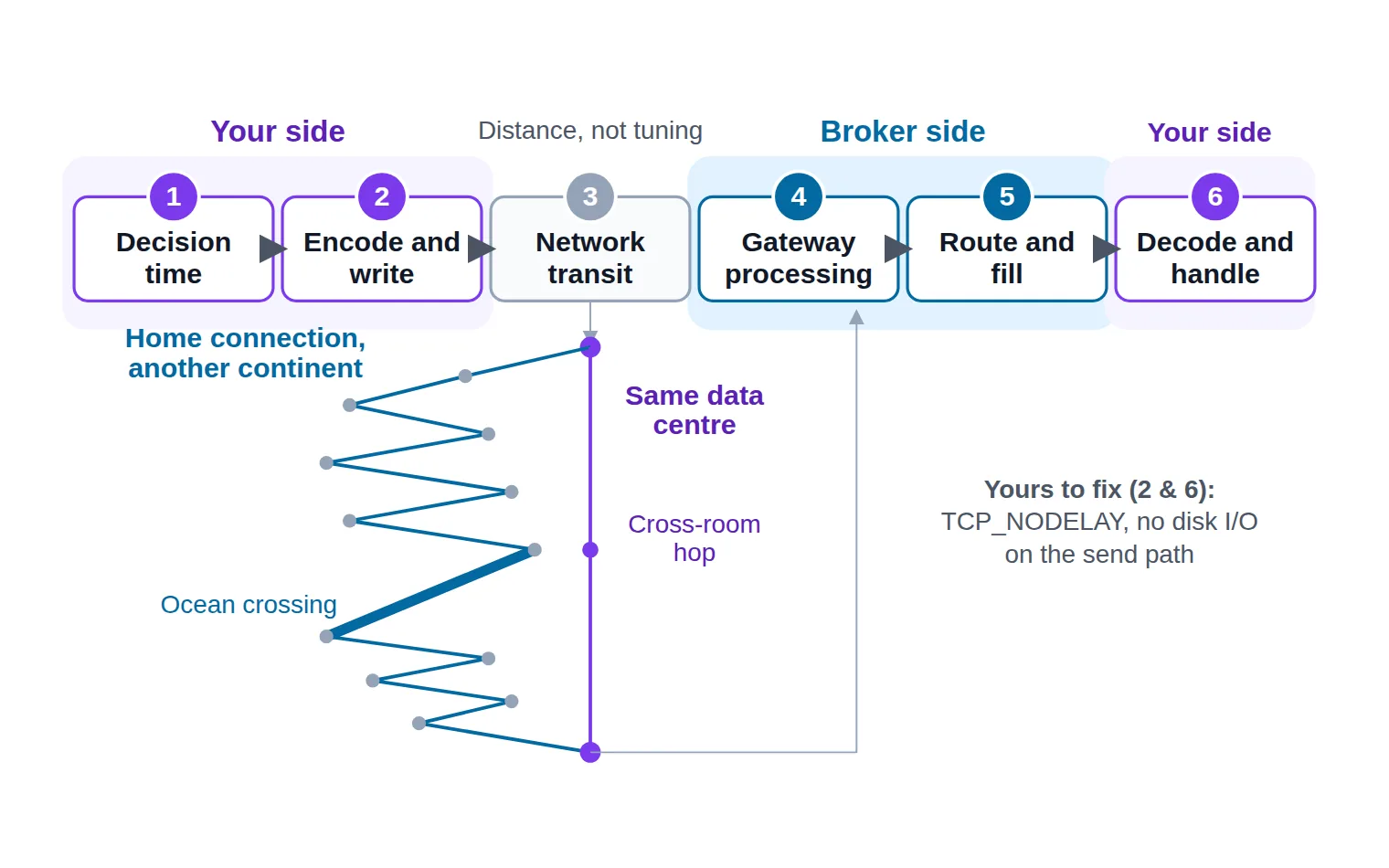
"Low latency" is only actionable once you know which segment you are paying for. An order's round trip breaks into six stages, and they are not remotely equal in size or in how much control you have:
Your decision time — the strategy computing that an order should exist.
Encode and write — your engine serialising the message and putting it on the socket.
Network transit to the broker's gateway.
Gateway processing, including the broker's pre-trade risk checks.
Routing to the liquidity pool and the fill coming back.
Decode and handle the ExecutionReport on your side.
An order's round trip is six stages; hosting moves exactly one of them, and the rest is yours to fix in code.
Stage 3 is the one people mean when they say latency, and it is dominated by physical distance rather than by anything you can configure. Most FX gateways live in a small number of financial data centres — the Equinix LD4 campus in Slough for London, NY4 in Secaucus for New York, TY3 for Tokyo. A machine in the same facility reaches the gateway across a room. A home connection on another continent reaches it across an ocean and a dozen router hops. That is not a tuning difference; it is a different order of magnitude, and no amount of code makes it up.
That is the whole argument for colocation and proximity hosting. Ask your broker which facility their gateway sits in, then place your VPS in the same one or the same metro. (Choosing and provisioning the machine is its own subject; our Alpari VPS guide covers it properly.)
Stages 2 and 6 are where self-inflicted latency lives, and they are entirely yours:
Turn off Nagle's algorithm.TCP_NODELAY matters enormously here. Left on, the kernel holds your small order message back, waiting to coalesce it with more data. Your order sits in a buffer for the sake of an efficiency you do not want.
Never do disk I/O on the send path. Log asynchronously to a queue. A synchronous flush to a slow disk can cost more than the entire network hop.
Do not batch orders to be tidy. Batching is a throughput optimisation and it is directly opposed to latency.
Respect the throttle. Every gateway has a message-rate ceiling, and API rate limiting on a FIX session is not a friendly 429 — a burst gets you queued, or logged out. A disconnect is the slowest latency outcome available.
Finally, measure the thing you actually own. Stamp a monotonic clock when you hand the message to the engine, and again when the matching 150=0 acknowledgement comes back. That client-side round trip is your number. The broker's internal figures describe their side of stage 4 and tell you nothing about your network path. Track the distribution rather than the average — the slow tail is where slippage is manufactured, and the difference between your typical round trip and your worst one is a better description of your execution speed than any single figure.
Does proximity hosting pay off for a smaller account?
It depends entirely on how fast your edge decays. If your strategy holds positions for minutes or hours, moving from a home connection to a nearby VPS will not measurably change your fills — but it still removes the tail risks that actually hurt an automated system: a router reboot, an ISP maintenance window, a laptop that sleeps. Buy hosting for uptime at that horizon and treat any latency gain as a bonus. If your edge decays inside a few hundred milliseconds, the calculation inverts and proximity stops being optional.
Keeping the Session Healthy: Gaps, Resends and Reconnects
Production FIX sessions fail in a small number of very specific ways, and they are all variations on one theme: the two sides disagree about sequence numbers.
A gap is a received MsgSeqNum higher than you expected. Something was lost. You send a ResendRequest (35=2) with 7 BeginSeqNo and 16 EndSeqNo (where 0 means "everything from there on"). The counterparty answers either by resending the original messages flagged 43=Y PossDupFlag, or with a SequenceReset (35=4) carrying 36 NewSeqNo and 123=Y GapFillFlag to skip administrative messages that are no longer worth replaying.
A received number lower than expected is not recoverable. It means the other side's state is wrong. The protocol's answer is to log out and investigate, and any code that quietly accepts it is hiding a real fault.
Persist your sequence numbers to disk, synchronously, before you act on a message. This is the single most important operational detail in FIX. A process that crashes and comes back with in-memory counters at zero will either be rejected at logon or trigger a resend of the entire day, and a resend storm during active trading is genuinely dangerous.
Use ResetSeqNumFlag (141) deliberately, not defensively. Setting 141=Y on logon tells both sides to restart at 1. That is correct for the scheduled start of a new trading day, and it is exactly wrong as a way to clear a gap you do not understand — you are throwing away the recovery mechanism to make an error message go away, and the messages you skipped may include fills.
Reconnect with backoff, and reconcile before you trade. After any disconnect, exponential backoff with a ceiling and a hard stop; a tight reconnect loop reads as an attack and gets your IP blocked. Once back, do not assume you are flat. Query order status (many gateways support OrderMassStatusRequest, 35=AF) or read the drop-copy session, and compare it against your own book before sending anything new. Pair that with a local kill switch that halts new orders on a reconciliation mismatch, because the moment after a reconnect is when a bug does the most damage.
Session lifecycle
stateDiagram-v2
    state "Logon sent" as LogonSent
    state "Session active" as Active
    state "Awaiting TestRequest reply" as Awaiting
    state "Sequence gap detected" as Gap
    state "Resend in progress" as Resending
    state "Logged out" as LoggedOut
    [*] --> Disconnected
    Disconnected --> LogonSent: send Logon 35=A
    LogonSent --> Active: gateway echoes 35=A
    LogonSent --> Disconnected: reject or timeout
    Active --> Active: heartbeats both ways
    Active --> Awaiting: silence past HeartBtInt
    Awaiting --> Active: Heartbeat echoes TestReqID
    Awaiting --> Disconnected: no reply, session is dead
    Active --> Gap: MsgSeqNum higher than expected
    Gap --> Resending: send ResendRequest 35=2
    Resending --> Active: gap filled by 35=4 or resent messages
    Active --> LoggedOut: Logout 35=5 exchanged
    Disconnected --> LogonSent: reconnect with backoff
    LoggedOut --> [*]
The transition teams get wrong is the gap: it belongs in resend recovery, not in a reconnect that resets sequence numbers and discards the missing fills.
Testing Your Order-Flow Pipeline Before Going Live
Ask for a UAT session before you ask for a production one. It has its own CompIDs, its own host and a simulated matching environment, and it is the only place you can safely provoke the failures you need to survive.
Test in the order the protocol stacks. The session layer comes first, before any order exists, because a heartbeat bug or a sequence-number bug quietly corrupts every order test you run on top of it. Those faults are also the ones that never appear while you are actively driving the session — they surface when it is left alone, interrupted or restarted. Prove the session survives boredom and a crash, and only then do order results mean anything.
The order layer is next, and the point of it is the unhappy paths rather than the happy one. An order that fills cleanly is the case your code already handles; what arrives unannounced on a live account is the refused order, the one that fills in pieces, and the one you try to take back a second too late. Provoke each of those deliberately here, where finding out what your parser does with a 150=8 costs an afternoon rather than a position.
Reconciliation closes the loop. At the end of a full test session your own book, the drop-copy stream and the gateway's order status should all agree, and any disagreement is the bug you came to find. Only after that does the smallest size your account permits belong on the live session. A forward test at minimum size will still teach you things no simulated environment can, because it is the first time your code meets real spread, real rejections and real timing.
Which makes the list below the gate rather than a summary. It pulls the session work, the order-flow work, the latency measurement and the safety stop from across this article into one place: nothing on it should be new to you by now, and nothing on it should still be untested when you send your first live order.
FIX go-live checklist
0 / 11
Logon succeeds on the UAT session with the issued CompIDs, and the gateway echoes 35=A
Session survives one hour idle: heartbeats sent, TestRequest answered, no disconnect
Process restart resumes from persisted sequence numbers with no resend storm
A forced sequence gap triggers your ResendRequest and the session recovers
Market, limit and IOC orders all produce the ExecutionReports you expect
A cancel and a cancel/replace are both handled, including the 35=9 reject path
An invalid symbol returns 150=8 and your code logs the OrdRejReason instead of stalling
A partial fill updates LeavesQty and CumQty correctly in your own position record
Your book matches the drop-copy stream after a full test session
Round-trip latency is measured client-side and its slow tail is recorded, not just the average
A kill switch halts new orders on a reconciliation mismatch, and you have tested it firing
★
Checklist complete — you’re cleared to proceed.
Every line here is a failure mode that shows up on a live session eventually. UAT is where you choose when to meet it.
Feeding the test pipeline with something real
There is a practical gap in all of this: to test an order-flow pipeline you need orders, and randomly generated ones exercise the transport without ever touching your decision path. If you want a realistic input while you validate the plumbing, our free live forex signals publish entries with reward-to-risk context you can use to trigger genuine test orders through your UAT session rather than synthetic noise.
Be clear about what it is and is not. It is a signal feed, not an execution endpoint — it does not place trades and it does not speak FIX. You would fire the test order yourself, or wire the feed into your own execution logic as an input. And as with any input to a live pipeline, read the risk warning before it drives real size.
Where This Leaves You
FIX is a small protocol wearing a large reputation. Strip away the mystique and there are two things to get right: a session that stays honest about sequence numbers, and a clear-eyed reading of the ExecutionReport stream. Everything else — the tags, the latency work, the recovery procedures — hangs off those two.
The Alpari-specific part is short, and it is worth repeating because it is where people waste time. There is no public FIX specification to download. Your host, port, CompIDs, symbol strings and throttle limits arrive with your access, and until they do, the productive thing to build is the engine-side scaffolding that will be identical whatever those values turn out to be: a session that logs on and reconnects, sequence numbers persisted to disk, an ExecutionReport handler that separates 150 from 39, and a UAT plan. Do that first, and the day your credentials land you are configuring, not building.
FAQ
Does Alpari publish a public FIX API specification?
No. Its public documentation covers MetaTrader 4 and MetaTrader 5, and no FIX gateway, host, port or CompID detail is published on its site. FIX connectivity at this kind of broker is arranged through the institutional or connectivity desk, and the specification is issued alongside your credentials after approval. Treat any third-party page quoting specific Alpari FIX hostnames with real suspicion — that is not information Alpari publishes.
Should I build against FIX 4.2 or FIX 4.4?
Build against whichever the gateway speaks, and ask before you start. FIX 4.4 is the more common choice in FX today and has cleaner handling of several order-lifecycle cases, but plenty of production gateways still run 4.2 and some run both on different ports. The differences are not cosmetic — required fields and repeating-group layouts vary — so a session written for the wrong version will fail at logon or, worse, at the first unusual order.
Do I need to write my own FIX engine?
No, and you should not. Framing, checksums, sequence persistence, resend logic and heartbeat timing are solved problems with mature open-source implementations in most languages; QuickFIX and its ports are the common starting point. Your job is the session configuration, the message construction for the order types you actually use, and the ExecutionReport handling — all of which are specific to your strategy and none of which the engine can do for you.
What does ExecType 150=F mean when OrdStatus 39 says partially filled?
They are answering two different questions and both answers are correct. 150=F describes the event that just occurred: a trade happened. 39=1 describes the order as a whole right now: some of it has traded and some is still working. Read 32 LastQty for the size of that individual fill and 151 LeavesQty for what remains. An order that fills in four pieces produces four ExecutionReports with 150=F, the first three carrying 39=1 and the last carrying 39=2.
How do I recover after my process crashes mid-session?
Restart with your persisted sequence numbers, not from zero. Log on without ResetSeqNumFlag, let the gateway tell you what it expected, and let your engine's ResendRequest fill whatever gap opened while you were down. Before sending a single new order, reconcile: query order status or read the drop-copy stream and compare against your own record, because fills that arrived during the outage are real whether or not your process saw them.
Can I run a FIX session and MetaTrader on the same account?
That is a broker configuration question rather than a protocol one, and it is worth asking explicitly during onboarding. Some brokers issue FIX credentials against the same trading account you can also open in a terminal; others provision a separate account for connectivity. Either way, if two systems can send orders to the same account, decide up front which one owns position state — two independent processes managing the same positions is a reconciliation problem that will eventually cost you a trade.
Sources & Further Reading
Want to go deeper? These independent, authoritative sources shaped this guide — each one is worth reading in full:
The Binary Options Desk is the SignalBots editorial team for fixed-time and OTC trading coverage. We research and write the guides that explain expiry timing, payout structure and disciplined entry across the major brokers.




Discussions 0
Leave a comment