Alpari publishes no Java SDK and no public API docs: MetaTrader Expert Advisors are the default retail automation surface, and REST or FIX access arrives as a per-account connection spec, not a download.
Choose REST for bar-close strategies and FIX when you need pushed fills and tighter execution timing — and price your poll rate against the rate limit before committing.
The single call is easy; the loop is where money is lost. Generate your own client order ID, never blind-retry an order, and put a kill switch and position caps in code.
Every snippet here runs unchanged against a demo endpoint. Forward-test the whole loop there before a live account sees a single order.
Table of Contents (37 min read)Contents
Does Alpari Offer a Java API? What "Connect and Automate" Really Means
Start here, because it saves you an afternoon of searching: there is no Alpari-branded Java SDK. No com.alpari artifact on Maven Central, no developer portal with endpoint tables, no broker-maintained sample repository. If you searched alpari java api and landed on generic broker tutorials and forum threads, that is not a gap in your Googling — the official thing you were looking for was never published.
What Alpari does document publicly is automation inside MetaTrader: an Expert Advisor written in MQL4 or MQL5, running in the terminal against your account. That is the supported, self-serve retail automation surface, and it is the one most Alpari clients actually use.
Programmatic access outside the terminal — a persistent FIX session or an HTTP endpoint your own process talks to — is not a self-serve product here the way it is at API-first brokers. At a broker structured like Alpari, that kind of broker API access is arranged per account: you ask, a desk qualifies you, and if you are approved you receive a connection spec — a host, a port, session identifiers, credentials, a symbol list — by email or as a PDF. There is no public doc site because the document is issued to you, not published — picture an empty shelf where the documentation would sit, and a sealed envelope addressed to a single account. The blocker is not the code — it is that the connection details are issued to an account, never published to a docs site.
So "connect and automate in Java" is really three different paths, and only one of them is open to every account:
Automation path
Who it is for
What you write
What you must obtain first
MT4/MT5 Expert Advisor
Any funded retail account
MQL4 or MQL5, inside the terminal
Nothing beyond the platform
FIX session
Professional and institutional-tier accounts, approved case by case
Java plus a FIX engine such as QuickFIX/J
A FIX connection spec and session credentials
HTTP / REST endpoint
Granted case by case, where the broker exposes one at all
Java plus any HTTP client
A base URL, credentials and an auth scheme
Only the first row is open by default. The other two start with a request to a desk, not a download.
Whether either of the bottom two rows is open to you is a desk decision about account standing rather than a technical one, so ask before you write anything — the answer decides your architecture.
If the answer is no
You are not stuck, but you are on a different architecture. The realistic fallback is the MetaTrader route: an EA carries execution inside the terminal, and if you want your Java system to drive it, the EA becomes a thin bridge — reading instruction files from a watched folder, or holding a local socket that your Java process writes to. Your strategy stays in Java; only the last inch runs in MQL. Building that EA is its own subject and this article does not cover it, but knowing the shape now stops you writing REST code against an endpoint you will never be given.
Everything below assumes the good case: credentials in hand, or an approval in progress. From that point on, the work is ordinary algorithmic trading engineering, and Java is a perfectly good language for it.
Prerequisites: API Access, Java, and Tooling You'll Need
Before the first line of code, get these on your desk. The order matters — items one and two are gates, the rest are setup.
Your connection spec. For a FIX session that means: host, port, TLS requirement, BeginString (FIX version), SenderCompID, TargetCompID, logon username and password, heartbeat interval, session start and end times, and the tradable symbol list. For REST: base URL, authentication scheme, account identifier, request-signing rules, and the published rate limits.
Algo-trading permission on the account itself. Credentials and permission are separate switches. An account can authenticate cleanly and still have every order rejected because automated execution was never enabled on it.
Java 17 or newer.java.net.http.HttpClient has been in the JDK since 11, and records plus pattern matching make the message-handling code much shorter. Nothing here needs a framework.
Maven or Gradle. Both are shown below.
A demo or UAT endpoint. Ask for it explicitly in the same request as the live one. Writing execution code with no safe target is how people learn expensive lessons.
A symbol mapping table.EURUSD, EUR/USD and EURUSD.pro are three different strings to a matching engine. Keep the broker's exact spelling in one config file, never scattered through your strategy.
Applying for that access — who to email, what the desk asks for, how long approval takes — is a separate topic from writing the client, and this article stays on the code.
REST or FIX — Which Should Your Java Client Use?
Often you get no choice: the spec sheet arrives and it says FIX. When you do have a choice, decide on how your strategy consumes information rather than on which protocol sounds more professional.
A REST API is request and response. You ask, you get an answer, the connection ends. That makes it trivial to write, trivial to debug with curl, and easy to run behind a corporate proxy. The cost is that nothing reaches you unless you ask for it: you discover your own fills by polling, and every poll spends part of your rate-limit budget.
The FIX protocol is a persistent, sequence-numbered session. After logon, the gateway pushes execution reports to you the instant they happen — no polling, no discovery lag. The cost is session mechanics: heartbeats, sequence-number gaps, resend requests, scheduled logout windows. QuickFIX/J absorbs most of that, but you still have to reason about it when something breaks at 3am.
The practical dividing line:
Bar-close strategies — you act on an M5, M15 or H1 close and hold for minutes to hours. REST is genuinely sufficient. A poll interval well under your bar length costs nothing you care about.
Reaction-sensitive strategies — you need the fill notification immediately, or your entry window is measured in seconds. That is where the execution speed difference stops being theoretical and FIX earns its complexity. The same argument applies if you were offered a WebSocket stream alongside REST: take it, and keep REST for order entry and reconciliation.
Before you commit to polling, price it honestly:
REST poll budget: request load and reaction lag
Set your symbol count and poll interval to see the request load your loop actually generates, and the worst-case delay between a price moving and your order leaving.
Symbols you watch
Poll interval
Extra calls per cycle
Round-trip latency
Requests per minute
—
Requests per day
—
Gap between requests
—
Worst-case reaction lag
—
Seven calls every ten seconds is already tens of thousands a day, and your worst case is still a full poll interval behind the market.
If that request-per-day number makes you uncomfortable next to the rate limit on your spec sheet, you have your answer: either lengthen the interval, or move to a pushed session.
Setting Up the Java Project (Maven/Gradle Dependencies)
The REST path needs almost nothing — the HTTP client ships with the JDK, so JSON parsing is the only real dependency. The FIX path needs the engine plus the generated message classes for your session's FIX version. Add both now; delete whichever you end up not using.
xmlpom.xml
<properties>
  <maven.compiler.release>17</maven.compiler.release>
</properties>

<dependencies>
  <!-- REST path: the HTTP client is in the JDK, so only JSON is needed -->
  <dependency>
    <groupId>com.fasterxml.jackson.core</groupId>
    <artifactId>jackson-databind</artifactId>
    <version>2.17.1</version>
  </dependency>

  <!-- FIX path: the engine plus message classes for YOUR BeginString -->
  <dependency>
    <groupId>org.quickfixj</groupId>
    <artifactId>quickfixj-core</artifactId>
    <version>3.0.1</version>
  </dependency>
  <dependency>
    <groupId>org.quickfixj</groupId>
    <artifactId>quickfixj-messages-fix44</artifactId>
    <version>3.0.0</version>
  </dependency>

  <!-- QuickFIX/J logs through SLF4J; with no binding you see nothing -->
  <dependency>
    <groupId>org.slf4j</groupId>
    <artifactId>slf4j-simple</artifactId>
    <version>2.0.13</version>
  </dependency>
</dependencies>
Swap quickfixj-messages-fix44 for the artifact matching the FIX version on your spec sheet.
Keep credentials out of the source tree from the very first commit. A properties file outside the repository, or plain environment variables, both work:
# Load from a path outside the repo, or read these as env vars instead.alpari.rest.baseUrl=https://HOST-FROM-YOUR-SPEC/v1alpari.rest.keyId=${ALPARI_KEY_ID}alpari.rest.secret=${ALPARI_SECRET}alpari.account=1234567
Connecting: Authenticating a REST Client in Java
Broker REST authentication almost always arrives in one of three shapes: a bearer token you send on every request, a static API key header, or an HMAC signature computed over a timestamp plus the method, path and body. Your spec sheet says which one, and the exact header names — do not copy the names below into production, copy the structure.
Because you cannot know which shape you will get until the spec arrives, put authentication behind a one-method interface. Swapping schemes then never touches transport code.
javaAlpariRestClient.java
package trading.alpari;

import java.net.URI;
import java.net.http.HttpClient;
import java.net.http.HttpRequest;
import java.net.http.HttpResponse;
import java.time.Duration;
import java.util.Map;

/** Thin REST transport: one client, one auth strategy, timeouts on everything. */
public final class AlpariRestClient {

    private final HttpClient http;
    private final String baseUrl;
    private final Authenticator auth;

    public AlpariRestClient(String baseUrl, Authenticator auth) {
        this.baseUrl = baseUrl.replaceAll("/+$", "");
        this.auth = auth;
        this.http = HttpClient.newBuilder()
                .connectTimeout(Duration.ofSeconds(5))
                .build();
    }

    public HttpResponse<String> send(String method, String path, String body)
            throws Exception {

        HttpRequest.Builder b = HttpRequest.newBuilder()
                .uri(URI.create(baseUrl + path))
                .timeout(Duration.ofSeconds(10))
                .header("Content-Type", "application/json")
                .method(method, body == null
                        ? HttpRequest.BodyPublishers.noBody()
                        : HttpRequest.BodyPublishers.ofString(body));

        // The spec sheet decides the headers. The transport never guesses.
        auth.sign(method, path, body == null ? "" : body).forEach(b::header);

        return http.send(b.build(), HttpResponse.BodyHandlers.ofString());
    }

    /** Implement once per auth scheme; the client never changes. */
    public interface Authenticator {
        Map<String, String> sign(String method, String path, String body);
    }
}
Two timeouts matter: connect (reaching the host) and request (waiting for the answer). Neither has a safe default of 'forever'.
The HMAC variant is the one people get wrong most often, because the string you sign has to match the server's byte for byte — same timestamp, same path, same raw body:
Sign the body you actually send. If Jackson serialises the map in a different order than the string you hashed, the signature fails and the error message will tell you nothing useful.
Connecting: Building a FIX Session in Java with QuickFIX/J
QuickFIX/J is configuration first, code second. The session file below maps one-to-one onto the fields on your spec sheet, so fill it in before writing anything.
Identical StartTime and EndTime mean a continuous 24-hour session. If your spec defines a daily maintenance window, put the real times here instead — otherwise the engine will fight the gateway's scheduled logout every day.
The message flow itself is worth seeing before you read the code, because FIX inverts the mental model a REST developer arrives with. You do not call a method and receive a result; you send a message and get answers later, on a callback, possibly more than one:
sequenceDiagram
    autonumber
    participant App as Java app
    participant QFJ as QuickFIX/J
    participant GW as FIX gateway
    App->>QFJ: initiator.start()
    QFJ->>GW: Logon with credentials
    GW-->>QFJ: Logon accepted
    QFJ-->>App: onLogon callback
    Note over App,GW: Only now is it safe to send orders
    App->>QFJ: NewOrderSingle
    QFJ->>GW: Order routed
    alt Order accepted
        GW-->>QFJ: ExecutionReport New
        GW-->>QFJ: ExecutionReport Filled
        QFJ-->>App: fromApp, twice
    else Order rejected
        GW-->>QFJ: ExecutionReport Rejected
        QFJ-->>App: fromApp, once
    end
One order can produce several execution reports. Treat fromApp as a stream of state changes, not as a return value.
Now the application class. Four callbacks carry all the weight: onLogon tells you when trading is safe, onLogout tells you when it stops being safe, toAdmin is where logon credentials get injected, and fromApp is where every execution report lands.
javaAlpariFixApp.java
package trading.alpari;

import quickfix.*;
import quickfix.field.Password;
import quickfix.field.Username;
import quickfix.fix44.ExecutionReport;
import quickfix.fix44.Logon;

public class AlpariFixApp implements Application {

    private final String username;
    private final String password;
    private volatile SessionID sessionId;

    public AlpariFixApp(String username, String password) {
        this.username = username;
        this.password = password;
    }

    @Override public void onCreate(SessionID id) { }

    @Override public void onLogon(SessionID id) {
        this.sessionId = id;              // trading becomes legal here
    }

    @Override public void onLogout(SessionID id) {
        this.sessionId = null;            // and stops being legal here
    }

    /** Credentials ride on the outbound Logon, not on a separate call. */
    @Override public void toAdmin(Message message, SessionID id) {
        if (message instanceof Logon logon) {
            logon.set(new Username(username));
            logon.set(new Password(password));
        }
    }

    @Override public void fromAdmin(Message m, SessionID id) { }

    @Override public void toApp(Message m, SessionID id) { }

    @Override public void fromApp(Message message, SessionID id)
            throws FieldNotFound {
        if (message instanceof ExecutionReport er) {
            System.out.printf("clOrdId=%s status=%s cumQty=%s avgPx=%s%n",
                    er.getClOrdID().getValue(),
                    er.getOrdStatus().getValue(),
                    er.getCumQty().getValue(),
                    er.getAvgPx().getValue());
        }
    }

    public SessionID sessionId() { return sessionId; }
}
Guard every send on a non-null sessionId. Sending between logout and reconnect is the classic silent failure.
Starting it is five lines, and the important detail is that start() returns immediately — the logon happens on another thread:
SessionSettingssettings=newSessionSettings("quickfixj.cfg");AlpariFixAppapp=newAlpariFixApp(user,pass);Initiatorinitiator=newSocketInitiator(app,newFileStoreFactory(settings),settings,newFileLogFactory(settings),newDefaultMessageFactory());initiator.start();// returns at once; wait for onLogon before trading
Placing and Monitoring a Trade From Java
Two rules apply to both protocols, and skipping either is what turns a working prototype into a bad afternoon.
Generate your own client order ID for every order. It is the only identifier that exists before the request leaves your process, which makes it the only thing you can reconcile against when a call times out and you do not know whether the order reached the broker.
Treat status as a sequence, not a value. An order moves through states; a partial fill is a normal intermediate stop, and an order rejection is a final one. Code that reads status once and assumes it is done will mis-report half its trades.
On the FIX side, an order is one message and its answers arrive on fromApp:
NewOrderSingleorder=newNewOrderSingle(newClOrdID(clientOrderId),// your idempotency keynewSide(Side.BUY),newTransactTime(LocalDateTime.now(ZoneOffset.UTC)),newOrdType(OrdType.MARKET));order.set(newSymbol("EUR/USD"));// spelled as the spec spells itorder.set(newOrderQty(0.10));// lots or units - check the specorder.set(newTimeInForce(TimeInForce.IMMEDIATE_OR_CANCEL));order.set(newAccount(accountId));Session.sendToTarget(order,app.sessionId());
Read the reply off OrdStatus (tag 39) for where the order stands and ExecType (tag 150) for what just happened to it, with CumQty and AvgPx telling you how much actually filled and at what price.
On the REST side the same job is a POST followed by polling. Here is the whole thing as one class you can compile, point at a demo endpoint and run — connect, authenticate, place, read back:
javaAlpariTradingClient.java
package trading.alpari;

import com.fasterxml.jackson.databind.JsonNode;
import com.fasterxml.jackson.databind.ObjectMapper;
import java.net.http.HttpResponse;
import java.nio.charset.StandardCharsets;
import java.util.Map;
import java.util.UUID;

/** Connect, authenticate, place one order, read it back. Nothing else. */
public final class AlpariTradingClient {

    private static final ObjectMapper JSON = new ObjectMapper();

    private final AlpariRestClient rest;
    private final String account;

    public AlpariTradingClient(String baseUrl, String keyId,
                               String secret, String account) {
        this.rest = new AlpariRestClient(baseUrl, new HmacAuthenticator(
                keyId, secret.getBytes(StandardCharsets.UTF_8)));
        this.account = account;
    }

    /** Cheap authenticated call: proves the credentials work before money moves. */
    public boolean connected() throws Exception {
        return rest.send("GET", "/accounts/" + account, null).statusCode() == 200;
    }

    public String placeMarketOrder(String symbol, String side, double qty)
            throws Exception {
        String clientOrderId = UUID.randomUUID().toString();
        String body = JSON.writeValueAsString(Map.of(
                "clientOrderId", clientOrderId,
                "account", account,
                "symbol", symbol,
                "side", side,
                "type", "MARKET",
                "quantity", qty));

        HttpResponse<String> r = rest.send("POST", "/orders", body);
        if (r.statusCode() >= 300) {
            throw new IllegalStateException("Rejected: " + r.statusCode() + " " + r.body());
        }
        return clientOrderId;
    }

    /** Poll until the order stops being working, or the deadline passes. */
    public String awaitFinalStatus(String clientOrderId, long timeoutMs)
            throws Exception {
        long deadline = System.currentTimeMillis() + timeoutMs;
        String status = "UNKNOWN";
        while (System.currentTimeMillis() < deadline) {
            HttpResponse<String> r =
                    rest.send("GET", "/orders/" + clientOrderId, null);
            if (r.statusCode() == 200) {
                JsonNode node = JSON.readTree(r.body());
                status = node.path("status").asText("UNKNOWN");
                if (!status.equals("NEW") && !status.equals("PARTIALLY_FILLED")) {
                    return status;
                }
            }
            Thread.sleep(500);
        }
        return status;
    }

    public static void main(String[] args) throws Exception {
        AlpariTradingClient client = new AlpariTradingClient(
                System.getenv("ALPARI_BASE_URL"),
                System.getenv("ALPARI_KEY_ID"),
                System.getenv("ALPARI_SECRET"),
                System.getenv("ALPARI_ACCOUNT"));

        if (!client.connected()) {
            throw new IllegalStateException("Credentials rejected - stop here.");
        }
        String id = client.placeMarketOrder("EUR/USD", "BUY", 0.10);
        System.out.println("Final status: " + client.awaitFinalStatus(id, 15_000));
    }
}
Paths and field names follow the shape almost every broker REST API uses. Replace them with the exact ones on your spec sheet.
Note what awaitFinalStatus returns when the deadline passes: UNKNOWN, not FAILED. That distinction is the single most valuable line in the class, and the error-handling section leans on it.
From One Trade to an Automated Loop
A single call is a script. A loop is a process that owns state, keeps running while you sleep, and can hurt you — so give it an explicit lifecycle rather than a while (true) with a Thread.sleep in it.
stateDiagram-v2
    [*] --> Disconnected
    Disconnected --> Connected: logon or auth succeeds
    Connected --> Evaluating: poll tick or pushed quote
    Evaluating --> Connected: no trigger
    Evaluating --> Placing: trigger fires and risk checks pass
    Placing --> Working: order acknowledged
    Placing --> Connected: order rejected
    Working --> InTrade: fill received
    Working --> Connected: cancelled or expired
    InTrade --> Cooldown: position closed
    Cooldown --> Connected: cooldown elapsed
    Connected --> Disconnected: heartbeat or session lost
    Disconnected --> Halted: retry budget exhausted
    InTrade --> Halted: kill switch tripped
    Halted --> [*]
The transition most bots get wrong is Placing back to Connected on a rejection: skip it and the loop retries an order the broker already refused.
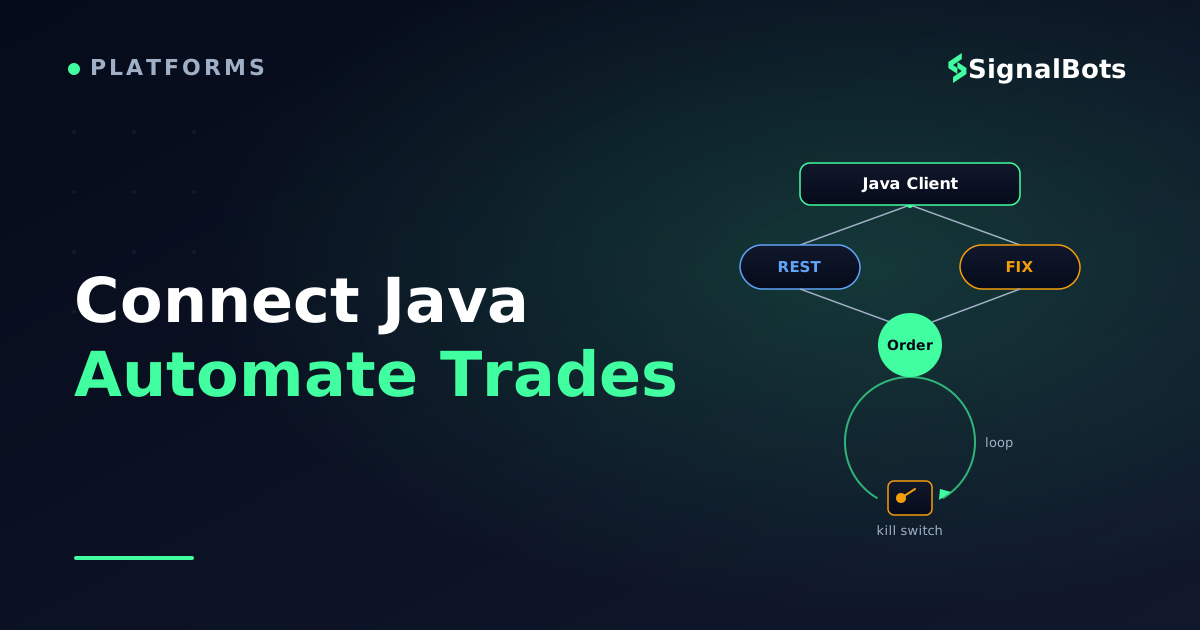
The same machine, drawn as hardware: a closed circuit with the signal running endlessly round it, and one switch wired into the edge that can stop it from outside. A loop that cannot be stopped from outside itself is not automation, it is an order generator.
Three design decisions make that machine safe to leave alone:
Isolate the strategy from the transport. The loop asks a Trigger for a signal and asks a RiskGate for permission. Neither knows whether execution happens over REST or FIX, which means you can test both without a broker connection.
Never let two cycles overlap. A scheduled task that runs every ten seconds while the previous cycle is still waiting on a fill will happily place the same trade twice.
Count failures, and stop. A loop that retries forever is not resilient, it is an order generator with no brakes.
javaTradingLoop.java
public final class TradingLoop implements Runnable {

    private final AlpariTradingClient client;
    private final Trigger trigger;                 // your strategy
    private final RiskGate risk;                   // caps that can veto any order
    private final AtomicBoolean halted = new AtomicBoolean(false);
    private final AtomicBoolean inFlight = new AtomicBoolean(false);

    @Override
    public void run() {
        if (halted.get() || !inFlight.compareAndSet(false, true)) {
            return;                                // no overlapping cycles, ever
        }
        try {
            Trigger.Signal s = trigger.evaluate();
            if (s == null || !risk.allows(s)) {
                return;
            }
            String id = client.placeMarketOrder(s.symbol(), s.side(), risk.sizeFor(s));
            String status = client.awaitFinalStatus(id, 15_000);
            risk.record(id, status);
            log.info("cycle clOrdId={} status={}", id, status);
        } catch (Exception e) {
            log.error("cycle failed", e);
            if (risk.consecutiveFailures() >= 3) {
                halted.set(true);                  // a brake, not a retry storm
            }
        } finally {
            inFlight.set(false);
        }
    }
}
Every branch releases the in-flight flag in a finally block. Forget that once and the loop silently stops trading forever.
Schedule it, and make sure the JVM shuts it down cleanly:
On the FIX path the shape is the same, minus the polling: fromApp feeds execution reports into the same state machine, so the loop reacts to events instead of asking for them.
Handling Disconnects, Errors, and Rate Limits Safely
This is the section that separates a demo from something you would let run unattended. Four failures account for almost everything that goes wrong.
Retry the retryable, and nothing else. Timeouts, connection resets and 5xx responses are worth another attempt. A 400 or 401 will fail identically forever — retrying it just burns your rate limit and delays the alert you actually needed. Back off exponentially with jitter so a broker-side blip does not turn into a synchronised stampede when your process and everyone else's reconnect at the same instant.
javaRetry.java
/** Retry only what is safe to retry - and an order POST is not on that list. */
static <T> T withBackoff(Callable<T> call, int maxAttempts) throws Exception {
    long delay = 250;
    for (int attempt = 1; ; attempt++) {
        try {
            return call.call();
        } catch (HttpTimeoutException | ConnectException e) {
            if (attempt >= maxAttempts) {
                throw e;
            }
        }
        long jitter = ThreadLocalRandom.current().nextLong(delay / 2);
        Thread.sleep(delay + jitter);
        delay = Math.min(delay * 2, 30_000);
    }
}
Jitter matters as much as the backoff itself: without it, every client on the venue reconnects on the same tick.
Never blind-retry an order. A timed-out POST /orders is UNKNOWN, not failed — the order may be live. Ask the broker what happened using your own client order ID, and if you still cannot tell, stop and page a human:
// A timed-out order POST is UNKNOWN, not failed. Ask before you decide.Stringstatus=client.awaitFinalStatus(clientOrderId,5_000);if("UNKNOWN".equals(status)){halt("Order state unknown after timeout - manual reconciliation required");}
Respect the rate limit before it bites. When a 429 arrives, read the Retry-After header and honour it rather than guessing; a client that ignores it can get its key throttled or suspended. On the FIX side the analogous discipline is clock drift: gateways validate SendingTime against their own clock and will reject or drop a session whose machine has wandered. Run NTP on the host and treat it as part of the deployment, not an afterthought.
Reconcile after every reconnect. When a session comes back, your in-memory view of open orders and positions is a guess. Fetch the broker's view first, adopt it, and only then re-arm the strategy. Wire in a hard kill switch and a max open trades limit at the same layer, so a runaway loop hits a ceiling that lives in code rather than in your intentions. Cap the lot size the same way — work out the size that matches your account and stop distance once, then encode that number as a constant the strategy cannot exceed.
Where Your Automation Loop Gets Its Trading Signal
Notice what the loop still does not have. Everything above is transport: it connects, authenticates, places, reads back and recovers. But trigger.evaluate() returns null until you give it something to decide on, and building that decision layer is a bigger job than the plumbing you just finished.
You have two honest options: write your own indicator logic against a price feed, or read a signal someone else generates and decide whether to act on it. If you want to test the loop end to end before your own strategy is ready, the second is faster.
That is where our live forex signals feed fits. Each signal carries a direction, an entry level and reward-to-risk context, which is exactly the shape your Trigger.Signal record already wants: symbol, side, and the numbers your RiskGate needs to size the position. In practice you would poll it, map a fresh signal onto a Signal object, and let the same placeMarketOrder() call you wrote above do the rest. Historical performance never guarantees future results, and the risk warning applies to any signal-driven automation.
Be clear about what it is not: a feed is a decision input, not an execution API. It does not replace the REST or FIX connection code in this article, it does not place trades on your behalf, and it does not cover binary-options automation, which runs on a different mechanism entirely. If you are building a proprietary strategy whose edge is the signal itself, you want your own logic here, not ours.
Test on a Demo Account Before You Go Live
Every piece of code above will run against a demo account with nothing changed but the base URL or the FIX host. Do that first, for longer than feels necessary. The bugs that cost money are not compile errors — they are a retry that duplicates an order, a reconnect that forgets an open position, or a clock that drifted overnight, and none of them show up in the first ten minutes.
A forward test on demo also tells you something a backtest cannot: whether your loop survives the venue's real behaviour — the maintenance window, the rejected order at rollover, the morning your credentials expire.
Before you point the loop at a live account
0 / 8
Run the full loop against the demo endpoint for a complete trading week, unattended.
Confirm every order you sent appears exactly once in the broker's own history, with no duplicates from retries.
Kill the network mid-cycle and verify the client reconciles by client order ID instead of resending.
Force a rejected order and confirm the loop logs it, counts it, and does not immediately retry.
Trip the kill switch by hand and confirm the process stops opening new positions.
Cap lot size, max open trades and daily loss in code, not just in your head.
Move credentials out of the source tree and confirm the build still runs from environment variables.
Sync the host clock with NTP and re-check that FIX SendingTime is still accepted.
★
Checklist complete — you’re cleared to proceed.
Eight checks, each one a failure someone has already paid for.
When the checklist is clean, go live small — one symbol, minimum size, and a human watching the log for the first session. The Java client you built is the easy part; the discipline around it is what keeps it running.
FAQ
Is there an official Alpari Java library on Maven Central?
No. There is no broker-published Java SDK, no com.alpari artifact, and no maintained sample repository. The Java code in this article uses the JDK's own HTTP client for the REST path and QuickFIX/J — a general-purpose open-source FIX engine used against many venues — for the FIX path. Neither is Alpari-specific, which is exactly why they keep working when a broker changes its stack.
Can I run the same Java code against a demo account first?
Yes, and you should. Demo and live differ by endpoint and credentials, not by code. Ask for the demo or UAT connection details in the same request as production, keep both in separate config files, and make the environment an explicit startup parameter so you can never launch against live by accident.
Do I need QuickFIX/J, or can I write FIX messages by hand?
You can technically build FIX messages as delimited strings, and you will regret it. The engine handles sequence numbers, heartbeats, resend requests, logon and logout scheduling, message persistence and dictionary validation — all of which the gateway will enforce whether or not you implemented them. Hand-rolled FIX usually fails not at the first message but at the first recovery.
What if Alpari will not grant me API or FIX access?
Then MetaTrader is your execution surface. Your strategy can still live in Java: an Expert Advisor acts as the last inch, reading instructions your Java process writes to a watched folder or a local socket, and reporting fills back the same way. It is more moving parts than a direct session, and it inherits the terminal's own constraints, but it is the fallback that actually works on a standard retail account.
Should the strategy logic live in the same Java process as the connection?
Keep them in the same process while you are learning the API, then split them once the strategy matters. A connection layer that only knows how to place, cancel and report is easy to test against a demo endpoint and easy to swap when the protocol changes. A strategy that only emits signals is easy to backtest offline. Merged together, neither can be tested without the other.
Sources & Further Reading
Want to go deeper? These independent, authoritative sources shaped this guide — each one is worth reading in full:
The Binary Options Desk is the SignalBots editorial team for fixed-time and OTC trading coverage. We research and write the guides that explain expiry timing, payout structure and disciplined entry across the major brokers.





Discussions 0
Leave a comment