The pitch that brought you here probably came with a number attached — a strategy with a win rate somewhere in the high eighties, or a promise that most people who deposit a hundred dollars finish their first day ahead. Then you searched, and every page that came back was selling exactly one product and describing it as though it were the only kind of thing that exists.
It isn't. "Olymp Trade bot" is not a product. It is a label stretched across at least five genuinely different pieces of software that decide trades in different ways, plug into your account at different depths, and break for completely different reasons. A Chrome extension that clicks a button inside a tab you already logged into and a Python script talking to an undocumented endpoint are both sold as robots, and they have almost nothing in common except the word.
So before you install anything, here is the map: what a bot actually does on a fixed-time platform, the five categories that exist, what each one takes from your account, how to read a win-rate claim without being taken in by it, and which type — if any — matches what you are actually trying to fix.
Key Takeaways
"Olymp Trade bot" covers five different things - browser extensions, desktop signal-followers, AI prediction tools, third-party mirroring services and custom-coded scripts - and they differ far more in what they access than in what they claim.
Olymp Trade has no native scripting language and no official public API, so every robot is an outside layer that can break whenever the platform changes.
Ask what a bot touches before you ask what it returns: session-only access, credentials on your own machine, and credentials on a vendor's server are three very different risks.
A win rate means nothing without the payout it was earned at, the sample behind it, and a live period to compare against the backtest.
Table of Contents (29 min read)Contents
What Is an Olymp Trade Trading Bot?
Trading a fixed-time contract by hand is two jobs, not one.
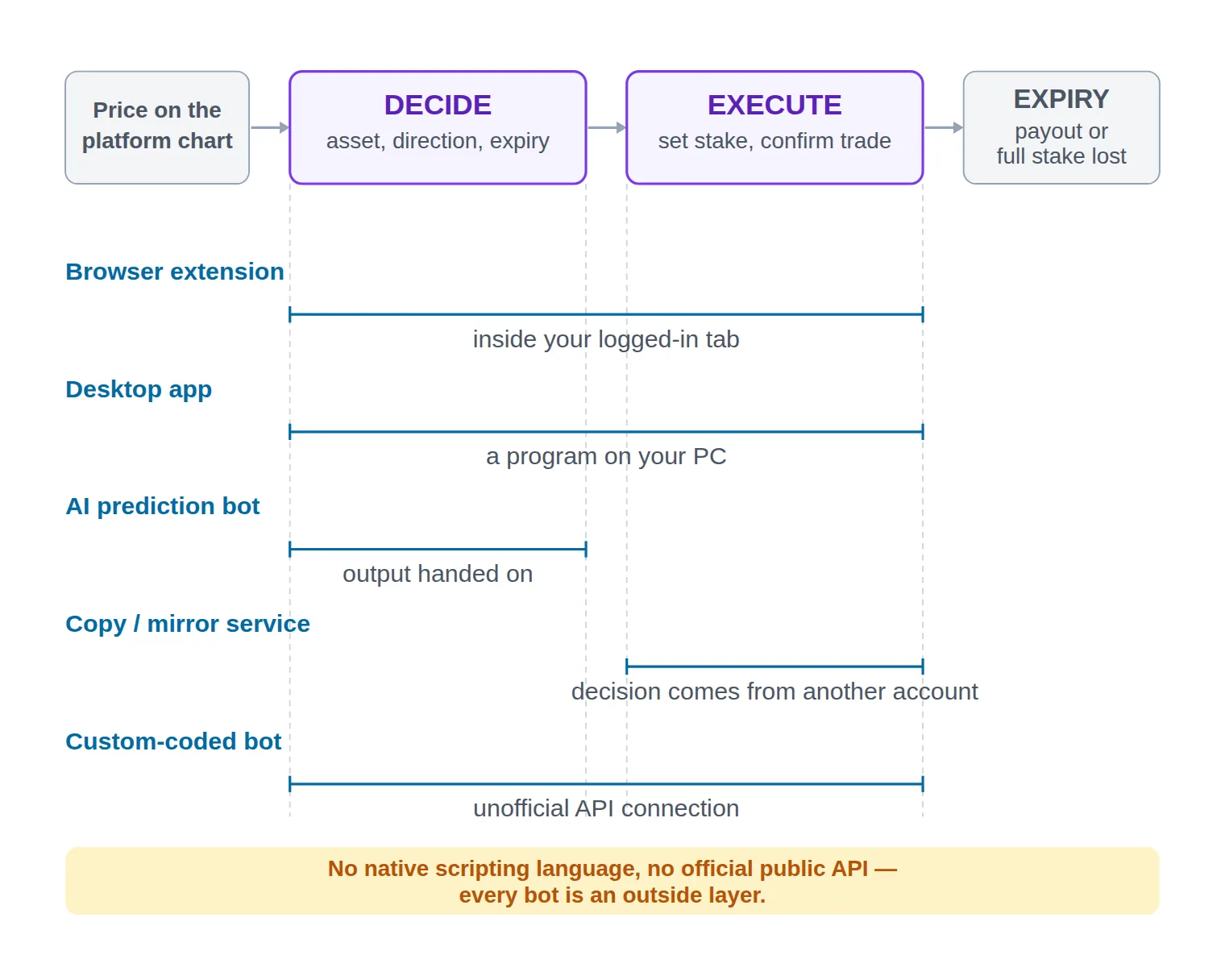
The first is deciding: which asset, which direction, and which expiry time — up or down, sixty seconds or five minutes, EUR/USD or gold. The second is executing: setting the stake and confirming the trade before the entry you wanted has already moved.
An Olymp Trade bot is software that takes over one or both of those jobs. That is the entire definition, and the useful thing about it is that it splits the field in half immediately:
A tool that automates only the decision and shows you the result is not really a bot. It is a signal provider wearing a robot's branding — you still place every trade yourself.
A tool that automates the execution is where the interesting part starts, because to press a button on your account, something has to be able to reach your account.
A tool that does both, unattended, is what most people mean by auto-trading — and it is also the version that can lose money while you sleep.
All of this sits inside algorithmic trading, but Olymp Trade occupies an unusual corner of it. On MetaTrader, automation is a first-class citizen: the terminal ships a scripting language, a strategy tester, and a documented way to attach a program to a chart. Olymp Trade has none of that. There is no native scripting language, no built-in tester, and no official public developer API.
That single structural fact explains most of what follows. Every Olymp Trade robot is an outside layer bolted onto a platform that was never designed to host it — either reading the page the platform renders, or talking to an endpoint the platform never published. Nothing is certified, nothing is supported, and nothing is guaranteed to still work after the next platform update.
The platform's own position is permissive but narrow: its help centre states that trading robots are allowed provided the software is not used to damage the platform or undermine honest execution. That is a conditional tolerance, not an endorsement and not an integration. No robot you install is an Olymp Trade product, and no vendor's promise is Olymp Trade's promise.
The two jobs a robot can take over - deciding the trade and placing it - and where each category of Olymp Trade bot attaches to the chain.
The Five Kinds of Olymp Trade Bots and Robots
Sort them by where the software physically sits relative to your account and the categories stop blurring. Marketing sorts them by claimed win rate instead, which is exactly why every page you have opened so far looks the same.
Browser-Extension Bots
A browser extension bot lives inside Chrome, Edge or Firefox and works on the trading tab you already opened and logged into. It reads the chart the platform is drawing, evaluates its rules in the browser, and then injects the click on the up or down button the way your mouse would.
The consequence is the single most important safety property in this taxonomy: a well-built extension never asks for your password, because it does not need one. You logged in, the session is already yours, and the extension acts inside it. Paired with local-only execution — rules evaluated on your machine rather than a vendor's server — this is the lightest access footprint any automation on this list can have.
It buys that with fragility and attendance. The extension is matched to how the platform's page is built, so a redesign can move the button out from under it. It only trades while the tab is open, the browser is running and the machine is awake. And it is worth reading the permissions it requests before installing: an extension scoped to the trading domain is a very different proposition from one that wants access to every site you visit.
Desktop Apps and Signal-Following Automation
The desktop category is a program you install on Windows rather than a browser add-on, and it covers two behaviours that get sold under the same name.
Some generate their own entries from built-in indicator rules. Others generate nothing at all and exist purely to execute what arrives from elsewhere — a Telegram signal channel, a TradingView alert webhook, or an AI agent you point them at. That second flavour is the more honest design, because it separates "is this decision any good?" from "did the trade get placed correctly?" and lets you evaluate each one on its own.
Rule enforcement is the real reason to pick this category, and it is badly underrated. A good desktop tool lets you fix the stake, fix the expiry, cap trades per day, and stop trading entirely after a set number of consecutive losses — a kill switch that a human staring at a red sequence will not pull for themselves. If your bad days come from revenge sizing rather than bad entries, that constraint is worth more to you than any signal.
The cost is credentials. A desktop app has to log in to place a trade, which means typing your platform login into third-party software. Most designs keep it on your own machine, and that is the acceptable version. Any variant that wants your login so it can run on the vendor's server is a different and considerably worse deal — it belongs with the third-party services described below, not here.
AI "Prediction" Bots
This is the fastest-growing label and the least informative one. An AI prediction bot is sold as a model that forecasts the next candle's direction and either hands you the call or trades it.
Some are exactly that. Many are a handful of indicator conditions with a confidence figure printed beside them. You usually cannot tell which, because almost none of them disclose the method, the training window or the assets they were fitted on. That opacity has a name — a black-box trading system — and on a short-expiry instrument it conceals three specific failure modes.
Repainting. The historical chart shows entries that were only identifiable after the candle closed. The past looks immaculate; the live alert arrives too late to trade.
Overfitting. The rules were tuned until they fit one stretch of history perfectly, which makes them a description of that stretch rather than an edge.
Regime mismatch on synthetic prices. Many of these tools are marketed for weekend use on OTC market assets, where the price stream is generated by the broker rather than an open market. A model fitted on weekday market data has no particular reason to behave the same way there — and no way to tell you it has stopped.
If a prediction bot cannot tell you what it looks at, you have no way to judge whether it still deserves trust once it starts losing. Which is precisely the moment you will want to know.
Copy Trading and Mirror Services
Readers often assume this is the safe category, and on some platforms it genuinely is: copy trading handled natively by the broker never leaves the broker's own systems, so nothing external ever holds your login.
That is not the situation here. Olymp Trade's platform does not currently offer a built-in copy-trading feature of its own, which means anything marketed as "Olymp Trade copy trading" is a third-party mirroring layer sitting outside the platform — and to mirror a trade onto your account, it needs access to your account. Structurally it sits far closer to a cloud-hosted bot than to the broker-native social trading products the term usually describes.
That does not make it useless. It does mean you should judge it by the same access question as everything else on this page, rather than filing it under "safe, because the broker handles it."
Custom-Coded Bots on the Olymp Trade API
The last category is the one you build yourself, and the first thing to know is that there is no official public broker API for Olymp Trade — no documented endpoints, no developer keys, no support channel for integrations.
What exists instead are community-maintained libraries that talk to the same private endpoints the web platform itself uses. They work until they do not, and three consequences follow that are not negotiable:
It needs your login. With no API-key mechanism to issue scoped access, your code authenticates the same way you do, so your credentials end up living in your script or its config file.
It breaks without warning. Undocumented endpoints change whenever the platform changes, and nobody is obliged to tell you in advance.
Nobody is on the hook. No terms of service cover the integration, so a bug that fires fifty trades in a minute is entirely yours.
Against all that, this category offers one genuine advantage nothing else on the list can match: you can read the logic. You know exactly what triggers an entry, you can log every decision it makes, and you can forward test it honestly instead of taking a vendor's word for a backtest. If you can code, that transparency is usually worth more than the convenience you give up.
What Each Type Touches, Costs and Asks of You
"Does it work?" is the question everyone asks first, and it is the wrong one to ask first, because you cannot verify the answer before you commit. "What does it get?" you can answer in thirty seconds, before installing anything.
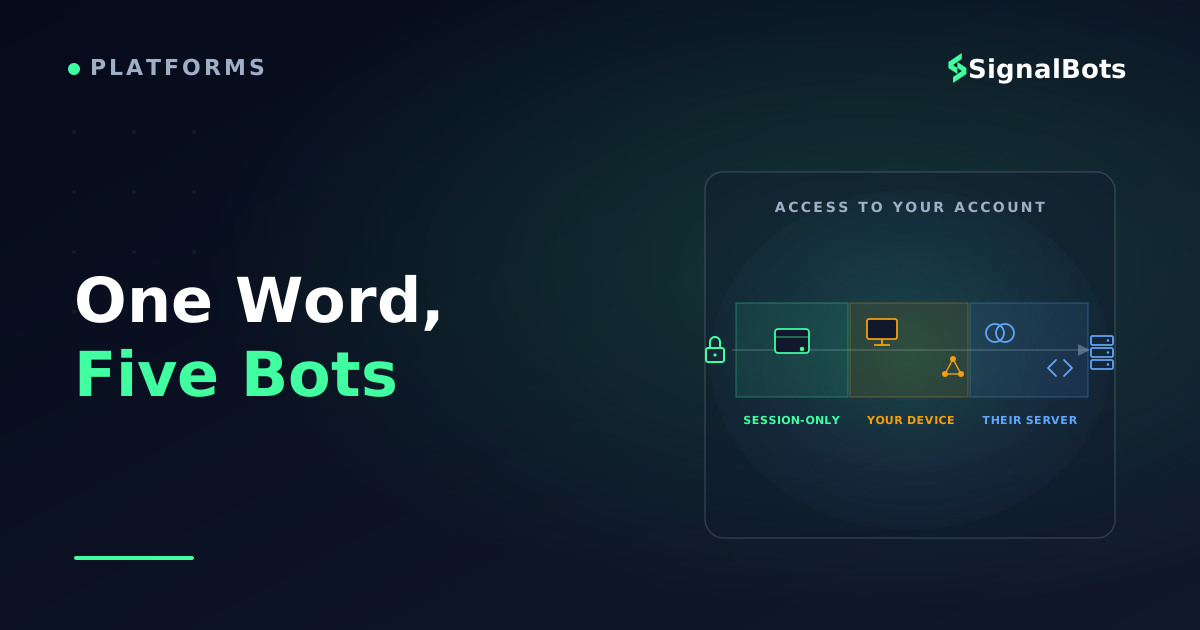
Three levels of exposure exist, and they are nowhere near equivalent:
Session-only. The tool acts inside a session you opened yourself and never handles your password. Log out and it is inert. Uninstall it and it is gone.
Stored credentials, your hardware. Your login sits in software on a machine you control. The trust you are extending is in the vendor's code, not in their servers or their staff.
Credentials on someone else's server. Your account is operable by a third party at any time, whether or not your computer is on. That is not automation of your trading; it is delegation of your account.
Access is the dimension that ranks these categories, but two more decide whether one is usable by you at all: what it charges, and what it expects you to already know. Neither is a price list — vendors change terms constantly and any figure here would be stale by the time you read it — but the shape of the cost and the kind of skill are stable per category, and those are what you can plan around.
Type-level comparison
Bot type
Where it runs
What it needs from you
Trades while you are offline
What it costs
Skill it demands
How it usually breaks
Browser extension
Inside your logged-in browser tab
Page permissions only; a good one never asks your password
No — the tab must stay open
Often free; paid ones sell as a one-off or a monthly fee
Lowest: install it, set the stake and expiry, read the permissions
A platform redesign moves the button out from under it
Desktop app
A program on your own PC
Your platform login, stored locally
No — the machine must stay awake
Usually paid: a one-off licence or a subscription
Moderate: the work is configuring caps, expiry and a signal source
The login flow changes, or its signal source goes quiet
AI prediction bot
An extension, app or hosted dashboard
Whatever its host requires — often your login
Depends entirely on the host
Almost always a subscription, tiered by signals or assets
Low to run, high to judge — the method is not disclosed
The model was fitted to old data and quietly stops matching
Copy / mirror service
A third party's server or app
Account access handed to the operator
Yes — which is the risk, not the feature
A subscription, sometimes plus a cut of what it copies
Least technical — but you still have to vet the trader
You inherit someone else's losing streak with no veto
Custom-coded bot
Wherever you run it — your PC or a VPS
Your login, sitting in code you wrote
Yes, if you host it somewhere always-on
Nothing to buy: build time, plus VPS rent to run it unattended
Highest: you write the logic and you debug the breakage
The unofficial endpoint changes and everything stops
Not a product ranking — a category ranking. Read the access column before the price one.
Read those last two columns together and a trade-off appears that no sales page advertises: the categories asking least of your skill are the ones asking most for your money and your account, while the only category with nothing to buy is the one you have to build and repair yourself. A subscription is not really buying you automation, then — it is buying you out of the learning, and the invoice for that arrives as access.
The line worth drawing hard: if a robot needs your Olymp Trade password so it can run somewhere you do not control, you have not automated your trading. You have handed over the account and kept the app.
Why a Bot's Advertised Win Rate Tells You So Little
A win-rate claim is only as good as the trade log, sample and date range behind it - and those are exactly what a marketing page leaves out.
Read enough bot pages and the claims start to rhyme. Three shapes cover almost all of them.
The named-strategy win rate. Three strategies, each with its own impressive backtested percentage, laid out like a spec sheet. What the page leaves out is the part that decides whether the number means anything: over what date range, on which assets, at which expiry, under what stake rule — and, critically, whether the rules were fixed before the test or adjusted until the backtested result looked good. A percentage with no sample size and no period attached is not a result. It is a design choice.
The day-one profit claim. Most new users with a small deposit finish their first day ahead, or some variation of it. Even taken at face value, it is a statement about day one, and nobody trades for one day. It also has survivorship bias built in: the users who lost and quit are not in the group being described.
The bare "AI-powered" claim. No method, no period, no numbers at all — just the adjective. There is nothing here to check, which is generally the point of phrasing it that way.
The arithmetic these claims hope you skip
Fixed-time trading has a structural feature that makes advertised win rates especially slippery: your wins and losses are not the same size. A winning trade returns the payout percentage; a losing trade costs the entire stake.
Suppose the payout on the asset you trade is 80%. Every win adds $0.80 for each $1 risked, and every loss takes the full $1 back. Breaking even therefore requires winning about 55.6% of trades — not 50%. Drop the payout to 70% and the bar climbs to roughly 58.8%. That threshold has a name, the break-even win rate, and because it moves with the payout, a win rate quoted without the payout it was earned at tells you nothing about whether the account actually grew.
Why the bar is not 50%
Fixed-time payoff at an 80% payout on a $100 stake
━ Call payoff━ Put payoffx-axis: underlying price at expiry • y-axis: P&L per $100 staked
Wins pay a fraction of the stake; losses cost all of it. That asymmetry, not the win rate alone, decides whether a bot is profitable.
Run your own numbers through the break-even win rate calculator before you judge any claim. Once you have seen where that bar sits, an advertised figure in the eighties stops reading as "good" and starts reading as "extraordinary" — and extraordinary claims are exactly the ones a marketing page is least equipped to support.
One more mechanism inflates advertised win rates without improving anything underneath them: stake recovery. A bot that doubles the stake after each loss — the martingale pattern, still the default in a lot of free Olymp Trade robots — will show a very high proportion of winning sequences, because nearly every sequence eventually closes green. What the headline hides is that the sequences which do not are large enough to end the account. Work that trade-off through the risk-of-ruin calculator and you will see why a strategy can be right nine times out of ten and still be a countdown.
What would make a claim checkable
Four things, and any vendor able to produce them usually will:
A verified track record on an account nobody can edit after the fact — not a screenshot, not a spreadsheet.
A trade-by-trade log that includes the losers, with timestamps, assets and expiries.
A stated historical win rate attached to its sample size, date range and payout level.
A live period as well as a simulated one, reported separately, so you can see the gap between them.
Absent all four, the honest move is to generate the evidence yourself: run the robot on a demo account long enough to sit through a bad week, then compare what it actually did against what the sales page said it would do. It costs you time and nothing else, and it is the only test whose result you own.
Automation does not reduce the risk in a fixed-time trade — it increases how many of those trades you take per hour, which is why our risk warning applies with more force to a robot than to manual trading.
Which Type of Bot Actually Fits Your Situation?
"Which bot is best" has no honest answer at the product level and a fairly clear one at the category level. It turns on three questions: can you state the rule, do you need it running unattended, and how much account access are you willing to give up to get that.
Access, not advertised win rate, is what actually separates these paths.
Three questions, five destinations — and one branch where the honest answer is that no bot fits yet.
The branch people skip is the first one. If you cannot write down, in one sentence, the rule you want automated, then no bot fits you yet — because you will have no way to distinguish a robot that is broken from a robot working through a perfectly normal losing streak. Both look like a shrinking balance. Automation multiplies a rule; it does not supply one.
The second branch is the one that decides the category. Unattended trading is the whole reason most people want a bot, and it is also the requirement that pushes your credentials out of your control. If you are willing to supervise, a browser extension gives you the same automation with the smallest footprint on the list. If you are not, you are choosing between a desktop app on hardware you own and a service on hardware you do not — and those two are not close.
Bots and Signals Solve Different Problems
A lot of people arrive at "I need a bot" when what they actually need is a better source of trade ideas — and a smaller number arrive at "I need signals" when their ideas were fine all along. The two are not competing products. They answer different complaints.
Diagnosis, not preference
A trading bot vs a signal provider
Trading bot
Decides and places the trade itself, directly on your account
Needs access: a browser session, stored credentials, or your login inside code
Removes hesitation and missed entries — and removes your veto along with them
Fails quietly: a broken bot and a bad week look identical from the outside
Fixes availability and discipline, not judgement.
VS
Signal provider
Proposes a trade — asset, direction, expiry — and stops there
Needs nothing from your account; you place the order yourself
You can ignore any call you dislike, and you see every one you skipped
Fails visibly: weak calls show up in your own review, trade by trade
Fixes idea generation, not discipline or availability.
Pick by which half of your process is actually failing — the decision, or getting the decision placed.
The test is diagnostic. If your rule is sound but you keep missing entries, arriving late, or oversizing after a loss, your gap is execution and a bot closes it. If your entries are placed cleanly but the calls themselves are the problem, a bot will place bad trades faster, and a better binary options signal source is the thing to fix first. Automating a losing rule is the most efficient way to lose money ever invented.
A Transparent Alternative to Handing a Bot Your Account
Every option above shares one cost: access. Even the lightest of them wants a foothold inside your trading session, and the heaviest want the account outright — while the win-rate claims that would justify that trade are, as the arithmetic above showed, structurally hard to verify before you commit.
There is a version of this with the access cost removed, and it is the one we run. Our binary options live signals page publishes signals as they fire — the asset, the direction and the context the call was made in — free to view, with no account credentials, no API key and no deposit involved.
Here is how that changes the shape of a trade. Say a call prints on a major pair to the upside with a short expiry. On the bot path, that call would already be a placed trade before you ever saw it, and if the logic behind it had drifted you would find out from your balance. On the signal path, you read it, check it against the one rule you wrote down for the decision tree above, and then either place the fixed-time trade yourself or skip it. Every skip stays visible to you, which is exactly the audit trail an unattended bot cannot give you.
The boundary matters as much as the offer: this is a feed, not an executor. It does not place trades, it never touches your account, and it will not act while you are asleep. If your real problem is that you cannot be at the screen when your setup appears, a signal feed does not solve it — you are back to choosing a bot, and back to the access trade-off that comes with one.
Where to Go Next on Olymp Trade Automation
You now have the map. Here is which question to take where, depending on where you landed:
Still not convinced any of this is trustworthy? Start with whether Olymp Trade robots are legit — the red flags, the vendor checks and what a scam bot looks like from the outside.
Picked a category and want it running? Read how to use an Olymp Trade robot for the install, the configuration and the first-trade walkthrough.
Not ready to pay for anything? The rundown of free Olymp Trade bots covers what the no-cost options genuinely do and where their limits bite.
Comparing paid tools? The guide to Olymp Trade auto-trading software weighs the PC and browser products against each other on features rather than claims.
Tempted by a forecasting tool? The deep-dive on Olymp Trade prediction bot accuracy takes that one category apart and tests what its numbers rest on.
Want to build rather than buy? Building an Olymp Trade bot with Python and the API walks through the code, the endpoints and the breakage.
Prefer following a person to running a program? The article on Olymp Trade copy trading covers how the mirroring actually allocates and scales.
Decided you want ideas rather than execution? Start with Olymp Trade signals, add the roundups of free Olymp Trade signals and the best Telegram channels for Olymp Trade signals for where to find them, then read how to use Olymp Trade signals for what to do with one when it arrives.
Whichever you open next, the two habits from this page travel with you: ask what a tool touches before you ask what it returns, and generate your own evidence on a demo before you fund anything.
The platform's help centre takes a conditional position: trading robots are permitted so long as the software is not used to damage the platform or undermine honest trade execution. That is tolerance, not integration. No third-party robot is an Olymp Trade product, none is certified by the platform, and if one stops working after an update, the vendor is your only recourse. Check the platform's current terms yourself before running anything on a funded account, because policies change.
Is there an official Olymp Trade API for building a bot?
No. Olymp Trade does not publish a developer API, issue API keys, or document endpoints for third-party integrations. The community Python libraries that circulate talk to the same private endpoints the web platform uses, which is why they authenticate with your ordinary login and why they break without notice whenever the platform changes.
Can a bot trade Olymp Trade OTC assets at the weekend?
Technically yes — OTC assets stay tradable when the underlying markets are closed, and bots will happily place trades on them. Whether it should is a separate question. OTC prices are generated by the broker rather than an open market, so a strategy validated on weekday market data has no particular reason to behave the same way, and most bots give you no signal that the regime underneath them has changed.
Will an Olymp Trade robot keep trading when my computer is off?
Only if it runs somewhere other than your computer. Browser extensions stop when the tab closes and desktop apps stop when the machine sleeps — which is as much a safety feature as a limitation, because unattended trading is exactly the mode that requires storing your credentials on infrastructure you do not control. A custom-coded bot on a VPS you rent is the middle ground: unattended, but on hardware you administer.
What is the safest way to test an Olymp Trade robot?
Run it on a demo account, at the stake size you would genuinely use, for long enough to hit a bad stretch — a few good sessions prove nothing. Log every trade it takes, then compare that log against what the sales page claimed: same assets, same expiries, same rough hit rate? Discrepancies surface fast, and the test costs you nothing but time.
Is a free Olymp Trade bot worse than a paid one?
Not automatically, but they fail differently. Free robots skew heavily towards stake-recovery logic such as martingale, which flatters the headline win rate while hiding the tail risk. Paid ones buy you support and updates, which genuinely matter on a platform where an interface change can break a bot overnight — but the price says nothing about whether the underlying rule has an edge. Judge both by the same evidence: what it touches, what it logs, and how it behaves on a demo across a losing week.
Sources & Further Reading
Want to go deeper? These independent, authoritative sources shaped this guide — each one is worth reading in full:
The Binary Options Desk is the SignalBots editorial team for fixed-time and OTC trading coverage. We research and write the guides that explain expiry timing, payout structure and disciplined entry across the major brokers.



Discussions 0
Leave a comment