Somewhere in a comment section, on a YouTube thumbnail, or in a PDF passed around a Telegram group, someone tells you a Quotex MT4 bot exists. The pitch always has the same shape: install this, connect it, and your Quotex trades get placed for you from MetaTrader. Then you go looking for the actual download and find a referral link, a forum thread with zero replies, or a "stealth setup" guide with no author on it.
You already know both platforms. You know what MetaTrader gives you — indicators, templates, a robot, a tester — and you know how a Quotex trade gets placed. The only thing missing is a straight answer about whether the two ever meet, and what the people selling "quotex mt4" tools are actually selling.
Key Takeaways
There is no native Quotex MT4 or MT5 integration. No trade server to log in to, no account number the terminal recognizes, and no robot that can place a trade on your Quotex balance.
Three different products share the "Quotex MT4/MT5" label: a manual dual-screen workflow, a read-only OTC price bridge into MT5, and browser-driving "stealth" bots. Only the first two stay clear of your credentials.
"Stealth", "undetectable" and referral-gated unlocks are the reliable warning signs — an honest read-only connector states up front that it cannot trade.
The workflow that works today: analyze in MetaTrader, translate the setup into one direction, stake and expiry, then place the trade by hand in Quotex.
Table of Contents (21 min read)Contents
Can You Use MT4 or MT5 With Quotex?
No — not in the sense the ads mean. Quotex is not a MetaTrader broker. There is no Quotex trade server to type into MetaTrader's login box, no Quotex account number the terminal recognizes, and no way for an Expert Advisor running in MT4 or MT5 to open, close or size a position on your Quotex balance.
The short answer
Essential answer
Can you connect Quotex to MT4 or MT5 and trade from the terminal?
No. Quotex runs its own platform, so there is no MetaTrader server to log in to and no route for a robot to place a Quotex trade.
Official MT4/MT5 accountsNot offered
MetaTrader server nameNone issued
Robot order executionNot possible
What third-party tools doCharts, alerts, analysis
Who places the tradeYou, inside Quotex
Based on how a MetaTrader terminal connects to a broker server, and on Quotex operating its own web and mobile platform.
The yes/no both head searches are really asking, before any of the nuance.
That "no" is narrower than it sounds, though, and the nuance is where most pages stop. MetaTrader 4 and MetaTrader 5 can still sit beside a Quotex account and do real work — charting, indicator research, strategy testing. What they cannot do is execute. Every product sold as "Quotex MT4/MT5" lives somewhere on the line between analysis and execution, and the rest of this page is about telling which side any given tool sits on.
One warning before you go further: if you land on a page saying Quotex "offers MT5", read the sentence after it very closely. It nearly always means MetaTrader exists as a separate analysis tool you open with some other broker's account — not that your Quotex balance is reachable from the terminal.
Why Quotex Has No Native MT4/MT5 Integration
MetaTrader is not a chart program you point at whatever you like. It is one half of a pair. The broker runs MetaTrader server software; you run the terminal; the terminal logs into that server with three things the broker issues you — an account number, a password, and a named server. Everything else rides on that connection, automation included. A robot never talks to the market directly; it talks to the terminal, which talks to the broker's server.
Quotex simply never built that half. It runs its own web and mobile platform, quotes its own instruments — including OTC symbols that keep pricing at the weekend when the underlying exchanges are shut — and settles a completely different product. On MetaTrader you hold a position sized in lots and close it at a price you choose. On Quotex you buy a fixed-payout contract: one direction, one stake, one expiry time, settled automatically at that moment against a payout rate the platform states in advance.
Those two models don't map onto each other cleanly even in theory. There is no lot size to convert, no stop-loss to place, no open position to modify. Even if a Quotex server address did exist, the terminal would have nothing sensible to send it.
You connect with three things the broker issues: an account number, a password and a named trade server.
Positions are sized in lots, held open, and closed at a price you choose.
A robot talks to the broker's server through the terminal, never to the market directly.
The broker licenses MetaTrader server software and plugs its own pricing into it.
Built around a broker-run server the terminal can log in to.
VS
Quotex
Access is a web or app login to Quotex's own platform; there is no server name to enter anywhere.
You buy a fixed-payout contract: direction, stake and expiry, settled automatically.
Quotex quotes its own OTC prices, including at weekends when exchanges are closed.
No public order-placing interface is exposed for an outside terminal to trade through.
A self-contained platform with nothing for MetaTrader to log in to.
Nothing is missing from Quotex — it was simply never built as the other half of a MetaTrader pair.
There is a detail in MetaTrader itself worth borrowing here. Its login screen already distinguishes a master password from an investor password, and the investor one is read-only by design — it can watch and analyze, never trade. That read-only-versus-trading split is baked into the platform at the account level, and it is exactly the split that "connector" marketing blurs.
What "Quotex MT4/MT5" Bots and Connectors Actually Do
Search the phrase and you get one label wrapped around three genuinely different products. They differ in a single respect that decides everything else: what crosses between the two platforms, and in which direction.
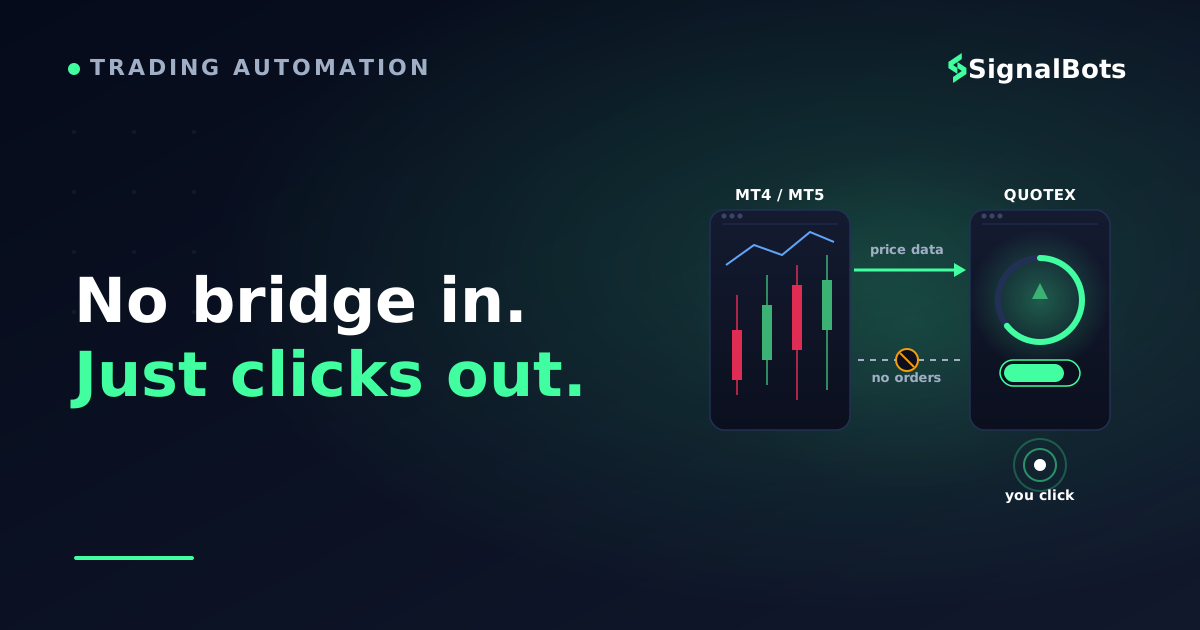
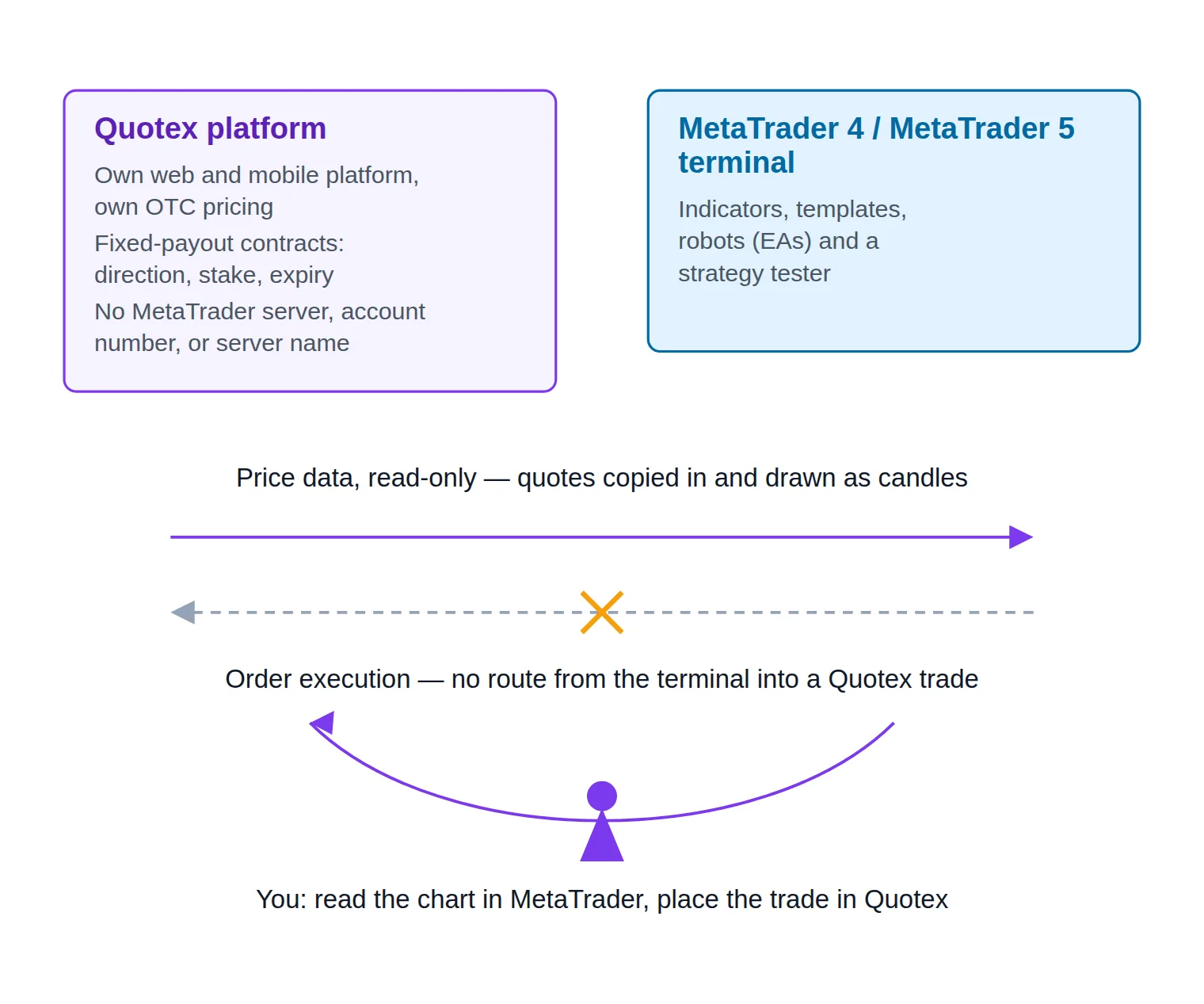
Every genuine Quotex-to-MetaTrader link is one-way: quotes in, no orders out.
Manual parallel analysis — MT4/MT5 for charting, Quotex for the trade
The most common thing sold as "trading Quotex with MT4" is not software at all. It is a workflow. You open MetaTrader on a demo account from any MetaTrader broker, do your analysis there, and place the trade by hand in Quotex.
That is legitimate, and it costs nothing. It is also the pattern behind most "quotex mt4 indicator" products: an indicator that runs inside MetaTrader, paints an arrow, and leaves you to act on it in a different window. Nothing about the indicator knows Quotex exists.
The weakness is data. A MetaTrader broker's EUR/USD is that broker's feed, not Quotex's, and the two will not tick identically. On weekend OTC symbols there is no MetaTrader equivalent at all. For higher-timeframe structure the drift rarely changes a decision; for a 60-second expiry it very much can.
Read-only OTC price bridges that stream Quotex data into MT5
The more technical pattern — usually marketed as a "quotex mt5 connector" — attacks that data problem in one direction only. A small program reads Quotex's price stream and writes it into MetaTrader 5 as a custom symbol, so the OTC series shows up as real candles. Once it does, your indicators, your robot and the strategy tester can all read it, and you can backtest ideas against the prices you will actually trade.
Genuinely useful, and genuinely limited. Data goes in; nothing comes out. A robot can compute a signal on Quotex prices and print an alert, and you still place the trade yourself. A connector that is honest about itself says exactly that on the first screen: it cannot place orders and it cannot see your balance.
Two things to hold onto here. Treat any connector that doesn't state that limit as suspect, and treat the imported price series as unverified until you have watched it beside the Quotex chart for a full session. A feed that silently drifts is worse than no feed, because every indicator you run on it inherits the error.
Scraper-based "stealth" signal bots — and why they're risky
The third pattern is the one the marketing works hardest to blur, and it is where ready-made Quotex trading bots usually sit. A script — commonly Python driving a headless browser — logs into the Quotex web platform with your credentials, scrapes prices out of that session, and feeds them to a robot or a clicker.
Some of these do place trades, and that is the honest exception to "nothing executes". But look at how: the clicking happens in the browser, against the Quotex web page. MetaTrader is not talking to Quotex. A script is using the website the way your mouse would, and MetaTrader is bolted on as the place the signal is calculated.
The distinction matters because the risk profile is nothing alike. Browser-based broker-page automation runs on your live session, holds your login, and is generally the exact behaviour a platform's terms of service exist to restrict. The vocabulary gives it away: when a product's own sales copy leads with "stealth", "undetectable" or "anti-detection", it is telling you plainly that it expects the platform to object.
That doesn't make every such tool malicious. It does mean the thing you are accepting is not "automation" in the neutral sense — it is terms-of-service exposure, credential exposure, and silent breakage. The platform changes one page element, the bot keeps clicking anyway, and you learn about it from your balance rather than from an error message.
Claim vs reality
Pattern
How it's advertised
What it actually does
Places the Quotex trade?
Main exposure
Manual parallel analysis
"Trade Quotex with MT4 charts and indicators"
MetaTrader is a second screen for charts, indicators and testing; the decision is carried across by you
No — you click it
Chart mismatch: a MetaTrader broker's feed is not the Quotex OTC feed
Read-only OTC price bridge
"Quotex MT5 connector — live OTC candles inside MetaTrader"
Copies Quotex quotes into MT5 as a custom symbol so indicators, robots and the tester can read them
No — data only
Unverified price quality, licences gated behind a referral link, breakage when the feed changes
Scraper-based "stealth" bot
"Fully automated Quotex MT5 signal bot, undetectable"
A script logs into your Quotex web session, scrapes prices, and drives a clicker or a robot from them
Sometimes — by clicking the website
Terms-of-service breach, your credentials in a stranger's hands, silent failure
Three products, one search term. Only the middle column tells you what you are actually installing.
How Do You Tell a Legitimate Tool From a Risky One?
The polish of the pitch and the contents of the package are two separate things to check.
Categories only take you so far, because what you actually meet is one specific product, on one specific page, with one specific promise. The skill worth having is reading that page.
Four signals do most of the work:
Capability honesty. A trustworthy tool states its ceiling in its own words, early and without being asked — "this streams prices, it cannot trade". A tool that never quite says whether it places orders has made that choice deliberately.
Credential appetite. Ask what it needs from you. A price bridge needs a data source. Anything asking for your Quotex password, session cookie or browser profile is asking for your account, whatever the feature list calls it.
Evasion language. "Stealth", "anti-ban", "undetectable" and "bypass" are not performance features. They describe a relationship with the platform, and you are the one who carries that relationship's consequences.
Independent evidence. A pitch is not a review. A thread the seller wrote with no replies under it, a PDF with no author, and a video with comments disabled are all the same amount of evidence: none.
Two more patterns are worth naming because they show up together. The first is a "free forever" unlock that only activates after you register a broker account through the seller's own referral link — that is a commission arrangement wearing the costume of a gift, and it tells you the seller is paid whether or not the tool works. The second is any claim that a bot removes the losing side of trading. Be wary of any product promising "risk-free" or "guaranteed" results on a fixed-payout contract; the payout structure alone makes that impossible, and a seller willing to say it will say anything else too.
Reusable filter
Vet a "Quotex MT4/MT5" tool before you install or pay
0 / 8
Get one answer in writing: can this place a trade on my Quotex account, yes or no? A vague reply is the reply.
Check what it wants from you. If it needs your Quotex password, session cookie or browser profile, it is asking for the account itself.
Treat "stealth", "undetectable" or "anti-ban" wording as a warning label: it means the tool expects the platform to object to it.
Reject anything promising a "guaranteed" or "risk-free" outcome — no price feed or robot can remove the loss side of a fixed-payout trade.
Look for feedback outside the seller's own thread, video or PDF. A pitch with no replies is not independent evidence.
Be skeptical of a "free forever" unlock that only activates after you register through the seller's referral link.
Read the tool's limitations before its features. An honest read-only bridge says up front that it cannot trade.
Test on a demo balance first, and never load an unsigned robot into a terminal that also holds a live funded account.
★
Checklist complete — you’re cleared to proceed.
Run any 'Quotex MT4/MT5' product through this before a download, a password or a payment.
The Realistic Workflow: MT4/MT5 Analysis, Manual Quotex Execution
Strip out everything that doesn't exist and one workflow is left standing — the one that has always worked, needs no connector, and costs nothing. MetaTrader does the thinking; you do the executing.
Be precise about what this is: it is not auto-trading. There is no hands-off mode here. What you get is the analytical depth of a desktop terminal — custom indicators, saved templates, multi-timeframe layouts, a strategy tester — applied to a decision you then make yourself.
Pick a Quotex asset that also prices on your MetaTrader feed. Weekend OTC symbols have no MetaTrader equivalent at all.
2
Do the analysis in MetaTrader
Run your indicators, templates and tester work on the MetaTrader chart, where the tooling goes far deeper than a web platform's.
3
Convert the setup into a contract
A MetaTrader setup gives entry, stop and target. Quotex needs that turned into one direction, one stake and one expiry.
4
Size the stake, not the lot
On a fixed-payout contract the stake is the risk. Decide the cash amount before you look at the payout, and keep it constant.
5
Place and log the trade in Quotex
Click it yourself in the Quotex platform, then record entry time, expiry and result so the edge can be reviewed later.
Five steps, no connector, no credentials handed over.
Step three is where most traders lose the thread. A MetaTrader setup is spatial — it says price should reach here before it reaches there. A Quotex contract is temporal — it says price will be above or below this level at this second. A setup with a good reward-to-risk profile can still be a poor binary trade if the move is likely to arrive after your expiry. Translating between the two is a skill in itself, and it is the real work of this workflow.
Step four has an arithmetic floor that MetaTrader will never tell you about. Because the contract pays a fixed payout percentage, the payout alone sets the win rate you must beat before your strategy contributes anything. Run your instrument's payout through the break-even win rate calculator once and you will know the bar your MetaTrader analysis has to clear — it is usually higher than people assume.
And MetaTrader isn't the only tool that fits this slot. If your analysis already lives on TradingView, the same structure applies unchanged: analyze there, translate to a contract, click in Quotex. The platform doing the charting is interchangeable. The manual step in the middle is not.
Where to Get Signals You Can Trust for Manual Execution
That workflow leaves one slot open, and it is the slot the scraper bots exist to fill: where does the trade idea come from? If the honest answer is "an unverified script reading my session", you have swapped an analysis problem for a security problem.
Our own Binary Options Signals page is one way to fill that slot without handing anything over. It publishes live buy and sell calls per asset, free to view, with direction and timing already stated — you read it the way you would read a MetaTrader chart, then place the trade yourself.
Worked through, it looks exactly like the five steps above with step two replaced. Say the feed shows a CALL on EUR/USD. You open EUR/USD in Quotex, set the fixed stake you decided on before looking at the payout, choose the expiry that matches the call's horizon, and click. Nothing is injected into your account, nothing asks for your password, and there is no software sitting between you and the platform that could break without telling you. The same binary options signal reads the same way whether you act on it in Quotex or anywhere else.
Its boundary is the honest one to state plainly: this is a manual-execution feed, not a bridge. It does not connect to Quotex, it does not run inside MT4 or MT5, and it will not place an order for you. If what you actually want is hands-off order placement on a Quotex account, no signal provider — ours included — changes the fact that you are the one clicking.
The Bottom Line on Quotex and MetaTrader
The question behind "quotex mt4" was never really about software. It was about whether someone had found a shortcut you hadn't. Nobody has: there is no terminal login, no server address, no robot that reaches into a Quotex account. What exists instead is a set of tools that move price data one way and stop at the glass, plus a smaller set that gets around the glass by driving your browser and charging you the risk for it.
Once you know which of those three you are looking at, the sales page stops being persuasive and starts being informative. And the workflow that remains — analyze in MetaTrader, translate to a contract, click it yourself — is the one that was available the whole time.
You arrived asking
“whether the "Quotex MT4 bot" in that video or PDF is real”
and you leave knowing
there is no execution bridge — only charts in, and your own click out.
The label is real. The connection is not.
MetaTrader is still worth running beside a Quotex account, for indicators, templates and testing a web platform cannot match. What no tool does is carry an order from a terminal into a Quotex position. Once you stop hunting for that bridge, the remaining questions get much simpler: which chart do I trust, which expiry fits this setup, and where is the trade idea coming from?
Continue your researchWhat an MT4/MT5 connector actually isThe glossary term behind the product claims→Weekend OTC trading, explainedWhy Quotex assets keep pricing when exchanges close→Symbol mapping between platformsWhy a Quotex symbol has no MetaTrader twin→
FAQ
Is there a Quotex MT4 plugin or server address I can enter in MetaTrader?
There is not. MetaTrader's login dialog needs an account number, a password and a named trade server, all issued by a broker running MetaTrader server software. Quotex does not run one, so there is nothing to type in. Any page offering you a "Quotex server address" for MT4 is either describing a different broker's demo server or making it up.
What is a "quotex mt4 indicator" actually selling?
Almost always an ordinary MetaTrader indicator — an arrow or alert tool that runs on a MetaTrader chart. The "Quotex" in the name is a marketing label describing where the seller expects you to place the resulting trade, not a technical link. The indicator has no awareness of Quotex, no access to Quotex prices unless a separate bridge supplies them, and no ability to act on your account.
Can an Expert Advisor place trades on my Quotex account?
No. A robot places orders by asking the terminal to send them to the broker's server it is logged into, and there is no Quotex server in that chain. A robot can compute a signal from Quotex prices if a data bridge has imported them, and it can raise an alert — but the order still has to be placed by you, inside Quotex.
Is a Quotex MT5 connector safe to install?
It depends entirely on which kind you have found. A read-only price bridge that only writes candles into a custom symbol is low-risk by design, provided you verify the prices against the Quotex chart and it never asks for your login. A tool that wants your Quotex credentials, ships with "stealth" language, or claims to place trades is a different category of software and carries account-level risk. Run it through the checklist above before it touches your machine.
Can I backtest a Quotex strategy in the MT5 strategy tester?
You can test the logic of one, and that is worth doing — but only against the data you actually have. Testing on a MetaTrader broker's EUR/USD tells you how the rules behave on that feed, not on Quotex's OTC feed, and weekend OTC symbols have no MetaTrader history at all unless a bridge has been recording them. Treat the result as a sanity check on the rules, not as a projection of Quotex outcomes.
MT4 or MT5 — which is better for analyzing Quotex assets?
MT5 is the more practical choice, mainly because custom symbols are a first-class feature there. That is the mechanism every read-only Quotex price bridge relies on, so anything streaming OTC candles will target MT5. If you are only running indicators on a broker's own feed and translating by eye, MT4 does the job perfectly well and its indicator ecosystem is enormous.
Isn't there an official Quotex API that would solve this?
Whether an official Quotex API exists, and what you would be allowed to do with it, is a separate question from MetaTrader — and it is the question worth asking next, because a sanctioned broker API route would bypass the terminal entirely rather than trying to bridge into it.
Sources & Further Reading
Want to go deeper? These independent, authoritative sources shaped this guide — each one is worth reading in full:
The Binary Options Desk is the SignalBots editorial team for fixed-time and OTC trading coverage. We research and write the guides that explain expiry timing, payout structure and disciplined entry across the major brokers.



Discussions 0
Leave a comment