Most people who search for Pocket Option signals want the same thing: someone to hand them an asset, a direction and an expiry, so the decision stops being a coin-flip made under time pressure. That is a reasonable thing to want. What makes it hard is that almost every page offering to satisfy it is also selling the thing it is describing.
So you end up choosing between a Telegram channel showing a screenshot of one good week, a bot whose logic nobody will show you, a paid service with a lifetime tier, and the arrows already sitting inside the platform — with no way to tell which of them deserves your stake.
This page does the part nobody sells. It defines exactly what a signal has to contain, lays every category of source side by side, and hands you a checklist you can point at any provider you meet later, ours included. We have no stake in whether you end up on Telegram, in a Discord server, or running a bot.
Key Takeaways
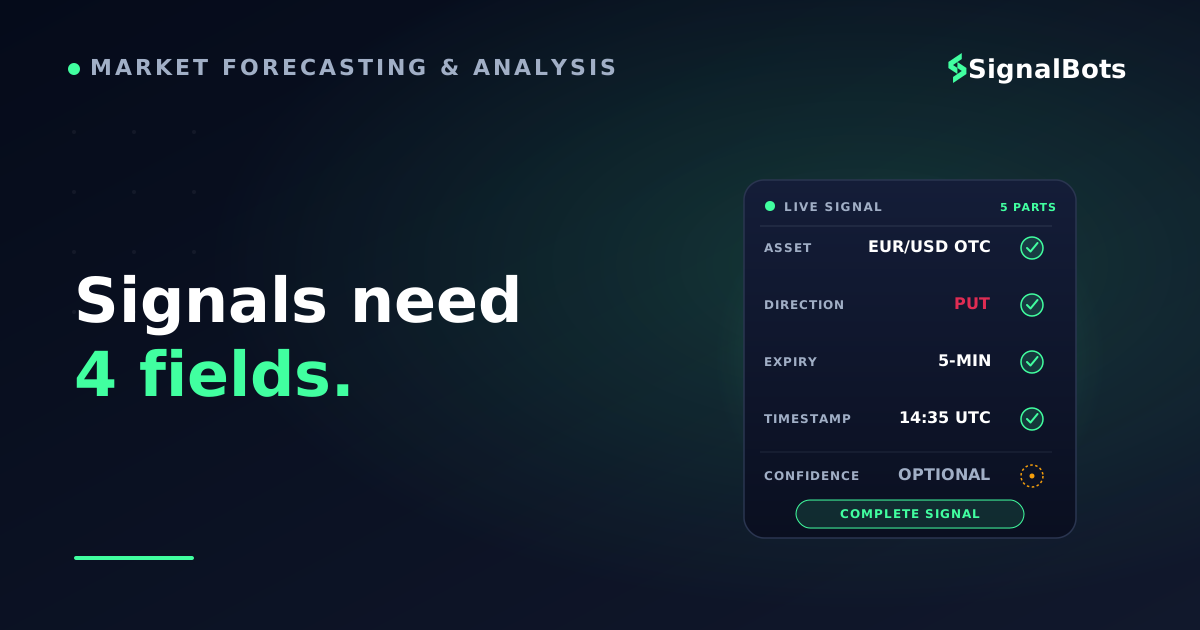
A usable Pocket Option signal names four things: asset, direction, expiry and the time it was issued. Missing any one of them, and nobody can check it afterwards.
Signals reach you through five categories of source (Telegram, Discord, bots and apps, the platform's own tools, paid services) that differ far more in accountability than in accuracy.
Judge every provider on the same five questions: sample size behind the win rate, delivery speed, cost transparency, coverage of the symbols you trade, and the red flags.
Price is not the dividing line. Paying buys filtering, support and someone answerable for a bad week; it never buys accuracy.
Table of Contents (21 min read)Contents
The Pocket Option Signal, Defined
A Pocket Option signal is an instruction to open one specific binary trade, complete enough that you could act on it without asking a follow-up question. In practice it reads like this:
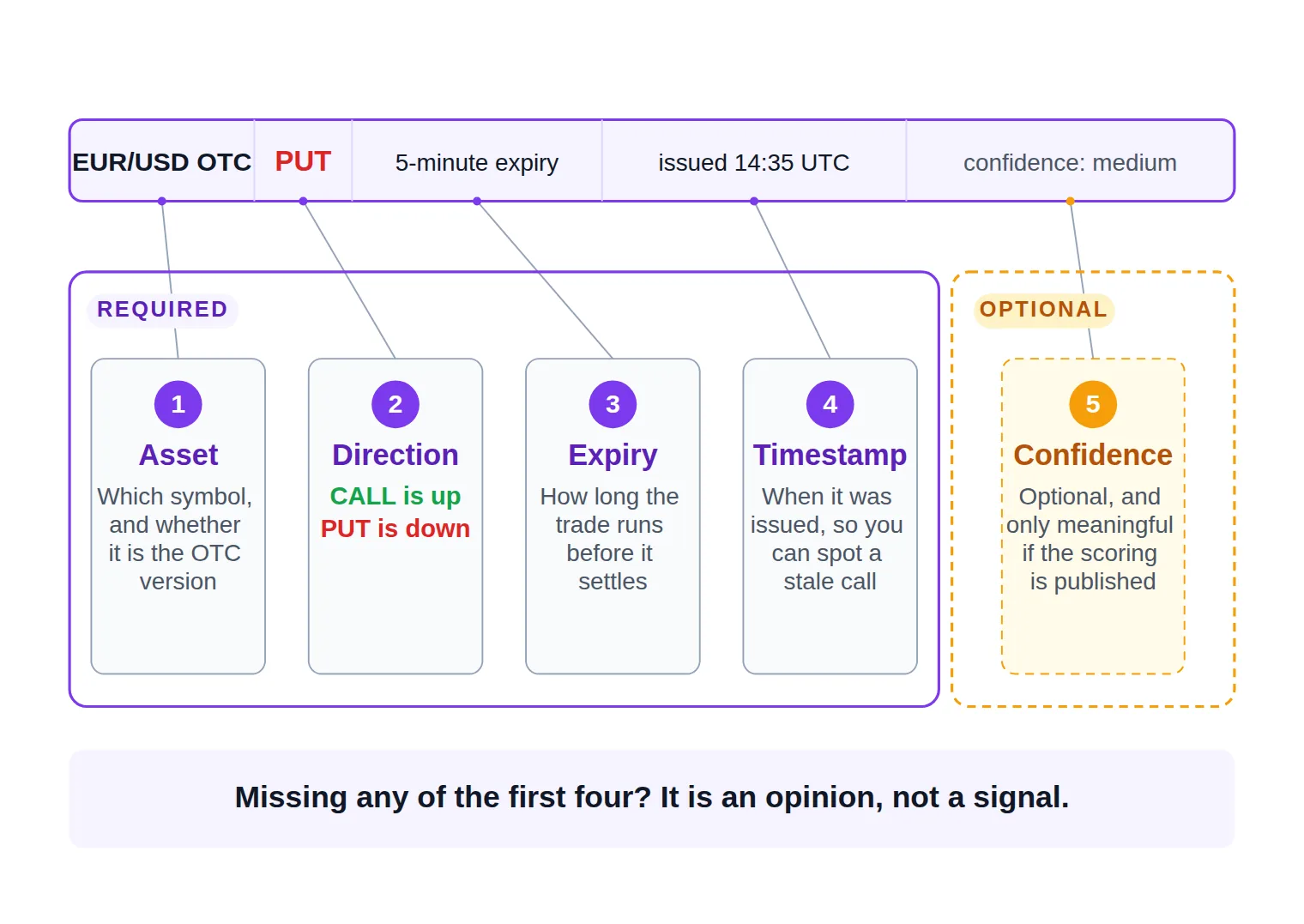
EUR/USD OTC · PUT · 5-minute expiry · issued 14:35 UTC · confidence: medium
Strip away the branding and every binary options signal worth the name carries the same parts:
Asset — the exact symbol, and whether it is the standard pair or the OTC market version the platform prices at weekends. "EUR/USD" and "EUR/USD OTC" are not interchangeable.
Direction — CALL or PUT. Up or down, nothing in between.
Expiry — the expiry time the trade settles on. A call that is right about direction and wrong about duration still loses.
Timestamp — when the signal was issued, so you can tell a live call from a stale signal you scrolled past four minutes late.
Confidence or rationale — optional, and only meaningful when the provider publishes how the signal confidence score is calculated rather than sprinkling "strong" on everything.
The five parts of a Pocket Option signal, and the four that are non-negotiable.
Miss any of the first four and you do not have a signal, you have an opinion with a currency pair attached. That distinction is the whole reason this article exists: most of what circulates as "signals for Pocket Option" is missing a timestamp, an expiry, or both, which conveniently makes it impossible to check afterwards.
It is also worth naming what a signal is not. It is not a strategy — it tells you what to open, never how much to stake or when to stop for the day. It is not an execution — nothing happens until you click. And it is not a removal of risk: every binary trade puts the full stake at risk regardless of who suggested it, which is why our risk warning applies to a signal you followed exactly as much as to one you invented.
One number makes this concrete. Binary trades pay a fixed payout percentage on a win and cost the whole stake on a loss, so the win rate you need just to break even is set by the payout, not by ambition. At an 80% payout you need to be right on roughly 56 trades in every 100 before a single dollar of profit exists; at a 70% payout that bar climbs past 58. Run your own payout through the break-even win rate calculator before you evaluate any provider, because that number is the bar every source in the next section has to clear.
The handoff
From a signal landing on your phone to a placed trade
1
The signal arrives
Asset, direction, expiry and a timestamp. Anything missing means you cannot judge whether the call is still live.
2
Check the clock, not the message
Compare the issue time with the entry window it assumes. A five-minute call posted four minutes ago is already spent.
3
Confirm the symbol is tradable for you
The exact symbol, standard or OTC, has to be open on your account at roughly the payout the signal assumed.
4
Size the stake, then place it
A fixed share of balance, decided before the signal arrived and never raised to chase back the last loss.
Four steps, and three of them happen before you touch the trade button.
Notice how little of that sequence belongs to the provider. Catching an entry window is a separate skill from choosing who to follow, and trading signals live in real time punishes hesitation far harder than beginners expect — a good call read ninety seconds late is a bad trade.
Where Pocket Option Signals Come From
There are five broad categories, and they differ from each other far more in accountability than in accuracy. Almost every provider you will meet is one of these five wearing a different logo.
Every category delivers the same kind of call. What differs is the delay it adds and who answers for it.
Telegram Channels
The default. A Telegram signal channel pushes a message the instant a call is made, which is exactly the delivery model a one-to-five-minute expiry needs — no refreshing, no app switching, a notification that beats you to the chart.
The trade-off is accountability. A broadcast channel's history is fully editable by its owner: a losing week can be deleted between Friday and Monday, and the pinned "results" image is a screenshot, not a record. Free channels are usually funded by broker referrals, so the joining flow often asks you to register under a specific link before the good signals unlock. Which is why the best Telegram channels for Pocket Option signals are the ones that post losses as loudly as wins, and timestamp every call before expiry rather than after.
Discord Servers
Discord communities for Pocket Option signals look structurally different from a broadcast channel. Calls land in a channel surrounded by conversation, and other members react to them in real time — which is the underrated advantage. A bad call in a Discord server gets questioned in the thread beneath it by people who took it; a bad call in a broadcast channel gets deleted.
The costs are the mirror image. Signals compete with chatter, so notifications either drown you or get muted until they are useless, and the VIP tier is usually a role you pay for rather than a separately-audited product. Servers built around voice sessions and screen-shares suit traders who want to learn the reasoning; they suit anyone who just wants a clean feed rather badly.
Signal Bots and Apps
Automated Pocket Option signal bots remove the human from the middle. A binary options bot or a standalone app computes a rule set — moving averages crossing, an oscillator leaving an extreme, a candle pattern completing — and emits a call every time the conditions fire, with no mood, no favorites and no fatigue at 3am.
That consistency is real, and it is the main reason to prefer a bot to a person. The catch is that most of these tools publish no rule set at all, so you cannot tell whether the signal fired on a closed candle or on a level that quietly redrew itself after the fact. A bot you cannot audit is not more objective than a human, it is just less accountable in a more convincing font. Bots also range from free browser scripts to paid apps, and setup, permissions and configuration differ enough between them that they deserve their own treatment.
The platform ships its own signal surface, and a surprising number of traders hunting for third-party feeds have never opened it. Pocket Option carries a Signals tab inside the trading terminal that marks direction per asset with arrows — a single arrow for a normal read, a double arrow for a stronger one — filterable by asset class and by timeframe from thirty seconds up to several hours. There is also an official Telegram bot you can activate from your account, which will post calls and, if you allow it, place them, with limits you configure: a fixed trade size, a minimum payout filter, a cap on how many positions can be open at once.
Two honest observations. It costs nothing beyond having an account, and there is no third party between you and the platform. But an arrow generated from indicators is an indicator readout, not a curated opinion — nobody at the broker is staking their reputation on it — and the venue paying out your trade is also the venue surfacing the arrow. That is not an accusation, it is a structural fact worth holding in mind, the same way you would with any in-house tool.
Paid AI Signal Services
Subscription services sit at the commercial end: a dashboard or channel, tiers running from a short trial to a monthly plan to a one-off "lifetime" license, and a headline accuracy figure on the sales page. Some route their output through Telegram anyway, so what you are buying is filtering, not a different pipe.
What you are usually not buying is a verified track record — an independently timestamped log of every call, wins and losses, that you could audit yourself. Some of these services also quietly exclude OTC pairs, which matters enormously if the reason you want signals is that you trade at weekends when the standard pairs are shut.
The landscape
Source type
Typical cost
How it reaches you
What you can actually verify
Main weakness
Telegram channels
Free, or a VIP tier
Push message, seconds after the call
Only what the owner leaves posted
History can be edited or deleted
Discord servers
Free, with a paid role
Channel post inside live chat
The discussion around each call
Signals compete with chatter
Signal bots and apps
Free to one-off license
Bot message or in-app alert
The rule set, if it is published
Usually a black box you cannot audit
Official platform tools
Free with an account
Signals tab, or the platform's own bot
The indicator behind the arrow
An indicator readout, not a curated call
Paid AI services
Subscription to lifetime
Dashboard, app or a private channel
The headline claim, rarely the record
Accuracy you cannot independently check
The five categories differ far more in what you can verify than in what they claim.
Evaluating a Pocket Option Signal Provider's Trustworthiness
Here is the part every page in this niche skips, because a neutral test is inconvenient when you are the thing being tested. Any signal provider — a channel, a bot, a paid service, us — can be put through the same five questions. The answers are usually available in under ten minutes, and the ones who refuse to answer have told you something too.
1. How big is the sample behind the win rate, and who timestamped it?
A headline accuracy figure means nothing without the sample size underneath it. Thirty trades can look brilliant by luck alone; a few hundred starts to say something. Then ask the harder question: were those results posted before each expiry, or assembled afterwards? A historical win rate built from a spreadsheet nobody could contest at the time is a marketing asset, not evidence.
The same caution applies to any backtested result a provider leads with. A simulated record is a hypothesis about a strategy, not a log of what that provider actually called in public, and the two are easy to confuse when both are presented as a percentage.
2. How fast does the signal actually reach you?
Binary expiries are short, so signal latency is not a technical nicety — it is most of the edge. Time it yourself: note when a call was issued versus when your phone buzzed, then compare that gap with the entry window the call assumes. A provider posting to a website you have to refresh has already lost on a two-minute expiry, however good the analysis was.
3. Is the cost visible before you commit?
Look for the price before the join button, and for what a free tier is funded by. Referral funding is not disqualifying — for the record, we earn through broker partnerships too — but it should be stated rather than discovered. The pattern to distrust is the one where signals only "work properly" after you deposit under a specific link, because at that point the incentive is your deposit, not your outcome.
4. Does the coverage match what you actually trade?
A provider covering only major pairs during London hours is useless to someone who trades on Sunday afternoon. Check the pair list, the sessions and explicitly whether OTC symbols are included, since a service can look comprehensive and still go silent exactly when you are free to trade.
5. Which red flags are present?
Be wary of any provider promising "risk-free" entries or a guaranteed weekly return — the phrasing alone tells you how they handle a losing streak. Treat these as disqualifying: results shown only as screenshots, a channel with no visible losses, pressure to increase stake size after a loss, no risk disclosure anywhere, and above all a recovery pitch built on doubling the stake until a win lands. That last one is worth ten minutes with a martingale calculator to see how few consecutive losses it takes for the required stake to exceed the account.
The vetting pass
Run this before you trust any Pocket Option signal provider
0 / 8
Count the trades behind the advertised win rate — under a few hundred calls, it is noise rather than evidence.
Confirm results were posted before expiry, not assembled into a screenshot afterwards.
Time one signal from issue to notification, and ask whether it still fits the entry window.
Find the price before joining, including what the free tier is funded by.
Check the pair list and sessions against what you actually trade, OTC symbols included.
Look for the losses. A feed with no visible losing calls is curated, not accurate.
Walk away from any recovery pitch built on doubling the stake after a loss.
Verify a risk disclosure exists and that the copy avoids 'guaranteed' or 'risk-free'.
★
Checklist complete — you’re cleared to proceed.
Eight checks, ten minutes, applicable to every provider in every category above.
Free vs Paid Pocket Option Signals: What's the Real Trade-Off?
Cost is where most readers start, so it is worth killing the assumption underneath it: paying more does not buy accuracy. Nobody in this market has a mechanism for selling accuracy — the same analysis costs the same to produce whether it is given away or charged for.
What a price tag can buy is filtering, a support channel, and someone with a reputation to lose when a week goes badly. What free costs you is paid in a different currency: volume you have to filter yourself, an upsell running underneath the signals, and an alignment problem, because free Pocket Option signal sources are usually funded by getting you to open an account rather than by getting your trades right.
Cost
Free feeds vs paid services
Free feeds
Nothing at the door, so the funding comes from somewhere else — usually a broker referral.
High volume, and the filtering is entirely your job.
Little accountability: a bad week can be quietly deleted.
Genuinely useful for seeing what signals look like before money is involved.
Cheap to try, expensive in attention and in trust.
VS
Paid services
A price buys filtering, support and someone to answer for a bad week — not accuracy.
Refund terms and a published record are the parts actually worth paying for.
Some paid feeds skip OTC pairs, which matters if you trade weekends.
Worth paying only when the record and the refund terms are real.
The dividing line is not price. It is whether anyone is accountable when the week goes badly.
The practical read: start free, apply the checklist above ruthlessly, and only pay once you have found a source whose losing calls you have personally watched it publish. The difference between VIP and free signals is worth a closer look on its own, because the catch in free feeds is more specific than "you get what you pay for".
See a Live Binary Options Signal Feed on SignalBots
Every check in this article assumes you can inspect a feed before trusting it, which is easier said than done when most of them sit behind a join button. So here is ours, used as a worked example rather than a pitch.
Our live Binary Options signal feed shows each asset, direction and expiry alongside its historical win-rate context, free to view. Run the checklist against it exactly as you would against a Telegram channel: the calls are timestamped on the page rather than screenshotted afterwards, the win-rate context sits next to the call instead of on a sales banner, and there is no deposit gate between you and the list. If something there fails one of the five questions above, that is the checklist working — which is the point of teaching it before showing you anything of ours.
To be clear about the fit: it is a directional feed you inspect on a web page, not a Pocket-Option-specific connector, not a curated VIP room, and not a bot that clicks for you. If what you actually want is calls pushed into Telegram, a community you can question in real time, or automation that executes without you, the categories above point somewhere better suited than we are.
Which Pocket Option Signals Are Right for You?
There is no best source in the abstract, only a best source given what constrains you. Find your constraint below and follow it.
flowchart TD
  A["What constrains you most right now?"] --> B["Budget is zero"]
  A --> C["I want people I can question"]
  A --> D["I want it automated"]
  A --> E["I trade at weekends"]
  A --> F["I keep entering too late"]
  B --> B1["Free feeds, plus the vetting checklist"]
  C --> C1["A Telegram channel or a Discord server"]
  D --> D1["A signal bot, or the platform's own bot"]
  E --> E1["A provider that covers OTC symbols"]
  F --> F1["Fix delivery speed and expiry alignment first"]
Pick by your binding constraint, not by whichever source markets hardest.
Budget is the constraint. Start with free Pocket Option signal sources, and be deliberate about the trade-off you are accepting — the funding model, the volume, and the missing loss log.
You want a room, not a broadcast. Telegram suits you if you want speed and silence; Discord suits you if you want to ask "why this entry?" and get an answer from someone who took the same trade.
You want the human removed. Automated bots and the platform's own tool are the consistent options, and the questions that matter shift from "do I trust them?" to "what exactly does it fire on, and can I see it?".
You trade when the majors are closed.OTC and weekend Pocket Option signals are their own problem: different symbols, different payout behavior, and a provider list that shrinks fast once you filter for real coverage.
You keep missing the entry. Fix delivery before you change provider. Most "the signals don't work" complaints are timing complaints wearing a costume.
Whichever lane you pick, the test never changes. Ask how many trades sit behind the claim, how fast it reaches you, who pays for it, whether it covers what you trade, and what it does on a losing streak. A source that answers all five without flinching is rarer than a source with a good week — and considerably more useful.
Many are. The platform's own Signals tab and its Telegram bot cost nothing beyond having an account, and a large share of third-party Telegram channels and Discord servers are free to join. "Free" almost always means funded another way, usually by a broker referral or by an upsell to a VIP tier, so the question worth asking is not whether you pay but who pays and what that buys them.
What is the best Pocket Option signal provider?
There is no single answer that survives contact with different traders, which is why this page teaches a test instead of crowning a winner. The best provider for you is the one that publishes losses as well as wins, timestamps calls before expiry, reaches you fast enough for the expiries you trade, covers your symbols including OTC if you need them, and is transparent about how it makes money.
Are Pocket Option signals accurate?
Accuracy is the wrong first question, because the bar is set by your payout rather than by the provider's claim. At an 80% payout you need to be right on roughly 56 trades in every 100 just to break even, so a feed advertising a win rate near that line is offering no edge at all once a losing streak arrives. Ask for the sample size and the timestamps before you take any accuracy figure seriously.
Does Pocket Option provide its own signals?
Yes. There is a Signals tab in the trading terminal that marks direction per asset and timeframe with single and double arrows, and an official Telegram bot you can activate from your account that posts calls and can place them with limits you set. Treat it as an indicator readout rather than a curated opinion, and remember the venue surfacing the arrow is the venue paying out the trade.
Can Pocket Option signals be automated?
Yes, to varying degrees. The platform's own bot can execute within limits you configure, and third-party bots and scripts exist that watch conditions and fire calls automatically. Automation changes which risks you carry rather than removing them: you trade emotional error for configuration error, so the questions become what the bot fires on, what caps you set, and how quickly you can stop it.
Why are my results worse than the provider's posted results?
Usually one of three things, in order of likelihood. You entered later than the call assumed, so a different candle filled you. Your payout on that symbol differed from theirs, which moves your break-even bar. Or the posted record was assembled after the fact, and the losses never made it in. Timing one signal end to end, from issue to your notification, usually settles which of the three it was.
Sources & Further Reading
Want to go deeper? These independent, authoritative sources shaped this guide — each one is worth reading in full:
The Binary Options Desk is the SignalBots editorial team for fixed-time and OTC trading coverage. We research and write the guides that explain expiry timing, payout structure and disciplined entry across the major brokers.
Want to use the bot without paying? Message our 24/7 support team via Telegram or Viber. Our experts will guide you step-by-step on how to unlock your free lifetime license through our exclusive broker partnership program.



Discussions 0
Leave a comment