Search "pocket option signal bot" and four different things answer to the name: a Telegram handle, a Chrome extension, a Python repository, and a sales page offering a lifetime license. They share a label and almost nothing else. One of them never touches your credentials. One of them stores a live login token in a text file on your machine. Nothing on the results page tells you which is which.
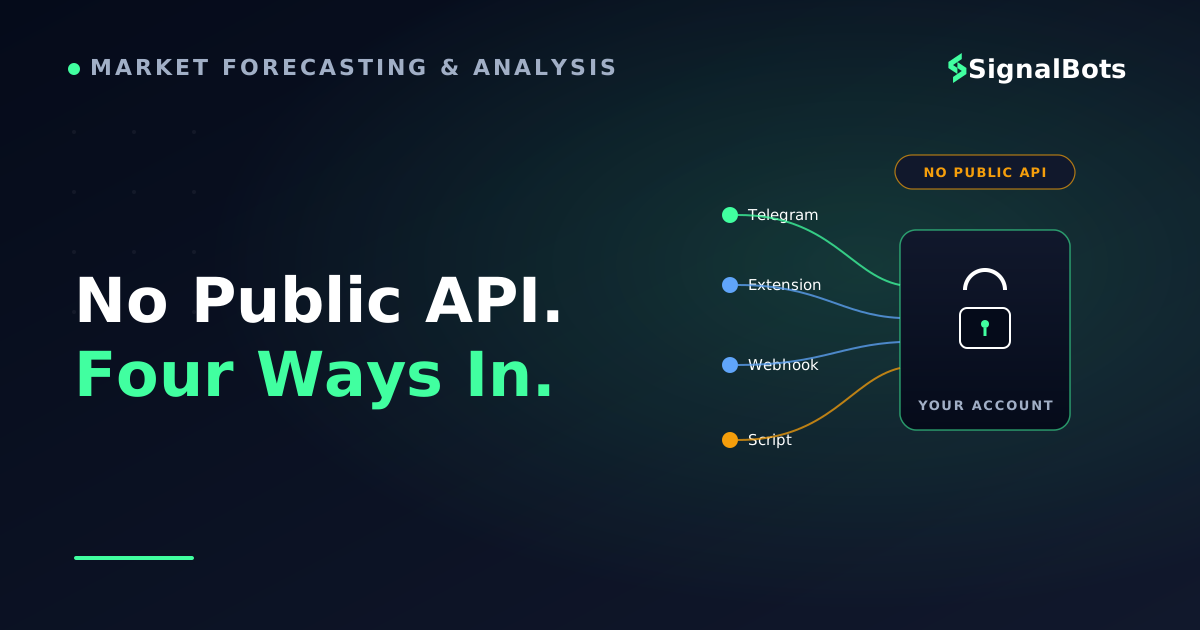
That confusion is not an accident, and it is not the fault of the people writing about it. It comes from one technical fact almost nobody states out loud: Pocket Option does not publish a public trading API. Every bot you can find has to reach your account by some other route, and the route it picks is what decides how it installs, what it costs, how fast it reacts, and how much of your account it is holding while it runs.
This page sorts the four routes, names the free and paid options that genuinely exist, explains what running one from GitHub actually involves, and walks the settings and the safety checks you want in place before anything trades on its own.
Key Takeaways
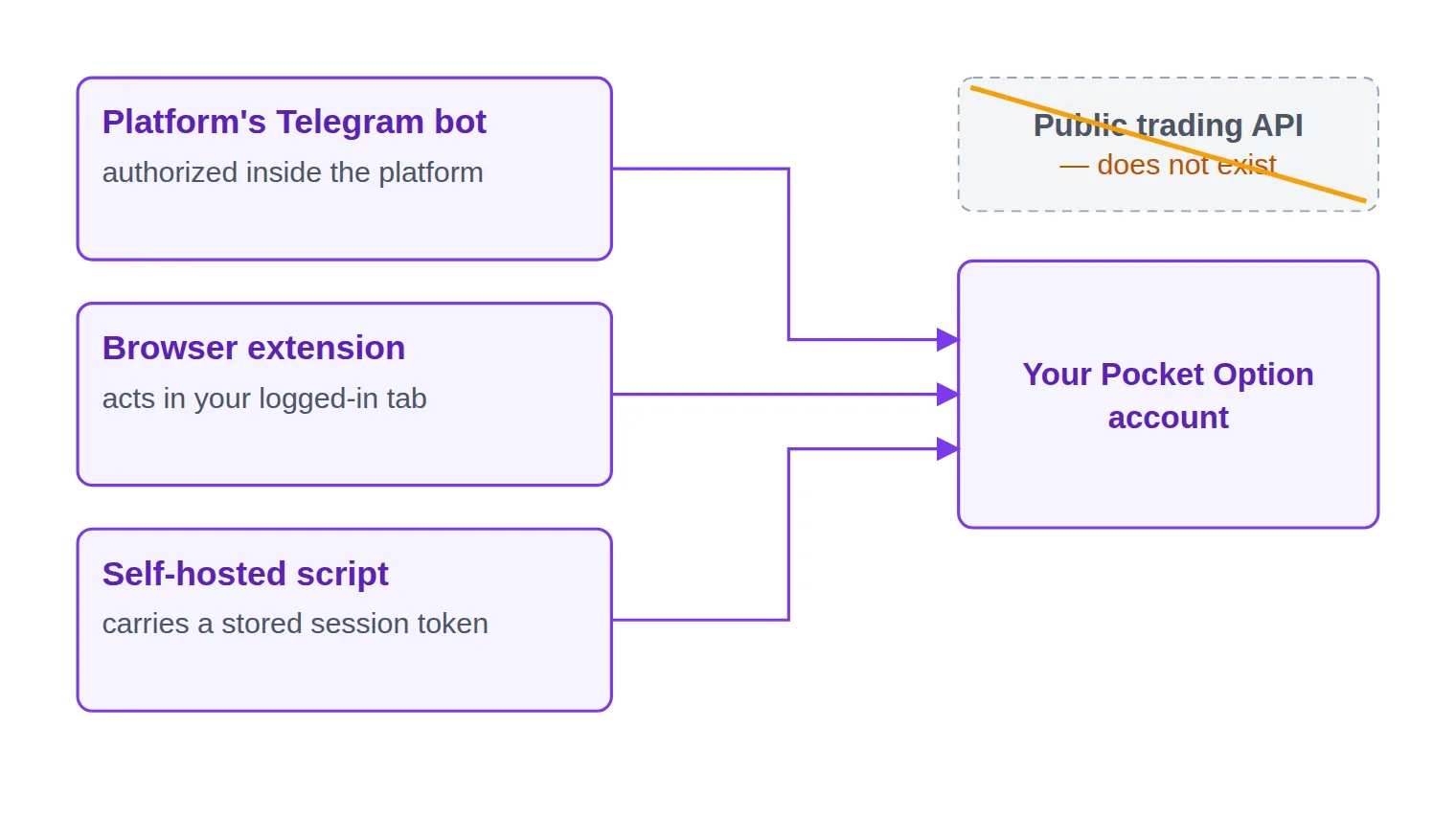
Pocket Option publishes no public trading API, so every bot reaches your account through one of three doors: the platform's own Telegram integration, your logged-in browser session, or a stored session token that logs in as you.
"Free" splits three ways — free because the platform earns on your volume, free because a partner earns on your registration, or free because it is open source and you pay in setup time and maintenance.
Set the control parameters (account mode, asset list, payout floor, stake, daily loss limit) on demo before the first live signal; strategy parameters can wait.
Know how to revoke the access before you grant it — unlinking a platform bot, removing an extension and invalidating a stored session are three different actions.
Table of Contents (24 min read)Contents
What Is a Pocket Option Signal Bot?
A binary options bot is any software that turns a trading signal into an action on your account without you doing the clicking. That definition hides a split that matters more than anything else in this article: a bot can do one job or two.
The first job is deciding — generating or receiving a call: this asset, this direction, this expiry. The second job is doing — placing that trade on the platform. Plenty of tools marketed as bots only ever do the first. They are a signal provider in a bot's clothing: a message arrives, and you still click.
That distinction is the one to hold on to while you read the rest of this page. An alerting bot can be wrong and cost you nothing but attention. An executing bot that is wrong has already spent your money by the time you read the message. Most of the free options start in alert mode and offer a toggle to switch into execution — and that toggle is the moment everything about the risk profile changes.
Telegram bot, browser extension, webhook bridge, or self-hosted script
Underneath the marketing, a Pocket Option bot is built one of four ways.
A Telegram bot. It lives in a chat window. You message it, it messages you. The platform's own bot can be authorized to trade because it operates inside Pocket Option's own system — the connection is made through your platform login, not by handing a stranger a password.
A browser extension. It runs inside the browser tab you already have the platform open in, reads the chart the platform is already drawing, and clicks the trade ticket the way you would. This is broker page automation: no separate connection to make, because the connection is your own logged-in session.
A webhook-driven bot. Your strategy lives somewhere else — a TradingView alert, a scanner, a spreadsheet — and fires an HTTP call to a small service when it triggers. The catch is the last hop: that service still has to reach Pocket Option, and it does so through one of the other doors on this list.
A self-hosted script. Usually Python, usually from GitHub, running on your own machine. It authenticates as you, using credentials you have stored in a config file.
They are not four flavours of the same product. They differ on setup effort, on cost, on how fast they can act, and — most of all — on what they are holding while they run.
Four mechanisms, one name
Bot type
Where it runs
What it needs from your account
Setup effort
Typical cost
How you shut it off
Platform's Telegram bot
Inside Telegram, linked to the platform
An authorization you grant in the platform itself
Lowest — a chat, a few prompts
Free
Unlink it, or stop approving trades
Browser extension
In the tab where the platform is open
Permission to read and act on the broker's pages
Low — install, log in, configure
Free or a one-time license
Toggle it off, or remove the extension
Webhook-driven bridge
A small service you host
Whatever its last hop uses — a session or a browser
High — you wire and host it
Free code, paid hosting
Stop the service
Self-hosted GitHub script
Your machine or a rented server
A stored session token that logs in as you
Highest — Python, dependencies, upkeep
Free, plus your time
Kill the process, then log out everywhere
The four bot types differ less in what they do than in what they hold while they do it — read the third and last columns together.
Pocket Option Has No Public Trading API, and Everything Follows From That
On a broker that publishes a documented trading API, automation is boring: you generate an API key, scope it, hand it to your bot, and revoke it in one click when you are done. Pocket Option does not offer that. There is no official developer API you can request a key for.
So every bot has to improvise, and there are only three doors into the account:
Through the platform's own product. The official Telegram bot is not reverse-engineering anything — it is a feature of Pocket Option, authorized the way any platform feature is.
Through your browser session. An extension does not log in at all. You are already logged in; it just operates the page in front of it.
Through a captured session. Unofficial API clients — the ones the GitHub projects depend on — work by carrying a session cookie and account identifier that you extract from your own browser and paste into a config file. Functionally, that file is a spare key to your account.
With no public API, a bot's mechanism is really a choice of which door into your account it uses — and how you shut that door again.
Two practical consequences fall straight out of this. First, signal latency is decided by the door, not by the marketing. Something acting in the same tab as the chart reacts in the time it takes to dispatch a click; a chain that goes signal source, Telegram message, your eyes, your hand, adds seconds you cannot get back on a short expiry. Second, an unofficial connection is only as stable as the platform's current behaviour. When the platform changes, unofficial clients break — and nobody is contractually obliged to fix them.
Free because the platform earns on your activity. The tool is a retention feature; you pay in trading volume.
Free because someone earns on your registration. The bot is unlocked when you open an account through a partner link, and that partner is paid by the broker.
Free because it is open source. Nobody is paid; you pay in setup time, maintenance, and the risk you now own personally.
Paid options come in two shapes: a one-time lifetime license, or a recurring subscription. On a tool whose connection can break when the platform changes, a subscription at least buys someone's ongoing attention — but it also means a monthly cost against a strategy that has to earn it back.
Pocket Option runs its own signal bot through Telegram, reachable from the official handles the platform itself publishes. It is free, it is authorized inside your platform account, and it can run either in a manual-approval mode — where it proposes and you confirm — or fully automatically. Its configuration covers the trade amount, an accuracy level, a minimum payout, the timeframe, and a switch between the demo and the real balance.
Its genuine advantage is the one nobody markets: no third party ever holds your credentials. The connection is made by the platform, inside the platform, and unwinding it is a platform action rather than a hunt through your browser settings.
Its genuine weakness is the same one on both of the platform's own write-ups about it: the material is promotional. There is no published long-run record, no discussion of what a bad run looks like, and no comparison with anything else. Treat it the way you would treat any tool documented only by the people selling it — as something to validate yourself rather than something already validated.
Independent extensions, free and paid
The Chrome Web Store carries browser extensions that automate Pocket Option and are not affiliated with it. They typically ship a handful of built-in entry rules, an asset picker, and a stake configuration, and many include a martingale option that increases stake after a loss — a setting whose worst case is much larger than it looks, and one worth leaving off until you have modelled it deliberately.
The thing to check on this category is not the feature list, it is the publisher. Extensions here are often listed by a developer with no other products, a handful of reviews, and no company behind the name — and an extension can be updated silently after you have installed it. An anonymous publisher is not automatically dishonest, but it does mean there is nobody to hold responsible if the next version behaves differently from the one you vetted.
Our own Pocket Option bot belongs to this category too, so here is the same disclosure applied to us. It is a browser extension for Chrome and Firefox that reads the live chart in the tab you already have open and fires a CALL or a PUT when a setup lines up; you can review the entries yourself or let it place them, and the demo-to-live switch is a single toggle. It covers roughly forty instruments across forex pairs, indices, metals, oil and Bitcoin, and its published end-to-end signal-to-click figure is under 10 milliseconds on a normal broadband connection. It is available as a free lifetime license when you open your Pocket Option account through our broker partnership, or as a one-time $50 license with no subscription. What it is not: it is desktop-only, it needs the platform tab open to do anything, and it is the wrong choice if you want something running on a server while your machine is off — that is the webhook or self-hosted route, with the trade-offs that come with it.
Is There a Reliable Pocket Option Bot on GitHub?
Yes, public repositories exist, and some are genuinely competent work. The best of them look roughly the same from the inside: Python, a signal engine built on common indicators such as a moving-average and oscillator combination, an unofficial API client with a browser-automation fallback for when the direct route fails, dependency installation through pip, and a .env configuration file holding a session value, an account identifier, and a mode flag for paper, demo or live trading. The better ones also refuse to trade live until you set an explicit confirmation flag, and their own documentation tells you to log a few hundred demo trades before you consider it.
"Reliable" is the wrong word for what you should be assessing, though. Code quality is the easy part. The four things that actually decide whether this path works for you are:
Whether the connection survives. It depends on undocumented behaviour, so an update to the platform can break it without warning and without anyone's obligation to fix it.
Whether you can read what you are running. You are about to give this program a live session on a funded account. If you cannot read the file that handles authentication, you are trusting a stranger with more than a Chrome extension ever asks for.
Whether you can keep it running. A bot that only trades while your laptop is awake is a different product from one on a small rented server, and the server is now your responsibility to patch and monitor.
Whether you accept having no support. There is no vendor. There is an issue tracker and the goodwill of whoever wrote it.
Some repository-level red flags are worth naming plainly, because they show up on real projects: obfuscated or minified source, a compiled binary you cannot inspect, any code that transmits your credentials to a server that is not the broker, a project with no commit history, and any README that advertises a win rate. The architecture you actually want is local-only execution — the credential never leaves the machine you control.
Who this path fits: someone already comfortable in Python who wants to change the logic and is willing to own the maintenance. If that is not you, the honest answer is that the no-code options will get you a better result with a fraction of the exposure — and that reading a repository's code is still worth an hour of your time even if you never run it, because it shows you exactly how these connections are made.
Connecting a Bot to Your Pocket Option Account
Whatever you pick, the sequence is the same, and the order matters more than any single step. The mistake that costs people money is not choosing the wrong bot — it is setting the limits after the first live trade instead of before it.
From choosing a bot to a supervised first live session
1
Pick the mechanism, not the brand
Decide which door you are comfortable with first — platform-authorized, browser session, or stored credential — then look at products.
2
Link it to your account
Authorize the Telegram bot in the platform, install and log in for an extension, or configure the credential file for a self-hosted script.
3
Point it at the demo balance
Switch the account toggle to demo before it can place anything, and confirm on the platform that the trades are landing there.
4
Set the guard rails
Trade amount, minimum payout, expiry, daily loss limit and asset list — all configured while nothing real is at stake.
5
Run one small live session, watching
Flip auto-trade on at your smallest size, stay at the screen for the whole session, and compare its log against the platform's history.
Every step before the last one is reversible. That is the point of doing them in this order.
Two things worth being explicit about at step five. First, flipping the switch into auto-trading is a delegation, not an optimization: from that moment the bot's rules, not your judgment, decide what your account does. In effect it is copy trading with software as the lead — the same handover of decision-making, with the same requirement that you have inspected what you are following.
Second, do not skip the demo stage because you are impatient to see it work. A demo account costs nothing but time and is the only place where a misconfigured expiry or a wrongly-mapped asset is free. The point of demo trading here is not to estimate profitability from a small sample — it is to confirm the plumbing does what you think it does.
The platform's own walkthrough of connecting its Telegram signal bot is a useful reference point for what the authorization flow looks like in practice:
How to Get Trading Signals from Pocket Option Telegram Bot | Trading Tutorials for Beginners — Pocket Option
Which Settings Actually Control Your Bot
Bot settings screens tend to mix two unrelated categories: strategy parameters and control parameters. Strategy parameters — which indicator, which threshold, which pattern — are the part everyone fiddles with and the part that matters least on day one. Control parameters decide what the bot is allowed to do to your account, and those are the ones to set deliberately.
Six categories cover almost every Pocket Option bot you will meet:
Account mode. Demo or live. This is the single setting whose misconfiguration is most expensive, and the one worth re-checking every session.
Asset selection. Which instruments the bot may touch. Narrow this hard at the start — a bot allowed to trade everything will find setups on assets you have never watched.
Minimum payout filter. A correct call on a low-payout asset can still lose money over a run, because your break-even win rate rises as the payout falls. Set a floor and let the bot skip anything below it; the break-even win rate calculator shows exactly where that floor should sit for the payouts you actually see.
Trade amount. A fixed stake per trade, or a percentage. Fixed is easier to reason about while you are still learning what the bot does. If you want to model the stake against your balance and your limits before you commit, run it through the money management calculator.
Expiry and timeframe. These must match the horizon the signal was built for. A signal engineered for a one-minute move, executed with a fifteen-minute expiry, is not the same trade.
Daily loss limit and stop conditions. A daily loss cap, an optional daily profit stop, and a consecutive-loss cooldown. This is the category most often left at its default, and it is the only one that reliably ends a bad day early.
The clearest way to see what those settings do is to look at the bot as a machine with modes. Each control parameter is a gate on one specific transition.
stateDiagram-v2
    [*] --> Idle
    Idle --> Scanning: auto-trade on
    Scanning --> SignalReceived: setup found on an allowed asset
    SignalReceived --> Scanning: payout below your floor
    SignalReceived --> InTrade: stake and expiry applied
    InTrade --> Cooldown: position settles
    Cooldown --> Scanning: cooldown elapsed
    Cooldown --> Halted: daily loss limit reached
    Scanning --> Idle: you switch auto-trade off
    Halted --> [*]
The transition most traders never configure is Cooldown to Halted - without a daily loss limit set, there is no state the bot can stop in on a bad day.
Read that diagram once and the settings screen stops looking like a wall of options. The asset list decides what can leave Scanning. The payout floor decides what gets sent back to it. The stake and expiry shape every trade that reaches InTrade. And the daily loss limit is the only thing standing between a bad session and an unattended one.
Before You Turn On Auto-Trade
Everything above is reversible. This section is about the part that is not, so it is worth being precise about what you are actually granting in each case.
A platform-authorized Telegram bot receives permission from Pocket Option to act in your account, and you withdraw that permission the same way you gave it. A browser extension is governed by its extension permissions — the host permissions it declares determine which sites it can read and act on, which is why an extension requesting access to every site you visit is asking for far more than a broker automation needs. A self-hosted script holds a stored session, which is the strongest access of the three: until that session is invalidated, anything holding it can act as you.
The question to answer before you flip the switch is not what the bot does, but what it is holding while it does it.
Knowing how to revoke each one before you grant it is not paranoia, it is the same discipline as placing a stop before an entry. And whichever mechanism you choose, decide in advance what your kill switch is: which toggle, which tab, which process — and test that it works while you are still on demo. Closing a browser tab stops an extension; it does nothing at all to a script running on a server.
Pre-flight
Run this before any bot trades real money
0 / 10
Name the mechanism: platform-authorized, browser session, or stored credential - and say out loud what each one is asking for.
Read an extension's permission list before installing, and reject anything requesting access to sites unrelated to the broker.
Never paste a session cookie, password or account identifier into a hosted dashboard or a form someone sent you.
Identify the publisher: a real company or developer you can look up, not an anonymous listing with no history.
Run it on a demo balance long enough to review individual trades, not just a summary screen.
Set the trade amount to a size you would accept losing on a bad day - before the first live signal, not after.
Turn on the minimum payout filter so the bot skips assets whose payout cannot support your break-even win rate.
Configure the daily loss limit, then verify on demo that the bot genuinely stops when it is hit.
Write down your kill switch - which toggle, which tab, which process - and trigger it once to confirm it works.
A week in, reconcile the bot's own log against the platform's trade history and check nothing extra has been placed.
★
Checklist complete — you’re cleared to proceed.
Ten checks, none of which take longer than a few minutes - and every one of them is cheaper to do before the first live trade than after it.
One last framing worth keeping. Automation removes hesitation and reaction time; it does not remove risk, and it does not improve the quality of the calls it is fed. A bot that executes a weak source faster simply loses faster. Binary options carry a real risk of losing your capital whether a human or a program places the trade — our full risk warning sets out what that means in practice.
Choosing the Right Setup for You
Four routes, four different readers.
If you want the least exposure and the shortest setup, the platform's own Telegram bot in manual-approval mode is the sensible starting point. Nobody outside Pocket Option holds anything, and you keep the final click while you learn whether the calls are any good.
If you trade from a desktop with the platform open anyway, and the delay between a signal appearing and a trade being placed is what bothers you, a browser extension from a publisher you can actually identify is the closest fit. Nothing leaves your session, and reaction time stops being a human variable.
If your strategy already lives in TradingView or another external tool, a webhook-driven bridge lets you keep it there — as long as you accept that the final hop into Pocket Option is still a browser or an unofficial connection, with the fragility that implies.
And if you write Python, want to change the logic rather than the settings, and are prepared to maintain the thing, a GitHub project gives you the most control and hands you every risk that a vendor would otherwise absorb.
The question that sorts all four is not which is best. It is: what does this need from my account, and how do I take it back? Answer that before you install anything, and the rest is configuration.
Then there is the question this page deliberately does not answer, because it is a separate job: a bot only executes, it never improves the calls it is given. Deciding which signal sources are worth automating in the first place — how a provider's record is verified, what a real track record looks like, and which types of source survive scrutiny — deserves its own scrutiny before you hand any of them a switch.
Yes, several. Pocket Option's own Telegram bot is free to use with a funded account. Some third-party browser extensions are free outright, others unlock free when you register an account through a partner link, and open-source projects on GitHub are free to download. What varies is what "free" costs you elsewhere — trading volume, a registration routed through someone's partnership, or your own time and maintenance.
Can a Telegram bot actually place trades on Pocket Option for me?
The platform's own bot can, because it is authorized inside your Pocket Option account and can be set to either propose trades for your approval or execute them automatically. Third-party Telegram bots are a different matter: most only deliver signals into a chat, and any that claims to execute is either routed through the platform's own integration or is asking you for credentials somewhere along the way — which is the point at which you should stop and check what exactly it is requesting.
Does Pocket Option have an official API for bots?
No. There is no public, documented trading API you can generate a key for. Every automated tool works around that absence — through the platform's own bot integration, by automating the browser page, or by reusing a session extracted from your own login. That is also why an unofficial connection can stop working after a platform update, with no obligation on anyone to repair it.
Are Pocket Option bots on GitHub safe to run?
They are as safe as your ability to read them. A typical project asks you to store a live session value in a configuration file, which is functionally a spare key to your account, so the code that handles it is the code you must inspect. Prefer projects whose source is readable and whose credentials never leave your own machine, and treat obfuscated code, compiled blobs, any transmission of your credentials to a third-party server, or a README advertising a win rate as reasons to close the tab.
What settings should I get right before the first live trade?
Five, in this order: the account mode (confirm it is where you intend), the asset list (keep it short), the minimum payout filter, the stake per trade, and the daily loss limit. Strategy parameters can wait — those five decide what the bot is allowed to do to your balance, and every one of them is easier to set while nothing real is at stake.
Will a Pocket Option bot keep trading while my computer is off?
A browser extension will not — it needs the tab open and the machine awake, which is a genuine constraint and also a natural limit on unattended trading. A Telegram bot authorized inside the platform, or a self-hosted script running on a rented server, will keep going without you. Decide which of those you actually want before you choose a mechanism, because it is the difference between a tool you supervise and a tool that runs unsupervised.
Sources & Further Reading
Want to go deeper? These independent, authoritative sources shaped this guide — each one is worth reading in full:
The Binary Options Desk is the SignalBots editorial team for fixed-time and OTC trading coverage. We research and write the guides that explain expiry timing, payout structure and disciplined entry across the major brokers.
Want to use the bot without paying? Message our 24/7 support team via Telegram or Viber. Our experts will guide you step-by-step on how to unlock your free lifetime license through our exclusive broker partnership program.




Discussions 0
Leave a comment