The signal landed at 14:32:00. You saw it at 14:32:11, unlocked your phone, hunted for the asset, second-guessed the direction for a beat, picked an expiry that felt about right, and clicked at 14:32:34. The trade finished out of the money — and the irritating part is that price went exactly where the signal said it would.
That is the failure this page is about. Not a bad read and not a bad provider: thirty-four seconds. On a one-minute binary, thirty-four seconds is more than half the trade, spent before you were in it.
If you have already settled where your signals come from, what is left is mechanical — a repeatable sequence from alert arrives to trade placed, an honest sense of how many seconds you actually have, and an expiry that ends when the move the signal read is finished. This page is about the clock, not the source.
Key Takeaways
A signal is live only while its window is open: without a generation time you cannot tell how much of the trade you have already spent, and a batch posted this morning is a watchlist, not a real-time signal.
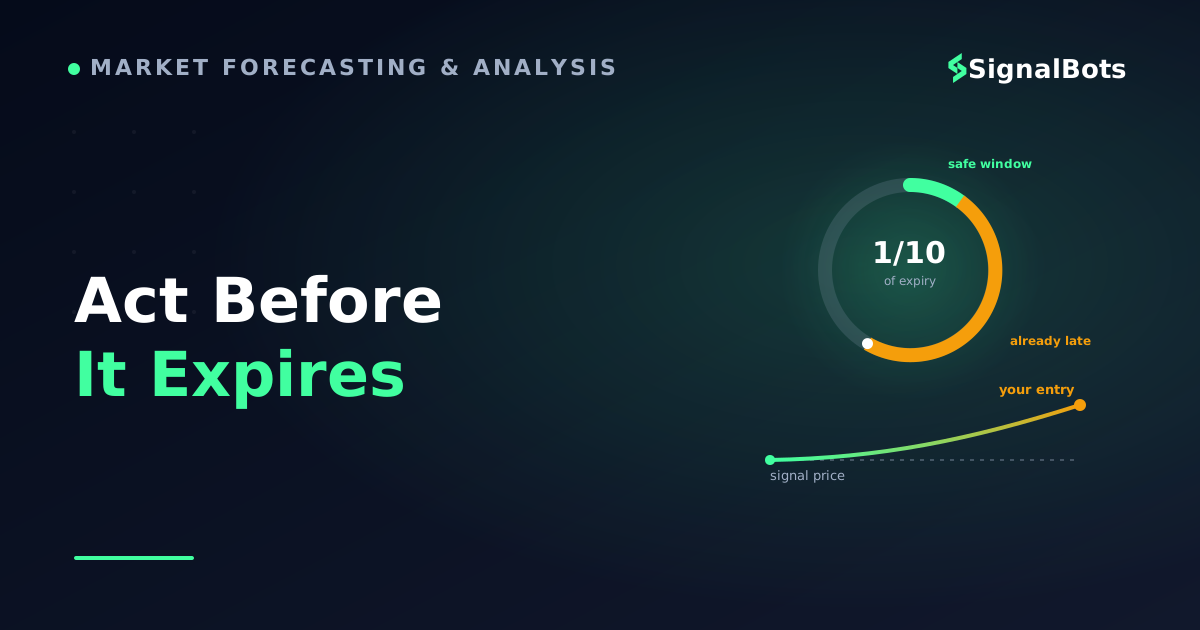
Budget your delay as a fraction of the expiry, not as a flat number of seconds — about a tenth of it, measured from when the signal fired, so a one-minute trade gives you roughly six seconds and a five-minute trade about thirty.
In a binary trade your entry price is the strike, so entering late does not just shrink the window, it moves the line you have to beat — which is how a correct direction still settles out of the money.
Match the expiry to the signal's analysis window rather than to your click: use the clock-time mode to end on the signal's candle, and treat duration mode as the exception.
Table of Contents (20 min read)Contents
What Counts As A "Live" Pocket Option Signal
A live signal is one whose validity window has not closed yet. That is the whole distinction, and it is stricter than most feeds admit.
A binary options signal is a short instruction — an asset, a direction, and, stated or implied, the moment it applies to. The moment is the part that decays. A CALL on EUR/USD read off the 14:31 close is a claim about the next minute or two of price, not a standing recommendation. Twenty minutes later the same message is a stale signal that happens to still be sitting in your notifications.
So when you go looking for Pocket Option signals today, three things disqualify a message from being live no matter how it is labelled:
No generation time. If you cannot tell when it fired, you cannot tell how much of its window you have already burned. Treat it as a chart idea, not an entry.
A batch published in advance. "Today's eight setups, posted at 07:00" is a watchlist. It may be a good watchlist, but the entry timing is yours to find, which is a different job from acting on real-time signals.
A results screenshot. A grid of green ticks is a marketing artifact. It has no window at all.
The practical test is one question: from the message alone, can you say the second it became valid and the second it stops being valid? If not, nothing below is usable, because there is no clock to race.
Two identical signals, one still inside its window and one long past it — only the clock tells them apart.
How Live Signals Actually Reach You
You have already picked a source — weighing the full range of Pocket Option signal sources against each other is a separate exercise, and this page assumes it is settled. What matters here is narrower: the route a message travels decides how much of the trade's life is gone before your eyes are on it.
Three routes cover nearly everything a signal provider uses:
An in-platform or in-app alert, fired while you already have the chart open. Shortest path, and the only one where you are looking at the panel when the message appears.
A messaging push — a channel message or a provider's own app. A push notification alert has to clear the sender's queue, a push service, and then your device's own notification behaviour before a human sees it.
A webhook into an automated client. Webhook delivery hands the message machine-to-machine, so a piece of software reads it the instant it arrives instead of waiting for you.
Now the part providers skip. The network is almost never your bottleneck. Delivery is fast on every route; what is slow is the human segment bolted onto the end of it — noticing, reading, deciding, and clicking. That segment does not shrink because a provider advertises "instant" delivery.
Illustrative delay budget
Stacked breakdown
Where the seconds go before a live signal becomes a trade
Chart already open~9sMostly your confirm step
Phone in your pocket~26sNoticing costs more than the network
Automated client~3sNo human segment at all
Illustrative figures, not measured data — but the shape holds on every setup: the hop is cheap, the human is expensive.
Read the shape rather than the numbers. Two of the four segments belong to you, and on a phone in your pocket they dwarf everything the provider controls. That is why "our signals are delivered instantly" tells you almost nothing about whether you will be on time.
How Fast Do You Really Need To Act On A Live Signal?
There is no universal number of seconds, and any provider quoting one is guessing. The number is derived from the trade, and the rule is simple: your total delay has to be small next to the expiry the signal was built for.
A working budget that holds up in practice is a tenth of the intended expiry, measured from the moment the signal was generated — not from the moment you saw it:
60-second expiry — roughly 6 seconds
2-minute expiry — roughly 12 seconds
5-minute expiry — roughly 30 seconds
15-minute expiry — roughly 90 seconds
The reason it is a fraction rather than a flat number is worth sitting with, because it is the mechanic most traders never have explained to them. In a binary trade your entry price is the strike. The signal identified a move from some level; every second you wait, price walks away from that level, and your strike is set wherever price happens to be when your order fills. Enter four pips late in the direction the signal called and you have not caught a head start — you have handed it back. You are now betting price finishes above a line four pips higher than the one the analysis was built on, with the same expiry and the same payout. The edge the signal found is quietly gone, and the trade can lose while the call was completely correct.
That is also why signal latency matters more on short expiries than long ones. Ten seconds is a rounding error on a fifteen-minute trade and a third of a thirty-second one.
Worked example
Signal generated
The provider's read completes on the 14:31 close and publishes a CALL on EUR/USD for the candle that just opened.
Alert lands
The message clears the sending queue and the push service and is sitting on your lock screen at 14:32:03.
You actually see it
The longest single leg: the phone was face-down. Eleven of the sixty seconds are gone before you have read a word.
Trade placed
Asset already on screen and stake preset, so confirming and clicking costs nine seconds. Expiry set to end at 14:33:00.
Expiry
The trade settles at the close of the 14:32 candle — the exact candle the signal was about.
One live signal, end to end: a third of the window was gone at entry, and this is a good run.
Twenty seconds into a sixty-second window is a third of the trade — and that run had the asset already on screen and the stake already set. Without that preparation the same sequence lands past forty seconds, which is not a trade, it is a coin toss with a fee.
So the discipline that follows is unglamorous: if you are past the budget, skip it. A signal you missed costs nothing. A signal you take late costs a stake and, worse, teaches you that the provider is unreliable when the problem was your clock. Track how often you are late before you conclude anything about the signal expiry window you were given.
Matching Signal Timing To Pocket Option's Expiry Options
Here is the second half of the timing problem, and the one nearly every guide leaves out. The trade panel offers two different ways to say when the trade ends, and they are not interchangeable:
A clock time. The trade ends at a fixed moment — typically snapping to the close of the current candle on your selected timeframe. Being late does not extend the trade; it shortens it.
A duration. The trade runs for a set length counted from the instant your order fills, commonly available from around half a minute up to several hours. Being late slides the whole window forward.
Both are legitimate. Choosing the wrong one for a given signal is what turns a correct call into a loss.
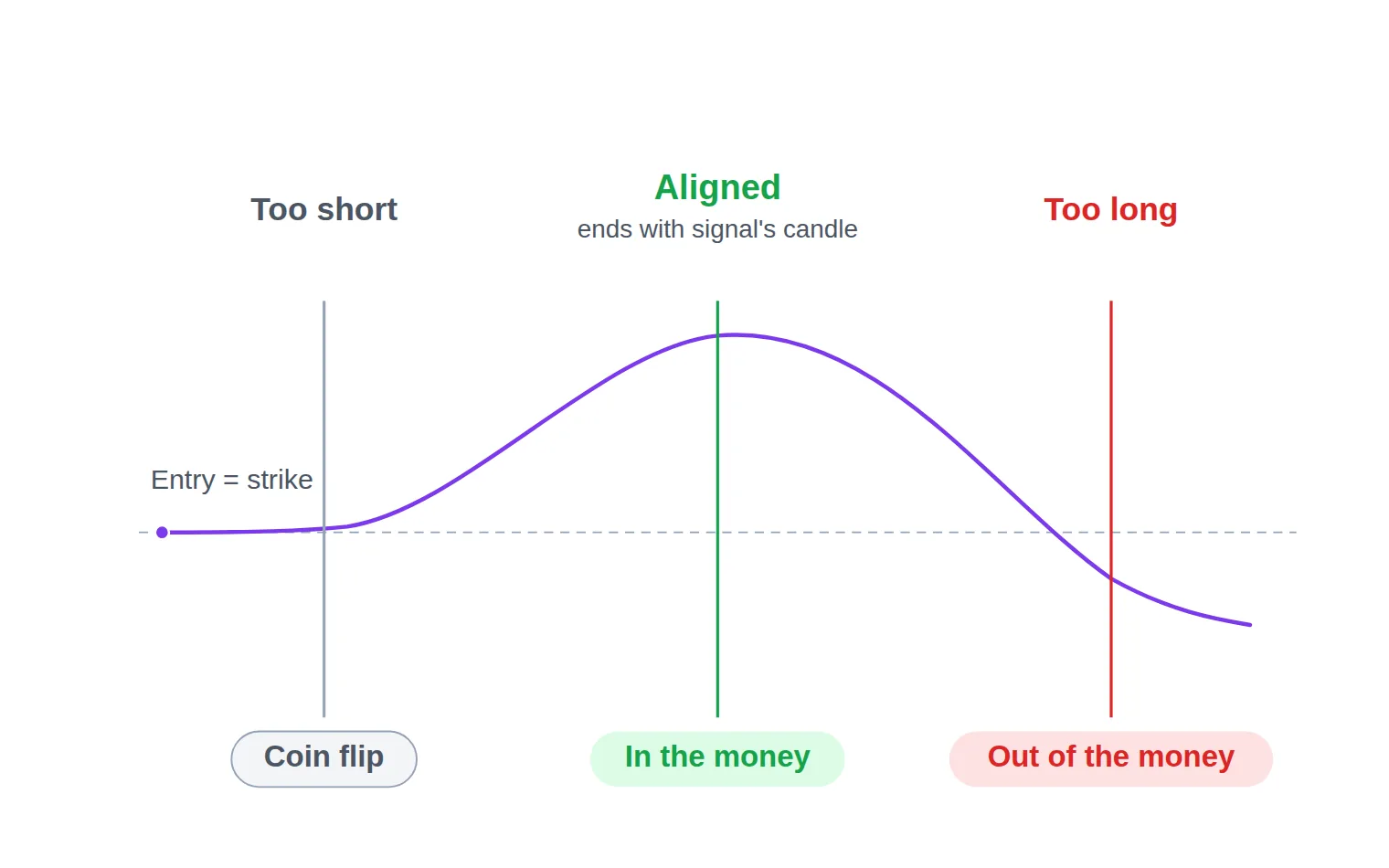
Work it through. A provider reads the close of the 14:31 one-minute candle and calls the 14:32 candle. The move it is describing is finished at 14:33:00. In clock-time mode you set the end to 14:33:00 and the trade settles on exactly the candle the analysis was about, whether you clicked at 14:32:05 or 14:32:20. In duration mode, clicking at 14:32:20 with a one-minute duration ends you at 14:33:20 — twenty seconds inside a candle the signal said nothing about, and long enough for the move to unwind.
The rule that falls out: match the expiry time to the signal's analysis window, not to your click. If the message names a candle or a timeframe, use clock time. Use duration only when the signal is framed as "valid for the next N minutes from now" — which is rarer than it sounds, and worth confirming with the provider rather than assuming.
Same signal, same price path — the expiry line decides the outcome.
Two corollaries follow from the same picture. The shortest expiry available is not the safest one: a very short window makes the trade a bet on noise, where a small random tick against you settles the contract before the move has room to develop. And a longer expiry is not a hedge — it gives price time to reverse past your strike, which is precisely the "too long" line above.
One scope note: if you are trading OTC pairs during off-hours sessions, the clock behaves a little differently, because OTC instruments are quoted continuously by the platform rather than following a market session — worth treating as its own topic rather than assuming the timing above transfers unchanged.
Step By Step — From Signal Alert To Trade Placed
This is the part people mean when they ask how to use Pocket Option signals: the literal sequence. But most of the work happens before the alert arrives. Six seconds is only enough time if the panel is already configured — if you are still choosing an asset when the message lands, you have lost before you started.
Stage these while nothing is firing:
The chart is on the asset your provider actually covers, at the timeframe their signals are read from.
The stake is already typed in, at the amount you decided for the session.
The expiry mode (clock time or duration) is chosen, and set the way the previous section describes.
The account selector shows the account you intend to trade.
Notifications for the signal channel are allowed to break through your phone's focus settings.
With that in place, the live sequence is short enough to run without thinking:
From alert to placed trade, in the order that survives the clock
1
Read the whole alert once
Direction, asset, and the time it was generated. Reading it once properly costs less than placing the wrong side once.
2
Check the timestamp, not just the arrow
If more than a tenth of the intended expiry has already elapsed, the entry you would get is not the entry the signal described.
3
Confirm the asset on your chart
Same symbol, and the same OTC-or-not variant. A pair and its OTC twin are different instruments quoting different prices.
4
Set the expiry to end the move
Clock time to the close of the signal's candle, rather than a round duration counted from whenever you happen to click.
5
Verify the stake and the account
The amount you set before the session, on the account you meant to use. Both are one tap away from being wrong.
6
Execute, then leave it alone
Once the strike is set the outcome is out of your hands. Adding a second trade to rescue the first turns one loss into two.
The two steps that fail most often are the timestamp check and the account check — both take under a second.
Two of those deserve a note. The timestamp check is the one that saves money, because it is the only step that can tell you to do nothing; every other step assumes the trade is happening. And the account check catches the mistake nobody admits to: the demo / real account toggle sits one tap from the trade button, and a signal you executed perfectly on the wrong account is still a signal you did not trade.
Worth adding to the same glance: the payout percentage on the asset can change between one trade and the next, and it is the number that decides how good the direction call has to be. Reading it takes as long as reading the stake.
Do You Need A Bot To Keep Up, Or Is Manual Fast Enough?
Honest answer: it depends entirely on the expiry you trade, and the crossover is sharper than most people expect.
Placing it yourself vs letting a client place it
Manual execution
Fine when expiries run in minutes — a ten-second confirm barely dents a five-minute trade.
You can veto a signal the market has already invalidated; software takes what it is told.
Nothing to configure, and nothing new to trust with your account.
Falls apart on sub-minute expiries, where your reaction time is most of the trade.
Good enough for expiries of a few minutes or longer.
VS
Automated execution
Removes the two slowest legs — noticing the alert and confirming it — completely.
Behaves the same at 3am as at 3pm: no hesitation, no revenge entry, no fumbling.
Places whatever arrives, including a signal a news spike has already made worthless.
Adds a dependency: a bad rule or a stale connection is now trading your account.
Earns its keep when the expiry is short enough that seconds decide it.
The question is not which is better — it is whether your expiry length leaves room for a human step.
If your signals run on five-minute or fifteen-minute expiries, manual execution is not costing you anything measurable, and the discipline of the checklist below is worth more than the seconds automation would save. If they run at a minute or under, the arithmetic from the stacked chart applies directly: the human segment is the trade. Configuring that automation is its own subject, and a decision to make deliberately rather than mid-signal.
Pre-Trade Checklist — What To Verify Before You Trust A Live Signal
Speed without a check is the worse failure. A trader who has learned to move fast, and moves fast on a stale or misread signal, loses money more efficiently than the one who was merely slow.
Two of the checks below are about the signal rather than the platform, and they are the ones that separate acting decisively from acting credulously. A provider's historical win rate describes trades that already closed; it says nothing about the one currently firing, and it only means anything alongside the payout you are being offered — run both through a break-even win rate calculator once, and you will know instantly whether a record is good enough to be worth chasing a window for.
A backtested result carries the same caveat one step further: it is a model of the past under assumptions you cannot see. Neither is a forecast, and every binary trade you place risks the whole stake — the risk warning is not a formality on an instrument that settles at zero.
Before you click on a live signal
0 / 9
The alert carries a generation time, and less than a tenth of the intended expiry has passed since it.
The asset on your chart is the exact instrument named, including whether it is the OTC variant.
That market is actually open and quoting, not frozen on its last print.
The direction you are about to click is the direction in the message, read one more time.
The expiry ends when the signal's move ends, not a round number of seconds from your click.
The payout showing right now still supports the win rate the provider's record implies.
The stake is the amount you set before the session, not a number chosen while the clock runs.
The account selector says the account you meant to trade — real or demo.
Nothing scheduled in the next few minutes makes this particular window unusually noisy.
★
Checklist complete — you’re cleared to proceed.
Nine checks, all of them yes-or-no, and none of them slower than the fumbling they replace.
Run it consciously for a week and it compresses into a single glance. That is the actual goal: not nine deliberate checks forever, but one trained look that catches the same nine things in the seconds you have.
See A Live Binary Signal In Action
Timing is a motor skill more than a concept, and it is much easier to build with nothing at stake. Our live binary options signals feed is free to watch: signals appear on it the moment they fire, each carrying its direction and its reward-to-risk context, so you can rehearse against real events instead of an imagined clock. Start a stopwatch the second one appears and run your own confirm-and-place sequence on a demo panel — you will learn more about your true delay in three signals than in an hour of reading about it.
Be equally clear about what it is not. It is our own feed, not Pocket Option's, and it is neither sourced from nor affiliated with Pocket Option's signal engine. It does not place trades, and it is not a Pocket Option-specific tool. Every Pocket Option trade is still yours to place on your own panel with your own expiry choice. Use it as a metronome for the drill; keep whichever source you already chose for the trades themselves.
Common Timing Mistakes That Cost The Entry Window
Almost every late entry traces back to one of five habits:
Reading the alert twice because you did not read it once. Skimming the arrow, then re-opening the message to check the asset, doubles the slowest leg on the chart above.
Choosing the expiry after the signal arrives. Deciding between clock time and duration under time pressure is how a one-minute call becomes a trade that ends twenty seconds into the wrong candle.
Taking it anyway. The move is half over, the entry is worse than the one described, and the discipline that says "skip" is the only thing standing between you and a strike that was never part of the analysis.
Chasing the missed one with the next one. A skipped signal costs nothing; a retaliatory entry on the following message, taken without the check, costs a stake.
Blaming the provider for your own delay. Log the gap between the generation time and your fill for a week. Until that number is honest, no verdict about signal quality means anything.
Go back to the trade at the top. Nothing about it required a better provider — the direction was right. It required the asset already on screen, the stake already typed, the expiry mode already chosen, and one glance at a timestamp that would have said too late, let this one go. That is the whole discipline: the seconds are not found during the signal, they are bought before it.
FAQ
Is it worth taking a live signal I saw 30 seconds late?
On a one-minute expiry, no — half the window is gone and your strike will be set wherever price has already travelled, which is the opposite of the entry the signal described. On a fifteen-minute expiry, thirty seconds is negligible and the trade is still the one that was analysed. Judge lateness as a fraction of the intended expiry, never as an absolute number of seconds.
What expiry should I pick if the signal doesn't specify one?
Use the timeframe the signal was read from. A call generated off one-minute candles is a claim about the next one-minute candle, so end the trade at that candle's close. If you cannot tell which timeframe a provider works on, ask them before you trade rather than guessing — an unstated expiry is the single most common reason a correct direction settles as a loss.
Why did a correct signal still finish out of the money?
Two causes cover most cases. Either you entered late, so your strike sat further along the move than the analysis assumed and price ran out of room; or the expiry outlived the move, so the trade settled after the reversal rather than at the peak. Both are timing faults, and both are invisible if you only review the direction afterwards.
Do live Pocket Option signals behave differently on a demo account?
The mechanics are the same, which is exactly why a demo account is the right place to build the reflex — same panel, same expiry modes, same delay from your own hands. What it cannot rehearse is hesitation, since nothing is at stake, so expect your first live entries to run a few seconds slower than your practice runs.
Can I use a provider's signals with a different expiry length than they suggest?
You can, but you are then trading a different idea from the one that was analysed, and their record no longer describes what you are doing. If you prefer longer expiries, look for a provider who works on that timeframe rather than stretching a short-horizon call to fit — the analysis window and the contract window have to be the same window.
How do I practise the timing without risking money?
Watch a live feed with a stopwatch and a demo panel open, and measure the gap between the signal appearing and your trade being placed. Do it for twenty signals and you will have a real number for your own delay, which tells you both which expiry lengths you can trade manually and whether preparation, rather than a faster alert, is the thing to fix.
Sources & Further Reading
Want to go deeper? These independent, authoritative sources shaped this guide — each one is worth reading in full:
The Binary Options Desk is the SignalBots editorial team for fixed-time and OTC trading coverage. We research and write the guides that explain expiry timing, payout structure and disciplined entry across the major brokers.



Discussions 0
Leave a comment