You already know the part that sends most developers here: Quotex does not publish a developer API, so there is no key to request, no sandbox to register for, and no reference page to read. What it does have is a live socket that its own web terminal talks to all day — and that socket is fully observable from your own browser.
This page is the protocol write-up nobody publishes: what the unofficial Quotex websocket API looks like on the wire, how a connection authenticates without an API key, what the quote and order frames contain, and how to hold your side of that conversation from Python without getting your account flagged. Every snippet is short and annotated on purpose — this is a reference you will reopen per task, not a bot you paste and run.
Key Takeaways
Quotex publishes no developer API — the unofficial route is the same WebSocket its web terminal uses, with every message wrapped in Socket.IO's numeric envelope (42["event", payload]).
Authentication is a session token (SSID) taken from your own browser, not an API key; it is a bearer credential with full account access and it expires without warning.
Connect, subscribe and order are three frames. The real project is the defensive plumbing around them: token refresh, a heartbeat watchdog, subscription replay after reconnect, and backoff conservative enough not to get the account flagged.
Table of Contents (27 min read)Contents
Why There's No Official Documentation for This
Quotex ships a trading interface, not a developer product. There is no published endpoint reference, no application registration, no documented rate-limit table. What the sanctioned route offers — and what it does not — is a separate question about official Quotex API access; this page assumes you have already asked it and landed on the unofficial side.
Here is what exists instead. The web terminal is a JavaScript application, and effectively everything it does — logging in, streaming quotes, changing account mode, placing a trade, receiving settlement — travels over one persistent WebSocket connection to the platform's gateway. That connection is not obfuscated or encrypted beyond ordinary TLS. Open your browser's developer tools on the trade page and you can read every frame in both directions, live.
That is all "Quotex websocket API reverse engineering" means: reading the traffic the browser already generates and reproducing it from your own process. Two consequences follow, and both shape everything below.
Nothing here is a contract. Event names, field names, the envelope version, even the hostname can change in a routine front-end deploy with no notice and no changelog.
The gateway expects a client, not a crawler. It was built for one browser tab per account. Behaviour that no browser would produce — dozens of parallel history requests, a reconnect storm, several sessions hammering the same account — is exactly what gets noticed.
So the durable skill is not memorising frames. It is knowing where to look when they change. This article gives you the current shape and the method for re-deriving it yourself in ten minutes when a deploy breaks your client.
How the Quotex Platform Sends Data Over WebSocket
At the bottom of the stack there is nothing exotic. The client opens an ordinary WebSocket connection: an HTTP request carrying Upgrade: websocket, a 101 Switching Protocols response, and from then on a single full-duplex channel where either side can send a frame at any moment.
That choice is the whole reason there is no REST endpoint to discover. Quotes are pushed as they happen rather than fetched on a timer, so the terminal never polls, and there is no request-response surface sitting beside the socket for you to call instead.
The endpoint follows the shape used by every open-source client: a ws2. subdomain on the brand's own hostname, with the query string that identifies the framing layer.
That socket.io path is the part most people trip on. The raw WebSocket is only the pipe — the messages inside it are Socket.IO packets, wrapped in Engine.IO's numeric envelope. So you never send bare JSON. You send a digit-prefixed string, and you have to strip the prefix off everything you receive before json.loads will touch it.
The prefixes you will actually meet:
0{...} — Engine.IO open: the server's handshake payload, including its heartbeat interval.
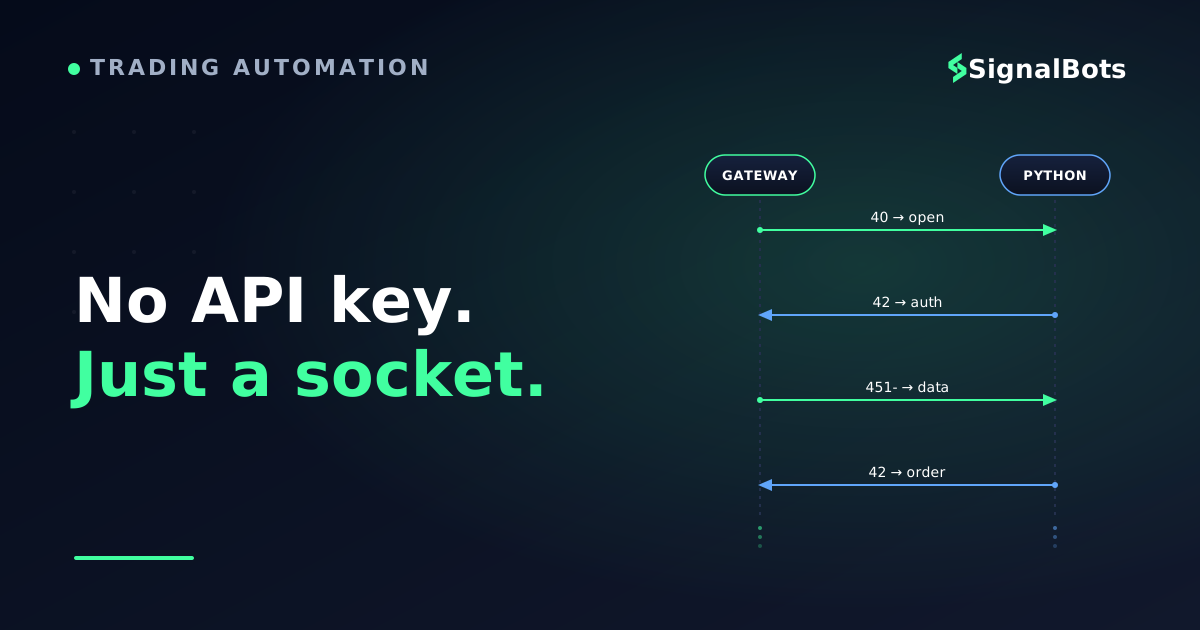
40 — namespace connect. Until you see this, the server is not listening for events.
42["event", payload] — a normal event in either direction. This is 99% of the traffic.
2 / 3 — heartbeat ping and pong, as bare digits.
451-["event", {"_placeholder": true, "num": 0}] — an event whose real payload arrives in the next frame, as binary. Miss this and half your data looks empty.
Abridged and annotated, the opening of a session reads like this:
The wire, unabridged
textwire-transcript.log
>>> GET wss://ws2.<host>/socket.io/?EIO=3&transport=websocket
<<< HTTP/1.1 101 Switching Protocols

<<< 0{"sid":"...","pingInterval":25000,"pingTimeout":5000}   # engine.io open
<<< 40                                                        # namespace ready

>>> 42["authorization",{"session":"<SSID>","isDemo":1,"tournamentId":0}]
<<< 451-["s_authorization",{"_placeholder":true,"num":0}]     # ok - payload next
<<< <binary frame: your account profile as JSON>

>>> 42["instruments/update",{"asset":"EURUSD_otc","period":60}]
<<< 451-["candle-generated",{"_placeholder":true,"num":0}]
<<< <binary frame: {"asset":"EURUSD_otc","time":...,"price":...}>

>>> 2                                                         # client ping
<<< 3                                                         # server pong
Reconstructed from public open-source clients: the digit prefix is protocol, not noise — strip it before parsing.
Because no wrapper library exposes this as a reference, here is the surface you will actually use. Five or six messages carry almost everything; the rest of this article is those messages in Python.
Message reference
Message
Direction
What it does
Minimal payload
authorization
Client to server
Binds the open socket to your account session
session, isDemo, tournamentId
s_authorization
Server to client
Session accepted; profile follows as a binary frame
placeholder, then payload
authorization/reject
Server to client
Session refused — expired, wrong host or wrong account mode
none
instruments/update
Client to server
Subscribes this socket to one asset on one timeframe
asset, period
candle-generated
Server to client
The live quote stream for every followed asset
asset, time, price
history/load
Client to server
Requests one window of past candles, paged backwards
asset, index, time, offset, period
orders/open
Client to server
Places a single CALL or PUT on one asset
asset, amount, time, action, requestId
orders/opened · orders/closed
Server to client
Acknowledges the ticket, then reports settlement
order id, then result
The whole practical protocol on one screen — everything else the terminal sends is chrome for the UI.
What You Need Before You Connect
Short list, but each item blocks the next one.
An account you are willing to risk. The socket is useless anonymously — there is no public quote feed. Every frame below is authenticated.
A demo account toggled on. The isDemo flag lives in the authorization frame and in every order frame. Develop with it set to demo and you can be wrong about the protocol without being wrong about money.
Python 3.10 or newer and one dependency — the websockets package. You do not need a Socket.IO client library; the envelope is four characters of string handling, and rolling it yourself means you can see what is happening when it changes.
A browser you can open DevTools in, on the same account. This is your protocol documentation.
Somewhere safe to keep a session token, which is where the next section starts.
How to Get Your Quotex Session ID (SSID) for Authentication
There is no API key to generate. The credential is your session token — the "SSID" — and it is the same one the browser uses. Every reverse-engineered client, whatever it looks like on the surface, ends up sending that string in an authorization frame.
The most reliable way to obtain it is also the way that teaches you the protocol: take it off the live socket.
Log in to the trading terminal in a normal browser window and open the chart page.
Open DevTools (F12), go to the Network tab, and filter to WS.
Reload the page. One socket connection appears — click it, then open its Messages tab.
Find the first outgoing frame, the green one starting 42["authorization",. The session value inside it is your SSID.
Copy the token only — not the whole frame — into an environment variable.
Two other routes exist and are worth knowing about. The token is also reachable from the page's own session state, which is why some clients read it out of Application → Cookies or scrape it from the authenticated profile response; and some projects drive a headless browser to log in and cache the result to a session file, so the token refreshes unattended. Both do the same thing the manual copy does. Neither changes what goes over the wire.
Treat that string exactly as you would treat your password. It is a bearer credential: anyone holding it has your account, including its balance, for as long as it stays valid. Keep it out of source control, out of screenshots, and out of any code you paste into a forum asking why your connection drops. It also expires — quietly, and often at the worst moment — which is the first failure mode we come back to below. There is no API key to generate — the session token your browser already holds is the whole authentication story.
Connecting to the Quotex WebSocket With Python
The order of operations matters more than the code. You cannot authenticate before the namespace opens, and you cannot subscribe before authentication is confirmed — send an instruments/update too early and it is silently discarded, which looks identical to "the asset has no data".
Connection sequence
sequenceDiagram
    autonumber
    participant B as Browser
    participant S as Your script
    participant Q as Quotex socket
    B->>B: Log in, session token issued
    B-->>S: You copy the session token
    S->>Q: TLS upgrade request to ws2 endpoint
    Q-->>S: 101 Switching Protocols
    Q-->>S: Engine.IO open, then 40
    S->>Q: 42 authorization with session token
    alt Session accepted
        Q-->>S: s_authorization, profile payload
        S->>Q: 42 instruments update, one asset
        Q-->>S: Continuous quote frames
    else Session stale or wrong mode
        Q-->>S: authorization reject, socket idles
    end
Authentication is a frame you send after the namespace opens — not a header on the handshake, which is why a correct SSID can still look like a dead socket.
Here is that sequence as a minimal Quotex websocket API Python example. It connects, waits for the namespace, authorises, and stops — nothing else.
Step 1 — connect and authorise
pythonconnect.py
import asyncio, json, os, websockets

HOST = "<your-quotex-host>"
WSS  = f"wss://ws2.{HOST}/socket.io/?EIO=3&transport=websocket"
SSID = os.environ["QX_SSID"]          # never hard-code this

# The gateway checks that the handshake looks like the terminal.
HEADERS = {
    "Origin": f"https://{HOST}",
    "User-Agent": "Mozilla/5.0 (X11; Linux x86_64) AppleWebKit/537.36",
}

def event(name, payload=None):
    """Wrap an event in the 42 envelope the gateway expects."""
    body = [name] if payload is None else [name, payload]
    return "42" + json.dumps(body, separators=(",", ":"))

async def main():
    # older websockets releases call this argument extra_headers
    async with websockets.connect(
        WSS, additional_headers=HEADERS, ping_interval=None
    ) as ws:
        async for raw in ws:
            if raw == "40":                       # namespace open -> authorise
                await ws.send(event("authorization", {
                    "session": SSID,
                    "isDemo": 1,                  # 1 = demo, 0 = live
                    "tournamentId": 0,
                }))
            elif "s_authorization" in raw:
                print("authenticated")
                break
            elif "authorization/reject" in raw:
                raise RuntimeError("SSID rejected — refresh the session token")

asyncio.run(main())
ping_interval=None disables the library's own keepalive: Engine.IO runs its heartbeat inside the message stream, as bare 2/3 frames you answer yourself.
Three details in there are the ones people lose an evening to. Origin is checked, so a bare websockets.connect(url) is refused before you ever get to authenticate. The library's built-in ping is protocol-level and Engine.IO will not accept it as a heartbeat, so you disable it and answer 2 with 3 yourself (or send the app-level heartbeat the terminal sends, a bare 42["tick"], every few seconds). And isDemo must match the account mode the token was issued under — a live-mode token on a demo flag is one of the quieter ways to earn a rejection.
Reading Real-Time Quotes From the Socket
Subscription is one frame per asset and timeframe. After that the real-time feed simply arrives; there is nothing to poll and nothing to acknowledge.
The trap is the 451- placeholder. High-volume events do not carry their payload inline — the text frame announces the event name with {"_placeholder": true}, and the actual JSON lands in the next frame as bytes. A reader that only looks at text frames sees an endless stream of empty events and concludes the subscription failed.
Step 2 — subscribe and parse
pythonstream.py
import json, time

ASSET, PERIOD = "EURUSD_otc", 60      # period is the candle length in seconds

def decode(raw):
    """Split a socket.io text frame into (event_name, payload)."""
    start = raw.find("[")
    if start == -1:
        return None, None                 # 0 / 3 / 40 control frame
    name, *rest = json.loads(raw[start:])
    return name, (rest[0] if rest else None)

async def stream(ws):
    await ws.send(event("instruments/update", {"asset": ASSET, "period": PERIOD}))
    await ws.send(event("depth/follow", ASSET))
    await ws.send(event("history/load", {
        "asset": ASSET, "index": 0, "period": PERIOD,
        "time": int(time.time()), "offset": 3600,
    }))

    pending = None                        # event name awaiting its binary payload
    async for raw in ws:
        if isinstance(raw, bytes):        # the payload for the last 451- frame
            handle(pending, json.loads(raw))
            pending = None
            continue
        if raw == "2":                    # heartbeat: answer it or get dropped
            await ws.send("3")
            continue
        name, payload = decode(raw)
        if isinstance(payload, dict) and payload.get("_placeholder"):
            pending = name                # real data is in the next frame
            continue
        handle(name, payload)

def handle(name, data):
    if name == "candle-generated":
        print(data["asset"], data["time"], data["price"])
The placeholder-then-binary pattern is the single biggest reason a correct subscription looks like an empty stream.
A few behaviours worth knowing before you build on this:
History comes back in bounded windows. One history/load will not return an arbitrarily long range — you page backwards by moving time and offset and stitching the batches. Third-party projects exist purely to wrap that paging, which tells you how firmly the cap is enforced.
Asset names are the platform's, not yours.EURUSD_otc and EURUSD are different instruments with different sessions; the weekend OTC instruments and how to pull their quotes over this socket are a topic of their own.
Quotes are payout-bearing. The instrument metadata the socket sends alongside prices carries the current payout percentage, and it moves during the session. Reading price without reading payout gives you half a trading decision.
Sending a Trade Order Through the Socket
One frame places a trade. That should feel more dangerous than it looks in the snippet below, which is why this section is a protocol reference and stops deliberately short of a loop, a strategy, or anything resembling a full Quotex trading bot.
An order is a CALL or PUT on one asset with a fixed stake and a fixed expiry time. The subtlety is that time is not a duration — depending on optionType it is either an absolute expiry timestamp or a duration in seconds, and mixing the two is the most common cause of an order landing at an expiry you did not intend.
Step 3 — one order, end to end
pythonorder.py
import time

async def place(ws, asset, direction, stake, duration):
    """Send ONE binary option. direction is 'call' or 'put'."""
    request_id = int(time.time() * 1000)     # your idempotency handle

    # The terminal always sends its chart state first; skipping this
    # is a common cause of an order that is accepted but never opens.
    await ws.send(event("settings/apply", {
        "chartId": "graph",
        "settings": {"currentAsset": {"symbol": asset}, "timePeriod": 60},
    }))

    await ws.send(event("orders/open", {
        "asset": asset,
        "amount": stake,
        "action": direction,
        "time": duration,        # optionType 100: seconds. optionType 1: unix expiry
        "optionType": 100,
        "isDemo": 1,
        "tournamentId": 0,
        "requestId": request_id,
    }))
    return request_id

# Results arrive asynchronously, not as a return value:
#   orders/opened  -> the ticket exists; carries the order id
#   orders/closed  -> settlement, some time after expiry
# Match them to your requestId. Never assume send() means filled.
Fire-and-forget on the wire: the socket acknowledges and settles on its own schedule, so correlate by requestId rather than by order of arrival.
Because the send is asynchronous, an unacknowledged order is not a failed order. If you retry on silence without checking for an orders/opened carrying your requestId, you will eventually double a position. Treat requestId as an idempotency key, keep a table of in-flight tickets, and give each one a timeout that logs rather than resends. And run every line of this against demo until the settlement events reconcile exactly with what the terminal shows you.
Why Reverse-Engineered Connections Break
A hand-rolled client that works for an hour and dies overnight is the normal outcome of a first attempt. Nothing failed dramatically; one of five predictable states arrived and the script had no answer for it.
Connection lifecycle
stateDiagram-v2
    [*] --> Connecting
    Connecting --> Handshaking: 101 accepted
    Handshaking --> Authorising: namespace open
    Authorising --> Streaming: session accepted
    Authorising --> SessionExpired: authorization reject
    Streaming --> Stale: no frame within the heartbeat window
    Streaming --> Throttled: too many parallel history calls
    Streaming --> ProtocolDrift: known event stops parsing
    Stale --> Connecting: backoff, reopen, replay subscriptions
    Throttled --> Connecting: pause, then widen the interval
    SessionExpired --> Refreshing: obtain a fresh session token
    Refreshing --> Connecting
    ProtocolDrift --> [*]: re-read the browser frames
    Streaming --> [*]: clean close
Every arrow leaving Streaming needs code behind it — the one teams forget is replaying subscriptions after a reconnect, which yields a live socket that streams nothing.
Session expiry. Tokens die on logout, on password change, on server-side rotation, and sometimes for no visible reason. The symptom is an authorization/reject, or worse, a socket that opens and stays quiet. Your client needs a refresh path — a cached session file, a headless re-login, or at minimum a loud alert — not a hard-coded string from last Tuesday.
Silent staleness. A TCP connection can stay open long after the gateway stopped sending. Answer heartbeats, and run a watchdog: if no frame of any kind has arrived within a couple of heartbeat intervals, assume the socket is dead and reopen it rather than waiting for an error that never comes.
Reconnect without replay. After you reconnect you have a brand-new session with no subscriptions. Keep a registry of what you had followed and re-send those frames on every open. A reconnect that "works" but streams nothing is almost always this.
Throttling and account flags. This is the one with consequences beyond your process. The gateway sizes for one browser tab; a burst of parallel history workers looks nothing like a human. Open-source clients warn about this explicitly because their users have hit it, and the outcome is account restriction, not a tidy HTTP 429. There is no published limit to code against, so apply ordinary API rate limiting discipline: one connection per account, a small worker pool, exponential backoff with jitter, and never a reconnect loop without a ceiling.
Drift — protocol and clock. Field names and event names change with front-end deploys, so pin nothing you cannot re-derive in DevTools, and fail loudly on an unknown event rather than swallowing it. And because expiries are computed against the server's clock, unsynchronised machine time silently shifts every order you place; clock drift is a real cause of "my one-minute trade expired at the wrong candle".
Before you point this at a live account
0 / 10
Session token is loaded from the environment or a cache file, never hard-coded
There is a refresh path for an expired token, not just an error message
Heartbeats are answered and a watchdog reopens a socket that goes quiet
Every subscription is replayed after each reconnect
Reconnects use exponential backoff with jitter and a maximum attempt count
History requests are paged sequentially with a small worker pool, not fanned out
Each order carries a unique requestId and is reconciled against orders/opened
Unknown or unparsable events are logged loudly instead of ignored
Machine clock is synchronised via NTP before any expiry is calculated
The full flow has settled correctly on a demo account across a whole session
★
Checklist complete — you’re cleared to proceed.
Ten boxes that separate a script that ran once from a client you can leave running.
The connection you have to design for is the one that stays open and stops delivering.
Is Using the Unofficial Quotex API Against the Terms of Service?
The honest answer is that you are operating in a space the platform has not sanctioned, and you should assume the terms you accepted at signup reserve the right to restrict automated or non-browser access to the service. Read them yourself for your jurisdiction and account type — nobody else's summary is a substitute, and terms change.
What that means practically, separate from the legal text:
You have no support path. Nothing here is a supported broker API. If it breaks mid-position, that is your problem to solve, with your money in the market.
The failure mode is your account, not your code. Restriction, withdrawal friction or closure are on the table in a way they are not with a documented interface.
Third-party clients are a supply-chain risk. Any library you hand a session token to can do everything you can do. Read the code, pin the version, and never run an unaudited client against a funded account.
None of that makes the protocol less interesting to understand. It does mean the demo account is the only sane development environment, and that anything you build should be reversible by you in one step. Binary options carry a high risk of capital loss whether you trade them by hand or over a socket, and our full risk warning sets out what that means before you automate anything.
If You'd Rather Not Build the Connection Yourself
By this point the honest picture is clear: the connection itself is an afternoon, and the defensive plumbing around it — token refresh, watchdog, replay, backoff, drift detection — is the actual project. That is a reasonable thing to take on if you need programmatic control over your own order placement. It is a poor use of a week if what you actually wanted was to see setups as they form.
If that is the real goal, our free live binary options signals already publish parsed, ready-to-read setups — direction, asset and expiry — without you running or maintaining a websocket client at all. It is the same information a stream gives you, minus the session token, the reconnect logic, and the risk of your account being flagged for how your script behaves.
Where it does not fit: it is a feed to read, not a code library and not an execution engine. It will not place your orders, it will not give you raw tick access, and it will not replace a client for anyone who specifically wants to control the connection and the order frame themselves — which is exactly the reader the rest of this page was written for.
Where to Go From Here
You now have the whole loop: what the transport is, why authentication is a session token rather than an API key, how to open and authorise a socket from Python, how to read the quote stream past the placeholder trap, what a single order frame contains, and which five states will eventually knock your client over.
Three sensible next moves, in order of how much they will teach you:
Reproduce the transcript yourself. Open DevTools on the terminal, watch a real session, and compare it to the message reference above. Where it differs, the browser is right and this page is out of date — that is the method, and it never expires.
Harden before you extend. Work the checklist above into your client before adding a second asset or a second account. Everything that goes wrong later goes wrong there.
Decide whether to keep hand-rolling. If the plumbing is the part you do not want to own, the existing open-source Quotex Python libraries already carry most of it — with the supply-chain caveat above. If the strategy is the part you care about, building a complete trading bot on top of this connection is a different project with different risks.
Keep the demo flag on longer than feels necessary. A protocol you understand and a client you trust are not the same milestone.
FAQ
Is there official Quotex websocket API documentation anywhere?
No. There is no published protocol reference, no versioned endpoint list and no developer portal for the socket. Every document you will find describing frames — including this one — is reconstructed by reading the browser's own traffic, which is why the honest way to use any of them is to verify against a live session before you trust it.
Can I connect to the Quotex socket without an account?
No. The gateway does nothing useful before it receives a valid authorization frame, and that frame requires a session token issued to a real logged-in account. There is no anonymous or public quote feed to read.
Why does my connection open and then go completely silent?
Almost always one of three things: you sent the authorization frame before the 40 namespace frame arrived, your Origin header is missing so the handshake was refused at the edge, or the session token has expired and the rejection was swallowed by a parser that only looks for events it recognises. Log every raw frame while you debug — the answer is usually visible in the first five.
How often does the protocol actually change?
Unpredictably, because it changes whenever the front end does. Event names have been stable across long stretches, but field names, envelope details and hostnames have all moved without notice. Write your client so an unknown event is a loud error rather than a silent skip, and budget maintenance time you would never budget for a documented interface.
Will running my own client get my account banned?
It can. The realistic trigger is not the existence of a custom client but behaviour no browser would produce — parallel history workers, reconnect storms, or several sessions on one account. Keep to one connection per account, page history sequentially, back off on failure, and test on demo. That is discipline, not a guarantee of anything.
Sources & Further Reading
Want to go deeper? These independent, authoritative sources shaped this guide — each one is worth reading in full:
The Binary Options Desk is the SignalBots editorial team for fixed-time and OTC trading coverage. We research and write the guides that explain expiry timing, payout structure and disciplined entry across the major brokers.



Discussions 0
Leave a comment