Somewhere between "I've heard signals exist" and "I'm paying for signals" sits the step most traders want first: install something free, watch it call a few trades, and judge it yourself. That instinct is right. The execution is where people get hurt.
Search for free binary options signals software and you land in one of the messier corners of the trading web. Some of what ranks is live and genuinely usable. Some is a download listing that has since become a parked domain with nothing behind it. Some is a flat table of "free" tools carrying a big round accuracy percentage with no methodology attached. And a fair share is an affiliate funnel wearing an app icon — free until the moment it asks you to fund a broker account.
This page sorts that shelf. Three formats hide behind the word "software", and each one asks something different of you before it shows a single binary options signal. Below: what's actually live, what each option costs you in ways that aren't money, the checks worth running before you double-click anything, and how to trial one safely.
Key Takeaways
"Free binary options signal software" means three different products — a desktop program, a mobile app, or a Telegram-delivered bot — and each carries a different install risk before it shows you a single signal.
Judge a download on publisher identity, distribution channel, permissions, review authenticity and last-updated date; a store listing is a distribution fact, not a quality certificate.
Never fund a broker account to unlock a feed you have not seen work — signals gated behind a deposit are a funnel, not a free tool.
Trial anything free on a demo balance with a logged, pre-fixed sample, and measure it against the break-even win rate your broker's payout demands.
Table of Contents (22 min read)Contents
The Three Things People Mean by "Free Signal Software"
The keyword hides a fork in the road. When traders type software, app, download or script, they usually mean one of three very different products.
A standalone desktop program. An installer you download and run beside your broker window — Windows mostly, sometimes macOS. It scans a watchlist and pops an alert with an asset, a direction and an expiry. This is "software" in the classic sense, and it is also the format with the highest install risk, because you are handing an unknown executable the run of your machine.
A mobile app. A Play Store or App Store listing, or an .apk file someone drops in a chat. Signals arrive as push notifications. The store listings look reassuringly official, but the shelf is dominated by tiny developers, and anything installed by APK sideloading skips store review entirely.
A Telegram-delivered bot or channel. Nothing new gets installed at all — the alerts arrive inside a messenger you already run. Some are plain broadcast channels; some are real bots you interact with; a few can be authorised to place trades on your account, which is a different animal entirely (see auto-trading below).
Two wrappers sit around the edges. The first is your broker's own signals panel, already inside the platform you use — no third-party download at all. The second is the browser extension, which asks for permission to read and change pages on the broker's site; before you accept that, know what extension permissions actually grant. And if you searched for a free signals script, you almost certainly mean either a chart indicator (a different product, outside this page's remit) or a bot script pulled from a forum thread — treat the second like any other unsigned executable.
Which one fits you, in one line: trade from a desktop beside your charts, and a program earns its install; trade only from a phone, and your broker's own app beats a stranger's app on the same store; already live in Telegram all day, and the bot format wins on install risk alone, because there is nothing to install. Desktop, mobile and Telegram all answer to the word "software" — and each leaves a different footprint on your machine.
Free Signal Software, Apps and Telegram Bots That Are Actually Live
Before the list, one thing nobody ranking for this term admits: a good chunk of this search result page is dead inventory. Download directories that once hosted these tools have lapsed into for-sale domains. Roundups still name products that stopped updating years ago. Others publish comparison tables of "free" tools with headline accuracy figures and no explanation of who measured them, over what sample, on which assets. A number with no method behind it is marketing copy, not evidence — which is exactly why the honest version of this list leads with the catch, not the claim.
Here is the shelf as it stands, grouped by the three formats above.
The free shelf, by format
Free option
Format
What you actually get
The catch
vfxAlert
Desktop app (Windows, macOS) or browser
Signal feed, charts, presets, broker-agnostic alerts
Free tier is capped at a small lifetime alert allowance; broker linking needs the paid tier
Broker-native signals panel
Inside the platform you already use
Asset, direction and duration for currently active calls
It is the broker's own analytics, tied to that broker, and it markets that broker
Official broker Telegram bot
Telegram
Free alerts, optional auto-execution with your own risk caps
Needs a live account linked, and auto-execution means it trades without asking
Generic app-store signal apps
Play Store, Microsoft Store, loose APK
Push alerts, usually ad-supported
Publisher is often a handle, not a company; many are dormant or unmaintained
Public free signal channels
Telegram
Calls posted in the open, nothing to install
Many exist to route you to a referral link; the deposit is the product
Every free tier buys itself somehow — with your alert count, your broker choice, your attention, or your deposit.
Standalone Desktop Programs
vfxAlert is the one long-running name in this category that still behaves like a real product. It runs as a downloadable application for Windows and macOS, or in a browser window if you would rather not install anything, and it is deliberately broker-agnostic: the signals are generated on its own analytics, not by whoever holds your money. The free tier is genuinely usable, but it is metered — you get a fixed lifetime allowance of alerts, after which the tool keeps working and the signals stop. Linking a broker so the app can act on an alert requires the paid tier.
That metering is worth naming as a feature, not a complaint. It is honest about where the free ends. Compare it to the other half of the desktop shelf: listings with names so generic they are indistinguishable from one another — the Microsoft Store carries a free Windows app called simply "Binary Option Signals" — where the page tells you almost nothing about who wrote it, what the signals are derived from, or when it was last touched. That is a black-box trading system with a download button, and an unmaintained one will happily keep firing on a feed that went stale years ago. A stale signal is worse than no signal, because it looks exactly like a live one.
The safest desktop route is often not a third-party program at all. Quotex carries a built-in signals item in its own platform menu, listing currently active calls with the pair, the direction and the duration, and it works while you are still on a demo balance. You install nothing beyond the broker platform you were going to use anyway.
Mobile Apps for Android and iOS
The Android shelf is crowded and thin at the same time. Search the Play Store and you will find several free listings — apps that promise signals with a direction, a timeframe and a confidence label, some tied to one specific broker, most supported by ads. They install in seconds and they cost nothing. What they rarely carry is any identity: a developer name that resolves to a real company, a stated method, or a track record you can inspect. The iOS shelf is markedly thinner, which is why so many "best free binary options signals app" results push you toward an APK download instead of a store listing.
Two practical consequences. First, an app-store presence is a distribution fact, not a quality certificate — the store checked the package, not the trading logic. Second, the moment a free app tells you to sideload an update, or hands you a link outside the store, you have left even that thin layer of review behind.
If you trade from a phone, the same shortcut applies as on desktop: the broker's own mobile app usually carries the signals panel already, and it is the only mobile signal source where you know exactly who is behind the alerts and what they want from you.
Telegram-Delivered Signal Bots
This is the format that has quietly taken over free binary options trading signals software, because it removes the install problem entirely. Nothing new touches your machine; the alerts arrive in a messenger you already trust.
Pocket Option runs an official signal bot inside Telegram, reachable from its own platform menu, and it is the clearest example of what this format can do. It is free, it delivers alerts, and — the part worth understanding before you enable it — it can be configured to execute trades on your account within limits you set: stake size, minimum payout, maximum concurrent trades, a profit target. That crosses the line from an alert into automation, and the risk profile changes with it. An alert you ignore costs nothing. An automated bot keeps trading while you sleep.
The other half of this format is the open Telegram signal channel, where anyone can post calls to a public feed. Some are run by traders sharing their own work. Many exist to build an audience for a referral link, and the free calls are the lure — the pitch to open and fund an account under their link is the actual product. Neither is inherently bad, but you should be able to tell which one you joined within a day of watching it, and the difference between free and VIP signals in most of these rooms is not accuracy — it is access and timing.
One quiet detail across all three formats: a large share of free binary signals are called on OTC assets, the broker-quoted synthetic instruments that stay open at the weekend. Nothing is wrong with that — but a tool tested only against OTC pricing has been tested against one broker's quotes, not the market.
Is It Actually Safe to Download and Install These?
Whether this signal provider is any good is not the question that matters at install time — that one belongs to the wider job of picking a signal service. Downloading an executable or granting an app permissions is a separate risk layer, and it is the one nothing else in this search result page addresses. A bad signal costs you a trade. A bad install can cost you the device, the broker credentials stored on it, or your identity.
The regulators that publish on this market make the same point about mobile listings specifically: appearing in a legitimate app store is not an endorsement of the operator behind it, and binary options fraud has moved with everyone else onto phones. Run these checks before the download, not after.
Before you double-click
Pre-install checks for any free signal tool
0 / 8
Find the publisher's real name on the listing — a company you can look up, not a handle and an icon.
Confirm the file comes from the official store or the vendor's own domain, never a forum post or a file-mirror site.
Read the permissions before you accept them: a signal app has no business asking for contacts, SMS or accessibility control.
Check review dates and wording — a wall of five-star reviews posted in the same week is a campaign, not a track record.
Check the last-updated date; an app untouched for years is probably streaming a feed nobody maintains.
Confirm you can see at least one complete signal before any deposit is requested of you.
Establish what it can DO: alert only, or place trades on your account with your credentials?
Look up whichever broker it steers you toward on a regulator's register before you fund anything.
★
Checklist complete — you’re cleared to proceed.
Eight yes/no checks. If any one of them cannot be answered from the listing itself, that is your answer.
Two of those deserve expanding. Permissions are the cheapest tell you get: an alert tool needs a network connection and notifications, and essentially nothing else. Anything reaching for your contact list, your messages, or accessibility services is asking for capabilities no signal feed requires. On desktop, the equivalent question is whether the program wants to control your broker window — which is auto-clicking, not alerting.
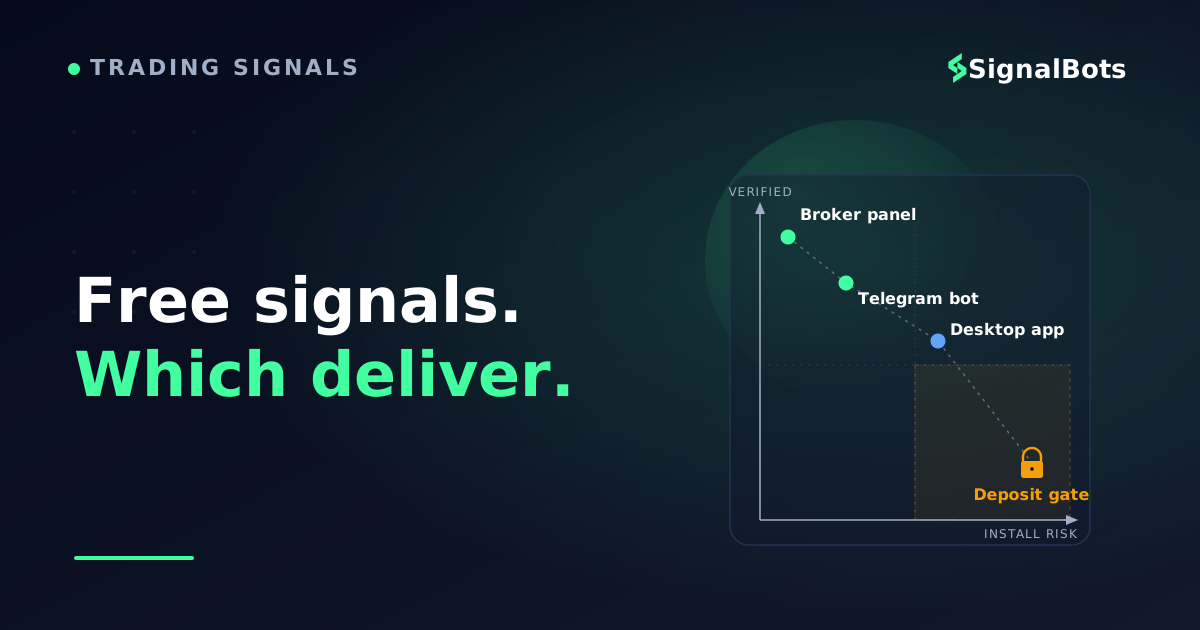
The deposit gate is the one that catches cost-sensitive traders hardest, because it looks like patience rather than a trap. The app installs free, the interface works, and the signals are blurred, delayed, or capped until you register — and then until you fund — an account through its link. At that point the software was never the product. Your deposit was. When the interface works but the signal stays clouded until you fund an account, the software was never what was being sold.
Red Flags That Mean Skip It or Uninstall It
Some warning signs are worth abandoning a tool over on the spot, no matter how polished the interface is.
A promise of guaranteed or risk-free wins. Regulators writing on this market consistently name fast profit with little or no risk as a hallmark of binary options fraud, and it is the clearest cue to close the tab. No feed removes the loss side of a trade.
A headline accuracy number with no method. A big percentage with no stated sample, period or asset list is decoration. Ask what signal accuracy is actually being measured over, and if the answer is not on the page, treat the figure as absent.
No inspectable history. A tool that shows only its winners, or shows nothing at all, has no verified track record. Losses are the part you learn from.
Signals gated behind a deposit. Covered above, and worth repeating as a hard rule: never fund an account to unlock a feed you have not seen work.
Permission overreach. An alerting app that wants control of your device is not an alerting app.
Pressure and disappearing offers. Countdown timers on a "free" tool exist to stop you researching it.
An unregisterable broker. If the platform behind the signals cannot be found on any regulator's register, the signal quality is the least of your problems. Read our risk warning before trading on the strength of any free feed.
The accuracy-claim flag deserves its own arithmetic, because binary payouts make the bar higher than beginners expect.
How to Test a Free Tool Before You Trust It With Real Money
Binary options pay out asymmetrically: a win returns a fraction of your stake, a loss returns nothing. That shape decides how good a signal feed has to be before it is worth following at all.
The arithmetic behind the claim
Why the break-even bar sits well above half
━ Call payoff━ Put payoffx-axis: underlying price at expiry • y-axis: P&L per $100 staked
Risk is bounded, but so is the reward — which is precisely why a coin-flip hit rate loses money.
Suppose a broker pays 80% on a winning trade and you stake $10 each time. Ten trades, six of them right: six wins return $48, four losses cost $40, and you are up $8 — barely. Drop to five right and you are down $10 on a coin flip. At that payout percentage you need better than roughly 56 wins in every 100 trades just to stand still, before you have paid for a single thing. That is the number any free tool has to beat, not the number on its landing page. Run your own broker's payout through our binary options break-even win rate calculator and you will have your bar in about ten seconds.
Now test against it. The method matters more than the tool, and it costs nothing but patience.
The two-week trial
1Trial on a demo balance only Switch the broker to a demo account and connect nothing else. No deposit, no live credentials in a third-party app, no auto-execution enabled on the first pass.
2Log every call, including the ones you skip Asset, direction, expiry, timestamp, result. Skipped signals belong in the log too — quietly ignoring the ones that looked wrong is how a mediocre feed reads as a good one.
3Fix the sample before you start Decide up front how many signals or how many sessions you will judge it over, and hold to it. A dozen trades tells you nothing; changing the finish line mid-test tells you less.
4Measure against the break-even bar Compare your logged hit rate to the rate your broker's payout demands, not to the tool's marketing. Check the losing streaks too: a feed you cannot sit through is a feed you will not follow.
5Stop conditions — no negotiation Kill the trial immediately if it asks for a deposit to continue, if the feed changes character once the trial ends, if it pushes you to an unregistered broker, or if the log finishes under break-even.
A structured forward test on demo turns 'it felt accurate' into a number you can act on.
That sequence is a forward test in miniature, and running it on a demo account removes every reason to rush it.
Two things people get wrong here. They judge on too small a sample size, where a run of luck in either direction swamps whatever edge exists. And they compare against a remembered feeling rather than the logged historical win rate — the only version of the number that survives contact with a spreadsheet.
Want Signals Without Installing Anything?
If you have worked down the checklist and the red flags, you have probably reached the same conclusion most traders do: the install itself is the expensive part. Unknown publishers, permission requests, dormant apps and deposit gates are all install-layer problems — and free live signal channels sidestep every one of them, because there is no file.
That is the format our own free binary options channel lives in. We run a binary options Telegram channel that delivers signals inside the app you already have: no separate program to download, no APK to sideload, no account registration required before you can see a signal arrive. Concretely, it is the same read you practised in the trial above — asset, direction, expiry — landing as a message you can log and score on your demo balance for as long as you like before anything else changes. You can join it at binary options Telegram signals.
Be clear about what it is not. It is a live alert channel, not standalone software and not an auto-trading bot: it will not sit on your desktop scanning a watchlist, and it will not place trades on your account. If your requirement is specifically a program running on your own machine, or a copier that pushes trades into a terminal, this is not that product — and it does not replace the setup steps that a specific broker's platform requires of you.
Which Free Option Actually Fits You
There is no single best free binary options signals software download, because the three formats fail and succeed for different people. If you want a real program with a stated method and no broker allegiance, vfxAlert is the one that still behaves like software, and its metered free tier tells you honestly where the free ends. If you trade from one platform and mostly want a second opinion inside it, the broker's own signals panel costs you nothing extra and hides nothing about who generated the alert. If your main worry is install risk — and after the checklist above it probably should be — the Telegram formats give you the whole trial with nothing to double-click.
What none of them give you is the thing the marketing implies. A free feed is a hypothesis. The demo log you build over the next two weeks is the evidence, and that log is worth more than any accuracy figure on a download page.
FAQ
Is free binary options signal software really free?
Usually free in one dimension and paid in another. The honest tools meter something openly — a lifetime alert allowance, a restricted asset list, or broker linking held back for the paid tier. The dishonest ones are free until the deposit gate: the interface works, the signals are blurred or delayed, and the lock only opens after you fund an account through their referral link. Free-with-a-stated-limit is a business model; free-until-you-pay-a-broker is a funnel.
Are free binary signal apps on Google Play or the Microsoft Store safe to install?
Store presence means the package passed a platform review, not that the trading logic or the operator was vetted. Regulators publishing on this market make the point explicitly: an app appearing in a legitimate store is not an endorsement of the firm behind it. Judge each listing on publisher identity, permission requests, last-updated date and review authenticity — and treat any prompt to sideload an update outside the store as a reason to uninstall.
What is the difference between a free signals app and an auto-trading bot?
An app that alerts hands you a decision; a bot that executes takes the decision away. Several free Telegram tools do both, with the automation switched off by default until you link an account and set stake, payout and concurrency limits. That distinction is the most important thing to establish before you install anything, because an alert you ignore costs nothing while an automated system keeps trading in your absence.
Do I need a broker account to use free signal software?
It depends on the format. Broker-native panels and official broker Telegram bots require an account with that broker by design, though a demo account is usually enough to watch the feed. Independent tools and open channels do not need one to show you signals. What no legitimate tool requires is a funded account before it will display a single call — that is the deposit gate, and it is the clearest line between a free tool and a free lure.
Is a "free signals script" the same as signal software?
Usually not. When people search for a free binary options signals script or a free signal indicator, they normally mean a chart add-on that draws arrows on their own charts rather than a program that pushes alerts to them — a different product with its own setup and its own repainting pitfalls. The other meaning is a bot script shared in a forum thread, which is an unsigned executable in a text file's clothing and deserves exactly the scrutiny of any other unknown download.
How long should I test a free tool before using real money?
Long enough that luck stops dominating the result, and defined in advance so you cannot move the finish line. Set the sample by signal count rather than by days — a feed that fires a handful of times a session reaches a meaningful sample far sooner than one that fires twice a week. Judge it against the break-even rate your broker's payout demands, and end the trial early only for a stop condition, never for a hot streak.
Sources & Further Reading
Want to go deeper? These independent, authoritative sources shaped this guide — each one is worth reading in full:
The Binary Options Desk is the SignalBots editorial team for fixed-time and OTC trading coverage. We research and write the guides that explain expiry timing, payout structure and disciplined entry across the major brokers.



Discussions 0
Leave a comment