You open MetaTrader, click through to the Navigator panel, and there it is: a folder called Expert Advisors with a few files inside that you have never touched. Or somebody in a group chat tells you to "just run an EA" and moves on, as though that explained anything. Either way you are left holding the same question, and nobody seems willing to answer it in plain words — what is this thing, what would it actually do to your account, and is turning it loose a reasonable idea?
This page answers exactly that. By the end you will know what an Expert Advisor is, how it turns coded rules into live orders on MT4 and MT5, what it genuinely gives you and what it cannot do, what has to be true before one can place a single trade, and which next step matches where you are standing right now. No MQL syntax, no installation click-path — the concept, explained properly, plus a map of where to go from here.
Key Takeaways
An Expert Advisor is a program written in MQL4 or MQL5 that sits on one MT4 or MT5 chart and opens, manages and closes trades whenever its coded conditions are met.
Automation changes who executes your plan, not whether the plan works — an EA is an execution layer, so automating a losing strategy simply loses more consistently.
An EA only trades while the terminal is open and AutoTrading is enabled, which is why serious users test on historical data first and host the platform on a VPS.
Table of Contents (24 min read)Contents
What Is an Expert Advisor (EA) in MT4 and MT5?
An Expert Advisor (EA) is a program that runs inside MetaTrader 4 or MetaTrader 5, sits on one chart, and follows trading rules that somebody wrote in code. When those rules are satisfied it can alert you, open a position, adjust it, or close it — with nobody clicking anything.
Three details in that sentence carry the whole concept:
It is a program, not a service. It runs in your terminal, on your machine, through your broker connection and your account. There is no external server placing trades on your behalf.
It lives on a chart. The chart's symbol and timeframe are its entire world. Attach it to EUR/USD on the H1 chart, and EUR/USD H1 is what it watches.
It does only what its rules say. An EA has no intuition, no memory of your goals, and no awareness of anything its code was not written to read.
You will meet the same object under several names. A "forex robot" in an advert, an "MT4 expert advisor" in a marketplace listing, a trading bot in a forum thread — all of them describe this.
What they have in common is that the decision is made by code rather than by you, which places EA trading squarely inside algorithmic trading. Expert Advisor is simply the name MetaQuotes gave the format inside MetaTrader, and it stuck.
The point of an Expert Advisor is not cleverness — it is that the strategy keeps running when you are not there.
The practical consequence is availability. A manual strategy exists only during the hours you are physically watching a screen; the same strategy expressed as an EA exists whenever the terminal is running. That single shift is what most people are really buying when they go looking for automated trading on MT4 and MT5.
If you want the two-minute version before the detail, this short broker-produced explainer covers the concept concisely:
What is an Expert Advisor? | FOREX.com — FOREX.com
How Does an EA Automate Your Trades?
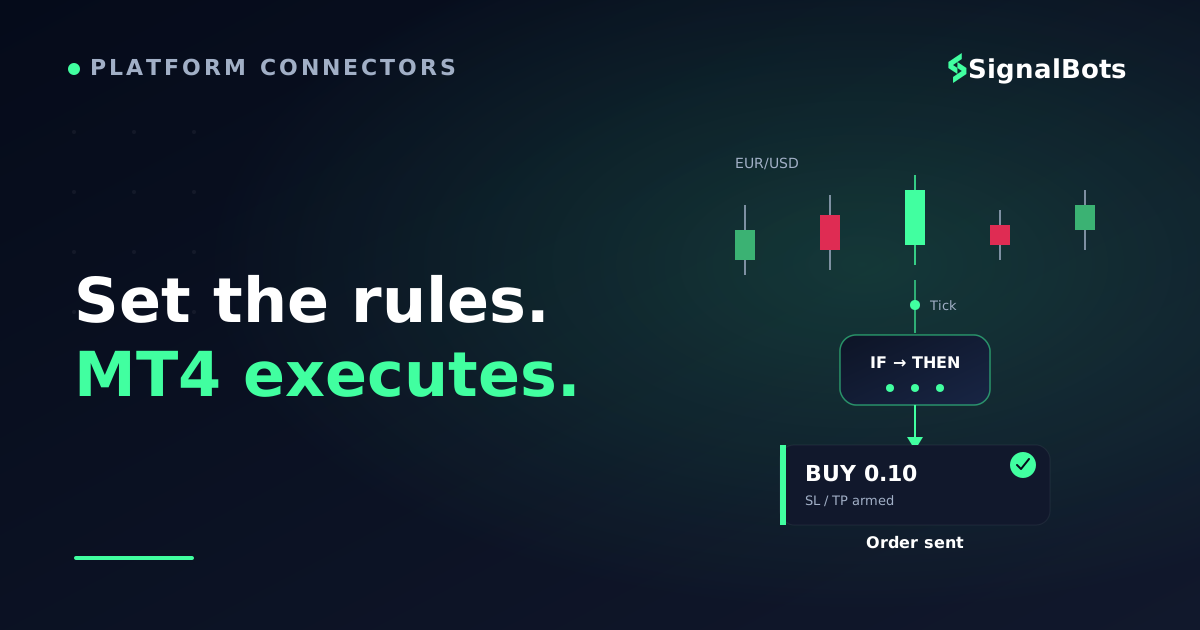
Nothing magical happens under the hood. An EA does not "read the market" the way you do. It re-evaluates a fixed list of conditions every time a new price arrives, and it acts on the tick where they all line up.
Where the automation logic comes from (MQL4 and MQL5)
Every EA is written in MetaQuotes' own programming language — MQL4 for MT4 and MQL5 for MT5 — and compiled into a file the terminal can execute (.ex4 on MT4, .ex5 on MT5). Two consequences matter even if you never open the source.
First, the builds are not interchangeable. An MQL4 EA does not run on MT5, and vice versa, so check which platform a file was compiled for before you buy or download it.
Second, everything the EA will ever do was decided by whoever wrote it: the entry trigger, the exit, the position size, what happens after three losses in a row, whether it hedges or averages down. Running an EA whose logic you cannot read is an act of trust in its author — which is exactly why testing exists.
One piece of jargon is worth learning here, because vendors use it without ever explaining it: a magic number is the identifier an EA stamps on the orders it opens, so that it manages only its own positions and leaves your manual trades — or a second EA's — untouched.
What triggers an EA to open or close a position
An EA runs on a loop driven by price itself. Every time your broker sends a new quote for the chart's symbol, the EA wakes up, runs once from top to bottom, and goes back to sleep.
How an EA turns a price tick into a live order
1
A new price tick arrives
The broker sends a fresh quote for the chart's symbol. That tick is the EA's heartbeat — no tick, no evaluation.
2
The rules are recalculated
Indicator values, price levels, candle patterns, the clock — whatever the code reads is recomputed on the new price.
3
The filters get their veto
Spread too wide, maximum trades already open, outside its allowed hours? Any failed filter and the EA does nothing this tick.
4
The order goes to your broker
If every condition passes, the EA submits the order through the terminal with the lot size, stop-loss and take-profit its rules define.
5
The position is managed to the exit
On later ticks it can trail the stop, take partial profit, or close on an exit signal — then it waits for the next valid setup.
Every EA, however complex, is this loop repeated on every incoming price.
Most of the time that loop ends at step three. An EA is idle far more often than it trades — on a quiet H1 chart it may run thousands of times between two orders. That is normal behaviour, and it is the first thing that surprises people who expect constant activity on the screen.
Manual Trading vs. Letting an EA Trade for You
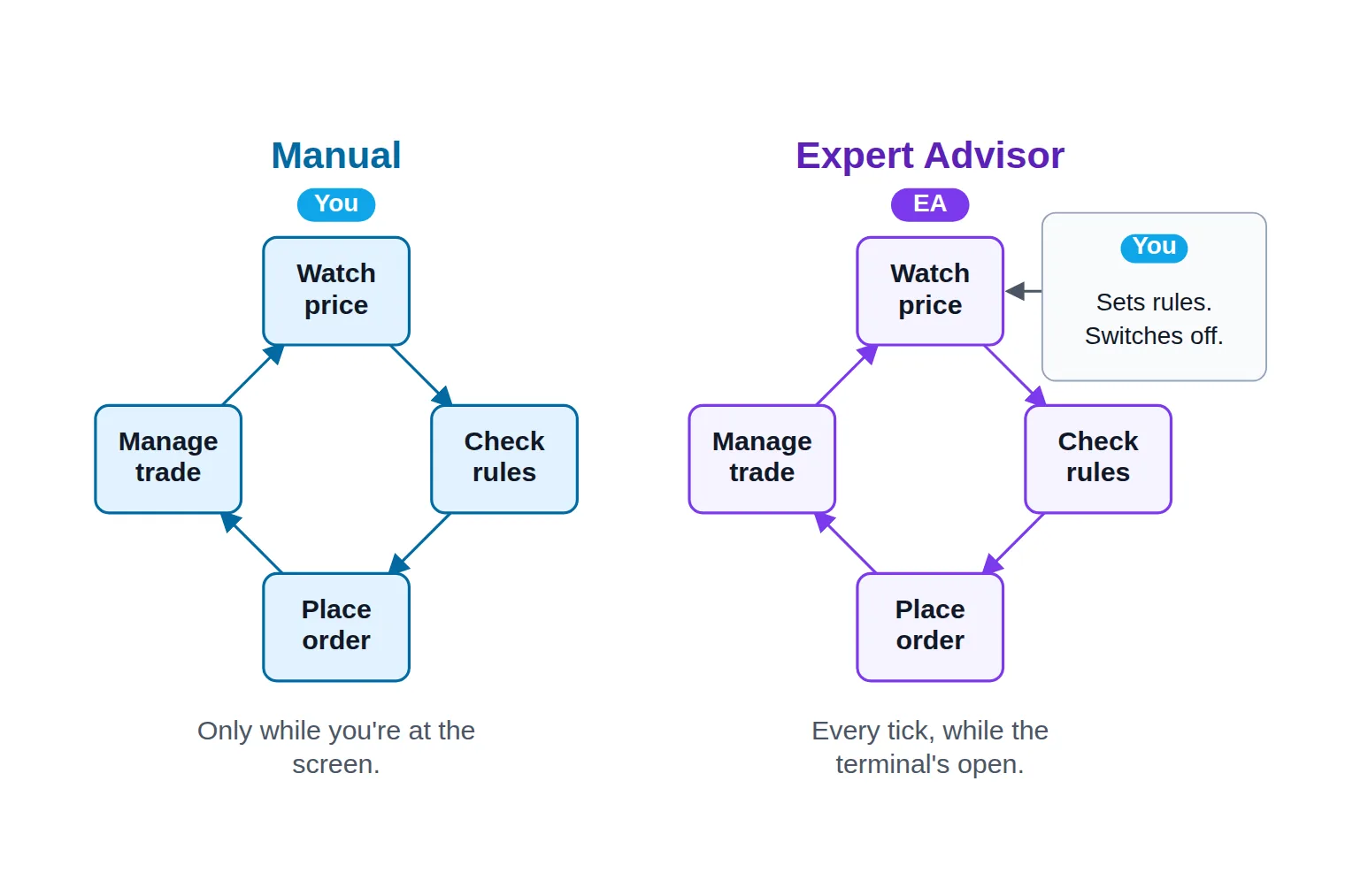
Here is the reframe that makes the rest of this obvious: automation does not change the steps of a trade. Someone still has to watch price, check the rules, place the order, and manage it to the exit. What changes is who performs each step — and how many of them can happen while you are asleep.
The same four steps in both loops. The only difference is who performs them, and whether the loop keeps turning while you sleep.
Three things genuinely improve when software takes over the middle of that loop:
Presence. The trade no longer needs you at the screen. It needs the terminal open and connected, which is a much easier thing to arrange.
Consistency. After two losses in a row you might talk yourself out of the third setup — and that is often where a positive expectancy quietly leaks away. An EA takes the third setup.
Speed. The gap between "condition met" and "order sent" shrinks from seconds or minutes to a fraction of a second.
One thing genuinely gets worse: you give up discretion. You would probably stand aside ten minutes before a central-bank rate decision. An EA will not, unless somebody coded a news filter into it. It cannot notice that spreads have blown out, that the pair has gone untradeable, or that today's price action looks nothing like the market its rules were designed for.
So the real choice is not "manual versus automatic". It is that you stop making individual trade decisions and start making system decisions: which rules to run, how much to risk per trade, and when to switch the thing off.
Benefits and Limits of Trading With an EA
What an EA reliably gives you:
Execution exactly as written, every single time the conditions trigger, with no hesitation and no improvisation.
Coverage of sessions you cannot sit through — the Asian open, an overnight breakout, the last hour of a Friday.
Reaction speed no manual trader matches.
A strategy that is finally testable. Rules explicit enough to compile are explicit enough to backtest over historical data — which is impossible for a strategy that lives partly in your head.
What an EA does not give you:
An edge. This is the misunderstanding that costs people the most. An EA is an execution layer, not a strategy. Automating a losing method simply loses more consistently.
Immunity from drawdown. Losing runs belong to the strategy, and the EA will trade straight through them without flinching — a strength while the rules still fit the market, a problem when they stop.
Adaptation. Markets change character. Code does not, until a human changes it.
A promise that the test predicts the future. A result tuned until it looks perfect on past data is usually overfitted, and the live version disappoints.
The honest way to hold both halves at once is to look at what a genuinely working edge actually produces. Suppose an EA wins 52% of its trades at a reward-to-risk ratio of 1.2:1 and risks 1% of the account per trade — modest, but positive. Run that same edge two hundred separate times over two hundred trades and you do not get one equity curve. You get a fan.
Illustrative hypothetical
One edge, two hundred possible futures
10th–90th percentile bandMedian pathBreak-even
Median return
—
final equity, all paths
Profitable paths
—
finished above start
Worst drawdown
—
deepest peak-to-trough
Risk of ruin
—
hit −25% equity
Identical rules, identical edge, no bug in the code — and the paths still spread this widely. A backtest sets the centre of the band; it does not choose which path your account walks.
Same rules, same edge, and the distance between the best and the worst path is enormous. That is not a flaw in the EA — it is what trading a probabilistic edge looks like once you stop averaging it. It is also why position sizing, rather than the entry signal, decides whether you are still trading at the bottom of that band. If you have never sized a position from a fixed risk percentage, work through it once on the forex position size calculator before an EA starts doing it for you at machine speed.
Two further realities a flattering backtest tends to understate: slippage on live fills, and spreads that widen at exactly the moment a breakout rule fires.
What You Need Before an EA Can Run
An EA is not a cloud service you subscribe to. It is a file that executes inside a program on a computer, and everything that file depends on has to be in place before it can send a single order.
Before an EA can trade for you
0 / 6
An MT4 or MT5 account with a broker that permits automated trading on your strategy type.
The EA compiled for your platform — an .ex4 file for MT4, an .ex5 file for MT5.
The file placed in the terminal's Experts folder so the EA appears in the Navigator panel.
AutoTrading enabled at terminal level and in the EA's own settings dialog.
The terminal left open and connected, either on your own machine or on a VPS.
A historical test and a demo forward test completed before the EA touches funded capital.
★
Checklist complete — you’re cleared to proceed.
Six conditions. Miss any one of them and the EA either sits on the chart doing nothing, or stops halfway through a trade.
Three of those lines are worth a word of nuance. AutoTrading is the master permission for the whole terminal, and each EA carries a second, separate permission inside its own settings dialog — an EA sitting silently on a chart is almost always one of those two switches still off. Broker permission is the quieter one: most forex and CFD brokers offering MetaTrader allow automation, though some restrict particular tactics such as ultra-short scalping, so it is worth confirming before you build a strategy around one.
The uptime line is the requirement that catches almost everyone, because nothing warns you. Close MetaTrader, sleep the laptop or drop the Wi-Fi, and your EA stops mid-strategy — possibly holding an open position it can no longer manage. That is the entire reason traders rent a VPS, a small always-on remote machine whose only job is to keep the terminal awake. The two tests at the bottom of the list also do different jobs: historical testing tells you whether the rules ever had an edge, while a forward test on a demo account tells you whether the live version behaves like the tested one, with real spreads and real fills.
None of that is difficult, but all of it is required, and none of it is the strategy. Once the conditions are met, the only question left is which of them you still have to solve.
Where to Go Next: Run One, Test One, or Build One
Find yourself in this map. Each situation has one obvious next move, and the rest of the path is here too, so you can see what follows it rather than only the step in front of you.
"I have an EA file and no idea what to do with it." The practical starting point is how to install and activate an EA on MT4 and MT5 — file locations, the two permission switches, and the small smiley face in the chart corner that tells you the EA is actually armed. Underneath that sits the mechanical question of how an EA executes trades on MT4: what happens inside the terminal between your EA's order and your broker's fill.
"Mine keeps missing trades overnight." That is an uptime problem, not a strategy problem, and choosing a VPS for MT4 and MT5 EAs is its own decision with its own criteria.
"I want the whole platform in one place." There is a full MT4 automated trading guide and a separate MT5 automated trading guide. They are genuinely different reads: MT5 handles positions differently from MT4 — netting versus hedging accounts — and reaches more asset classes, so automation behaves differently on it.
"My EA does not do the one thing I need." There is a whole layer of MT4 EA tools, add-ons and plugins — trade managers, loaders, copiers — that solve problems your EA was never written to handle. And if you are starting to wonder whether MetaTrader is even the right home for your automation, the comparison of MetaTrader alternatives for automated trading answers that directly.
Already Trading on Signals? Route Them Into an EA
If you already act on trade calls — from a channel, a service, a friend who is better at this than you are — then you are doing the manual half of automation already. Somebody else supplies the analysis; you supply the clicking, the hesitation, and the entries you miss because you were driving.
The bridge you want is a copier: software that reads incoming signals and turns them into orders on your MT4 or MT5 account, sized by your own risk rules rather than the sender's. A Telegram-to-MT5 copier is the most common shape of it, but the principle holds whatever the signal source.
Choosing between that and a self-contained EA is really the build-versus-buy-versus-signals question, and it belongs to setting up a full automated trading system end to end — the page that covers picking your strategy source, wiring execution to it, and defining the risk controls and monitoring that keep the whole arrangement honest.
Wherever you land on that map, the thing itself is no longer a mystery. The next time someone tells you to "just use an EA", you know exactly what is being proposed: handing a fixed set of rules to a program that will follow them faster and more patiently than you ever could, on one chart, in a terminal that has to stay awake. Whether that is a good idea depends entirely on the rules — which is now something you can test, instead of a mystery you have to take on faith.
FAQ
Is an Expert Advisor the same thing as a trading bot?
In everyday use, yes — "Expert Advisor" is simply MetaTrader's name for it. "Trading bot" is the generic term and also covers automation on crypto exchanges, TradingView-driven systems and broker APIs. So every EA is a trading bot, but not every trading bot is an EA: platforms outside MetaTrader use their own formats and languages, and an EA file will not run on them.
Do I need to know how to code to use an EA?
No. Running an EA that somebody else wrote requires no programming at all — you place the file, set its inputs, and enable AutoTrading. Coding becomes relevant when you want to change what the EA does, or when you would rather verify its logic than trust a seller's description. Reading enough MQL4 to follow an entry rule is a far smaller job than writing an EA from scratch.
Can an EA keep trading when my computer is off?
Not by itself. An EA only runs while its MetaTrader terminal is open and connected to the broker, so shutting the machine down stops it — sometimes with a position still open. Traders solve this by running the terminal on a VPS, a remote machine that stays powered on permanently, so the EA keeps working overnight and through local internet outages.
Will the same EA work on both MT4 and MT5?
Only if the developer compiled a version for each platform. MT4 runs MQL4 and MT5 runs MQL5; the compiled files are different formats and are not interchangeable. Serious vendors ship both builds — check which one you are downloading before you attach it to a chart, because the wrong build simply will not appear in the platform.
Can an EA lose money?
Yes. An EA can lose money just as quickly and just as consistently as it can make it, because it will keep executing its rules through conditions they were never designed for. Automation removes hesitation, not risk. Treat any EA advertised with guaranteed or risk-free returns as a warning sign, size your positions so that a losing run is survivable, and read our risk warning before trading a live account.
Are free EAs worth using?
Some are, mostly as learning material. The problem with free EAs is rarely the price — it is the missing information: no description of the actual rules, no out-of-sample test, and often aggressive recovery logic such as doubling position size after a loss, which produces a beautiful equity curve right up until the run that erases it. Test any free EA on historical data and then on a demo account before it goes anywhere near funded capital.
Sources & Further Reading
Want to go deeper? These independent, authoritative sources shaped this guide — each one is worth reading in full:
The Cross-Market Desk is the SignalBots editorial team for topics that span every market — platform connectors, copy trading, partnership and IB programs, and the general mechanics of trading automation. We research and write the guides that apply no matter what you trade.



Discussions 0
Leave a comment