You attach the Expert Advisor to a chart, watch it take two clean trades, and go to bed happy. In the morning there is nothing in the log after 01:14. The laptop went to sleep, and the EA it was hosting went to sleep with it.
That is the moment most traders discover the uncomfortable truth about MetaTrader automation: an EA is not a service running somewhere in the cloud. It is a program inside a terminal on one specific machine, and it makes decisions only while that machine is awake, powered, and connected. A virtual private server is the standard fix — but "get a VPS" is where most advice stops, right before the part that decides whether it was money well spent: which kind, sized how, in which city, and at what point the free one your broker offers quietly costs you more than a paid one.
This page assumes you already know what an Expert Advisor is and have one running. What follows is the hosting decision underneath it.
Key Takeaways
Your EA only decides while a terminal is receiving ticks — and the expensive failure is not the missed entry, it is an open position whose exit logic stopped running.
There are three hosting paths, not two: your broker's bundled VPS, MetaTrader's own virtual hosting, and a third-party Windows VPS — each with different costs and hard limits.
Latency only counts between the VPS and your broker's trade server; pick the datacenter for that leg, then verify the ping yourself instead of trusting the sales page.
Size the plan to your real terminal and chart count, and force a reboot before going live — most traders overbuy RAM and underestimate what a restart does to automated trading.
Table of Contents (30 min read)Contents
Why Your EA Stops Trading the Moment Your PC Does
An EA on MT4 or MT5 is event-driven. Its main handler runs when the terminal receives a new tick from the broker's server — no tick, no execution, no decision. And the terminal is the thing that receives ticks. So the chain is brutally short: no running terminal, no ticks; no ticks, no EA.
That chain breaks in four ordinary ways, none of which announce themselves:
Sleep and hibernation. Closing a laptop lid suspends every process on it. The terminal does not reconnect later and quietly catch up on the ticks it missed — those decisions were simply never made.
Forced restarts. Windows updates reboot at whatever hour they decide. Unless the terminal is set to launch with Windows and restore its charts, you come back to an empty desktop. Unless algo trading permission is restored too, you come back to a terminal that looks perfectly fine and trades nothing.
Connection drops. A router reset, an ISP blip, a Wi-Fi handover — the terminal shows "No connection" and stops receiving ticks until it reconnects.
Power. A desktop without a UPS is one flicker away from an unattended position.
The expensive failure is not the missed entry — it is the unmanaged exit. A missed entry costs you a trade you never took, which is annoying and finite. But if your EA is the thing that trails the stop, moves to break-even, scales out, or closes on a time filter, then that logic lives in a process that is no longer running.
Orders sitting on the broker's server survive fine, because the broker holds them: a hard stop-loss, a take-profit, a pending order. Anything your EA was going to compute on the next tick does not. That asymmetry is the real argument for hosting the terminal somewhere else, and it is why "I will just leave the PC on" is a weaker plan than it sounds.
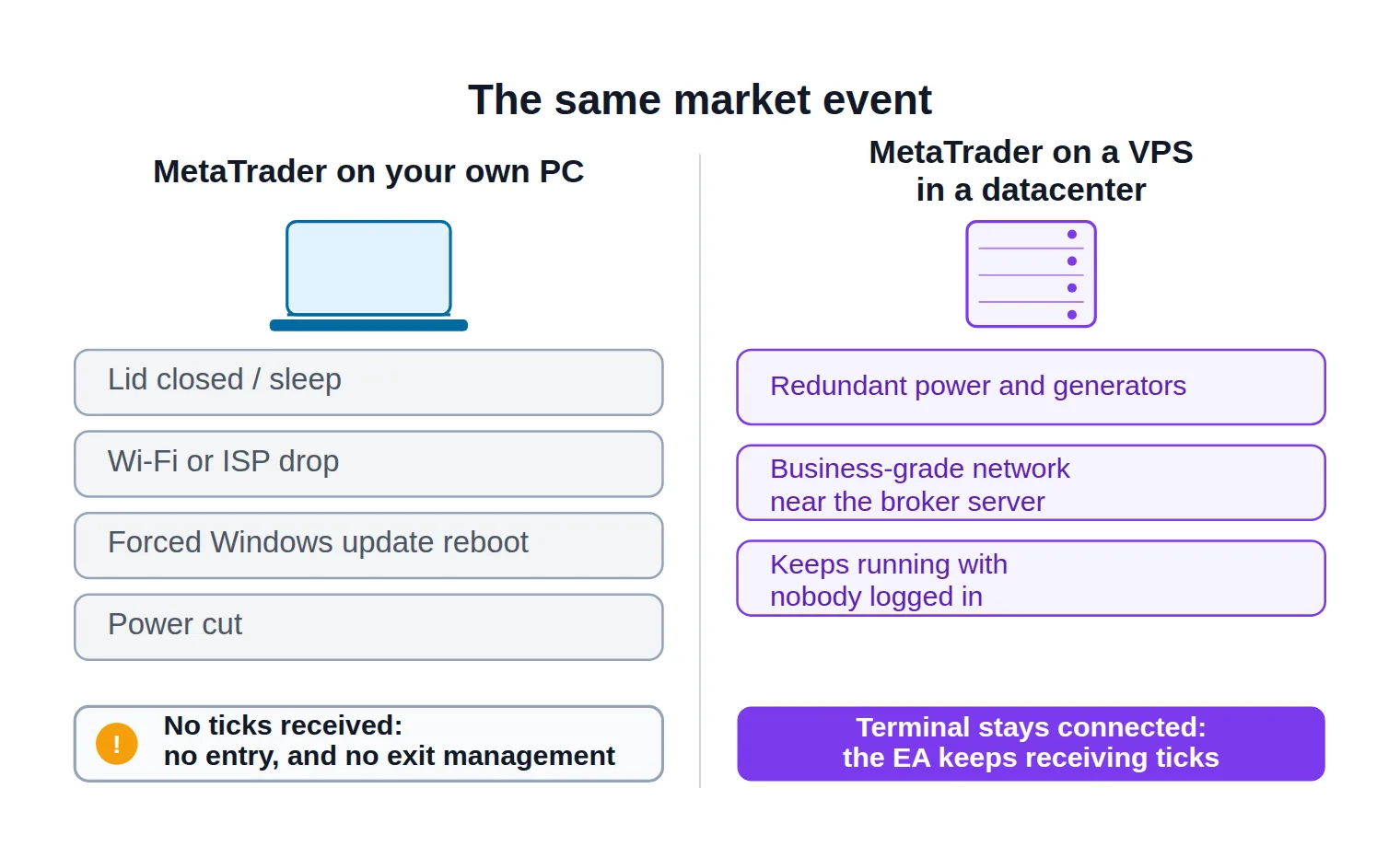
The same market event, two hosting setups: the home PC has four independent ways to drop out, and none of them announce themselves.
Leaving the PC on genuinely helps — right up to the first forced update, the first storm, or the first time you need the machine for something else. It is not a bad plan; it is an unmonitored one. Nothing tells you the terminal went down. You find out from a position that should have closed and didn't.
What a VPS Actually Is (and What It Isn't)
A VPS is a slice of a physical server in a datacenter, running its own copy of Windows, that you rent by the month and reach over Remote Desktop. You get administrator access to what is, for every practical purpose, a second computer — one whose only job is to keep a MetaTrader terminal open.
The mechanical detail that makes the whole thing work is easy to miss: closing the Remote Desktop window does not close the programs inside it. You log in, start the terminal, disconnect, and shut your own laptop. The session keeps running on hardware you never touch.
Three things change the moment the terminal lives there instead of on your desk:
Power and connectivity become somebody's full-time job. Datacenters run redundant power feeds, generators, and multiple upstream network providers. Your flat has one of each, on a good day.
The machine sits physically closer to your broker. Trading-focused providers place servers in the same financial datacenter campuses brokers use, which shortens the round trip your orders travel.
Nothing competes with the terminal. No video calls, no browser with forty tabs, no antivirus full-scan at 2 p.m. eating the CPU cycles that were supposed to process a tick.
Be equally clear about what a VPS does not do:
It does not improve a strategy. It removes an infrastructure risk, not a market risk — a losing EA simply loses more consistently.
It does not run "in the cloud" independently of MetaTrader. It is still a full terminal that must stay logged into your account.
It does not shield you from the broker's side: server maintenance, weekend gaps, requotes and order rejections happen exactly as before.
It does not babysit fragile code. An EA that crashes will crash unattended, at 3 a.m., with nobody watching.
Three Ways to Host MT4/MT5 — Which One Fits You?
Almost every page on this topic presents two options, because whoever wrote it sells one of them. There are three, and they are genuinely different products with different failure modes.
1. The VPS your broker bundles
Most MT4/MT5 brokers offer one, and the commercial logic is consistent across the industry: it is free while you clear a threshold — a minimum deposit, a minimum number of standard lots traded per month, or both — and a modest monthly fee is debited from your trading account in any month you fall short. It arrives pre-configured, it sits next to that broker's trade server, and it is the least work of the three by a distance.
The catch is the one that never appears on the offer page: the threshold quietly prices your strategy. If qualifying means trading more lots than your EA naturally produces, you are paying for "free" hosting with trades you did not want to take — the exact opposite of what a rule-based system is for. Check the threshold against your realistic monthly volume first, and treat the fallback fee as the actual price.
The other limit is structural. The box is tied to that broker. If you run EAs across two brokers, or you expect to switch, it does not come with you.
2. MetaTrader's own virtual hosting
Fewer traders know this exists: you can rent a virtual server from inside the terminal — right-click the account in the Navigator panel, register a virtual server, pay from your MQL5.community balance — and MetaQuotes runs a headless copy of your environment on a server chosen for its proximity to your broker. You then migrate your charts, EAs, indicators and settings across, and close your own terminal.
It is the cheapest and simplest path, and it carries a specific set of hard limits you must check before you buy:
There is no desktop. You never log into Windows. You manage everything by synchronising from your local terminal — which means any change you make locally is invisible up there until you re-synchronise. This is the single most common surprise.
DLL calls are forbidden. An EA that imports an external library stops with a critical error on the first call, regardless of what you allowed locally. If your EA ships with a .dll, this path is closed.
Not everything migrates. Charts with attached EAs and indicators do. Scripts, terminal global variables, and oversized files do not.
Anything using WebRequest needs its addresses cleared first. Set up the WebRequest URL whitelist before migrating, or the call fails once it is up there and you have no console to debug it from.
Automated trading is always enabled in the virtual terminal, whatever your local setting was. Convenient, and slightly dangerous: migrate a half-configured EA and it starts trading.
If your EA is self-contained MQL code with no external dependencies, this is usually the best value on the list.
3. A third-party Windows VPS
A general-purpose or trading-specialised hosting provider rents you a Windows instance with full administrator access over Remote Desktop. You install everything, and you control everything: as many terminals as the specs support, across as many brokers as you like, plus whatever else the setup needs — a copier, a monitoring agent, a bridge, a browser.
The price of that freedom is that you are now the system administrator. Updates, restarts, backups, and verifying the latency claim are all yours. Quality between providers varies more here than anywhere else in this decision, which is exactly why the criteria in the next section exist.
The three hosting paths
What you're comparing
Broker-provided VPS
MetaTrader virtual hosting
Third-party Windows VPS
Typical cost
Free above a deposit or monthly-volume threshold; small fee below it
Flat monthly rent from your MQL5.community balance
Monthly fee to the provider; wide range by spec and location
What it takes to qualify
A live account meeting the broker's deposit or lots-traded threshold
Nothing beyond a funded MQL5.community balance
A payment method; no trading conditions attached
Server location
Chosen for you, beside that broker's trade server
Chosen automatically for proximity to your broker
You pick the datacenter — and you verify it
Remote desktop access
Usually yes, as a full Windows session
None — you sync from your own terminal
Yes, with administrator rights
DLLs, bridges, extra software
Usually allowed
Blocked; a DLL call stops the program
Anything you can install on Windows
Multiple brokers on one box
No — it is tied to that broker
One migrated environment per rented server
As many terminals as the specs carry
Who maintains it
The broker
MetaQuotes — nothing for you to patch
You: updates, restarts, backups, monitoring
Best suited to
Traders already at the broker's volume threshold
A self-contained EA with no external dependencies
Several EAs, several brokers, or custom tooling
Same job, three different products: the rows that constrain YOUR setup — DLLs, multiple brokers, and who does the maintenance — decide this more often than price does.
Read across those rows and the routing is usually obvious. If your EA is plain MQL with no external files and you want the lowest total effort, MetaTrader's virtual hosting wins on cost and setup time. If you already trade the volume your broker's threshold demands, take their VPS — you are effectively being paid to use it. If you run more than one terminal, more than one broker, or anything that has to be installed, buy a third-party VPS and manage it properly.
What to Look For When Choosing an MT4/MT5 VPS
Every VPS sales page leads with the same three claims: low latency, high uptime, powerful specs. All three are checkable, and the checking is the entire job.
Server location and latency
The number that matters is the round trip between the VPS and your broker's trade server — not the distance between the VPS and you. You can sit in Lagos administering a London VPS through a laggy connection and it changes nothing, because the only leg your EA's orders travel is VPS to broker.
So the sequence is: find out where your broker hosts its MT4/MT5 servers — support will tell you, and the big financial datacenter campuses around London, New York, Tokyo, Frankfurt and Singapore cover most of them — then buy a VPS in that same metro area. A "low latency" claim that names no datacenter is marketing, not a specification.
Then verify it yourself. MetaTrader displays the ping to the trade server in the connection indicator at the bottom-right of the terminal; open it on the VPS and on your home machine and compare the two. Most providers offer a trial or a short refund window, and this is what it is for.
How much any of this matters depends entirely on your strategy, and honest advice says so out loud. An EA acting on closed daily bars will not notice a hundred milliseconds. A scalper, a news EA, or anything that fires a market order the instant a level breaks absolutely will — and the cost arrives as slippage, not as an error message you can search for.
Suppose your EA buys the moment a level gives way. Between the tick that triggers the decision and the fill landing, price keeps moving. Shorten the round trip and you shorten that gap; add a slow, distant connection on a fast break and you may give up an extra fraction of a pip on every entry. On one trade that is invisible. Multiply it by your monthly trade count and your position size and it becomes a line item — run your own numbers through the pip value calculator to see what a badly-placed server would actually cost you.
That is also why execution speed and signal latency are worth measuring rather than assuming. No marketing page has ever reported a bad number.
Uptime, reboots, and what the guarantee actually covers
An advertised uptime figure is a service-credit policy, not a promise about your terminal. Read what it excludes — scheduled maintenance and host patching almost always sit outside it — and read what compensation actually means: a credit against next month's bill, never anything connected to your trading result.
The failure that hurts is smaller and far more common than an outage: the VPS reboots and MetaTrader does not come back the way you left it. Host patching, a Windows update, a hypervisor migration — the machine restarts inside a minute and you never notice, except the terminal is closed, or open with no charts, or open with automated trading switched off. Before you trust the setup with live money, force a reboot yourself and watch exactly what happens.
Two more questions are worth asking while you are still on the sales chat: does the provider warn you before a planned reboot, and does it offer monitoring that alerts you when the machine goes down? Without that, you learn about downtime from a trade that never appeared.
Finally, plan your kill switch before you need one. If the VPS becomes unreachable mid-session, how do you flatten open positions? A broker mobile app logged into the same account is usually the answer — set it up on day one, not during the incident.
Sizing RAM, CPU, and disk to your actual EA load
This is where most of the money gets wasted. A "trading-optimised" plan with 16 GB of RAM is a perfectly good product and completely unnecessary for one terminal running three charts.
What genuinely consumes resources on MetaTrader:
Each terminal instance carries a fixed baseline, and this is the single biggest driver. Two brokers means two terminals means roughly double the memory before you open a chart.
Each open chart adds a small, steady amount on top. Remember that MT4 and MT5 run one EA per chart — three EAs means three charts, not one busy one.
What the code does per tick matters more than how many EAs you run. A heavy custom indicator recalculating a long history on every tick will pin a core; a rule set checking two moving averages on bar close will not.
Windows itself wants a couple of gigabytes before MetaTrader even opens. Budget for the operating system, not just the platform.
Two related traps appear when you consolidate EAs onto one terminal. Give each EA a distinct magic number so it only ever manages its own positions, and expect the occasional trade context is busy error when several EAs try to send orders in the same instant — the terminal processes them one at a time.
On CPU, per-core speed beats core count for MetaTrader work, so do not buy eight vCPUs for a single terminal. On disk, an SSD or NVMe volume matters far more than raw capacity, though history files and logs do grow over months — leave room rather than buying the floor.
Size it before you shop
What size VPS does your EA setup actually need?
Set your real configuration — not the one on the provider's example page — and read off the plan size to shop for.
MetaTrader terminals running
Charts with an EA attached (total)
Heavy indicators or tick-by-tick logic
Extra tools on the box (copier, bridge)
Working RAM in use
—
Plan to shop for (with headroom)
—
vCPU cores
—
A starting bracket, not a verdict: terminal count drives memory far harder than chart count, and the operating system is already inside the number.
Treat the result as a bracket to shop inside. If a provider's cheapest tier already clears it, start there — upgrading later takes minutes, and by then you will have real numbers from your own Task Manager to upgrade against.
Windows version, MetaTrader compatibility, and the clock
Confirm the operating system. MT4 and MT5 are Windows applications. Most trading VPS ship a Windows Server build; some budget plans ship a desktop Windows image, and some ship Linux with a compatibility layer. The last one works until it doesn't, and no EA vendor tested against it.
Confirm you can install software. If your EA needs a DLL, a bridge, or a third-party tool, you need administrator rights on an unrestricted machine — which immediately rules out MetaTrader's virtual hosting.
Match the platform to the code. An EA compiled for one platform does not run on the other; if you are changing hosts and moving from MQL4 to MQL5 at the same time, settle that locally first and migrate only working code.
Check the clock. The VPS should synchronise its time automatically. Clock drift quietly breaks anything time-based — session filters, news windows, cut-off times — and makes your own records disagree with the broker's server log.
Ask about outbound restrictions. Some cheap plans block the ports a Telegram bridge, webhook listener, or e-mail alert needs, and you will only discover it after the EA is live.
Pre-purchase
Verify these on a trial, not on the sales page
0 / 8
Ping your broker's trade server from the VPS itself and compare it with the number your home connection gives you.
Confirm the operating system is a licensed Windows build MetaTrader is actually tested on — not Linux with a compatibility layer.
Check that Remote Desktop access is included and that you can install software, if your EA needs a DLL or a bridge.
Reboot the machine deliberately and watch whether MetaTrader reopens, restores its charts, and re-enables automated trading.
Ask what the uptime figure excludes, and whether you are told in advance about scheduled maintenance and host patching.
Confirm the plan runs your real terminal and chart count with headroom, rather than the tier the sales page pushes.
Check the billing terms: monthly to start, and find out whether the Windows licence, backups and snapshots are billed separately.
Write down how you would close open positions from your phone if the VPS became unreachable mid-session.
★
Checklist complete — you’re cleared to proceed.
Every item here is verifiable on a trial or by asking support — none of it can be confirmed from a features page.
How Much Should an MT4/MT5 VPS Cost?
Prices move and vary by region, so treat what follows as brackets to sanity-check a quote against, never as a price list.
Broker VPS. Free while you clear the deposit or monthly-volume threshold; otherwise a modest monthly charge debited straight from your trading balance. The real cost is not the fee — it is whether the threshold pushes you to trade more than your strategy calls for.
MetaTrader virtual hosting. A flat, low monthly rent paid from your MQL5.community balance, usually discounted for longer prepay. No separate Windows licence, no administration time, no hardware to size.
Third-party VPS. A wide band. A general-purpose cloud instance can start in the low single-digit dollars per month; trading-specialised providers with named datacenter locations and a Windows licence included typically sit in the low tens of dollars for a plan that comfortably runs a terminal or two. Above that you are buying more memory, dedicated rather than shared CPU, or premium network routing — all real things, and all worth paying for only once you have proven you need them.
Watch the extras that never appear on the headline price: a separately-billed Windows licence, backups and snapshots as paid add-ons, "unmetered" bandwidth with a fair-use clause buried in the terms, setup fees, and annual prepay that locks you in before you have measured anything.
Two rules keep this sane. Start on a monthly plan until you have watched the provider through at least one maintenance window. And buy the smallest tier that runs your setup with headroom — upgrading a VPS takes minutes, while recovering a year you prepaid to an unreliable host takes a support ticket and a lot of optimism.
Getting Your Terminal Onto the VPS
If you took MetaTrader's virtual hosting there is nothing to install. You prepare the charts and EAs locally, run the migration from the terminal, and re-synchronise the environment after every change you make afterwards. The whole model is "your local terminal is the master copy" — forget the re-sync and you are running yesterday's settings.
For a broker VPS or a third-party VPS, you are setting up a real Windows machine, and the order of operations matters.
First hour on a new box
Getting a Windows VPS ready for MetaTrader
1
Connect over Remote Desktop
Use the address and administrator password the provider sends to open a Windows session from your PC, tablet, or phone.
2
Secure it and fix the clock
Change the default password, leave the firewall on, and enable automatic time synchronisation so your records match the broker's.
3
Install the terminal from your broker
Download MT4 or MT5 from your own broker's link rather than copying your local folder across, then log into your account.
4
Copy the EA and its preset files
Move only the compiled EA and any preset files into the terminal's Experts folder, then refresh the Navigator panel.
5
Prove it survives a restart
Reboot the VPS on purpose and confirm the terminal reopens, the charts restore, and automated trading comes back on by itself.
The last step is the one people skip — and it is the only one that proves the setup survives the thing most likely to happen to it.
From there, installing and activating the EA on the VPS terminal is the same sequence you already ran locally — attach it to the chart, allow algo trading, confirm it is live. Nothing about the hosting changes those steps.
Two habits are worth building on day one. Run the EA on a demo account on the VPS for a few sessions before pointing it at live money: you are not testing the strategy here, you are testing the hosting — does the terminal stay connected overnight, does it survive a reboot, do the logs read as continuous? And once everything works, take a snapshot or write the configuration down, so rebuilding the box is a twenty-minute job instead of an evening.
When a VPS Is Actually Worth It
Come back to the laptop that went to sleep. The question was never "is a VPS good." It is whether the gap between your machine's reliability and your EA's requirements is wide enough to pay to close.
It is wide — and you should host remotely — if any of these are true: your EA manages its own exits rather than placing broker-side stops; it trades sessions that run while you sleep; it reacts to news or trades intraday, where a delayed fill is a measurable cost; you run more than one EA or more than one broker; or you are inside a funded-account challenge where a daily-loss rule makes one unattended position genuinely expensive.
You can reasonably wait if you run a single EA on closed daily bars, every position carries a hard stop and target held on the broker's server, and your machine is a desktop that already stays on behind a UPS. That describes a narrower group of traders than it sounds like.
Whichever path you pick, the discipline is the one that makes automated trading work at all: measure instead of assume. Ping the broker's server from the box you actually bought. Reboot it on purpose. Read the log the morning after. Hosting is infrastructure — it removes one category of failure from your results and leaves every market risk exactly where it was, so read the risk warning and size positions for the strategy, never for the server.
FAQ
Do I still need to leave my own computer on after moving to a VPS?
No. Once the terminal is running on the VPS and you have disconnected the Remote Desktop session, your own machine is irrelevant to the EA — you can shut it down, take it on a flight, or reinstall it. The same applies to MetaTrader's virtual hosting once migration is complete, with one difference: you will need your local terminal again whenever you want to change something, because that is where you re-synchronise the environment from.
Can I run MT4 and MT5 on the same VPS?
Yes, and you can run several copies of each, one per broker. They are separate installations with separate memory footprints, so size the plan for the total rather than for the largest one. If two installations point at the same broker, install them in different folders so their settings and logs stay separate.
Will a VPS make my EA more profitable?
Not by itself. A VPS removes downtime, sleep, and connection drops from the list of things that can go wrong, and it can reduce slippage if it moves the terminal meaningfully closer to your broker's server. Both are real improvements to execution quality. Neither changes the logic of the strategy — an edge that does not exist on paper will not appear because the hosting improved.
How do I check the latency between my VPS and my broker?
Open MetaTrader's connection indicator at the bottom-right of the terminal, which reports the ping to the trade server, and read it on the VPS and on your home machine for comparison. For a second opinion, ping the broker's server address from a command prompt on the VPS. Do this during an active session rather than on a quiet weekend, and repeat it a few times before drawing a conclusion.
Is MetaTrader's virtual hosting the same thing as a VPS?
It is a VPS in the sense that your terminal runs on rented hardware in a datacenter near your broker, but it is not a general-purpose Windows machine. There is no remote desktop, DLL calls are blocked, extra software cannot be installed, and it mirrors an environment you configure on your own terminal rather than one you build on the server. For a self-contained EA that is a fair trade; for anything with external dependencies it is a blocker.
What happens to my open trades if the VPS reboots?
Anything held on the broker's server is unaffected: stop-losses, take-profits and pending orders stay exactly where they are. Anything your EA manages in memory — a trailing stop it recalculates, a time-based exit, a scale-out plan — stops until the terminal is back and automated trading is re-enabled. That is precisely why forcing a reboot during setup is a required test rather than an optional one.
Can I use a free VPS for forex trading?
The realistic free options are your broker's bundled VPS, which is free above a deposit or monthly-volume threshold, and time-limited trials from hosting providers. Genuinely unconditional free offers are promotional low-spec instances: fine for confirming MetaTrader installs and runs, unsuitable for a live account you intend to leave unattended. If the hosting has no commercial relationship to protect, nobody is accountable for its uptime.
Sources & Further Reading
Want to go deeper? These independent, authoritative sources shaped this guide — each one is worth reading in full:
The Cross-Market Desk is the SignalBots editorial team for topics that span every market — platform connectors, copy trading, partnership and IB programs, and the general mechanics of trading automation. We research and write the guides that apply no matter what you trade.



Discussions 0
Leave a comment