You already run automated strategies. What you are unsure about is whether MetaTrader is still the right home for them.
cT
cTrader— closest like-for-like swap
Strategies written in C#, with Python also supported
Cloud execution keeps bots running with the app closed
Tick-data backtesting plus parameter optimisation
Offered by established FX and CFD brokers
Best all-round EA replacement
Best for
#2NinjaTraderBest for CME futures
#3TradingViewBest research layer
#4ProRealTimeBest no-code automation
#5TradeLockerBest if your firm uses it
Judged on automation only: language, hosting, testing depth, execution, market access, ecosystem.See the full comparison →
cTrader is the shortest jump for a trader who wants to keep writing code; the others win on specific situations rather than overall.
Something stopped fitting. Maybe the instrument you want to automate is not quoted on your terminal, maybe MQL feels like a language from another decade, maybe a broker or a prop firm put you on a platform you did not choose, or maybe you are tired of a terminal that has to stay awake for your strategy to exist at all. This is not a page about what an Expert Advisor is or whether automation is worth it — you answered that a long time ago.
The problem with most "MetaTrader alternatives" lists is that they answer a question you did not ask. They compare chart layouts, mobile apps and depth-of-market widgets, then leave you to work out whether your Expert Advisor logic would even survive the move. So this comparison judges every candidate on automation alone, and it says up front what "better" is being measured against.
Key Takeaways
Judge a MetaTrader alternative on automation criteria only: the language and who maintains it, where the strategy runs, how honest the tester is, how cleanly orders fill, which brokers offer the platform, and how big the ecosystem is.
cTrader is the closest like-for-like swap for a coder (C# plus cloud execution), NinjaTrader owns futures, ProRealTime automates without code, and TradingView researches everything but needs a bridge to trade.
Nothing converts an EA automatically — changing platform means a rewrite, a new performance baseline, and often a new broker.
If the complaint is tooling rather than capability, MT5 plus a parallel forward test usually settles the question faster than a migration.
Table of Contents (26 min read)Contents
What actually matters when you compare a MetaTrader alternative
Seven things decide whether a platform can carry your automation. Everything else is taste.
1. The language — and who can maintain it. MetaTrader hands you MQL4 and MQL5, a C-like language with its own editor and its own habits. Alternatives hand you C#, a proprietary scripting language, or a chart language that was never designed to place orders. The useful question is not "is it modern" but "can I, or a developer I can actually find and afford, still maintain this in two years".
2. Where the strategy physically runs. An EA is code inside a running terminal. Close the terminal and the strategy stops thinking, which is why VPS hosting became a standard line item for MetaTrader traders. Some alternatives keep that model. Others run your strategy on their own servers, which changes both your monthly cost and your failure modes.
3. How honest the testing is. Every platform claims backtesting. They differ enormously in what they model: real tick data or bar approximations, spread and commission or price only, one symbol or a portfolio, and whether they give you optimisation and walk-forward tools that make overfitting harder to fool yourself with. A backtested result is a historical simulation, never a forecast — read our risk warning before you treat one as evidence.
4. Instruments, and who actually offers the platform. Platform availability is a broker decision, not a download. You can love NinjaTrader's tooling and still find that the firm holding your capital does not offer it. If the move forces a broker change, you are not switching platform — you are switching everything.
5. Execution quality — how the orders actually fill. A strategy earns or loses its edge in the gap between the price it asked for and the price it got. That gap is set by the order path as much as by the logic: how many hops sit between your code and the venue, whether the platform's model is quote-driven or routed straight to a book, how requotes and rejections are handled when the market moves mid-order, and whether you get fill data detailed enough to audit afterwards. Automation is unusually exposed here, because a bot fires at exactly the moments a human hesitates — the open, a news print, a fast reversal — and it never notices slippage widening on its own. Judge it per platform-and-broker pair rather than per logo, and judge it with a measured execution test on your own account rather than from a features page.
6. The ecosystem standing behind it. Ready-made strategies you can study, documentation that answers the awkward questions, forum threads from someone who hit your exact bug at 2am, and freelancers who will quote on your spec. Ecosystem is invisible until you need it, and then it is the only thing that matters.
7. How cleanly your existing logic ports.Hedging versus netting accounts change what "close half the position" even means. Symbol naming differs between platforms and brokers. Order types, partial closes and position tagging all have platform-specific behaviour your code quietly depends on.
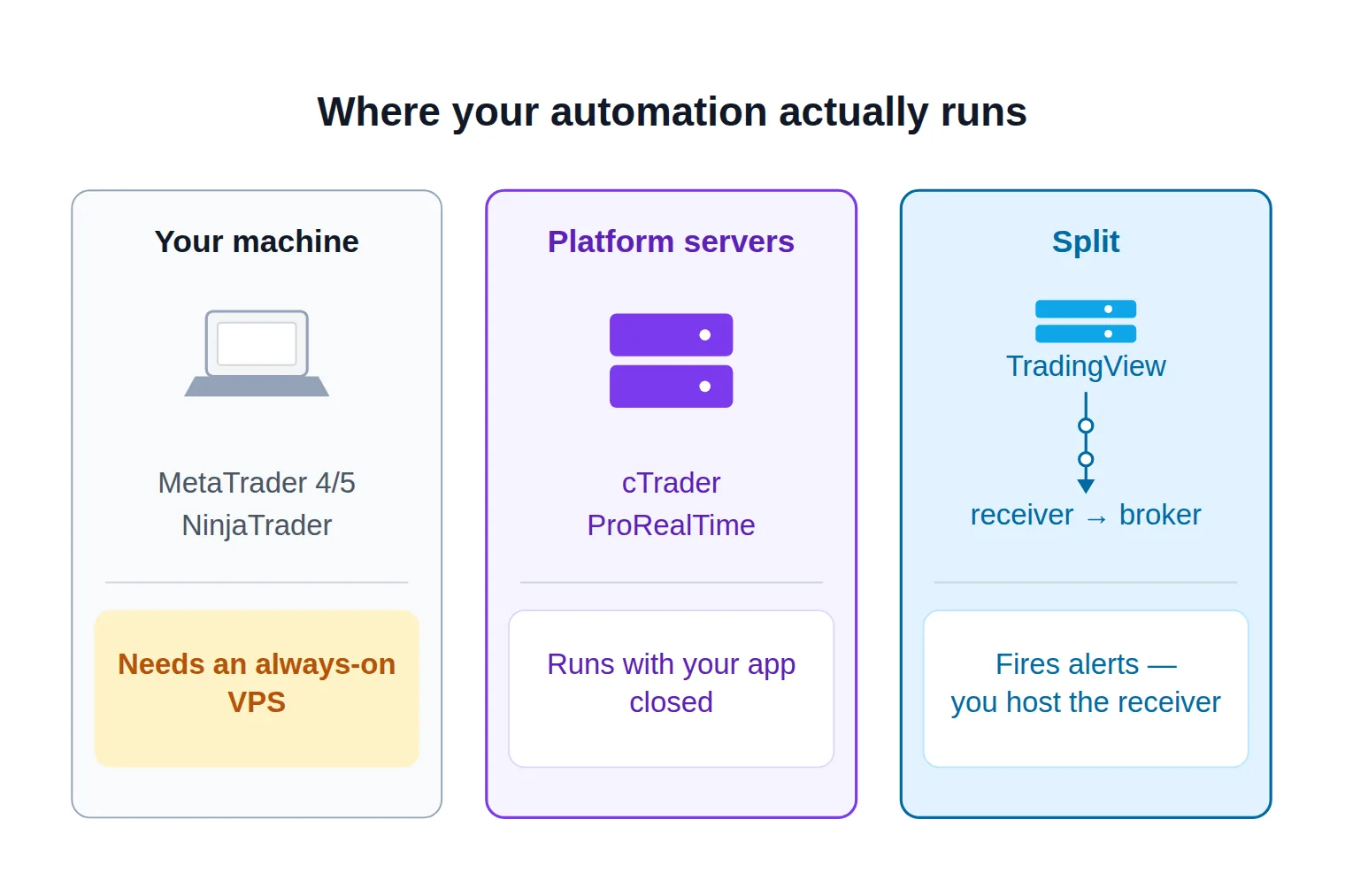
Criterion two is the one nearly every comparison skips, and it is the one that changes your running costs the day you migrate. There are really only three hosting models on the market, and knowing which one a platform uses tells you immediately whether you still need a machine that never sleeps.
Three hosting models. The middle one is why cTrader and ProRealTime change your monthly costs, not just your code.
Score any candidate platform before you move a strategy to it
0 / 9
You can name the language you would rewrite the strategy in — and a person who could maintain it.
Your broker or prop firm actually offers that platform on a live account, not just a demo.
You know whether the strategy runs on your machine or on the platform's servers.
The tester models spread, commission and swap, not price alone.
Every instrument you trade is quoted there, with the order types your logic uses.
You have measured fills on that platform and broker — spread, slippage and rejections — rather than assumed them.
The account model, hedging or netting, matches how your strategy manages positions.
Automation is permitted on your account type in writing, not according to a forum post.
You have a forward-test plan on demo before any live cutover.
★
Checklist complete — you’re cleared to proceed.
Nine yes/no answers. If a platform fails one of the first three, the rest of the list is academic.
Quick pick: match what pushed you off MetaTrader
If you only have a minute, start from the reason you are here rather than from the platform names. In most cases the trigger points at one obvious candidate, and the profiles below are confirmation rather than discovery.
Which alternative should you look at first?
Take itProceed with careSkip / stand aside
The trigger that brought you here usually narrows the field to one candidate before any feature comparison starts.
The MetaTrader alternatives worth taking seriously
Five platforms clear the bar of "a strategy can genuinely live here". Each profile sticks to automation: what you write, where it runs, how it tests, and who can give you an account.
cTrader: cBots in C#, and a cloud that keeps them running
cTrader is the closest thing to a like-for-like MetaTrader replacement for someone who writes their own strategies. Automated strategies are called cBots, they are written in C# against a documented trading API, and Python is supported as a second language. You can work in the built-in editor or in a full external IDE, which is the single biggest day-to-day upgrade over MetaEditor for anyone used to modern tooling — real refactoring, real debugging, real package management.
Testing is comparable in ambition to MetaTrader's own: historical runs against tick data, plus parameter optimisation so you can sweep settings rather than guess them. The genuinely distinctive piece is cloud execution. A cBot can be started on cTrader's own infrastructure and keep trading with your application closed, your laptop shut, or your connection dropped. Instance limits vary by broker and account type, but the model itself removes the reflex assumption that automation means renting a server.
Availability is the constraint. cTrader is offered by a respectable list of established FX and CFD brokers rather than by all of them — IC Markets is one of the better-known cTrader houses, and FxPro has offered the platform for years. Confirm that the specific entity holding your account supports it before you plan anything else. That same list decides your execution: cTrader grew up on raw-spread, no-dealing-desk accounts and shows depth of market alongside timestamped fills, which makes an order path easy to audit — but the broker behind the platform, not the platform itself, still sets the spread you pay and the way a rejection is handled.
Best for: a coder who wants to keep writing strategies, with better tooling and without a hosting bill.
TradingView: Pine Script for research, a webhook for execution
TradingView is the one candidate that is not really a trading terminal, and understanding that saves a lot of disappointment. Pine Script is excellent for expressing an idea quickly and testing it on the chart, across a market catalogue no broker platform matches. What Pine cannot do is place your orders. A Pine strategy backtests and it fires alerts; it does not talk to your broker on its own.
Live automation therefore looks like a relay. Your strategy raises an alert, the alert hits a webhook, and something on the other end — a commercial bridge, or your own small service against the broker API — turns the payload into an order. The upside is that alerts fire on TradingView's servers, so your chart does not need to be open. The catch is that the receiver does, so you have moved the hosting problem rather than solved it, and you have added a link in the chain where fills can go missing. Execution quality is decided in that relay rather than on the chart: TradingView neither routes nor fills the order, so latency, retries and rejections all belong to your receiver and the broker behind it, and an entry that looked instant in the backtest can reach the venue a noticeable moment later.
The testing model deserves scrutiny too. Pine strategies evaluate on bar data, so intrabar fill assumptions and repainting are real risks that flatter results in ways a tick-level tester would not. Treat a Pine backtest as an idea filter, not as final validation.
Best for: research across every market, and for feeding an execution layer you are comfortable running.
NinjaTrader: NinjaScript, built around futures
If the reason you are leaving is that MetaTrader cannot give you CME futures the way you want them, NinjaTrader is the obvious destination. Strategies are written in NinjaScript, which is C# with a purpose-built strategy and indicator class model, so the concepts transfer cleanly from an EA: an event fires per bar or per tick, you evaluate conditions, you submit orders, you manage the position.
Its testing suite is the strongest argument for the platform. The Strategy Analyzer runs tick-level backtests and optimisation, and market replay lets you re-run recorded sessions so you can watch a strategy behave in something much closer to live conditions than a summary report describes. For a futures trader used to MetaTrader's Strategy Tester, that is a clear step up in fidelity.
Execution benefits from the same futures focus: orders go into a central exchange order book through your chosen futures broker, so there is no dealer in the middle to requote you, and the price you model is the price the whole market is looking at. Hosting stays on your side, though, and that is also where your fills are exposed: strategies run inside the desktop application, on a machine you keep awake and on a connection whose distance from the exchange is now part of your execution profile. Charting, backtesting and simulation are free to use, while live futures trading runs through licensing and commission plans you should price out for your own volume before switching.
Best for: futures traders who want serious testing and do not mind hosting the platform themselves.
ProRealTime: automation you can build without writing code
ProRealTime solves a different problem: automation for a trader who has no intention of becoming a programmer. Strategies are expressed in ProBuilder, its own scripting language, but they can also be assembled in a wizard where you pick entry conditions, exit conditions and money management from menus and the platform generates the code. That generated code stays editable, so the wizard doubles as a way to learn the language.
Automation runs through ProOrder, and its defining feature is server-side execution: a running system keeps placing orders even when your platform is closed. Combined with backtesting over long histories with tick-by-tick precision and detailed performance reports, that makes it unusually complete for something you can operate without code.
Execution follows the same server-side path: ProOrder sends the order from ProRealTime's infrastructure into the partner broker's book, which takes your home connection out of the equation and hands fill quality entirely to that broker's pricing model — reliability gained, and the ability to shop for a better execution profile lost unless you change broker.
Access comes through partner brokers rather than a standalone download, with IG the best-known route in Europe, so your instrument universe is whatever that broker lists. The subscription model is also unusual — active traders frequently have the platform fee waived — which makes it worth reading the terms rather than assuming a fixed monthly cost.
Best for: a rules-based trader on CFDs and futures who wants automation without code or hosting.
TradeLocker: the platform your prop firm probably chose
Most people evaluating TradeLocker are not really evaluating it — a broker or a funded-account provider put them there. It is browser-first, so there is no installation and no terminal to keep alive, and it has grown fastest among newer brokers and prop firms rather than through individual traders choosing it.
For automation it offers Studio, an in-platform environment for building bots and strategies that can generate one from a plain-English description of your rules. There is also an API and a partner network of bridges and copiers, which is how most serious automation reaches the platform today. The ecosystem is young: there is no deep back-catalogue of published strategies to learn from, and far fewer developers who have shipped anything on it.
Execution is not really the platform's to give either: orders pass through the broker or funded-account provider that put you on it, and on a challenge account the fills you are tuning against may come from a simulated book rather than a live one. Establish which it is before you trust a strategy that is sensitive to a single tick.
The bigger constraint is rarely technical. Whether you may run a bot at all is decided by your firm's rules, not by the platform's capabilities, and those rules vary on unattended trading, third-party execution software and copying. Get the answer in writing before you build.
Best for: traders whose broker or prop firm has already made the choice for them.
Also worth knowing: MultiCharts, Quantower and Sierra Chart
Three more platforms come up repeatedly among traders who left MetaTrader for technical reasons rather than market coverage. MultiCharts runs PowerLanguage — close enough to EasyLanguage that TradeStation code often ports — alongside C#, with portfolio-level backtesting that MetaTrader does not offer at all. Quantower exposes a C# API across futures, FX, equities and crypto, with a panel for supervising several running strategies at once. Sierra Chart goes lower still, with a C++ study interface for people who care about control and latency more than convenience.
None of them is a mainstream first stop, and each asks more of you than cTrader or ProRealTime. Look at them when your bottleneck is what the platform will let you build, not which markets it can reach.
Side by side: language, hosting, testing, markets and cost
Read the table by column, not by row. The row everything else should be compared against is the first one — it is the deal you already have.
Automation comparison
Platform
Automation language
Where it runs
Execution profile
Testing depth
Markets and access
Cost model
MetaTrader 4 / 5
MQL4 / MQL5
Your terminal — a VPS in practice
Whatever your broker's model gives you
Strategy Tester; MT5 adds real ticks and multi-symbol
Widest broker support; MT5 adds futures and stocks
Free platform, you pay for hosting
cTrader
C#, plus Python
Your app or cTrader's cloud
Raw-spread heritage, depth and auditable fills
Tick-data backtests with optimisation
Solid but shorter FX and CFD broker list
Free platform, cloud execution included
TradingView
Pine Script
Alerts on their servers, orders via your bridge
Owned by your bridge — an extra hop before the venue
Bar-based; intrabar fills are assumptions
Broadest instrument catalogue, few native brokers
Subscription tiers, bridge costs extra
NinjaTrader
NinjaScript (C#)
Desktop app you keep awake
Exchange order book, no dealer to requote
Tick-level tests, optimisation, market replay
Futures-first, with FX and options
Free to test, live plans for futures
ProRealTime
ProBuilder, or a no-code wizard
ProOrder on their servers
Server-side orders into the partner broker
Long tick-by-tick histories with full reports
CFDs and futures through partner brokers
Subscription, often waived when active
TradeLocker
Studio, including plain-English rules
Browser-based, broker-hosted
Your firm's routing; challenge fills may be simulated
Lighter than the desktop platforms
Whatever your broker or prop firm lists
Free to you, your firm pays
Nothing here beats MetaTrader on every axis. Each alternative trades one of MetaTrader's strengths for a different one.
What you give up when you leave MetaTrader
Comparisons written by platform vendors are strangely quiet about this part, so here it is plainly. MetaTrader's position is not nostalgia — it bought you four things that do not travel with you.
The strategy travels. The catalogue, the examples and the people who fix it at 2am do not.
The catalogue. MQL carries the deepest public inventory of ready-made strategies, indicators and utilities, the busiest freelance market for custom work, and a code base full of examples for the awkward corner you are about to hit. Its copy-trading service is wired into the terminal itself. On a smaller platform, the answer to "has anyone solved this already" is more often no.
Broker breadth. Nearly every retail broker offers MetaTrader; far fewer offer any given alternative. If the platform choice forces a broker change, you inherit a new funding process, a new instrument list, a new regulator and a new execution profile — and your strategy's sensitivity to slippage and spread will notice all four.
Your code. There is no converter. Moving an EA to C#, NinjaScript, Pine or ProBuilder is a rewrite, and even a faithful rewrite behaves differently: position handling changes under netting, symbol names and digits change, server time and session boundaries change, and fill assumptions change. Budget for the rewrite plus a re-validation, not the rewrite alone.
Your baseline. Every performance number you hold — the backtest, the optimisation surface, the live record — belongs to the old platform. After a port you need a fresh forward test before you can claim the strategy still works, because too many variables moved at once to reason about the difference on paper.
Match your situation to a platform
The right choice is almost entirely determined by which of these you are.
You trade CME futures and want testing you can trust. NinjaTrader, and accept that you keep hosting it. Nothing else here treats futures as its home market.
You write your own strategies and want better tooling. cTrader. C# in a real IDE, tick-data testing, and cloud execution that ends the hosting line item.
You do not want to code, and never will. ProRealTime. The wizard is a genuine path to a running system, and server-side execution means there is nothing to host.
You are an execution-sensitive scalper on a raw-spread account. Let the broker decide the platform, then measure. cTrader is the common answer at ECN-style houses, but measure fills on your own account before rewriting anything.
You want one research environment across every market. TradingView, provided you are honest that you now own a webhook receiver and its uptime.
You are trading a funded account. Your firm's platform and its written automation permissions decide this, in that order. Ask before you build, not after a rule breach.
You have a large MQL library that works. Stay. Read the next section.
Do you actually need to leave MT4 or MT5?
For a large share of traders who ask this question the honest answer is no, and hearing that from a page about MetaTrader alternatives is worth more than another feature grid. Take the specific complaint seriously before you generalise it into a platform problem. "My tester is slow" and "my broker's server time confuses my session filter" are not reasons to rewrite a working strategy in another language.
Two facts keep MetaTrader in the running. It still carries the largest ecosystem of ready-made strategies, signal services and developers-for-hire in retail trading, and it is still the platform your broker almost certainly supports — which is exactly why it is worth being precise about how MT4 runs EAs today before deciding it cannot serve you. If the complaint is tooling ergonomics rather than capability, MT5 alone closes part of the gap with a faster multi-threaded tester, real tick modelling, multi-symbol tests, and netting accounts for the markets that require them.
Where a move is genuinely justified, do it in parallel rather than as a cutover. Keep the MetaTrader strategy running, rebuild it on the candidate platform, run both on demo over the same period, and compare trade by trade rather than at the summary level. When the two disagree, you usually learn something about your logic that the original platform was hiding from you. Migrate capital only once the ported version has stopped surprising you.
You came in with
“the feeling that MetaTrader had stopped fitting your automation”
and you leave with
a platform choice made on automation criteria, not on charts.
Switch for a reason you can state in one sentence
The platform question only gets a good answer once the criteria are fixed: the language and who maintains it, where the code runs, what the tester really models, how orders actually fill, which brokers offer it, and how much ecosystem stands behind it. Run those against the specific thing that pushed you here. If the winner is still MetaTrader, that is a result too — you have stopped paying attention tax on a decision you kept re-opening.
Can I convert my MQL4 or MQL5 EA to another platform automatically?
No. There is no reliable converter from MQL to C#, NinjaScript, Pine Script or ProBuilder, and tools that claim to do it produce code you would have to audit line by line anyway. Plan for a manual rewrite, and treat it as a chance to re-read assumptions your original code inherited from MetaTrader — how it handles partial closes, how it identifies its own positions, and how it reads server time.
Does TradingView place trades automatically?
Not by itself. A Pine Script strategy backtests on the chart and fires alerts, but it does not send orders to your broker. Live automation needs an alert carrying a webhook payload and something on the receiving end — a commercial bridge or your own service against the broker's API — that converts that payload into an order. TradingView's native broker integrations handle manual and semi-automatic order entry, which is a different thing from unattended execution.
Which MetaTrader alternative works without a VPS?
cTrader and ProRealTime, for different reasons. cTrader can run cBots on its own cloud infrastructure so they keep trading with the application closed, and ProRealTime's ProOrder executes systems on its servers. TradingView is a partial case: alerts fire server-side, but whatever receives the webhook still has to live somewhere. NinjaTrader and MetaTrader both keep the strategy inside an application you are responsible for keeping awake.
Do prop firms allow bots on these platforms?
That depends entirely on the firm, not on the platform. Many funded-account providers permit automated entries while restricting unattended overnight operation, third-party execution software, or copying between accounts, and the same firm can apply different rules at challenge stage and funded stage. Get the permission in writing for your specific account type before you build anything, because a breach discovered at payout time is not a negotiation.
Is cTrader better than MT5 for automated trading?
Better at some things, worse at others. cTrader wins on development tooling, on running strategies in the cloud, and on the general feel of a modern codebase. MT5 wins on broker availability, on the size of the ecosystem you can borrow from, and on asset coverage wherever your broker offers futures and equities. If you write and maintain your own strategies, cTrader is the stronger environment; if you depend on bought or borrowed strategies, MT5 keeps more doors open.
Sources & Further Reading
Want to go deeper? These independent, authoritative sources shaped this guide — each one is worth reading in full:
The Cross-Market Desk is the SignalBots editorial team for topics that span every market — platform connectors, copy trading, partnership and IB programs, and the general mechanics of trading automation. We research and write the guides that apply no matter what you trade.




Discussions 0
Leave a comment