You already know how to read a chart, place an order and set a stop. Your problem is not skill — it is presence. The setup you marked out on Sunday fires at 3am or in the middle of a meeting, and by the time you see it, the move has left without you. On the trades you do catch, you widen the stop "just this once" because you are sitting there watching it breathe.
Somebody told you MetaTrader 4 can run a robot. You have probably opened the Navigator panel, found a folder labelled Expert Advisors, and stared at it. Maybe someone has already offered to sell you a file.
Before you install anything, you need the mental model — because every decision that follows (buy this one, test it, host it, trust it) is a decision about one part of a machine you cannot yet see. This page is that machine, part by part: what happens in the fraction of a second between a price tick and an order, where the rules actually come from, what a robot will never do for you, how to look at a seller's backtest without being taken in, and whether you are even on the right MetaTrader version.
Key Takeaways
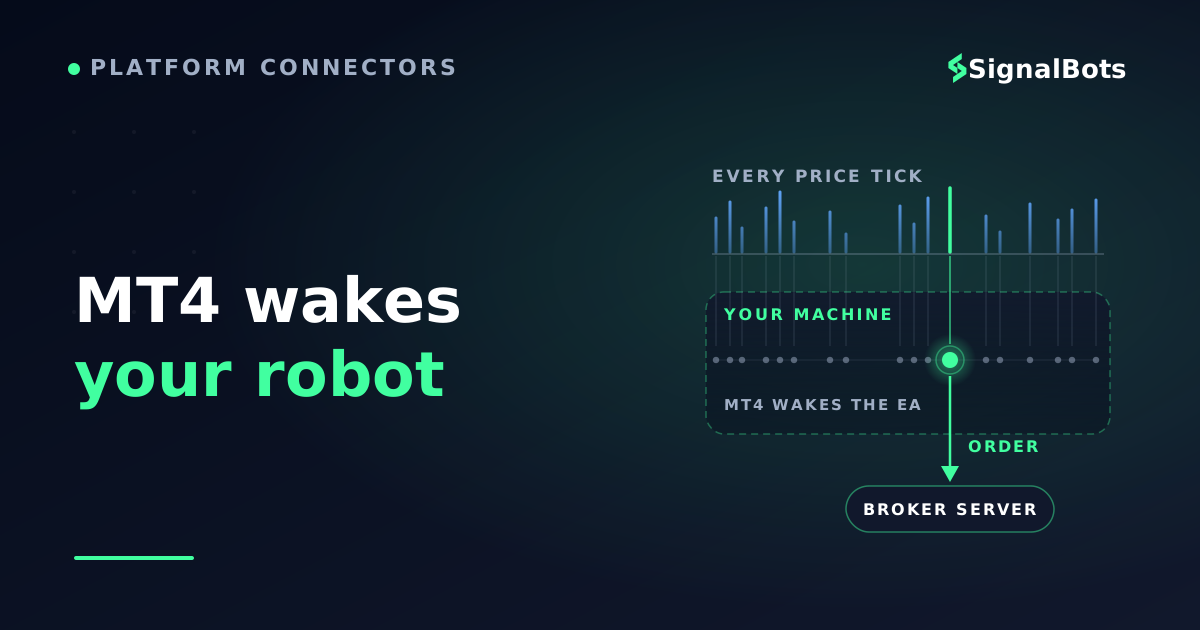
An Expert Advisor is a program on your machine, not at your broker: MT4 wakes it on every price tick, it checks its rules, and only then does an order travel to the server.
MT4 is rule-neutral — it runs good logic and bad logic with identical discipline, so the hard problem is never the platform, it is where your rules come from.
A backtest is a replay under assumptions: the test period, the assumed spread, the modelling quality and an out-of-sample check decide whether an equity curve means anything.
Stay on MT4 if your EA is MQL4 and works; move to MT5 for a netting account, wider instruments or tick-level testing — an .ex4 file does not carry over.
Table of Contents (26 min read)Contents
What MetaTrader 4 actually is — and why automation lives inside it
MetaTrader 4 (MT4) is a client terminal: a program running on your computer that keeps an open line to a server your broker operates. Prices come down that line; orders go up it. The platform is built by MetaQuotes and licensed by brokers all over the world, which is why every MT4 looks identical while the account, the symbol names, the spreads and the rules behind them belong entirely to your broker.
The terminal does three jobs, and most traders only ever meet two of them. It draws charts. It sends orders. And — the third one — it runs programs, with a language and a compiler shipped inside the platform itself.
That third job is the whole story. Most retail front-ends let you click; MT4 lets you write down what you would have clicked, then hands the terminal permission to click on your behalf. A terminal that ships with its own programming environment is the reason algorithmic trading stopped being an institutional privilege and turned up on retail desktops.
One consequence matters more than any other, and it will come back four times in this article: the thinking happens on your machine, not at your broker. Your broker's server holds the money, quotes the prices and matches the orders. Nothing over there knows or cares that a robot is making your decisions.
MT4 can run three kinds of program, and confusing them is the first place beginners get lost:
an indicator draws on the chart and never touches your account;
a script runs once, does one job, and exits;
an EA stays attached to a chart, wakes on every price update, and can open, modify and close trades.
The useful way to hold it in your head: an EA is your own trading checklist, rewritten in a language the terminal can execute, and then re-checked every time the price moves — without fatigue, without hesitation, and without the small negotiations you have with yourself at 3am.
Two words in that sentence carry weight. It is a program, so it does precisely what its code says and nothing else. And it is attached to a chart, which is how it knows which symbol and which timeframe it is responsible for. An EA that is not on a chart is just a file.
The parts of MT4's automation machinery
Almost everything that confuses people about MT4 automation is really a missing part. You can only debug, buy or trust a machine whose components you can name, so here they are.
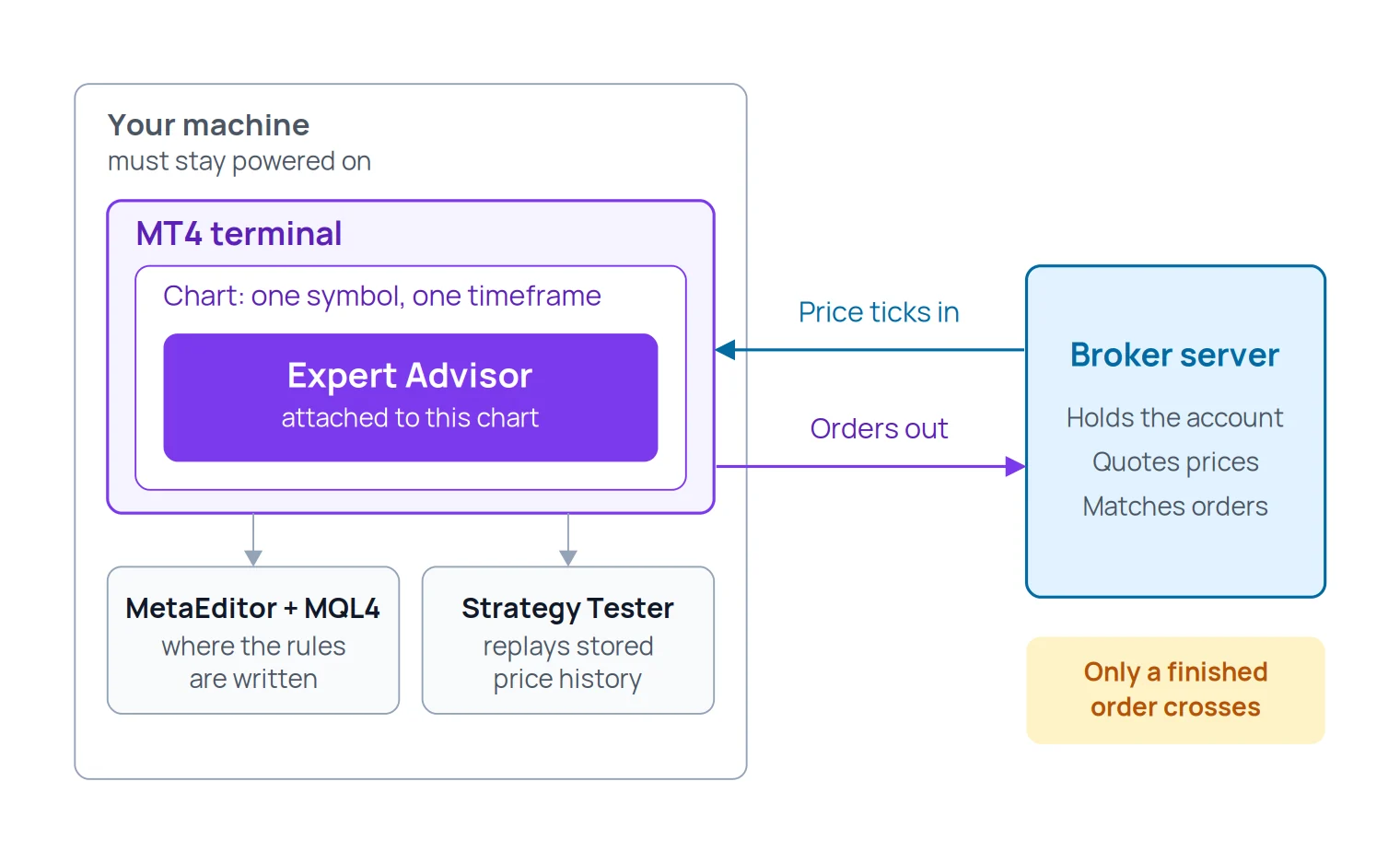
MT4's automation chain: the EA sits inside your terminal, and only the order it decides on travels to the broker.
The terminal and your broker's server
The terminal is where everything you are about to read takes place. It receives a stream of price updates from the broker, and it is the only thing on your side that can transmit an order.
This is the fact that makes the rest make sense: your EA never talks to the broker directly. It talks to the terminal, and the terminal talks to the broker. Close the terminal, and the conversation stops mid-sentence.
The chart an EA is attached to
An EA runs on a chart — one symbol, one timeframe. That chart is not decoration; it is the EA's address. It defines which instrument's price updates wake the program up and which timeframe its candle-based logic reads.
Attach the same EA to three charts and you have three independent copies, each managing its own trades and each unaware of the others unless the code was deliberately written to coordinate. This is where a lot of accidental over-exposure comes from.
MQL4 and MetaEditor — where the rules are written
MQL4 is the language every MT4 Expert Advisor is written in, and MetaEditor is the editor and compiler that ships with the platform for writing it. Source code carries the .mq4 extension; the compiled, runnable program is .ex4.
That distinction has a practical edge to it. If someone hands you only an .ex4, you have a program you can run and nobody — including a developer you hire later — can read or modify. You do not need to learn MQL4 to use MT4 automation. You do need to know that the file type you were given decides whether the logic is inspectable or a black box.
The Strategy Tester — the rehearsal room
The Strategy Tester replays stored historical prices through an EA's rules and reports what would have happened, including a pass that tries many combinations of the EA's input settings to find the ones that scored best on that history.
Think of it as a rehearsal in an empty theatre. It tells you the actor knows the lines. It tells you nothing about the audience, and — as the next section on reading results will show — it is very easy to rehearse against a script that only exists in the past.
The AutoTrading switch, and the machine that has to stay awake
Between an EA's decision and a live order sits a permission the platform calls AutoTrading. It is a master switch at the terminal level, and MetaQuotes' own documentation is blunt about what happens when it is off: your Expert Advisors still run, they simply cannot trade. Everything thinks; nothing acts. This gate is what our algo trading permission entry describes, and it is the single most common reason a newly-installed robot appears to do nothing at all.
The last part is not software. It is a computer that is powered on, connected, and running the terminal — because the moment that machine sleeps, the automation sleeps too. We will come back to what that actually costs you.
What happens on every price tick?
A tick is one price update for one symbol. Not a candle, not a bar — a single change in the quote. Ticks arrive irregularly: in a fast London hour they pour in, and on a quiet cross at 2am there are long silences between them.
Everything an EA does is bolted to that stream. MQL4's reference for program events is precise about it: the new-tick event fires only when a new tick arrives for the symbol of the chart the EA is attached to. The terminal wakes the program, the program runs its rules top to bottom, and then it stops and waits.
The loop, one tick at a time
sequenceDiagram
    autonumber
    participant Brk as Broker server
    participant MT4 as MT4 terminal
    participant EA as Expert Advisor
    Brk->>MT4: New price tick
    MT4->>EA: Wake up and run
    Note over EA: Rules checked against
the new price and any open trades
    alt Conditions met
        EA->>MT4: Order request
        MT4->>Brk: Send order
        Brk-->>MT4: Filled or rejected
        MT4-->>EA: Result handed back
    else Nothing to do
        EA-->>MT4: Return and wait for the next tick
    end
Nothing here is continuous. Between two ticks the EA is not thinking at all — which is why a quiet market and a broken robot look identical from the outside.
Three things follow from that loop, and they are the ones readers most often get wrong.
Managing an open trade is also tick work. A trailing stop does not glide upward; it jumps each time a tick arrives and the code decides to move it. No ticks, no management.
A dormant EA and a healthy EA look the same. If the market for that symbol is closed, no ticks arrive, no rules are checked, and the robot sits there looking exactly like one that is misconfigured.
Speed is not the same as continuous attention. The EA reacts within milliseconds of a tick it receives, but it is blind to everything between ticks — and completely blind to anything happening on the other symbols you are not attached to.
Three honest ways to get the rules an EA runs
Here is the part nobody says out loud: MT4 does not come with a strategy. The platform is rule-neutral. It will execute disciplined logic and nonsense logic with exactly the same obedience, at exactly the same speed.
So the real question was never "can MT4 automate my trading". It is "where do the rules come from" — and there are only three answers.
Where the logic comes from
Route to the rules
What it costs you
What you must be able to do
What you are accepting
Write it yourself in MQL4
Months of learning, then a long run of unpaid evenings
Restate your own strategy as if-then conditions, then find your own bugs
Every mistake is yours — and so is every line you can read
Commission a developer
A fee, plus the hours it takes to write an exact specification
Describe the strategy precisely enough that a stranger cannot misread it
The logic is yours, the code is theirs — without the source you cannot change a thing
Run an EA someone else wrote
Whatever the seller asks, usually for a compiled file
Judge a system from the outside, having never seen inside it
You are trusting logic you cannot read, on an account you can lose
Every route trades one scarce thing for another: time, money, or the ability to inspect what is running your account.
Notice what all three have in common. None of them is solved by learning the platform better. You can master every menu in MT4 and be no closer to having rules worth automating — which is why "I can't code" is rarely the real blocker. The real blocker is that a strategy you have never written down cannot be handed to anyone, human or machine.
What an EA will never do for you
Being able to say this list out loud is the difference between automating and gambling with extra steps.
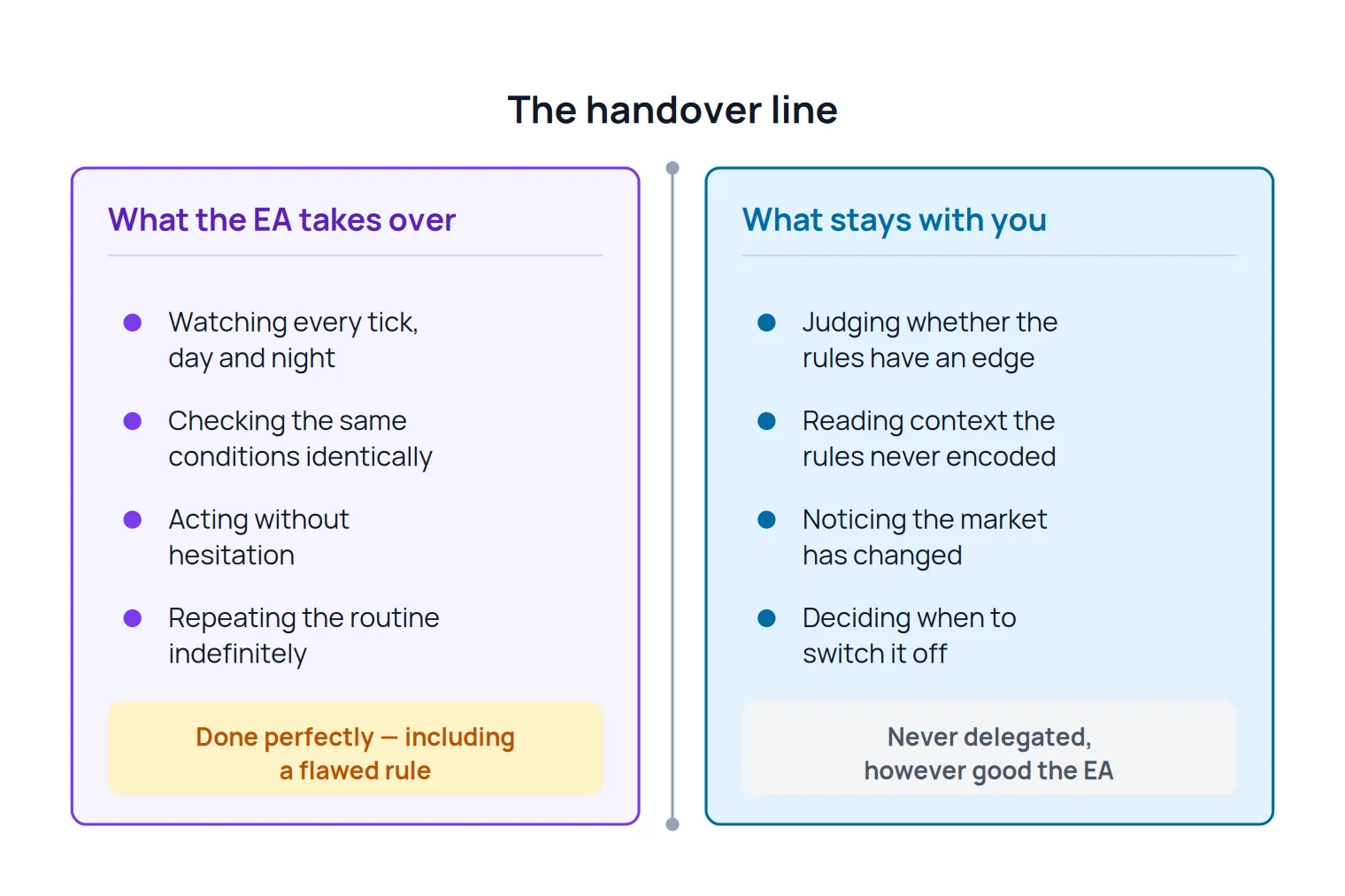
The handover line: an EA takes over the repetition, never the judgement.
It has no judgement. It cannot tell an ordinary pullback from the start of something structurally different. It has conditions, and conditions either match or they do not.
It does not read context. Unless a filter was explicitly coded in, an EA does not know a central bank is speaking in ten minutes, or that liquidity has thinned into a holiday.
It does not adapt. A rule set tuned to a trending market keeps trading trend logic into a range, patiently, until you stop it.
It executes a flawed rule perfectly, and repeatedly. This is the one that hurts. Your worst manual habit, automated, becomes your worst habit at machine speed and without the fatigue that used to stop you.
It cannot manufacture an edge. If the strategy loses money slowly by hand, it will lose money faster and more consistently without you.
What it genuinely does give you is narrower than the marketing suggests, and more valuable than sceptics admit: it is awake when you are not, and it does not renegotiate the plan mid-trade. Those are exactly the two failures that brought you here.
And it will not survive your laptop going to sleep
Remember where the EA lives: inside the terminal, on your machine. This is not a technicality — it decides whether your strategy is viable at all.
Check yourself
Knowledge check
Your EA is running on a chart with AutoTrading on. You close the laptop lid and go to bed. What happens to a trade it opened an hour ago?
Why
The EA runs inside the terminal on your machine. A stop-loss and take-profit attached to the order live at the broker and still execute. But everything the EA itself does — trailing a stop, closing on a time rule, opening the next position — needs a tick delivered to a running terminal. Sleep the laptop and the robot sleeps with it.
That is the honest case for a VPS — an always-on machine that keeps the terminal running when yours is closed. Whether you actually need one is a question about your strategy, not about hosting: a system whose exits are all pre-placed stop and limit orders can tolerate an offline night; one that trails stops, exits on time, or trades the Asian session while you sleep cannot. Decide that before anyone sells you a subscription.
Reading a backtest without fooling yourself
At some point — probably soon — someone will show you an equity curve that climbs from left to right like a staircase. It might come from a seller, a forum post, or your own first optimisation run. This section is the defence.
A backtest is a replay: the tester feeds stored historical prices through the EA's rules and records the trades those rules would have produced. It is genuinely useful. It is also the easiest thing in trading to make beautiful.
Read honestly, the report tells you the shape of a system rather than its future. A jagged, upward-drifting equity curve with a survivable worst-case drawdown describes a strategy someone could actually sit through. A perfectly smooth one usually describes a strategy that has been told the answers.
Four things quietly destroy the meaning of a result, and none of them is visible in the pretty picture.
It was fitted to the history it was tested on. Run enough parameter combinations and something will fit the past exquisitely — this is overfitting, and an optimisation pass is a machine for producing it. The more settings an EA exposes, the easier it is to accidentally curve-fit.
The costs were assumed, not paid. A test models spread, commission and slippage using assumptions. If the assumed spread is tighter than what your account actually pays, a scalping strategy that "worked" for years may never have been profitable at all.
The price path in between was invented. Historical data is stored as bars, so the tester has to model how price moved within each bar; the report states a modelling-quality figure for exactly this reason. Any strategy whose entries or stops depend on the order of movement inside a candle is fragile to that guesswork.
Nothing was held back. A result only starts to mean something when part of it comes from data the strategy was never tuned on — an out-of-sample test — and then survives a forward test on a demo account in live conditions, at today's spreads, on tomorrow's news.
Before money changes hands, ask for the five answers below. A seller who cannot give them is not hiding a secret — they usually do not have them either. And treat any historical win rate quoted without its reward-to-risk ratio and its number of trades as decoration: a system that wins nine times out of ten and gives it all back on the tenth is a losing system with good manners.
Before you pay for anything
Five questions to ask about any backtest you are shown
0 / 5
Over what period was it run — and does that period contain a market regime unlike the one it was built in?
What spread and commission were assumed, and are those the costs my account would actually pay?
What modelling quality does the report state, and how much of the price path inside each bar was simulated rather than real?
Was any part of the result produced on data the strategy was never optimised on?
Has it been run forward on a demo account since, and can I see that period reported separately?
★
Checklist complete — you’re cleared to proceed.
None of these is a trick question. They are simply the four assumptions every historical result rests on.
Be equally sceptical of the language around the numbers. Any EA sold as "risk-free", or with a claimed win rate and no losing period anywhere in its history, is describing marketing rather than a trading system. Read our risk warning before you put a tested strategy on a live account.
The silent reasons an attached EA never trades
Your first day of automation usually goes like this: the EA is on the chart, the market is moving, and nothing happens. No error, no message, no trade. This is where most people quietly give up.
There is almost always a gate closed somewhere along the order path. Walk them in order rather than guessing.
Where the order actually stops
flowchart TD
    A["EA attached to a chart"] --> B{"AutoTrading enabled<br/>in the terminal?"}
    B -- No --> B1["Sad face on the chart:<br/>rules run, orders blocked"]
    B -- Yes --> C{"Live trading allowed in<br/>the EA's own settings?"}
    C -- No --> C1["It thinks, it never trades"]
    C -- Yes --> D{"Chart symbol matches the<br/>name the EA expects?"}
    D -- No --> D1["EA looks for a symbol<br/>that does not exist for it"]
    D -- Yes --> E{"Market open for<br/>that symbol?"}
    E -- No --> E1["No ticks, so no rule checks"]
    E -- Yes --> F{"Do the EA's own entry<br/>conditions pass?"}
    F -- No --> F1["Healthy: it is simply waiting"]
    F -- Yes --> G{"Free margin covers<br/>the position size?"}
    G -- No --> G1["Server rejects the order"]
    G -- Yes --> H["Order reaches the broker"]
Two of these outcomes are not faults at all — an EA waiting for its conditions looks exactly like an EA that is broken.
AutoTrading is off. The master switch is disabled by default, and a disabled state shows as a sad face in the corner of the chart rather than an error. The programs run; the orders never leave.
The EA's own permission is off. Automated trading is granted twice — once for the terminal, once for the individual EA when it is attached. The second one is easy to skip past.
Something switched it off for you. The platform can deliberately disable automated trading when the account changes, when the profile changes, or when the chart's symbol or timeframe changes. Those are safety features, not bugs, and they are the reason a robot that traded happily yesterday is inert this morning after you flipped a chart from H1 to M15.
The symbol name does not match. Brokers add suffixes — EURUSD.pro, XAUUSDm, GOLD — and an EA written against a plain EURUSD will simply not recognise the instrument it has been attached to. This is symbol mapping, and it is the failure that looks most like a broken product and is most often just a naming difference.
The market is closed for that instrument. No ticks, no wake-ups, no trades. Perfectly correct behaviour that feels like a fault.
Its own conditions have not been met. Most EAs trade far less often than their buyers expect. A robot that placed nothing for two days may be working exactly as designed.
There is not enough free margin. The order is composed correctly and then refused by the server. This one leaves a trace: the terminal's Experts and Journal logs record what the EA attempted and what came back, and they are where you should look before assuming anything is broken.
MQL4 — procedural and C-like, the language most retail EAs were written in
MQL5 — object-oriented and closer to modern C++
Moving an EA across
An .ex4 file runs on MT4 only
An MQL4 EA must be rewritten, not copied
Supply of ready-made EAs
The deeper back catalogue, thanks to a long head start
A newer, smaller catalogue that keeps growing
Strategy Tester data
Models the price path between stored bars
Can replay stored real tick data and test several symbols together
Account model
Hedging only — every order is its own ticket
Hedging or netting, depending on the account your broker issues
Instrument coverage
The FX and CFD symbols your broker lists
The same, plus exchange-traded instruments and depth of market where offered
Timeframes and tools
The classic set most published strategies assume
More timeframes and a built-in economic calendar
The row that decides it for most traders is the second one: an EA does not travel between the two platforms.
Stay where you are if your broker's MT4 account is what you have, the EA you intend to run is MQL4, or you are learning from material written for MT4. Nothing in the list above fixes a strategy problem, and switching platforms mid-learning costs you weeks.
Move if you need something MT4 structurally cannot give you: a netting account, exchange-traded instruments, or tick-level historical testing. The hedging versus netting distinction is the one that most often forces the decision, because it changes how positions on the same symbol behave — and therefore how an EA has to be written.
The one thing that should not drive the decision is age. MT4 is older; it is also the platform with the deepest supply of existing automation, and "newer" has never been a trading edge.
Where the trade ideas come from while you are still learning the platform
Settling the MT4-or-MT5 question does not move you an inch closer to having rules worth automating — that is the part the platform never solves, and all three routes to it take time.
While you decide whether to build, commission or adopt an EA, it is worth reading real setups written the way a machine would need them. Our free forex feed of live forex signals is open without an account, and each setup is published with its pair, direction, timeframe, entry, stop-loss and take-profit — the same handful of numbers any rule-based system has to define before it can act at all.
Be clear about what it is not. It is a feed you read and act on yourself: it does not attach to MT4, it does not place orders, and there is no SignalBots connector for forex — so if you want genuinely hands-off execution on MT4, you still need an EA of your own. Treat it as a way to study how a setup gets specified, not as automation.
Your next step — from understanding MT4 to running your first EA
Go back to the 3am setup you missed. MT4 can genuinely solve that, and now you know exactly what solving it involves: a program on a chart, woken by every tick, checking conditions you defined, on a machine that stays awake, with two permissions switched on and a symbol name that matches.
You can now name every part of the machine, describe what happens between a tick and an order, say out loud what a robot will and will not take off your hands, look at an equity curve and ask the four questions that matter, and decide whether MT4 or MT5 fits your situation. That is the whole orientation layer, and most people who buy an EA never had it.
Three moves follow, in this order. Get the rules — write them down as conditions before you write or buy anything, because that document is what every route above consumes. Rehearse them honestly — test, then forward-test on demo, and let a bad result be a real answer rather than a reason to re-optimise. Then, and only then, go small and live, with a size that survives the losing streak your test told you to expect.
When you are ready to stop orienting and start installing, the click-by-click sequence — where the file goes, how it reaches the chart, which permissions to enable — is a walkthrough of its own, and it is a much shorter read now that you know what each step is actually doing.
FAQ
Can I use an EA on MT4 if I cannot code?
Yes. Running an Expert Advisor requires no programming at all — you install it, attach it to a chart and enable the permissions. Coding only becomes necessary when you want to change what the EA does, or when you want to verify its logic rather than trust it. That is the trade-off in the three routes above: no code means no inspection.
Will an MT4 Expert Advisor run on MT5?
No. MT4 EAs are written in MQL4 and compiled to .ex4; MT5 uses MQL5 and .ex5, and the two languages differ enough that porting a strategy means rewriting the program, not converting a file. Automatic converters exist and generally produce code that still needs a developer. If your EA is MQL4 and it works, that is a strong reason to stay on MT4.
Does my EA keep trading after I close MetaTrader 4?
No. The EA runs inside the terminal on your computer, so closing MT4 — or letting the machine sleep, or losing the connection — stops every decision it would have made. Stop-loss and take-profit levels already attached to an open order sit at the broker and still execute, but nothing new is opened and nothing is actively managed until the terminal is running again.
Do I need a VPS to run an EA on MT4?
It depends entirely on your strategy, not on the EA. If all exits are pre-placed stop and limit orders and the system trades your own waking hours, a normal computer is enough. If it trails stops, exits on a time rule, or trades sessions while you sleep, then an always-on host is a genuine requirement rather than an upsell.
How many Expert Advisors can I run at the same time?
One per chart — but you can open as many charts as you like, so several EAs can run side by side, and the same EA can run on several symbols. Each instance is independent and manages only its own trades, so total exposure and margin are yours to keep track of. Running many at once is the most common way beginners end up far more leveraged than they intended.
Is automated trading allowed on a normal forex account?
For most retail forex and CFD brokers, yes — MT4's automation is a standard part of the platform they license. What varies is the fine print: some brokers restrict specific tactics, particularly high-frequency scalping or latency arbitrage, and prop firms often publish their own rules about EAs and copied trades. Check the account terms before you deploy anything, not after.
Sources & Further Reading
Want to go deeper? These independent, authoritative sources shaped this guide — each one is worth reading in full:
The Forex Desk is the SignalBots editorial team responsible for our currency-market coverage. We research and write the guides, explainers and reference articles on how the majors, minors and crosses actually trade — sessions, spreads, swaps and the macro releases that move price.



Discussions 0
Leave a comment