You have the strategy. It lives in a notebook, a TradingView alert, or the back of your head as a set of if-this-then-that rules you have traded by hand a hundred times. What you do not have is the version that fires at three in the morning without asking your permission.
That gap is not conceptual. It is a syntax gap. You already know what an Expert Advisor is and exactly what yours should do — you just do not know which functions MetaTrader calls, where your rules are supposed to sit inside them, or what to type to actually place an order.
This guide closes that gap and nothing else. By the end you will have a compiling .mq4 file: an Expert Advisor skeleton, your key numbers exposed as tunable inputs, entries placed with OrderSend, open positions managed with OrderModify and OrderClose, and a hardening pass so the whole thing does not fall over the first time your broker requotes you. It stops the moment the code compiles clean — proving the strategy comes after.
Key Takeaways
An MT4 EA is event-driven code: OnInit sets up, OnTick carries your rules, OnDeinit cleans up — MT4 calls them, you never write the loop.
Every number your strategy can be tuned on belongs in an input variable; hardcoding is what makes an EA impossible to optimise later.
Orders go through OrderSend, OrderModify and OrderClose — normalize prices and lots, filter by magic number, and check the return of every call.
Compiling clean is the start, not the finish: harden for stop levels, trade permissions and requotes before the code ever reaches the Strategy Tester.
Your strategy already written as unambiguous rules. "Buy when momentum looks good" is not a rule; "buy when the 12-period EMA closes above the 48-period EMA" is. If you are still designing the strategy rules before coding them, do that first — a vague rule becomes an ambiguous line of code, and ambiguous code becomes a trade you cannot explain the next morning.
A demo account, not a live one. Every line below should meet fake money first.
Comfort with C-style syntax. Braces, semicolons, if/else, for loops. MQL4 is close enough to C that if you have written anything in C, Java, JavaScript or PHP, the syntax will not surprise you. No prior MQL4 experience is assumed here.
Writing an EA does not invent your strategy — it translates rules you already trust into instructions MT4 can execute without you.
Opening MetaEditor and Creating a New Expert Advisor
MetaEditor is a separate application that ships inside the terminal, and it is where the entire rest of this article happens.
Open it from MT4. Press F4, click the MetaEditor button on the toolbar, or use Tools → MetaQuotes Language Editor. A separate window opens.
Start a new file. File → New (Ctrl+N) launches the MQL Wizard.
Choose "Expert Advisor (template)" and click Next. The other options — Custom Indicator, Script, Library — build different program types that MT4 calls at different moments; an EA is the only one allowed to place trades repeatedly on its own.
Name it. Type a name only, such as MACrossEA — the wizard appends the .mq4 extension and files it under Experts for you. Author and link fields are optional.
Skip the extra event handlers. The next screen offers OnTimer, OnChartEvent and OnTester. Leave them unticked; you can add any of them by hand later. Click Finish.
The wizard writes a file containing a few #property lines and three empty function stubs. That file lives in MQL4\Experts inside the terminal's data folder — and if you ever need to find it outside MetaEditor, use File → Open Data Folder from MT4 rather than hunting through Program Files, because MT4 usually keeps your data somewhere entirely different from where it was installed.
Two folders matter from here on: MQL4\Experts holds your source and its compiled output, and MQL4\Include holds any .mqh files you want to reuse across several EAs.
How an EA's Code Actually Runs: OnInit, OnTick, and OnDeinit
This is the part that trips up experienced programmers more often than beginners, because it inverts the habit of a lifetime: MT4 does not run your file from top to bottom. You do not write a program that loops. You write handlers, and the terminal decides when to call them.
Three of them matter for an EA.
OnInit() runs once, the moment the EA is attached to a chart — and again every time you change an input, recompile the file, or restart the terminal. Validate inputs here, cache anything derived from the symbol here, and return INIT_SUCCEEDED to continue or INIT_FAILED / INIT_PARAMETERS_INCORRECT to refuse to start at all.
OnDeinit(const int reason) runs once on the way out — you remove the EA, close the chart, change the timeframe, or recompile. The reason code tells you which. Clean up chart objects here.
Execution model
stateDiagram-v2
    [*] --> Init
    Init: OnInit - runs once when the EA loads
    Tick: OnTick - runs again on every incoming price
    Deinit: OnDeinit - runs once on the way out
    Init --> Tick: returns INIT_SUCCEEDED
    Init --> [*]: returns INIT_FAILED
    Tick --> Tick: next tick arrives from the broker
    Tick --> Deinit: EA removed, timeframe changed, or file recompiled
    Deinit --> [*]
The self-loop on OnTick is the transition beginners miss: nothing resets between ticks, so a condition that was true a moment ago is usually still true now.
The wizard's output, with the boilerplate stripped away, is exactly this:
mql4MACrossEA.mq4
// MACrossEA.mq4 - the empty shell every MT4 Expert Advisor starts from
#property strict

int OnInit()
  {
   // Runs ONCE when the EA is attached, recompiled, or its inputs change.
   Print("EA loaded on ", Symbol(), ", timeframe ", Period(), " minutes");
   return(INIT_SUCCEEDED);
  }

void OnTick()
  {
   // Runs EVERY time the broker sends a new price for this chart's symbol.
   // Your entry, exit and trade-management logic goes here.
  }

void OnDeinit(const int reason)
  {
   // Runs ONCE when the EA is removed, the chart closes, or you recompile.
   Print("EA unloaded, reason code ", reason);
  }
Three functions MT4 calls for you. You never write the loop that drives them.
Four consequences follow directly from that model, and each one causes a real bug when ignored:
Never write while(true) inside OnTick. Returning from OnTick is how you hand control back to the terminal. Block it and the chart freezes, prices stop updating, and the terminal eventually kills the EA.
Tick timing tracks market activity, not the clock. Quiet sessions deliver few ticks, news releases deliver a flood. Anything that must happen on a schedule belongs in OnTimer, not in an assumption about tick spacing.
Nothing resets between ticks. A condition that was true on the previous tick is almost always still true on this one. That single fact is behind the most common beginner failure in MQL4 — the one below.
OnInit re-runs whenever the user edits an input. Anything that must survive that, such as a counter or a stored state, has to live in a global variable or be persisted deliberately.
Knowledge check
Your entry rule is a bare if(fastMA > slowMA) SendOrder(OP_BUY); sitting inside OnTick(). What happens during a strong uptrend?
Why
OnTick fires on every price update, and 'fast is above slow' stays true long after the cross. Nothing in MT4 deduplicates orders for you. Two guards fix it: act only once per completed bar (compare Time[0] against a stored value), and count your own open trades by magic number before sending anything.
Declaring Input Parameters for Lot Size, Take Profit, and Stop Loss
An EA with its numbers buried in the logic is an EA you can only change by editing source and recompiling. Worse, the Strategy Tester's optimizer can only vary values you declared as inputs — so hardcoding today is exactly what makes tuning impossible later.
The input modifier marks a variable as user-editable. It is read-only inside your program, it appears in the EA's Inputs tab in the properties window, and MT4 reinitializes it immediately before OnInit() runs. The older extern keyword does the same job and still compiles; input is the current form. There is also sinput ("static input"), which is user-editable but excluded from optimization passes — useful for a switch you never want the optimizer touching.
One detail with a disproportionate payoff: the comment at the end of each declaration becomes the label shown in the properties dialog. Write it for the person who will be tuning this EA in six months, because that person is you.
mql4Inputs and OnInit
#property strict

input double LotSize        = 0.10;      // Trade volume in lots
input int    StopLossPips   = 30;        // Stop loss distance, in pips
input int    TakeProfitPips = 60;        // Take profit distance, in pips
input int    SlippagePips   = 3;         // Maximum acceptable slippage, in pips
input int    FastMAPeriod   = 12;        // Fast moving average length
input int    SlowMAPeriod   = 48;        // Slow moving average length
input int    MagicNumber    = 20240517;  // Identifies this EA's own trades
input string TradeComment   = "MA cross EA";

// Derived at load time, never typed by the user.
double PipSize;          // What one pip is worth in price units on THIS symbol
int    SlippagePoints;   // OrderSend wants points, not pips

int OnInit()
  {
   PipSize = (Digits == 3 || Digits == 5) ? Point * 10 : Point;
   SlippagePoints = (int)MathRound(SlippagePips * PipSize / Point);

   if(FastMAPeriod >= SlowMAPeriod)
     {
      Print("FastMAPeriod must be smaller than SlowMAPeriod.");
      return(INIT_PARAMETERS_INCORRECT);   // Refuse to start on bad inputs
     }
   return(INIT_SUCCEEDED);
  }
Tunable numbers become inputs; anything derived from the symbol is computed once in OnInit and never recalculated per tick.
Points, pips, and the mistake everyone makes once
Point is the value of the last digit in a quote, and Digits is how many digits sit after the decimal. Most brokers now quote forex to five digits (three for JPY pairs), which means one pip is ten points, not one. An EA that treats them as identical places a 30-pip stop three pips from entry, has it rejected as invalid, and its author spends an evening blaming the broker.
Convert once in OnInit() — that is what PipSize above is for — and use it everywhere else. Note too that OrderSend wants its slippage argument in points, not pips, which is precisely the kind of asymmetry that hides bugs in plain sight.
If you are not sure which volume matches the risk you actually want to carry on your account, work the number out with our forex lot-size calculator and use the result as your input's default instead of guessing at 0.10.
Writing Entry Logic with OrderSend
OrderSend places every market and pending order in MQL4. It takes eleven parameters, returns the ticket number of the new order, and returns -1 when the trade server refuses it.
symbol — use Symbol() so the EA follows whichever chart it is attached to.
cmd — OP_BUY or OP_SELL for market orders, plus OP_BUYLIMIT, OP_SELLLIMIT, OP_BUYSTOP and OP_SELLSTOP for pending ones.
volume — in lots. Must match the symbol's minimum, maximum and step exactly.
price — Ask for a buy, Bid for a sell, normalized. Taking the wrong side of the spread is a guaranteed rejection.
slippage — the maximum deviation you will accept, in points. See slippage for what you are actually agreeing to here.
stoploss / takeprofit — absolute price levels, not distances. Pass 0 for none. These become the position's stop loss and take profit.
comment — free text that shows in the terminal's Trade tab.
magic — an integer that fingerprints the order as yours.
expiration — pending orders only; pass 0 for market orders.
arrow_color — the marker drawn on the chart, or clrNONE for none.
Two habits prevent most first-day rejections. Normalize every price with NormalizeDouble(price, Digits) — the trade server rejects unnormalized floating-point values outright. And check the return value every single time; an EA that fires and forgets will look like it is working while placing nothing at all.
mql4Entry logic
// How many trades on this chart belong to THIS EA?
int CountMyTrades()
  {
   int n = 0;
   for(int i = OrdersTotal() - 1; i >= 0; i--)
     {
      if(!OrderSelect(i, SELECT_BY_POS, MODE_TRADES)) continue;
      if(OrderSymbol() == Symbol() && OrderMagicNumber() == MagicNumber) n++;
     }
   return(n);
  }

// Place one market order with stop loss and take profit attached.
void SendOrder(int type)
  {
   if(!IsTradeAllowed() || IsTradeContextBusy()) return;

   double price = NormalizeDouble((type == OP_BUY) ? Ask : Bid, Digits);
   int    dir   = (type == OP_BUY) ? 1 : -1;

   double sl = (StopLossPips   > 0)
               ? NormalizeDouble(price - dir * StopLossPips   * PipSize, Digits) : 0;
   double tp = (TakeProfitPips > 0)
               ? NormalizeDouble(price + dir * TakeProfitPips * PipSize, Digits) : 0;

   int ticket = OrderSend(Symbol(), type, LotSize, price, SlippagePoints,
                          sl, tp, TradeComment, MagicNumber, 0, clrNONE);

   if(ticket < 0)
      Print("OrderSend failed. Error ", GetLastError(),
            "  price=", price, "  sl=", sl, "  tp=", tp);
  }
One helper counts the EA's own trades; the other places a single order with normalized prices and a permission check in front of it.
Notice that SendOrder never asks whether it should trade — it only knows how. Keeping the decision ("has the condition just become true, and am I flat?") separate from the mechanics ("send this order safely") is what keeps an EA readable once the strategy grows past one condition.
Managing Open Trades with OrderModify and OrderClose
MQL4 handles existing orders through a selection model that feels dated but is simple once it clicks: you select one order, and from then on the accessor functions all describe that order until you select another.
OrderSelect(index, SELECT_BY_POS, MODE_TRADES);  // pick one
OrderTicket();  OrderType();  OrderOpenPrice();  // now these describe it
OrderStopLoss();  OrderTakeProfit();  OrderLots();
Three rules govern every loop you will ever write over that pool.
Iterate backwards, from OrdersTotal() - 1 down to 0. Closing an order re-indexes the pool, so a forward loop silently skips entries.
Filter on OrderSymbol() and OrderMagicNumber() together. Without both, your EA will happily move the stop on a trade you placed by hand, or on another EA's position running in the same account.
Check the return of every modify and close. They return bool, and false means the server said no.
OrderModify(ticket, price, stoploss, takeprofit, expiration, color) changes an existing order. For a market position the price argument is meaningless — pass OrderOpenPrice() back unchanged. MT4 also rejects a modify that changes nothing, so compare the new values against the current ones before you call it.
OrderClose(ticket, lots, price, slippage, color) closes a position at Bid for a buy and Ask for a sell. Pass fewer lots than the position holds and you get a partial close, with the remainder left open under a new ticket.
mql4Trade management
// Move the stop to break-even once the trade is one stop-distance in profit.
void ManageOpenTrades()
  {
   for(int i = OrdersTotal() - 1; i >= 0; i--)
     {
      if(!OrderSelect(i, SELECT_BY_POS, MODE_TRADES)) continue;
      if(OrderSymbol() != Symbol())         continue;
      if(OrderMagicNumber() != MagicNumber) continue;

      double open = OrderOpenPrice();

      if(OrderType() == OP_BUY && Bid >= open + StopLossPips * PipSize
         && OrderStopLoss() < open)
        {
         if(!OrderModify(OrderTicket(), open, NormalizeDouble(open, Digits),
                         OrderTakeProfit(), 0, clrNONE))
            Print("OrderModify failed. Error ", GetLastError());
        }

      if(OrderType() == OP_SELL && Ask <= open - StopLossPips * PipSize
         && (OrderStopLoss() > open || OrderStopLoss() == 0))
        {
         if(!OrderModify(OrderTicket(), open, NormalizeDouble(open, Digits),
                         OrderTakeProfit(), 0, clrNONE))
            Print("OrderModify failed. Error ", GetLastError());
        }
     }
  }

// Close every trade this EA owns on this symbol.
void CloseAllMyTrades()
  {
   for(int i = OrdersTotal() - 1; i >= 0; i--)
     {
      if(!OrderSelect(i, SELECT_BY_POS, MODE_TRADES)) continue;
      if(OrderSymbol() != Symbol())         continue;
      if(OrderMagicNumber() != MagicNumber) continue;

      double price = NormalizeDouble((OrderType() == OP_BUY) ? Bid : Ask, Digits);
      if(!OrderClose(OrderTicket(), OrderLots(), price, SlippagePoints, clrNONE))
         Print("OrderClose failed. Error ", GetLastError());
     }
  }
A break-even stop and a full close, both scoped to trades this EA owns on this symbol.
A Complete Working Example: Moving-Average Crossover EA
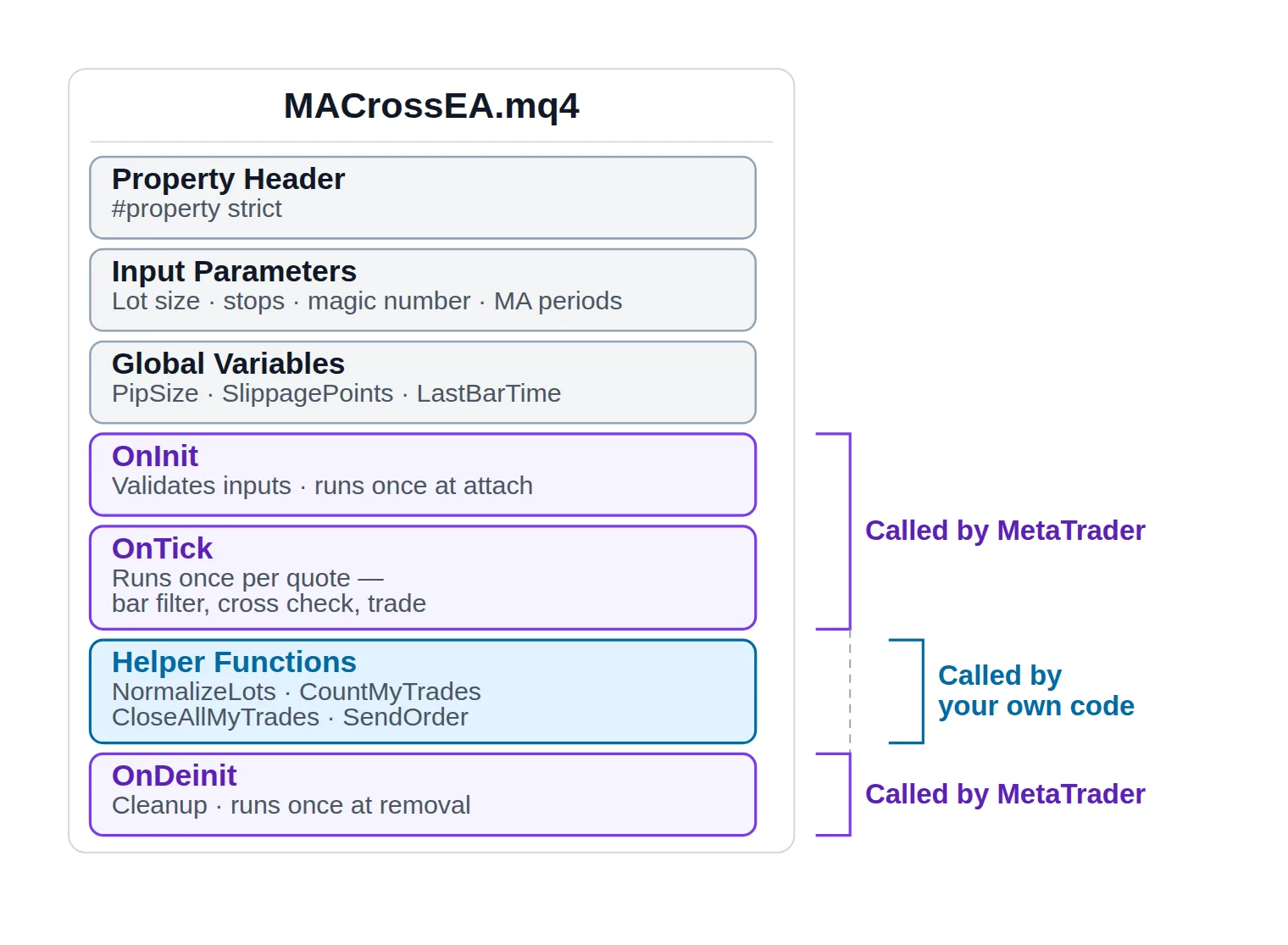
The rules below are deliberately unremarkable: a fast EMA crossing a slow EMA, long on the way up, short on the way down. That is not a recommendation — it is a placeholder for whatever your strategy already says. What matters is the wiring around the condition, not the condition itself. Replace the two comparisons in OnTick with your own logic and the rest of the file stays exactly as it is.
One file, two kinds of function: three handlers MetaTrader calls on its own schedule, and a block of helpers only your own code calls.
Skeleton, inputs, order helpers and entry logic in one compilable file. Swap the crossover test for your own rules.
Six things in that file are worth pausing on, because they are the difference between code that compiles and code that behaves.
The bar filter at the top of OnTick. Storing Time[0] and returning early until it changes turns thousands of tick events into one decision per completed bar.
Indicator values are read from shift 1 and 2, never 0. Bar zero is still forming and its values change on every tick, so a rule built on it fires, un-fires and re-fires — and produces a backtest you can never reproduce live.
NormalizeLots exists for a reason. Brokers reject volumes that sit off the symbol's step, and the step is not always 0.01.
Every trade call checks its result and prints GetLastError() alongside the numbers it tried to send. Silent failure is the most expensive habit in MQL4.
CountMyTrades filters on symbol and magic number, so the EA never touches an order it did not open.
Nothing tunable is hardcoded. Every number the strategy depends on is an input.
One honest caveat about this example: it closes an existing position and opens the opposite one inside the same tick. On a live account that reversal can collide with a busy trade context and leave you flat instead of reversed. A production version waits for the close to confirm before sending the entry — which is exactly the kind of defensive detail the hardening section covers.
Compiling Your EA and Reading Errors in the Journal
Press F7, or click Compile. Results land in the Errors tab at the bottom of MetaEditor.
Errors block the build. Warnings do not, but they usually mean something. Double-click any line to jump straight to it in the source. And fix the first error before reading the rest — a single missing brace or semicolon cascades into a screenful of phantom errors underneath it, most of which vanish the moment you fix the real one.
Compile-time errors are only half the story. The other half appears at runtime, in the terminal rather than the editor:
The Experts tab carries your Print() output and the errors the EA reports about itself. This is the tab you will actually live in.
The Journal tab carries the terminal's own events — connection state, order requests, server responses, and any order rejection with its reason attached.
Debugging reference
What you see
Where it appears
What it actually means
What to change
'OrderSend' - wrong parameters count
MetaEditor, Errors tab
Your argument list does not match the function's eleven parameters.
Count the arguments and check their order against the reference.
'LotSize' - undeclared identifier
MetaEditor, Errors tab
A typo, or the variable is declared below the line that uses it.
Fix the spelling; declare every input above OnInit().
'possible loss of data due to type conversion'
MetaEditor, warning
A double is being assigned to an int, so it silently truncates.
Cast deliberately with (int) or round with MathRound().
Error 130 - invalid stops
Terminal, Experts tab
Stop or target sits too close to price, or was never normalized.
Wrap prices in NormalizeDouble() and respect MODE_STOPLEVEL.
Error 131 - invalid trade volume
Terminal, Experts tab
Your lot size is off the symbol's minimum, maximum or step.
Round the volume through a NormalizeLots() helper.
Error 146 - trade context is busy
Terminal, Experts tab
Another EA or a manual order already holds the single trade thread.
Check IsTradeContextBusy(), wait briefly, then retry.
The first three block the build. The last three compile perfectly and only show up once orders are actually being sent.
The cheapest debugging tool in MQL4 is still a Print() line immediately before every trade call, dumping the exact values you are about to send. When the server refuses an order, the difference between "error 130" and "error 130, price=1.09443, sl=1.09413" is the difference between an evening of guessing and a thirty-second fix.
Hardening Your Code Before You Optimize It
A clean compile proves the syntax is legal; the hardening pass is what keeps the EA working when the volume is off-step, the stop is too tight, or another EA holds the trade thread.
Compiling proves your syntax is legal. It proves nothing about whether the code survives a real tick stream, a widening spread, or a broker that says no. The passes below are what turns a file that runs into a file you can hand to a tester and, eventually, to an account.
Give the EA a magic number and use it everywhere. A magic number is an arbitrary integer stamped onto every order the EA opens, and it is the only reliable way for the code to recognise its own trades. Without it, running two EAs on one account — or placing a single manual trade — means each one starts managing the other's positions.
Normalize the lot size against the symbol, not against your assumptions. Read MODE_MINLOT, MODE_MAXLOT and MODE_LOTSTEP from MarketInfo() and round to them. A volume that works on EURUSD at one broker gets rejected on gold at another.
Respect the broker's minimum stop distance.MODE_STOPLEVEL reports how close to the current price a stop or target is allowed to sit. Send anything tighter and you get error 130, invalid stops — by a wide margin the most-searched error in MQL4.
Check trade permissions before every attempt, not once at startup.IsTradeAllowed() returns false when AutoTrading is off, when the EA lacks algo-trading permission, or when the symbol's session is closed. IsTradeContextBusy() returns true when another EA already holds the terminal's single trade thread — the trade context busy condition, which no amount of correct order code will get around.
Retry the transient rejections; fail loudly on the permanent ones. A requote (138), off quotes (136) and price changed (135) all mean "the price moved, try again" — call RefreshRates() and resend. Not enough money (134) and invalid volume (131) will fail identically forever; log them and stop rather than hammering the server.
Print GetLastError() with context. An error number alone tells you what the server disliked, never what you sent it.
Kill the magic literals. Any bare number sitting in the trading logic is a number the optimizer cannot vary and you will not recognise in six months. Promote it to an input, or at minimum to a named constant.
Decide bar-close or intra-bar deliberately. Acting on completed bars makes results reproducible; acting intra-bar reacts faster but makes every test more dependent on tick quality. Either is defensible — an accident is not.
mql4Hardening helpers
// 1. Never send a stop or target closer than the broker allows.
bool StopsAreValid(int type, double price, double sl, double tp)
  {
   double minDist = MarketInfo(Symbol(), MODE_STOPLEVEL) * Point;
   if(type == OP_BUY)
      return((sl == 0 || price - sl >= minDist) && (tp == 0 || tp - price >= minDist));
   return((sl == 0 || sl - price >= minDist) && (tp == 0 || price - tp >= minDist));
  }

// 2. Retry the transient rejections; give up immediately on the permanent ones.
int SendWithRetry(int type, double lots, int attempts)
  {
   for(int i = 0; i < attempts; i++)
     {
      if(!IsTradeAllowed())    return(-1);
      if(IsTradeContextBusy()) { Sleep(200); continue; }

      RefreshRates();
      double price = NormalizeDouble((type == OP_BUY) ? Ask : Bid, Digits);
      int ticket = OrderSend(Symbol(), type, lots, price, SlippagePoints,
                             0, 0, TradeComment, MagicNumber, 0, clrNONE);
      if(ticket >= 0) return(ticket);

      int err = GetLastError();
      Print("Attempt ", i + 1, " of ", attempts, " failed. Error ", err,
            "  price=", price, "  lots=", lots);

      // 135 price changed, 136 off quotes, 138 requote - worth another try.
      if(err != 135 && err != 136 && err != 138) break;
      Sleep(500);
     }
   return(-1);
  }
A stop-distance guard and a retry loop that distinguishes 'the price moved' from 'this will never work'.
Pre-backtest hardening checklist
0 / 9
Every order this EA sends carries its own magic number, and every loop filters on that number plus Symbol().
Lot size passes through a normalization helper built on MODE_MINLOT, MODE_MAXLOT and MODE_LOTSTEP.
Every price, stop and target is wrapped in NormalizeDouble(..., Digits) before it reaches a trade function.
Pip distances are derived from Digits at load time, so 3- and 5-digit quotes are not silently ten times too tight.
Stop and target distances are checked against MODE_STOPLEVEL before the order is sent.
Every trade call checks its return value and prints GetLastError() together with the numbers it tried to send.
IsTradeAllowed() and IsTradeContextBusy() are checked before each order attempt.
No number inside the trading logic is hardcoded - each one is an input you can change without recompiling.
The EA acts on completed bars, or a comment states explicitly why it acts intra-bar.
★
Checklist complete — you’re cleared to proceed.
Nine boxes. Anything left unticked tends to reappear later as a rejected order or a result you cannot explain.
What's Next: Testing and Running Your Finished EA
A clean compile means your syntax is legal and your logic is expressible. It says nothing about whether the strategy makes money, or whether the code does what you believe it does. Answering both means testing the finished EA before running it live, in a fixed order: a Strategy Tester backtest first, then a forward test on demo, and a live chart only after those two agree. Each of those steps is its own job with its own pitfalls; none of them belongs inside the editor you have been working in.
One thing worth being blunt about before any of that touches funded capital: automation removes emotion from execution, not risk from the market. An EA executes a losing strategy with exactly the same discipline it brings to a winning one, and code that compiles is not evidence of an edge. Read our risk warning before the first live tick.
Then go back to the file. The first version of an EA is never the one you run — it is the one that proves the idea can be expressed at all.
FAQ
Do I need programming experience to write an MQL4 Expert Advisor?
Not formal experience, but you do need to be comfortable reading and editing C-style code — braces, semicolons, conditionals, loops. MQL4's syntax is close enough to C that prior exposure to any C-family language transfers almost completely. What genuinely does not transfer is the event-driven model: MT4 calls your functions rather than running your file, and that inversion is the real learning curve, not the syntax.
Where does the .mq4 file have to live for MT4 to find it?
In the MQL4\Experts folder inside the terminal's data folder, which on Windows is usually not the folder MT4 was installed into. Open it reliably with File → Open Data Folder from the MT4 terminal. If the file compiled successfully but the EA does not appear in the Navigator panel, right-click the Navigator and choose Refresh.
Why does my EA open a new trade on every tick?
Because OnTick() runs on every incoming price and your entry condition stays true after it first becomes true — nothing resets in between. Two guards fix it: act only once per completed bar by storing Time[0] and returning early until it changes, and count your own open positions by magic number before sending an order. Both are in the worked example above.
What does error 130 mean when my EA sends an order?
Error 130 is "invalid stops": the stop loss or take profit sits closer to the current price than the broker permits, or the price was passed without normalization. Read the broker's minimum with MarketInfo(Symbol(), MODE_STOPLEVEL), keep your levels outside it, and wrap every price in NormalizeDouble(price, Digits). On a five-digit account, confusing pips with points triggers this error almost every time.
Can I run MQL4 code on MetaTrader 5?
No. MT5 runs MQL5, and while the event handlers keep the names used throughout this guide, the trading functions underneath them are not the same ones, so an .mq4 file will not build as .mq5 until every order call is rewritten. Treat moving an EA across platforms as a port in its own right rather than the last step of this one.
Should my EA act on every tick or only on completed bars?
Bar-close execution is the better default while you are still building: results are reproducible, the tester's modelled ticks matter far less, and one decision per bar is easy to reason about. Intra-bar execution is legitimate for scalping and for stop management such as trailing, but it makes every backtest more dependent on tick quality. Pick one on purpose, and write the reason in a comment.
Sources & Further Reading
Want to go deeper? These independent, authoritative sources shaped this guide — each one is worth reading in full:
The Cross-Market Desk is the SignalBots editorial team for topics that span every market — platform connectors, copy trading, partnership and IB programs, and the general mechanics of trading automation. We research and write the guides that apply no matter what you trade.






Discussions 0
Leave a comment