Search pocket option bot and you get three different machines wearing one word. One messages you and waits. One clicks Buy on the page while you are asleep. One decides what to trade in the first place. They need different setup, they fail in different ways, and they carry very different exposure if the platform decides it dislikes what you are running.
The confusion is not your fault. Pocket Option's own material blurs the line — its Telegram bot is presented as a signal tool, yet the same tool can be switched into placing trades on your behalf. Vendors lean on the ambiguity too, because "bot" markets better than "alert feed with a monthly fee".
This page is the map, not the manual. It separates the three categories, gives you a straight answer on where the platform stands, compares the real options side by side, and hands you to the one deeper guide that matches your situation. What it deliberately does not do is teach you to write bot code, tune a strategy's parameters, or read the terms of service line by line — each of those is its own page.
Key Takeaways
"Bot" on Pocket Option covers three different products, and the question that separates them is who places the trade — you, or the software.
"AI" answers a different question again (who decides), so it can sit under either a signal bot or an execution bot rather than being a third category.
Automation is not banned in principle, but the platform endorses only its own tools; third-party browser extensions sit outside the sanctioned set.
Pick the category that matches how much of the trade you will hand over, then prove it on a demo account with written limits before any live balance.
Table of Contents (21 min read)Contents
What Is a Pocket Option Trading Bot?
Start with the constraint that shapes every answer here: Pocket Option is a web-based binary options platform, not a MetaTrader-native broker. There is no built-in slot to drop a compiled robot into and press Start. Anything automated has to reach the platform from outside — through a chat app, through the browser tab the platform is already open in, or through a desktop relay that speaks to MetaTrader on one side and your Pocket Option account on the other.
Acts — either by telling you, or by placing the trade itself.
The first three are ordinary algorithmic trading plumbing, and every tool on the market does them in some form. The fourth is where the categories split, and it is the only distinction that changes what you are actually buying. Every bot reads, decides and sizes the same way. The category is decided by the last step alone.
Signal Bots vs. Auto-Trading Bots vs. AI Bots
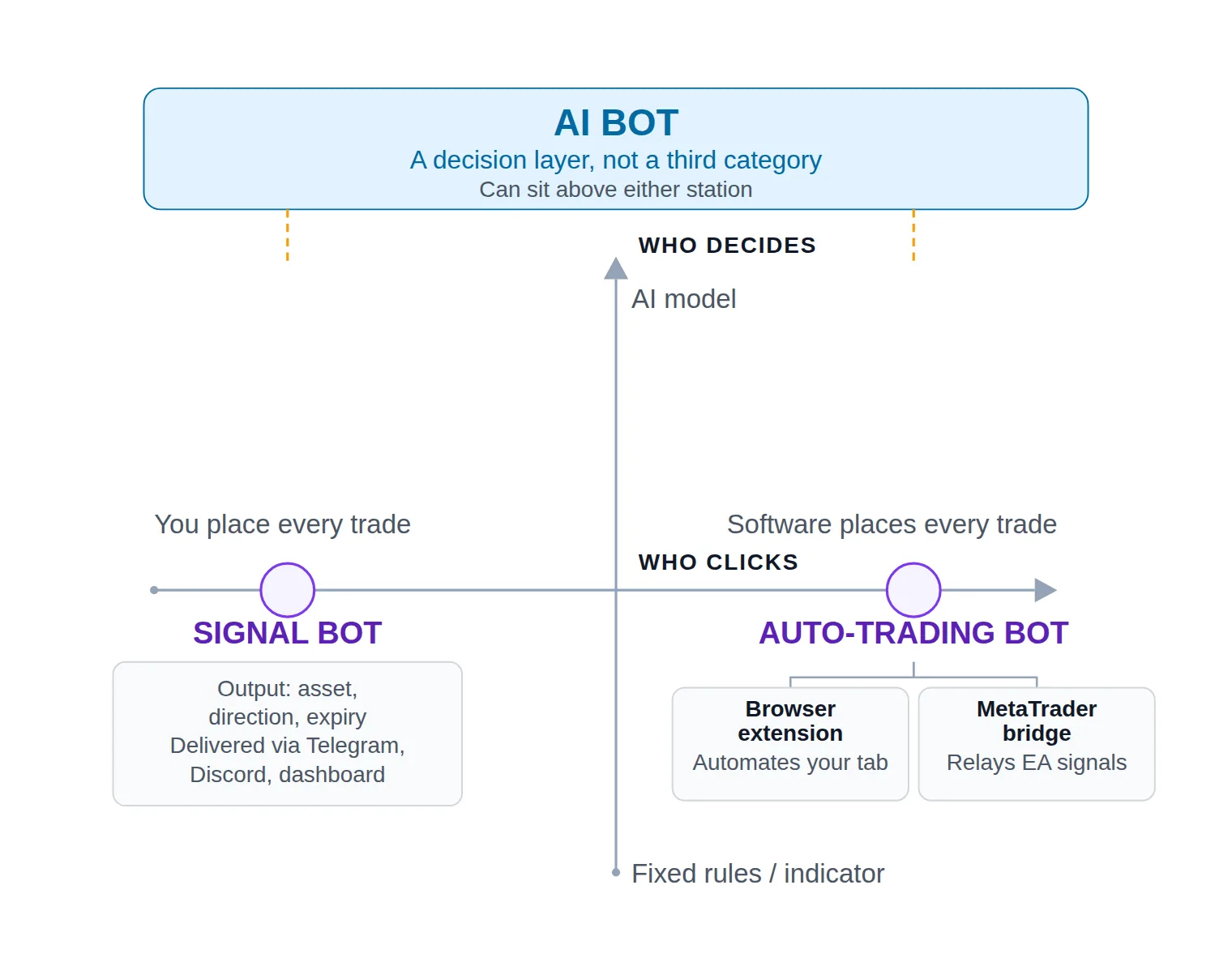
A signal bot produces alerts and stops there. Its output is a binary options signal — an asset, a direction, an expiry, a timestamp, sometimes a confidence score. It arrives in a Telegram signal channel, a Discord server, or a web dashboard, and a human decides whether to place it. The bot never touches your account, which is why this is the category with the smallest surface area for anything to go wrong.
An auto-trading bot places the trade itself.Auto-trading on Pocket Option takes one of two shapes, precisely because of that web-platform constraint. The first is broker page automation: an extension that drives the live trading interface in your own logged-in tab, reading the chart and clicking the buttons the way your hand would.
The second shape is a bridge — a desktop application in the family of an MT4/MT5 connector that takes a signal generated by a MetaTrader indicator or expert advisor and relays it into your Pocket Option account. Tools such as MT2Trading are built this way and usually add a copy-trading mode, where the source of the signal is another trader rather than an indicator.
An "AI bot" describes how the decision gets made, not who clicks. This is the distinction almost every page on this topic drops, and dropping it is why the landscape looks incoherent. AI is not a third seat at the same table — it is a second axis. Pocket Option's own AI trading mode sits on it, and so do third-party tools built on large language models, and either can be configured to alert only or to execute unattended. A signal bot can be AI-driven. So can an execution bot. "AI" tells you nothing about whether software will be clicking on your behalf.
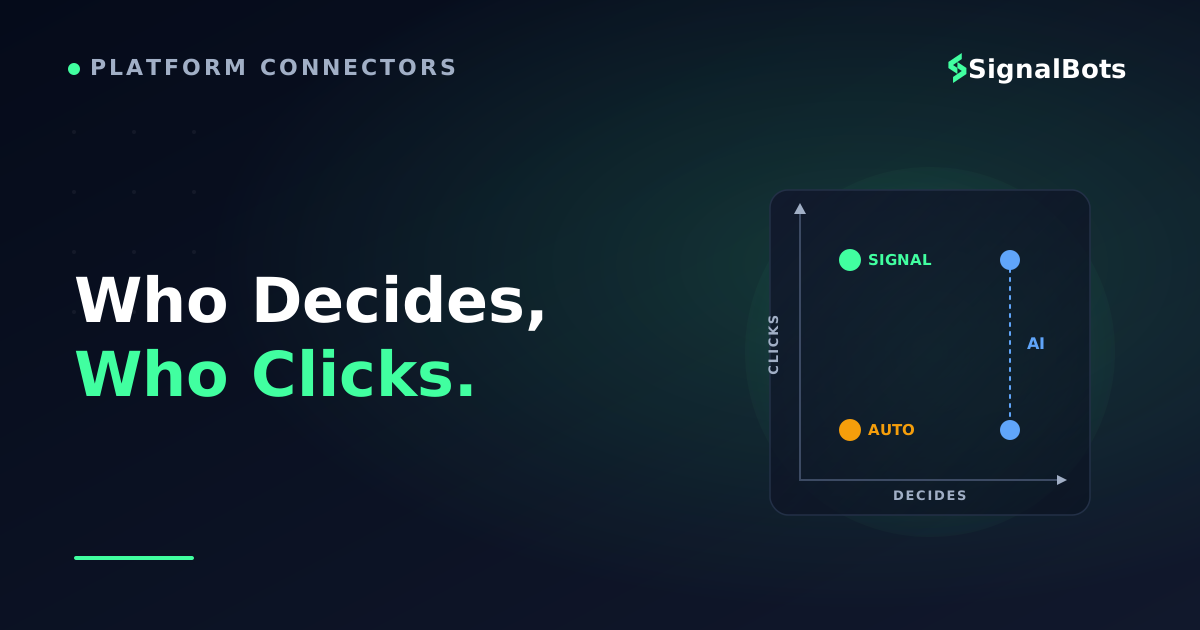
So every product in this market is sorted by two questions, not one: who decides — a fixed rule set, a technical indicator, a model, or another trader — and who clicks: you, or the software.
Every Pocket Option bot sits somewhere on two axes at once: who clicks, and who decides.
This is not pedantry. The most common way people get caught out by a Pocket Option bot is buying one category while picturing another: expecting alerts and ending up with an account trading unattended overnight, or expecting hands-off automation and finding a feed of messages that expire while they are at work. Find the "who clicks" answer on a product page before you read anything else on it.
Is Automated Trading Allowed on Pocket Option?
The honest short answer: automation is not banned in principle, but not every route to it is equally sanctioned.
The platform is not hostile to the idea — it ships automation of its own. There is a Telegram bot wired to trading accounts and an AI trading mode inside the platform itself. Its published educational material treats automated strategies as acceptable so long as they follow platform rules, and it draws the line at behaviour it reads as abuse rather than at automation as such: exploiting faults in the platform, manufacturing artificial trading volume, or hitting the system in patterns no human hand produces.
What "not banned" does not mean is "every path is equal". Pocket Option endorses its own tools, and has publicly said it does not endorse third-party Chrome extensions for trading — which places extension-based auto-traders outside the sanctioned set even when nobody is doing anything abusive with them. Exposure is therefore graded rather than binary:
Signal bots — lowest exposure. No software ever touches your account. You place every trade yourself, and the platform sees an ordinary manual trader.
The platform's own tools — sanctioned by definition. The trade-off is that you get the logic the platform chose to give you, with limited ability to inspect or change it.
Third-party execution bots — highest exposure. You are automating an interface that was not built to be automated, on a tool the platform has not endorsed. There is a second question layered on top: a trading browser extension that trades for you runs inside your logged-in session with whatever extension permissions it asked for, so this is a trust decision about the vendor as much as about the broker.
None of this changes the arithmetic of the trades themselves. Automation strips hesitation, fatigue and revenge-clicking out of execution — it does not manufacture an edge that was not there, and a weak strategy will lose money faster and far more consistently under a bot than under a tired human. Read the risk warning before you point any of this at a live balance. Automation is permitted in principle — but the platform stands behind only one of the routes into it.
Exactly where the terms draw the line, what has actually triggered account restrictions, and how to keep an automated setup inside the rules is a longer question than a map should answer — it deserves a full reading of Pocket Option's bot policy and the real ban risk, on its own page.
The Best Pocket Option Trading Bots, Compared
Most comparisons on this topic cover one category and call it the market: a list of Telegram channels, or a list of extensions, never both in the same frame. Here is the cross-category view, scored on the four things that genuinely differ between them.
Auto mode runs unattended once armed; alerts expire if you are away
Pocket Option AI Trading Mode (official)
The software
Inside the trading platform
Included with the platform
Logic you cannot inspect, tune, or backtest yourself
MetaTrader bridge (MT2Trading and similar)
The software
Desktop app plus MT4/MT5 running on your machine
Free tier advertised, paid plans above it
Your PC or VPS dropping offline; a repainting indicator
Browser-extension auto-traders (2BOT and similar)
The software
Your browser, on the live Pocket Option tab
Varies by vendor — free and subscription both exist
Closing the tab halts it; not endorsed by the platform
Third-party Telegram / Discord signal channels
You
A chat app on any device
Free tiers and paid VIP tiers
No verifiable track record; latency between alert and your click
A bot you build yourself
The software
Your own machine or server
Your time, plus hosting
Unofficial endpoints changing without warning; you are the support team
The column that decides which row you belong in is the second one — everything else is a consequence of it.
On cost. Free and paid do not map onto weak and strong here. A free tier exists at both ends of the quality range — the platform's own Telegram bot costs nothing to use, and so do plenty of thin channels with no track record behind them. What free actually predicts is the support model and how quickly a broken tool gets fixed. If price is the constraint you are optimising for, the free signal bots and the free execution bots are two separate shortlists with two separate sets of trade-offs, and mixing them is how people end up with unattended automation they did not intend to run.
On performance claims. Notice the column this table does not have. Not one entry in it publishes an independently verified track record, and several advertise win rates with no methodology attached. Treat an advertised historical win rate as a hypothesis, not a specification: confirm it yourself with a forward test on your own account, in the sessions you actually trade, before it sees real money.
Two scope notes worth flagging now. Several of these tools will keep trading OTC synthetic pairs at the weekend when the underlying markets are closed — genuinely different behaviour that deserves its own evaluation rather than being assumed from weekday results. And most execution bots ship some form of recovery sizing, frequently a martingale ladder, often switched on by default; how that one setting is configured matters more to your balance than the entry logic sitting above it.
How to Choose the Right Bot for Your Trading Style
Choose the category first and the product second. Reversing that order is what produces the mismatch described above — and the branch you belong on is decided by a single question: how much of the trade are you actually willing to hand over?
The branch is decided by how much of the trade you hand over — not by which tool has the loudest marketing.
Four situations, four categories — find your branch before you compare products.
If you have never automated anything, start on the signal branch. You keep the veto, you learn what the alerts look like when they are wrong as well as when they are right, and nothing runs while you are not watching. Traders who skip this step and go straight to unattended execution usually discover their strategy's weaknesses at the worst possible scale.
If you already trade a rule-based strategy by hand, you are on the execution branch, and the sub-question is where your rules currently live. Rules already encoded in a MetaTrader indicator or EA point at the bridge path; rules that only exist in your head point at either a preset-driven extension or a build.
If you want the machine to make the calls, the AI branch is honest about what you are accepting: a black box whose reasoning you cannot audit. That is not automatically bad — plenty of profitable trading is done on models nobody can fully explain — but it should change your position sizing, not just your expectations.
If you can code, building is the only path that gives you full control of entries, stake, and expiry logic, at the price of owning every future breakage yourself.
Whichever branch you land on, one number sets the bar for all of them. Because a binary payout percentage is below 100%, the win rate required simply to break even sits above 50% — suppose the payout on your asset is 80%: the trade needs to win more than roughly five times in nine just to stay level, before you have made a cent. Run the number for your own payout with the break-even win rate calculator before you judge any bot's advertised accuracy. A bot that wins slightly more than half its trades is not a marginal winner; it is a loser with better throughput.
How to Get Started With a Pocket Option Bot
The sequence below is the same regardless of which category you picked. It exists to make the first live week boring.
From choosing a bot to a live account, safely
1
Name the category you actually need
Signal bot, execution bot, or AI decision engine. Every later choice — channel, cost, setup effort — follows from this one.
2
Run it on a demo account first
Let it trade unattended across a full week, including the sessions you would normally sleep through. Watch behaviour, not profit.
3
Write the limits down before going live
Maximum stake, trades per day, and the loss that ends the session. Set them inside the bot, never only in your head.
4
Go live at the smallest stake allowed
The first live week tests plumbing: fills, dropped connections, and what the bot does when the tab or the terminal closes.
5
Read the log, then keep it or kill it
Compare live results against the demo run. A bot that only behaves while you are watching it is not automation.
Nothing here is optional — every step exists because skipping it is how a first live week goes badly.
Two things belong in step three that people routinely skip. The first is a hard kill switch you can reach without opening the bot's own interface — closing the browser, quitting the terminal, revoking the Telegram command — because the moment you need to stop a bot is exactly the moment its settings panel will feel too slow. The second is a stake plan written before the first losing streak rather than during it; a demo account will tell you what your bot's worst run looks like, and that number is the one to size against.
From here, the path splits by delivery channel, and each one has its own short procedure:
If you already own a MetaTrader indicator or EA, connecting MT2Trading to Pocket Option is the bridge path, and it has specific installation requirements on the MetaTrader side.
And once any of those is running, tuning the bot's settings — stake progression, filters, expiry, session windows — is where the results are won or lost.
See a Live Signal in Action
The signal-bot category stays abstract until you have read an actual signal. So here is what one looks like on our own feed, to give you something concrete to judge the category against rather than a screenshot in an advert.
Our live binary options signal feed publishes real-time alerts across forex pairs, US and global indices, metals, oil and crypto, and the live feed is free to browse. Each card carries the fields a signal has to carry to be actionable: the symbol, the direction as a call or a put, the strike level the signal was taken at, the expiry it is measured against, the strategy that generated it, and — once the clock runs out — the settled outcome. Read a few in sequence and the category clicks into place: the machine did the analysis and the timing, and the click stayed with the human.
That is also the boundary, stated plainly. It is a signal feed, not an auto-trading bot — it does not log into Pocket Option and place anything on your behalf, and it will not trade while you sleep. If hands-off execution is genuinely what you want, this is the wrong shape for you; you need an execution bot or the platform's own AI mode, and the comparison table above is where that search starts.
The Bottom Line
You arrived with
“three different machines all being sold as a Pocket Option bot”
and you leave with
two questions that sort every one of them: who decides, and who clicks.
Pick the category first. The product argument only matters after that.
Signal bots hand you the analysis and keep you on the trigger. Execution bots take the click, through the browser page or a MetaTrader bridge, and carry the most platform exposure with it. AI describes the decision layer and can sit under either. Once you know which of those you actually want, the shortlist gets short fast — and the work moves to where it belongs: a demo week, written limits, and a stake plan that survives the losing run every automated strategy eventually has.
Yes — two, and they belong to different categories. There is a Telegram bot linked to your trading account, which delivers signals and can also be switched into placing the trades itself, and there is an AI trading mode inside the platform. Both are first-party tools, which makes them the sanctioned end of the spectrum, but neither publishes an independently verified performance record, so the usual demo-first discipline still applies.
Is a Pocket Option trading bot free?
Some are. The platform's own Telegram bot costs nothing beyond having an account, plenty of third-party signal channels run a free tier, and at least one MetaTrader bridge advertises a free plan alongside paid ones. Price is a poor proxy for quality in this market — a free tool with a clear stopping mechanism and demo support is safer than a paid one that will not tell you what it does when your connection drops.
Will using a bot get my Pocket Option account banned?
Automation is not banned as a concept, and the platform ships automation of its own. What draws enforcement is behaviour the platform reads as abuse — exploiting faults, manufacturing volume, or activity patterns no human produces. The grey zone is third-party browser extensions, which the platform has said it does not endorse. If that specific risk is what is holding you back, it deserves a proper reading of the policy rather than a paragraph in a FAQ.
Can I use MT4 or MT5 to trade Pocket Option automatically?
Not directly — Pocket Option is a web platform and does not host MetaTrader expert advisors. What bridges the gap is a separate desktop application that watches an indicator or EA signal in your MetaTrader terminal and relays it into your Pocket Option account. That means two programs must stay running and online for the automation to work, which is why traders on this path usually end up hosting them on a VPS.
Do Pocket Option bots trade OTC pairs at the weekend?
Many of them will, because the platform offers synthetic OTC instruments when the underlying markets are closed. Whether that is a feature or a hazard depends on the bot: price behaviour on weekend OTC instruments is not the same as weekday market behaviour, so a strategy validated from Monday to Friday has not been validated for Sunday. Test weekend behaviour separately, or switch the bot off for it.
What is the difference between a signal bot and an AI bot?
They answer different questions. A signal bot is defined by what it does with its conclusion — it tells you, and you click. An AI bot is defined by how it reaches the conclusion — a model rather than a fixed rule set. A tool can be both at once: an AI-driven signal bot sends alerts you approve, while an AI-driven execution bot places the trade itself. Always resolve "who clicks" separately from "who decides".
How do I test a Pocket Option bot before risking real money?
Run it on a demo balance for at least a full week, unattended, including the hours you would not normally be at the screen — the goal is to observe behaviour rather than to admire a profit figure. Note what it does at the session boundaries, during news, on weekend instruments, and when you close the tab or the terminal. Then go live at the minimum stake and compare the first live week against the demo week before scaling anything.
Sources & Further Reading
Want to go deeper? These independent, authoritative sources shaped this guide — each one is worth reading in full:
The Binary Options Desk is the SignalBots editorial team for fixed-time and OTC trading coverage. We research and write the guides that explain expiry timing, payout structure and disciplined entry across the major brokers.




Discussions 0
Leave a comment