Open Pocket Option's own Help menu and you are offered a bot. Search pocket option bot signals and you are offered four more. Every one of those pages was written by whoever sells the tool, and not one of them answers the question you need settled before anything else: will this thing send you a trade to consider, or place it while you are making coffee?
That single distinction decides everything downstream — how much you can risk while you are still learning the tool, what it needs access to on your account, and whether a bad run was your call or the software's. So this ranking starts by splitting the field, then compares only the tools that hand the decision back to you.
Below: four named bots, how each one gets the alert in front of you, what it costs, what risk controls it ships with — and an honest explanation of why "hit rate" is not one of the columns.
Pocket Option's Help menu offers a bot. Three more sites offer their own. Not one of those pages compares them.
PO
Pocket Option Official Signal Botin manual-approval mode
Free, and it is the broker's own bot - no third party
Alerts land in Telegram; you approve each trade
Trade size, daily loss cap and stop-balance built in
Runs against a demo account before you risk anything
Best for alerts you approve
Our take
#2PoSignals (Enigma Signals)Best free dashboard
#32BotTrades unless told not to
#4AutoBotSignalPaid, unverifiable
Compared on delivery channel, cost, signal method and built-in risk controls.See the full comparison →
Ranked for readers who want the alert, not the auto-click.
Key Takeaways
Half the tools sold as pocket option bot signals are execution bots: they place the trade rather than describe it, so only the ones with a real manual-approval mode belong in a signal-bot ranking.
None of the four publishes a track record you can verify, so the honest ranking is by what is checkable - delivery channel, cost, built-in risk controls, and how fast you can measure the hit rate yourself on a demo balance.
Pocket Option's own bot ranks first in manual mode because nothing sits between the signal and your account; PoSignals is the strongest free third-party option; the single paid entry's product page did not resolve when we checked it.
On sixty-second expiries the delivery channel matters more than the algorithm - every hop between the bot and your click moves the strike your contract settles against.
Table of Contents (34 min read)Contents
Not Every "Pocket Option Bot" Sends You a Signal - Some Just Place the Trade
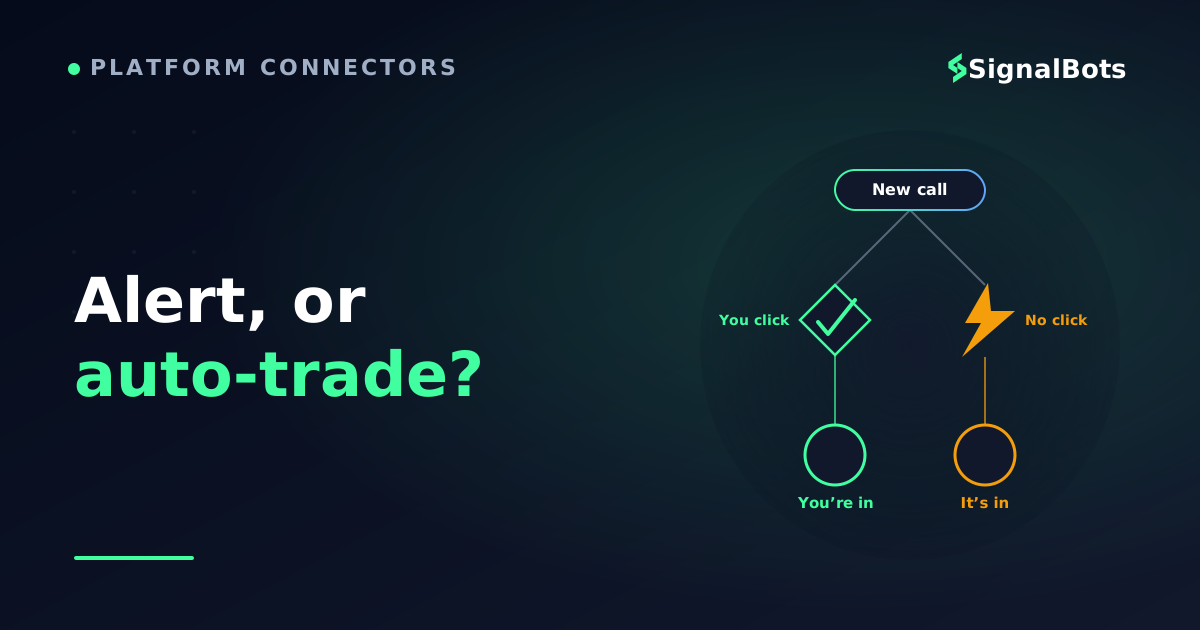
A signal bot produces a call and stops: asset, direction, expiry time. You read it, you look at the chart, you decide whether it still makes sense. An execution bot takes that same call and clicks for you — the analysis is identical, the consequence is not.
Pocket Option's own tool is exactly where this blurs. The official Telegram bot is one product with two modes: it can push the call to you and wait, or it can fire the trade on your account the moment its conditions are met. Same bot, same alerts, completely different relationship with your balance. When people search for a pocket option prediction bot and land on that page, they are usually reading about the second mode without realising it.
The rest of the landscape blurs the same way. The platform separately offers an AI Trading Bot, which is an execution product, not an alert feed. 2Bot is a browser extension built to trade, with a manual-assistant layer bolted on the side. And to be straight about our own position: our Pocket Option browser extension is a hybrid too — it generates its own calls and places them — which is precisely why it is not sitting in the ranking below. A page that ranks its own auto-trader as the best "alert-only" bot is not a ranking.
So the admission rule for this list is narrow and mechanical: a tool qualifies only if it has a genuine mode where nothing reaches your account until you press the button yourself. Everything else belongs to the different types of Pocket Option trading bots that sit one category over — auto-trading software, judged on different criteria entirely. Both are sold as Pocket Option bots. Only one of them leaves the decision with you.
The Best Pocket Option Signal Bots Compared
Four tools clear the bar, or nearly clear it. Two are first-party or first-party-adjacent, one is a community project, one is paid. The last column is the one most buying decisions actually turn on.
This is the pocket option official signal bot most searches are really looking for: activated from inside the platform's applications area, then linked and authorised inside Telegram. In manual mode it pushes the call to your chat and stops there — you read the asset, direction and expiry, then place the trade yourself on the platform.
What makes it the pick is not cleverness, it is the absence of a middleman. There is no third-party service holding a session to your account, no extension reading the page, no separate vendor to disappear. Its configuration covers the controls that actually matter on a binary account: account mode (demo or real), timeframe, a minimum payout percentage filter so it ignores low-paying assets, per-trade stake, a daily loss limit, and a stop-balance that halts everything once a profit goal is hit.
The catch is the same thing that makes it flexible. Auto-execution lives one toggle away from manual approval, and the setup flow walks you past that toggle. If you want alerts only, verify the mode after every settings change — not once at the start.
Note that setting up a Telegram signal bot end to end — the authorisation handshake, the per-asset rules, the demo run before you switch to live funds — is its own job, and this page deliberately does not repeat those steps.
2. PoSignals and Enigma Signals
PoSignals is the strongest free third-party option, and the only one in the group that lets you choose where the alert lands. Enigma Signals is its automatic signal engine, producing directional calls across a spread of assets; the alerts show up on the chart you are already watching, in the browser dashboard, and optionally as Telegram notifications.
Two other pieces come attached. Supercharts is a multi-chart workstation for watching many pairs at once, which matters more than it sounds when your bot is calling several assets in the same minute. Trading Manager is a risk-and-journal layer that logs your Pocket Option trades automatically and manages stake sizing through preset schemes — including martingale and its variants — with a profit target, a loss limit and a session timer that stop the session when any of them trips.
It ranks second, not first, on trust surface rather than capability: it is a third-party platform that sits alongside your account rather than inside it, and it can auto-execute on its own signals if you switch that on. Its marketing also leads with a headline win-rate figure on one pair with no trade log behind it — treat that as a claim, not a record, and hold it to the standard in the next section.
3. 2Bot
2Bot — distributed as a free Chrome extension and openly described by its makers as a community project with no affiliation to Pocket Option — is the most capable free tool here and the worst fit for this list's actual question.
It runs two modes. In signal mode it reads the platform's own forecasts across timeframes and acts on the ones that match your filters. In indicator mode it scans the available pairs against an indicator you select and fires when that indicator triggers. Its risk settings are genuinely thorough for a free tool: a minimum-payout threshold, a cap on how often it may trade, a cap on simultaneous positions, a take-profit level that halts the bot once reached, and a safety net that closes losing positions to protect the balance.
But read the verbs. It enters trades; it does not describe them. There is a manual-assistant layer, and the product supports a demo account — a genuinely good habit it enforces on new installs — yet the thing is architecturally an auto-trader. If you install it hoping for a signals bot that whispers suggestions, you have installed something that clicks.
4. AutoBotSignal
Pocket Option's own knowledge base places AutoBotSignal in the paid tier of the landscape, alongside MT2Trading, and describes it as TradingView-based. That is the entirety of what can be confirmed.
Its product page did not resolve when we checked it for this ranking — a not-found error, on the URL the broker's own article points at, on repeated attempts. We are not going to describe features we could not see, and you should be wary of any roundup that does. For a paid tool that is itself the finding: you would be asked to pay before anything about it is inspectable.
How We Ranked Them - and Why Hit Rate Isn't a Column
Every ranking should say what it measured. Here is ours, including the part that failed.
What could be checked, from each tool's own material: how the alert is delivered, what it costs, where the directional call comes from, whether a true alert-only mode exists, which risk controls ship built in, and whether the tool runs on a demo balance before real money is involved. Those six things are observable, and they are what the table scores.
What could not be checked: performance. Not one of the four publishes a verified track record — no exportable trade log, no read-only account, no third-party-audited history. What circulates instead is a headline percentage on a landing page. A historical win rate with no trade count and no payout beside it is not a measurement; it is a design element. Sixty wins from a hundred trades on a 70% payout is a different business from sixty wins from a hundred trades on a 50% payout, and a run of a hundred trades is a small enough sample size that luck is still the loudest voice in it.
So "ranked by hit rate" becomes something more useful than a leaderboard of unverifiable numbers: ranked by how quickly you can measure the hit rate yourself. Three of the four run free, and all three of those run on a demo balance. That turns a marketing claim into a testable one, and it costs you a fortnight instead of a deposit. Log every alert the bot sends — including the ones you skip — with the asset, the payout offered, and the result. Then run your own numbers through an expectancy calculation rather than the vendor's.
None of this makes any ranking a performance forecast. Binary options are a bounded-loss, bounded-gain instrument where the payout structure does the arithmetic against you, and every tool on this page inherits that; the full risk warning is worth two minutes before you connect anything.
Where the Seconds Go Between the Signal and Your Click
Bots advertise speed as a property of the bot. On a binary account, the number that decides your outcome is the delay between the moment the bot decides and the moment your stake is locked at a strike price — and most of that delay is not the bot's.
The three channels in the table produce genuinely different amounts of it:
Inside the platform tab. An extension like 2Bot renders its call in the same page as the trade ticket. Nothing travels anywhere; whatever signal latency exists is local.
Telegram push. The alert leaves the bot, reaches Telegram's servers, reaches your phone, waits for you to notice the notification, and then waits again while you switch back to the platform. The bot's side of that is milliseconds. Your side is not.
Dashboard and on-chart markers. In between: no app switch, but your eyes have to be on the right chart, which is why PoSignals ships a multi-chart layout.
None of that matters on a four-hour view. It matters enormously on the sixty-second expiries these tools are built around, because in binary options a late entry does not just cost you a few pips of a running position — it changes the strike your contract is settled against.
A 60-second call: the strike the signal described vs the strike you gotEUR/USD OTC1m
Illustrative. The bot's direction was right for the whole minute. The entry you got was not the entry it described.
That is what a stale signal means on a one-minute expiry: nothing about the analysis rotted, the strike simply moved while the alert was in transit and you were reading it. It is also why "which bot" is, in practice, a question about which channel suits how you actually sit at your desk. A Telegram push is fine if you trade five-minute expiries with your phone beside you and terrible if you chase sixty-second entries. Every handoff between the bot and your click is time the market does not pause for.
Two footnotes on channel. First, none of these four delivers to Discord — traders who prefer that room are looking at a relay they wire themselves, and setting up a Discord signal bot is a separate build with its own webhook plumbing. Second, asset coverage shapes the clock as much as the channel does: much of Pocket Option's activity sits in weekend OTC trading on synthetic pairs, and a bot that only reads live-market feeds simply goes quiet on a Saturday while the platform is still open around it.
Is a Free Signal Bot Enough, or Should You Pay?
The usual roundup logic — free tools are the trial, paid tools are the real product — inverts in this niche, and the table above is the reason. The two most trustworthy entries cost nothing, one because it is the broker's own, the other because it is a free platform funded elsewhere. The only paid entry is the only one whose claims could not be inspected at all.
Free signal bot vs paid signal bot, on this platform
Winner
Free tools
The broker's own bot and a free third-party platform both sit here
You can run them on a demo balance for a fortnight at zero cost
Risk controls are already built in - loss caps, payout floors, stop-balance
No refund fight if it turns out to be useless; you just uninstall it
Enough to answer the only question that matters: does it work on your assets?
VS
Paid tools
Should buy an inspectable record, real support and maintenance
On this platform, the paid entry's own product page did not resolve
You are asked to commit money before anything is verifiable
A subscription is not evidence - the free tools disclose more, not less
Worth it only when the vendor shows a track record you can check first.
Paying is not the problem. Paying before you can inspect anything is.
There is a legitimate argument for paying: a maintained tool from a company with something to lose survives platform interface changes that break community extensions overnight, and support you can reach at 2am has real value. But that argument only starts once the vendor shows a record. Until then, the free signal bot options are not the budget compromise — they are the ones offering more disclosure, not less.
Is It Safe to Connect a Signal Bot to Your Pocket Option Account?
Before any of these touches a funded balance, two questions are worth more than the entire comparison above.
What is it allowed to see and do? A browser extension that operates the platform for you needs extension permissions to read and act on that page — which is functionally the same reach as your own logged-in session. That is not automatically sinister; it is how any in-page tool works, including ours. It does mean you install only from the official store listing for the extension, you check what the listing declares it can access, and you treat any tool that asks for your platform password directly as disqualified on the spot. A signal bot never needs your password.
Is it allowed at all?Whether Pocket Option's own rules permit a third-party bot on a funded account is a genuinely separate question — one with a real answer in the platform's terms rather than in a vendor's FAQ, and one worth reading before your first withdrawal request rather than after it. Flagging it here; adjudicating it is not this page's job.
The 30-Second Shortcut
If you do not want to re-read the table:
You want zero setup and zero third parties → Pocket Option's official signal bot, left in manual-approval mode. Activate it from the platform, verify the mode, run it on demo for two weeks.
You want the alerts on the chart you are already watching → PoSignals with Enigma Signals, auto-execute switched off. Best pick if you follow several assets at once.
You want the most control over the trigger → 2Bot's indicator mode, on a demo balance, with the trade caps set low. Accept that you are configuring an auto-trader to behave itself, not running an alert feed.
You want to pay for something better → not yet. Ask the vendor for a trade log first; if none arrives, you already have your answer.
Get Binary Options Alerts Without Installing a Bot
Everything above assumes you want software attached to Pocket Option. Some readers, at this point, realise they do not — what they actually wanted was the alert itself: an asset, a direction and an expiry arriving while they decide. That is a channel, not a bot, and it needs nothing installed.
Ours is the binary options Telegram channel. It pushes live binary options signals into Telegram — the same delivery route the official bot uses in its alert mode, and the same reading job: you get the call, you check the chart, you decide. Nothing is linked to your broker account, nothing has permission to click, and there is no mode to accidentally leave switched on.
Be clear about what it is not. It covers the binary options market broadly rather than living inside Pocket Option's platform, so its asset list is not identical to what you see in your ticket — including the weekend OTC set. And it does not execute: if what you concluded from this page is that you want a bot that trades, a manual channel is the wrong tool and you should be reading about execution bots instead.
Choosing the Right Signal Bot for Your Trading Style
The field sorts itself once you stop asking which bot is smartest. Decide first whether you want the software to decide or to advise. Then pick the channel that matches where you actually are when a sixty-second setup appears. Only then does the algorithm matter — and by that point, three of your four options cost nothing to test.
The one thing worth carrying away from a page full of best pocket option signal bot claims, including this one: no tool here has proven a hit rate to anybody. The one that will prove it to you is the one you run on demo, in your own hours, on your own assets, with every alert written down.
You arrived asking
“which Pocket Option bot sends the best signals”
and the answer turned out to be
the one that asks permission before it trades.
Start with the bot that waits for you
PO
Pocket Option Official Signal Bot (manual mode)
It is free, it is the broker's own, no third party holds access to your account, and it ships with the controls that matter on a binary balance - stake size, a daily loss cap and a stop-balance. Run it on a demo account for a fortnight and log every alert, then check the win rate you actually recorded against the payout you were actually offered.
Not your fit? If you decided you want the software to place the trade rather than describe it, you are shopping for an execution bot - a different tool, a different risk profile, and not what this ranking measured.
Yes. It is activated from inside the platform's applications area and then linked in Telegram, where it delivers its calls. It is free, and it can run in either manual-approval mode — where you place every trade yourself — or auto-execution mode, where it trades on your account. The mode is a setting, not a separate product, so check which one is active after any configuration change.
Are Pocket Option signal bots free?
Three of the four compared here are: the official bot, PoSignals with its Enigma Signals engine, and 2Bot. The paid entry, AutoBotSignal, is named in Pocket Option's knowledge base but its product page did not load when we checked it. On this platform, cost is a poor proxy for quality — the free options currently disclose more about how they work than the paid one does.
Can a signal bot place trades for me on Pocket Option?
Some can, and that is the distinction to watch. The official bot and 2Bot both execute; PoSignals can if you enable it. A tool that only alerts you is a signal bot, and one that clicks is an execution bot, even when the same product does both. Whichever you choose, confirm the current mode before funding the account rather than after.
Do these bots work on Pocket Option's weekend OTC pairs?
It depends on where the bot's data comes from. Tools that read the platform's own feed — the official bot and 2Bot in signal mode — see the OTC assets the platform is quoting. A tool driven by external market data goes quiet when the underlying market is closed, even though the platform is still trading. If weekends are when you trade, test that specifically before committing.
How do I check a signal bot's win rate myself?
Run it on a demo balance and log every alert it sends, including the ones you skip: asset, direction, expiry, the payout offered at that moment, and the result. After a few hundred alerts, compare the win rate you recorded with the break-even win rate that payout requires. That comparison, on your assets and in your trading hours, is worth more than any figure printed on a vendor's page.
Is a prediction bot the same as a signal bot?
In practice, yes — "prediction bot" is marketing language for the same thing: software producing a directional call on an asset for a defined expiry. Be more careful with the word than with the category, though. A tool that describes its output as a prediction rather than a signal is often the same tool selling certainty it cannot have, and the language is a decent early filter.
Sources & Further Reading
Want to go deeper? These independent, authoritative sources shaped this guide — each one is worth reading in full:
The Binary Options Desk is the SignalBots editorial team for fixed-time and OTC trading coverage. We research and write the guides that explain expiry timing, payout structure and disciplined entry across the major brokers.




Discussions 0
Leave a comment