Search "AI trading bot" for Pocket Option and almost everything that comes back promises the same shape of thing: connect it, walk away, let it place trades. If what you actually wanted was narrower — the AI's read on the market handed to you, so you look at it and decide — most of those pages never answer your question. They answer a different one.
The narrower tool exists. It produces the same kind of call, and then it stops: it sends you the asset, the direction and the expiry, and the trade ticket stays yours. This page is about that tool — how it builds a call, where the call lands, what each field in it means, how you act on one before it goes stale, and how to pressure-test the win rate a provider advertises before any of your money is involved.
Key Takeaways
A signal-only tool has no write access to your account. It delivers a call and stops; whether that call becomes a position depends on you opening the platform and clicking.
The setup process tells you which product you have. Asked only for a destination (Telegram, email, webhook)? It can talk to you. Asked to sit in your trading tab or hold credentials? It can trade.
An alert has a shelf life. It describes conditions at the moment it was scored, so the timestamp — not the confidence score — decides whether it is still tradable.
A win rate means nothing without the payout beside it. Binary payouts push break-even above 50%, so judge the margin above break-even at your own ticket's payout, never the headline.
Table of Contents (26 min read)Contents
Does an AI Signal Bot Auto-Trade for You on Pocket Option?
No — not if it is genuinely a signal bot. But the phrase gets stuck on two different products, and the marketing rarely separates them, so the honest answer is: it depends which one you installed, and you can tell in about thirty seconds.
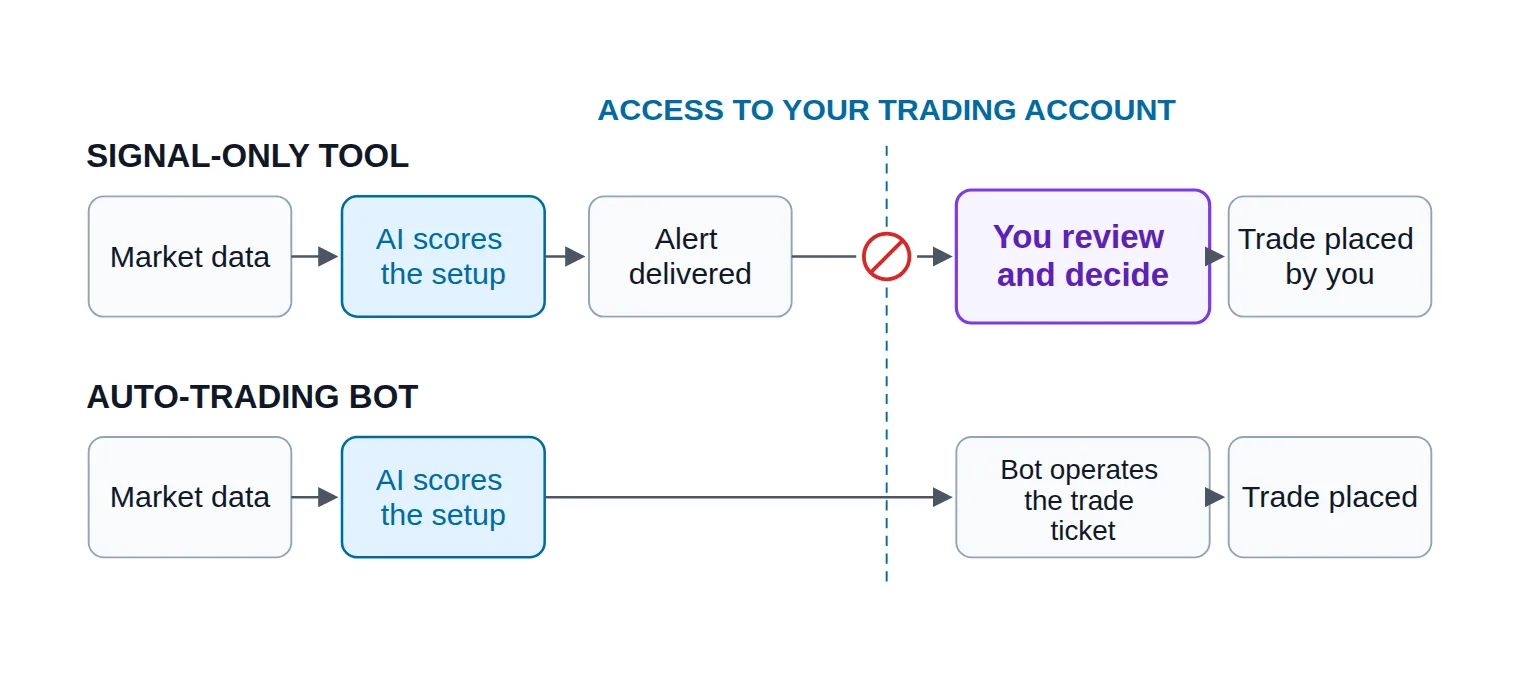
A signal-only tool has no write access to your trading account. It watches market data, forms a call, and delivers it as a message. That chain ends at your notification. Whether the call becomes a position depends on a human — you — opening the platform and pressing a button. What it hands you is a binary options signal: an instrument, a direction, and a deadline.
An auto-trading bot is granted a path into the trade ticket. Usually that path is a browser extension that operates the platform's own buy and sell buttons on your behalf, or a connector that submits the order through another terminal. Once that path exists, the bot's decision and the trade are a single event; auto-trading is precisely the removal of the step where you could have said no.
The thirty-second test is what the setup asks you for. If installation only wants a destination — a Telegram username, an email address, a webhook URL — the tool can talk to you and nothing else. If it wants to live inside the browser tab where you trade, or wants your platform credentials, it can act. There is no third category, and no amount of "AI-powered" copy changes which side of that line a product sits on.
Pocket Option's own signal bot is a useful illustration rather than an exception. It runs inside Telegram and carries a setting that switches between placing trades for you and handing you a call to approve — same bot, two behaviours, and a separate thing again from the platform's built-in AI Trading feature, which only ever suggests a direction. Before your first live trade, check which mode it is in. The setting, not the product name, decides whether anything is automated.
The two products differ by exactly one node: the review step where you, not the software, decide the trade happens.
How a Signal-Only AI Tool Actually Builds an Alert
You are being handed a conclusion by a system you did not build, so it is worth knowing what went into it. Three layers do the work, and a fourth decides whether you ever see the result.
What it sees. Streaming quotes for the symbols it watches, closed candles at one or more timeframes, and values derived from those candles — momentum, range, volatility, sometimes the trading session the market is in. Nothing exotic. What separates one tool from another is which series it reads, how far back it looks, and how quickly it gets the data.
That last point matters more on Pocket Option than it does elsewhere, because a large share of what traders click there is OTC — synthetic instruments the platform quotes at weekends and outside the underlying market's hours. An alert on "EUR/USD OTC" is scored against a different price series from an alert on the live pair with the same name. A tool that reads one well can be mediocre on the other, and a provider who never distinguishes the two in their marketing has told you something.
How it decides. Whatever sits in the middle — a rule set, a classifier, an ensemble of models voting — the output is the same shape: a directional lean plus a number expressing how strongly current conditions match the pattern the system was tuned on. That number is a confidence score, and it is worth being blunt about what it is not. It is not the probability that your trade finishes in the money. It is the model's internal agreement with itself, on its own history, before your payout, your timing or your broker's fill are anywhere in the picture.
When it publishes. Below its threshold, nothing is sent. This is the layer beginners misread as a fault: a well-behaved signal tool is silent for long stretches, and "more alerts per day" is a marketing number, not a quality one. A system that lowers its bar to fill a schedule is trading your attention for its retention.
Then a clock starts. The call describes conditions that existed at the moment it was scored, and those conditions decay. The delay between generation and your seeing it is signal latency; the delay between your seeing it and your acting is yours. Both spend the same budget.
Signal path
sequenceDiagram
    autonumber
    participant Feed as Price feed
    participant AI as Signal engine
    participant Ch as Alert channel
    participant You as You
    Feed->>AI: Stream candles and quotes
    AI->>AI: Score the setup
    alt Confidence clears threshold
        AI->>Ch: Publish the call
        Ch->>You: Deliver the alert
        You->>You: Review, then decide
    else Below threshold
        AI->>AI: Send nothing
    end
    Note over Ch,You: The chain ends here. Nothing in it can reach your trading account.
In a signal-only setup the last hop is a message, not an order — which is exactly why the workflow needs you awake for it.
Where Your Alerts Arrive — Telegram, Dashboard, or Browser Extension
Every provider pitches its own channel as the fast one, which hides the tradeoff that actually decides your results: the channel that reaches you fastest is not always the one you can act on fastest. A message on your phone finds you anywhere and then makes you change devices. An overlay in the trading tab is zero steps from the ticket and only exists while that tab is open.
Delivery
Channel
Reaches you when
Steps to the trade ticket
How it fails
Telegram bot
Anywhere you have a connection, phone locked or not
Switch device or window, then open the platform
A muted chat, or a phone left face-down
Web dashboard
Only while the page is open in front of you
One window away, both on the same screen
Silence while you are away from the desk
Browser extension overlay
Only while the trading tab is open
Zero — the call appears on the trade screen
Dies with the tab, and is tied to that browser
Mobile app push
Lock-screen banner, app closed
Open the platform app, or move to a desktop
Suppressed by notification or battery settings
Pick the channel by how far it sits from the button you have to press, not by how loudly it buzzes.
In practice most traders end up running two: one that reaches them away from the desk, and one that sits next to the ticket while they are at it. A Telegram signal channel is the usual first half of that pair because it survives a closed laptop, and it is where most Pocket Option providers deliver by default — our own Pocket Option Telegram signals run the same way.
Two channel-specific things to check before you commit to one. First, whether alerts are sent to a group everyone reads at once or to you individually — a broadcast channel means several hundred people are reaching for the same expiry at the same second. Second, whether the tool re-sends or edits a call. An edited message is a different call, and if your platform shows notifications as a preview you may act on the old text.
Reading a Signal Before You Click
An alert is small, and the temptation is to read only the direction. The fields exist because each of them constrains whether the call is valid for you, on this account, at this moment.
Anatomy of an alert
Essential answer
What does one Pocket Option AI alert actually tell you?
It names the instrument, the direction and the deadline — everything after that is still your decision.
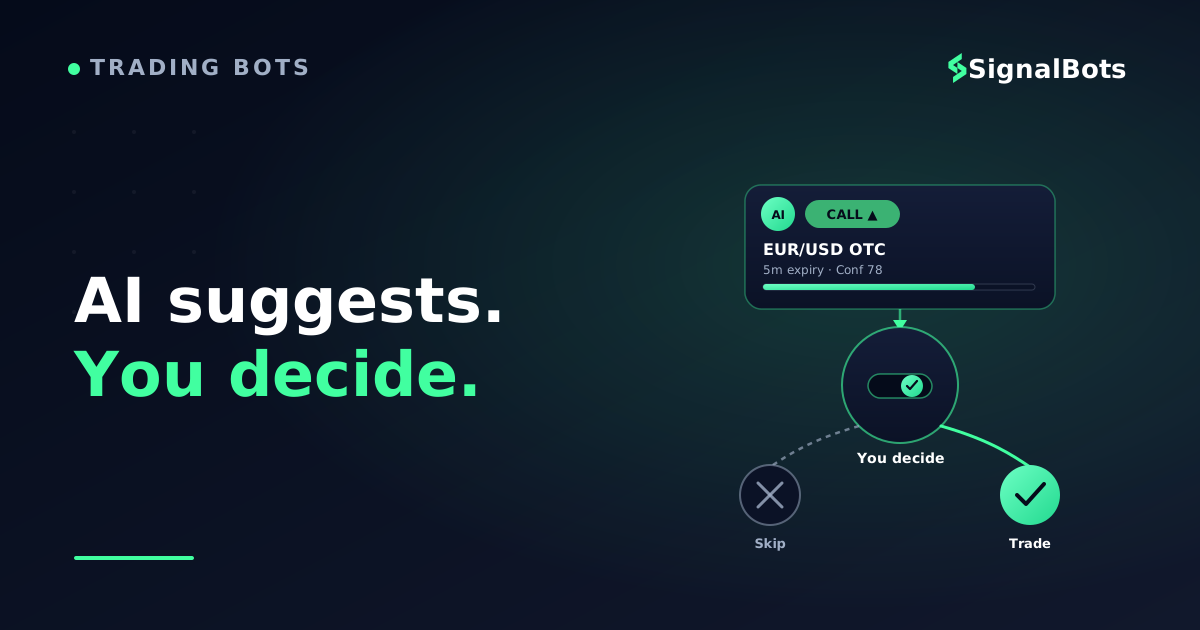
AssetEUR/USD OTC
DirectionCALL (up)
Expiry5 minutes
Timeframe readM1 candles
Confidence78 / 100
Issued at14:22:05 UTC
Illustrative alert. Field names vary between providers; the fields themselves rarely do.
Six fields, and not one of them is your stake.
Reading it field by field:
Asset — the exact instrument, including the OTC suffix when it carries one. Treat "EUR/USD" and "EUR/USD OTC" as two unrelated tickers that happen to rhyme.
Direction — CALL or PUT: whether the model expects the price at expiry to sit above or below the price at entry. Nothing about magnitude, because on a binary contract magnitude does not pay.
Expiry — the contract length, not a suggestion. A five-minute call evaluated on a fifteen-minute contract is a different bet with a different chance of landing.
Timeframe read — which candles the model scored. This is your best clue to the alert's shelf life: a read built on one-minute candles ages in minutes.
Confidence — the model's internal agreement, as above. Useful for ranking two alerts against each other; useless as an absolute promise.
Issued at — the field most people skip and the one that most often decides the outcome.
And the things an alert does not tell you, which you have to supply yourself every single time: your stake, the payout percentage your ticket is showing right now, whether your account can even trade that symbol at this hour, and whether the setup is still there. A signal is a suggestion with a timestamp attached. It is not a reservation.
Approving a Trade Manually, Step by Step
This is the half of the workflow that almost no provider documents, presumably because it is the half they do not do for you. Run the same five checks every time until they are automatic.
Manual approval
From alert received to trade placed, without losing the window
1
Check the timestamp first
Compare the issue time to now. If a meaningful slice of the expiry has already elapsed, the setup you were sent no longer exists.
2
Confirm you are on the same symbol
An OTC instrument and the live pair share a name and not a price series. Open the one the alert actually names.
3
Read your own payout, now
The payout on your ticket at this moment sets your break-even, and it moves. Never assume the one the provider modelled.
4
Size the stake by your rule
Your stake comes from your risk plan, not from the confidence number. A high score is not permission to raise it.
5
Place it, then log it
Set direction and expiry, confirm, and record the alert alongside the result. That log is how you audit the provider later.
Four checks, then one click — the sequence is short on purpose, because the window is short.
How long is the window? Long enough to run those checks, and rarely much longer. A practical rule: the usable life of an alert is on the order of the candle it was read from. A call built on one-minute candles that has been sitting unread for several minutes is a stale signal — the price has moved, the condition may have resolved, and what you would be entering is a fresh trade wearing an old recommendation's clothes.
The failure mode here is not missing a trade. It is taking it anyway, late, at a worse price, because you did not want to waste the alert. That is chasing a trade, and manual approval only protects you if you are willing to use it to say no. A skipped alert costs nothing. A late one costs a full stake.
Two habits make the rest of it easier. Decide your stake rule before the session rather than per alert — a fixed fraction of your balance, or a fixed amount, either is fine as long as the confidence score cannot argue you upward; our binary options money management calculator is one way to fix that number in advance. And run the whole loop on a demo account for a couple of dozen alerts before real funds are anywhere near it — not to test the provider, but to find out whether you can actually execute inside the window on the device you carry.
Can You Trust the Win Rate a Bot Advertises?
Landing pages for signal services almost always lead with one big number. Suppose one advertises a 90% win rate on a particular OTC pair. The problem is not that the number is necessarily false — it is that as printed, it is not a claim you can check, and on a binary contract it is not even the number that decides whether you make money.
Start with the arithmetic, because it is the part nobody hides and everybody skips. A losing binary contract costs your whole stake; a winning one returns only the payout percentage of it. So breaking even needs more than half your trades to land — the break-even win rate is set by the payout, and it rises fast as the payout falls. A historical win rate quoted without the payout it was earned at is an unfinished sentence.
Reality check
Test an advertised win rate against your own payout
Enter the win rate a provider advertises and the payout your ticket is actually showing. The break-even line is set by the payout, not by the claim.
Payout on a win
Advertised win rate
Stake per trade
$
Trades in the sample
Break-even win rate
—
Margin above break-even
—
Result over the sample
—
Slide the payout down and watch the break-even line climb — the same advertised win rate can be an edge or a slow bleed.
Drag the payout slider and the point makes itself: an identical headline win rate is comfortable at one payout and marginal at another, and every percentage point the payout loses has to be paid for in accuracy. That is why the useful question is never "how high is their number" but "how much margin does it leave at the payout my ticket shows".
Then ask what would make the number checkable. A verified track record has four properties, and a marketing number usually has none of them:
The calls were published before the outcomes were known. A results page assembled afterwards is a backdated track record, and it is indistinguishable from skill until you check the timestamps. Timestamped delivery — a channel with a message history — is the cheapest verification you will ever get.
The sample is big enough and long enough. Any strategy has good weeks. A number covering a few dozen trades in one calm month tells you about that month.
Losing periods are visible. A published record with no drawdown in it has been filtered, not achieved.
You know whether it is backtested or live. A backtested figure describes how a rule set would have behaved on data it has already seen; a forward record is what it did in real time, on calls it could not revise. Both are legitimate to publish. Presenting the first as the second is not.
And treat the language as evidence too. Be wary of any service that describes its signals as "risk-free", or frames a losing trade as something that simply does not happen to its subscribers — on a contract where one loss costs the entire stake, that phrasing is not optimism, it is a tell. The honest version of the same pitch names a historical win rate, names the payout it assumed, and links its own risk warning.
The last check is the one you can only do yourself: log the alerts you receive and the results you get, in your account, at your payouts, on your timing. Thirty logged alerts of your own are worth more than any number on a landing page, because they are the only sample that includes you.
Alert-Only vs Fully Automated: Which Keeps You in Control
Every trade is a decision you can veto — a call you dislike simply never becomes a position.
Your stake, your timing, your payout; the tool never touches the ticket.
You are the bottleneck: alerts that land while you sleep are alerts you miss.
A losing run stops the moment you stop clicking.
Best when control matters more than coverage.
VS
Fully automated bot
Takes every qualifying setup, including the ones you would have flinched at.
Reacts inside the window every time, awake or not.
A bad stretch keeps compounding while you are away from the screen.
Only as safe as the limits you set around it beforehand.
Best when coverage matters more than veto power.
Neither side is safer by nature — the alert-only path trades coverage for a veto, and the automated path trades the veto for coverage.
The honest read is that alert-only removes one category of risk and adds another. It removes the runaway sequence — a rule set that keeps firing into a market it was never tuned for, unattended. It adds execution risk, all of it yours: the missed windows, the late entries, the alert you took because you were bored rather than because it passed your checks.
If you do end up on the automated side later, the things that make it survivable are limits set in advance and a way to stop it — a maximum number of open positions, a daily loss cap, and a kill switch you can reach from your phone. Those are not optional extras on an unattended system; they are the substitute for the judgement you just delegated.
See a Live Binary Signal Feed With Manual Approval
Everything above is easier to hold in your head after you have watched an alert-only feed for one session rather than read about one. Our live binary options signals feed publishes each AI-generated call with its asset, direction and reward-to-risk context, and nothing on that page executes — it shows you the call and leaves the trade ticket where it belongs.
Use it as a rehearsal for the five checks above. When a call appears, look at its timestamp before its direction, confirm the symbol including any OTC suffix, check the payout your own ticket is showing at that moment, and only then decide whether you would have taken it. Do that a dozen times without placing anything and you will learn more about your own reaction window than any provider's statistics page could tell you.
One boundary worth stating plainly: this is a feed for manual review. If you have already decided you want positions opened for you without a click, it is the wrong shape of tool, and the route you want is an auto-trading bot for Pocket Option rather than a signal you approve.
The Bottom Line — AI Suggests, You Decide
A signal bot is a research assistant with a very short attention span. It reads more instruments than you can watch, it never gets bored at 3am, and it hands you a conclusion with a timestamp on it. What it cannot do is know your payout, your balance, your rule about not trading the last twenty minutes before a session close, or whether you are in a state to trade at all.
That is not a limitation to work around. It is the entire reason to choose this shape of tool: the software takes the part that is mechanical, and the veto — the part that costs money when it is delegated badly — stays with you.
You came in asking
“whether an AI signal bot places trades on Pocket Option for you”
and you leave with
a workflow where the AI proposes and you dispose.
AI suggests, you decide — and the deciding is the part worth protecting
A signal-only tool ends its chain at your notification, which means the whole workflow lives or dies on two things you control: whether you receive alerts on a channel you can actually act from, and whether you run the same short checklist — timestamp, symbol, payout, stake — before every entry. The advertised win rate is the least informative number in the whole arrangement; the payout on your own ticket and your own logged results are the ones that decide the outcome.
Does an AI signal bot need access to my Pocket Option account?
A signal-only one does not, and that is the defining property. It needs somewhere to send messages — a Telegram username, an email address, a webhook endpoint — and nothing more. If a tool advertised as a signal bot asks for platform credentials or wants to install itself into the tab where you trade, it is capable of placing orders, whatever the product page calls it.
How quickly do I have to act on an alert?
Treat the timeframe the alert was read from as the budget. A call scored on one-minute candles is describing a condition that is measured in minutes, so acting several minutes late is entering a different trade. The practical answer is to build a routine short enough to complete inside that budget — check the timestamp, the symbol and the payout, then place — and to skip anything you cannot get to in time.
Do these tools work on OTC pairs?
Many are built specifically for them, because OTC instruments are quoted when the underlying markets are closed and that is when a lot of Pocket Option activity happens. Just do not assume performance carries across: an OTC symbol is a separate price series from the live pair it is named after, so a provider's record on one says little about the other. Ask which of the two their published results came from.
What does a confidence score of 78 actually mean?
That the current setup matched the pattern the system looks for more strongly than a setup scoring 60, and less strongly than one scoring 90. It is a ranking device, not a probability. It does not incorporate your payout, your entry delay, or the market conditions since the score was calculated — all of which sit between that number and your result.
Can I upgrade a signal bot into an auto-trading one later?
Sometimes it is one switch, sometimes it is a different product entirely. A few tools ship both modes behind a single setting — Pocket Option's own Telegram bot is one of them — while most third-party signal services deliver alerts only, so adding execution means installing something that has access to your account. Either way, treat the switch as a new setup with its own risk limits, not as turning up the volume on what you already had.
Do I need to leave a browser tab open to receive alerts?
Only for the in-page channels. A browser extension overlay and a web dashboard both exist only while their page is loaded, so they cannot reach you away from the desk. Telegram and mobile push do not have that constraint, which is why most traders who rely on this workflow run one always-on channel for reach and one in-page channel for speed once they are actually at the screen.
Sources & Further Reading
Want to go deeper? These independent, authoritative sources shaped this guide — each one is worth reading in full:
The Binary Options Desk is the SignalBots editorial team for fixed-time and OTC trading coverage. We research and write the guides that explain expiry timing, payout structure and disciplined entry across the major brokers.



Discussions 0
Leave a comment