You found a signal source you trust. The calls look clean, the reasoning holds up, and you are ready to trade them. Then the first one arrives — and you read it four minutes after it fired, on a chart where the setup has already expired and closed. Nothing was wrong with the signal. The delivery was wrong.
That gap is the whole problem with binary options trading alerts. On a spot or futures position you can join a move late and still manage it. A binary contract cannot be joined late: it has a fixed strike and a fixed clock, and once that clock has run past your entry window, the trade you were sent no longer exists. Everything below is about closing the distance between "the alert fired" and "it is on your screen, loud enough that you noticed it" — channel by channel, setting by setting, and then how to prove the whole chain works before you risk money on it.
Key Takeaways
A binary expiry is a fixed clock, so an alert's value dies with the entry window — transport speed matters less than whether your phone let the alert interrupt you.
App push and Telegram are the only channels fast enough for 60-second-to-5-minute expiries; email and SMS belong as an archive and an independent backstop.
Most missed alerts are configuration, not technology: battery throttling, a Focus/DND profile, a force-closed app, or a scheduled notification summary.
Test the chain with the screen off and the phone idle, measure your real end-to-end delay, and trade only the expiries that number can support.
Table of Contents (17 min read)Contents
Why Alert Speed Matters More in Binary Options Than Anywhere Else
A binary option's clock does not pause for a late alert — the budget from dispatch to entry is fixed the moment the signal fires.
Every alert you receive spends its life in a budget you rarely see written down. The budget is the time between the moment your signal provider generates the call and the moment the entry it describes is no longer valid. On a 5-minute expiry time, that budget might be sixty seconds. On a 60-second expiry it can be ten.
Out of that budget you have to pay for four things, in order:
Generation to dispatch — your source formats and sends the message.
Transport — the network path between their server and your device. This is signal latency in the strict sense, and it is the part most people assume is the whole story.
Attention — the seconds between your device receiving the alert and you actually perceiving it. A notification that lands silently in a tray you check every ten minutes has effectively infinite latency.
Execution — reading the direction and pair, switching to the platform, setting the stake, clicking.
Transport is usually the smallest of the four. The two that quietly eat the budget are attention and execution, and both are configuration problems rather than technology problems. That is why "install the app and hope" fails: the app was delivering fine, the phone was throttling it.
The practical consequence is a rule worth carrying through the rest of this article. Anything that arrives after your entry window is not a late alert — it is a stale signal, and acting on it is a different, worse trade than the one you were sent. Discipline here is not optional; the moment you start "catching up" to alerts you missed, you are trading impulse, not a plan. (Trading binary options carries substantial risk of loss — read our risk warning before you trade any signal, however fast it reaches you.)
Setting Up Push Notifications That Actually Break Through
A push notification is the fastest path a signal can take to a phone that is asleep in your pocket, because the device keeps a persistent connection open to the platform's push service and the message is delivered down it rather than waiting for your app to ask. A well-configured push notification alert typically lands within a second or two of dispatch.
"Well-configured" is doing a lot of work in that sentence. Modern phones are built to protect you from notifications, and they will happily protect you from the one you are waiting for. Fix that explicitly.
On iPhone:
Open Settings → Notifications, select the app, and confirm Allow Notifications is on with Lock Screen, Notification Centre and Banners all enabled. A banner style of Persistent keeps the alert on screen until you dismiss it, which is what you want for a short expiry.
Turn Sounds on. A visual-only banner is useless when the phone is face-down.
Enable Time Sensitive Notifications for the app. This is the switch that lets an alert break through a Focus mode.
Open Settings → Focus, and for every Focus you actually use — including Sleep and Do Not Disturb — add the app to the allowed list and allow Time Sensitive notifications. Configuring the app but not the Focus is the single most common way a correct setup still fails.
Check Settings → Notifications → Scheduled Summary. If the app is included in your summary, its alerts are deliberately held back and delivered in a batch — catastrophic for a 5-minute trade. Remove it.
On Android:
Open Settings → Apps → [app] → Notifications and set the relevant notification category to the highest importance the app exposes (Urgent, on most builds). Urgent is the level that produces a heads-up banner plus sound; anything lower can arrive silently in the shade.
In Do Not Disturb, add the app to the apps that can interrupt. Android's DND is per-app, so an app can be perfectly configured and still be muted globally.
Set the app's battery usage to Unrestricted. Battery-saver and adaptive-battery modes defer background work aggressively, and a deferred notification is a missed trade.
If your phone is from a manufacturer with an aggressive task killer, allow autostart for the app and exclude it from any "app cleanup" or "protected apps" sweep. This is the most under-diagnosed cause of missing alerts on Android.
The same logic applies on desktop: browser or app notifications need permission granted at the OS level as well as inside the app, and Windows Focus Assist / macOS Focus will silence them independently of whatever the app thinks it is doing.
If your source ships its own mobile app, that is usually the shortest possible path, since it controls both ends of the delivery. And if you generate alerts yourself from a charting platform, that platform's own alert configuration is where the direction, condition and channel are chosen; TradingView's walkthrough of every alert type it supports is a good grounding for that half of the chain.
All The Ways to Create Alerts on TradingView: Tutorial — TradingView
Configuring Telegram So You Never Miss a Signal
Telegram is the default home for signal distribution, and mechanically it is excellent: messages travel over a live connection and land as a push in roughly the same time as an app's own notification. The failure mode is almost never speed. It is that your signal channel is buried under fifty muted group chats, or drowning in them.
Set it up so the source is the only thing that makes noise:
Open the signal channel or group, tap its name, and open Notifications. Set it to On, pick a distinct sound you use nowhere else, and enable Show Preview so you can read direction and asset from the lock screen without opening the app. That preview is worth several seconds on every alert.
Go to Settings → Notifications and Sounds and mute your default for groups and channels. Per-chat settings override the global default, so this mutes everything except the exceptions you set in step 1. Telegram lists these under Exceptions, where you can audit them at a glance.
On Android, check Importance inside Telegram's own notification settings and set it to High or greater — Telegram exposes this because the Android channel importance below it controls whether you get a heads-up banner at all.
Configure Telegram Desktop separately. Its notification settings are wholly independent of your phone's, and a desktop client left with notifications off is a redundancy layer you thought you had and do not.
Leave Telegram running in the background rather than swiping it away. On Android especially, a force-closed app stops receiving until it is reopened.
A Telegram signal channel also has one property worth knowing: channel posts are broadcast, so the message that reaches every subscriber is the same message at the same moment — the variance you experience is on your device, not theirs.
Choosing which channels are worth following is a separate question from configuring them — this section is about making a source you already trust actually reach you.
Email and SMS: The Slower Lanes, and What They Are Good For
Email and SMS are not push. They are store-and-forward systems, which means the message is handed to intermediaries that will deliver it reliably but on their own schedule.
Email is structurally slow for two reasons. First, mail servers queue and retry, and a receiving server that greylists an unfamiliar sender will deliberately defer the first delivery attempt. Second — and usually larger — your mail client decides when to look. If it fetches on a schedule rather than holding an idle connection, your effective delay is that schedule, no matter how fast the sending side was. Realistically, plan for tens of seconds at best and several minutes in ordinary conditions.
SMS goes through a carrier's message centre, which accepts your message and delivers it when it can. It is impressively resilient — it will reach a phone with no data connection at all — but the delivery time is not yours to control, and it can be measurably worse during network congestion. Its real virtue is independence: it uses a path that has nothing in common with your data connection, which makes it the natural backstop rather than the primary. (Carrier behaviour, opt-in and cost have their own considerations, covered separately.)
For a binary delivery channel, both of these should be treated as confirmation and record, not as the thing you trade from. Email in particular is excellent for the audit trail: a timestamped copy of every alert you were sent, which is exactly what you want when you later review whether you executed your source faithfully.
Which Channel Should You Actually Use?
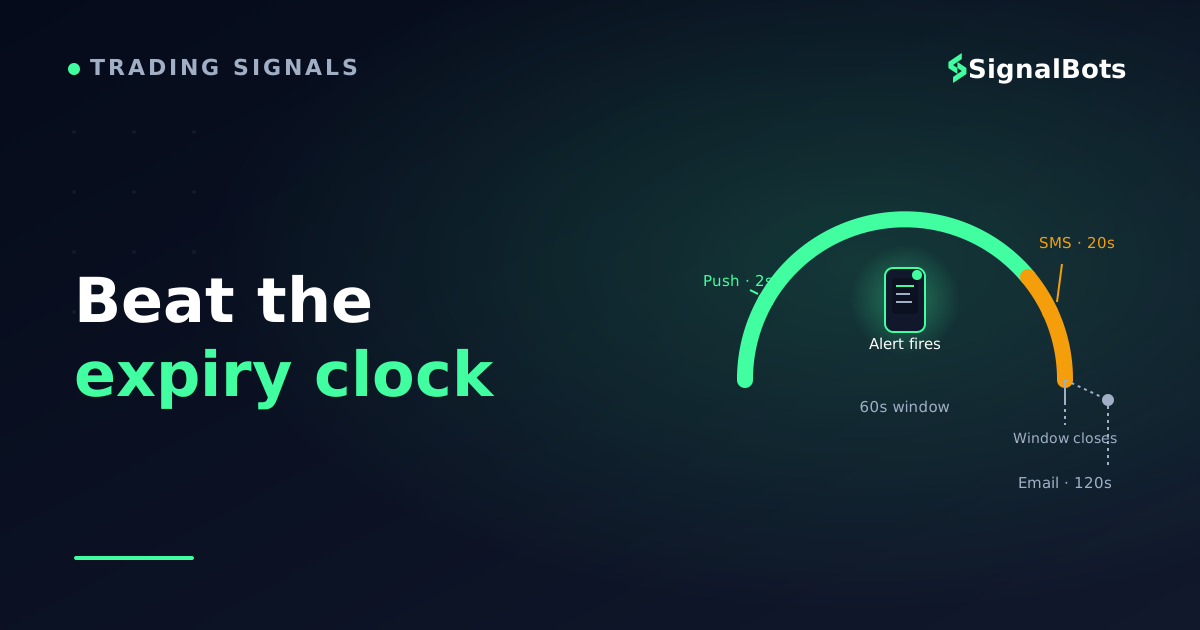
Compare them against the clock you are actually running, not in the abstract. If your typical binary options signal gives you a sixty-second window to act, the question for each channel is simply: does it consume a small fraction of that window, or most of it?
Channel speed vs your expiry clock
Typical Delay vs a 60-Second Entry Window
App push2 / 60 s
3% of limit usedDominated by your reaction time, not transport.
Telegram2 / 60 s
3% of limit usedBroadcast push, same order as app push.
Desktop client3 / 60 s
5% of limit usedFast if the platform is already open.
SMS20 / 60 s
33% of limit usedIndependent path, but timing isn't yours to control.
Email120 / 60 s
Limit reachedClient fetch schedule, not transport, sets the pace.
Illustrative typical delay, not measured data. Push, Telegram and a desktop client fit comfortably inside a 60-second entry window; email routinely blows past it.
Illustrative typical delay against a 60-second entry window: push, Telegram and a desktop client fit inside it; email routinely blows past it.
The ranking above is the easy half. The half that changes how you trade is what each channel is for once you know where it sits against the clock. Push and Telegram are primary channels: transport costs you almost nothing, so the only variable left is your own reaction. A desktop client is an equal primary when you trade from a desk, because execution starts one window away instead of after an unlock. Email is not a trading channel at these expiries at all — give it the archive job, where a timestamped record of every call is worth more than speed. And SMS gets the opposite job: not the fastest lane, but the one that still works when your data connection does not, which is exactly what a backstop is for.
Then add the piece almost no setup guide mentions: run two channels in parallel, on genuinely different paths. Two apps both pushing through the same mobile push service is not redundancy — one outage takes out both. Real failover delivery means the second channel fails independently of the first: phone push plus a desktop client, or Telegram plus SMS. Configure the secondary with a quieter sound so it reads as confirmation rather than doubling your alert noise, and you get resilience without fatigue.
Troubleshooting Alerts That Do Not Arrive
When an alert goes missing, resist the urge to reinstall. Almost every case is one of a short list of silent failures, and they are worth checking in this order because the cheap checks catch the most cases.
The phone throttled it. Battery saver, adaptive battery, or an OEM cleaner suspended the app's background connection. Symptom: alerts arrive in a burst the moment you unlock the phone. Fix: unrestricted battery, autostart allowed.
A Focus or DND profile swallowed it. Symptom: the alert is in the tray with the right timestamp, but made no sound. Fix: per-app exceptions in every Focus profile, not just the default one.
The app was force-closed. Symptom: nothing at all until you reopen the app, then everything at once. Fix: stop swiping it away, and re-check autostart.
Desktop and mobile settings diverged. Symptom: alerts arrive on one device only, and you assume the channel is broken. Fix: configure each client separately; they share nothing.
The scheduled summary held it. Symptom: alerts arrive in tidy batches at fixed times. Fix: remove the app from the notification summary.
The source is throttling or batching. Symptom: consistent, uniform lateness across every channel and every device you own. That points upstream, not at your phone — and it is the one case where the fix is a conversation with your provider rather than a setting on your device.
The diagnostic that separates these quickly: check whether the alert is late or silent. A late alert with a correct timestamp is a transport or throttling problem. An on-time alert you did not hear is an attention problem. They have completely different fixes, and conflating them is why people reinstall apps that were working.
Test Your Alert Pipeline Before You Trade On It
Never let a live trade be the first test of a delivery chain. Test it deliberately, and test it under the conditions you will actually be in.
Send a test alert through each configured channel. Most sources and charting platforms let you fire one manually; if yours does not, a price alert set a tick away from the current price will trigger within moments.
Measure the real end-to-end time. Compare the timestamp inside the message with the clock on your device at the moment you noticed it. The message timestamp tells you transport; the difference between that and when you reacted tells you the number that actually matters.
Repeat it with the screen off and the phone idle for thirty minutes. This is the test that catches battery throttling, and it is the one everybody skips. A device that has been awake in your hand behaves nothing like one that has been in a pocket since lunch.
Repeat it inside every Focus/DND profile you use — including overnight, if you trade sessions that run into your night.
Verify your secondary channel independently, with the primary deliberately disabled. Otherwise you never find out that your backup was silently broken the whole time.
Re-test after every OS update. Major updates reset notification and battery permissions more often than you would expect, and the failure is invisible until an alert goes missing.
Write down the delay you measure. That number is your real entry budget, and it tells you which expiry lengths your setup can honestly support: if your measured reaction time is thirty seconds, 60-second expiries are not a realistic target for you until you shorten the chain.
See Binary Options Alerts Delivered in Real Time
Once your channels are configured, the natural next step is to watch a live, fast-moving source and check that your setup keeps up with it. Our binary options live signals feed publishes each call at the moment it is generated, with the asset, direction and expiry on the card — so you can hold your phone next to the page and see how long your own configured channel takes to catch up with the feed. That comparison is the cleanest read you will get on whether your delivery chain is fast enough for the expiries you trade.
To be clear about what that is and is not: it is a feed to watch, not a replacement for the configuration work above. If you want signals arriving in your existing Telegram or push setup, you still need every setting in this article dialled in — the feed only shows you what "on time" looks like so you have something to measure against.
Getting Alerts You Can Actually Act On
Reliable alerts are not a product you buy, they are a chain you maintain. The source dispatches, the network transports, the operating system decides whether you are allowed to be interrupted, and you execute. Only one of those four links is out of your hands.
So do the unglamorous parts: pick one fast primary channel and configure it to break through everything your phone does to keep you calm, add a second channel on an independent path, and measure the end-to-end delay with the phone in the state it will really be in. Then trade only the expiries your measured number can support. That is what separates a signal you received from a signal you could actually take.
FAQ
How fast should a binary options alert reach my phone?
Fast enough that transport is a small fraction of your entry window. For a push or Telegram alert, the message itself typically lands within a second or two of dispatch, which leaves the rest of the budget for you to read and execute. The number to trust is not a published figure but the one you measure yourself, end to end, with your phone in its normal idle state.
Why do I get alerts on my computer but not my phone?
Because they are two separate configurations that share nothing. Desktop clients hold their own notification permissions and sound settings, and the phone adds a second layer — battery optimisation, Do Not Disturb and per-app importance — that the desktop does not have. Work through the phone's settings independently rather than assuming the account-level setting covers both.
Is Telegram fast enough for 60-second binary expiries?
Transport-wise, yes — Telegram delivers over a live connection and a correctly configured channel notification arrives as promptly as a native app push. Whether you are fast enough for a 60-second expiry is the separate question, and it depends on how quickly you can read the alert and place the trade. Measure your own end-to-end time before committing to the shortest expiries.
Should I use SMS alerts for binary options?
As a backstop, not as your primary. SMS travels a completely independent path from your data connection, which makes it genuinely useful when mobile data or Wi-Fi fails — but delivery timing sits with the carrier and can slip under congestion. Pair it with a fast primary channel rather than relying on it alone.
What if alerts arrive but I keep missing them?
That is an attention problem, not a delivery problem, and the fixes are different. Give the signal source a distinct sound you use nowhere else, enable lock-screen previews so you can read direction and asset without unlocking, use a persistent banner style so the alert stays on screen, and add the app as an exception in every Focus or Do Not Disturb profile you run.
Do I need a separate app, or can one channel do everything?
One well-configured channel is enough to trade from — but one channel is also a single point of failure, and outages, OS updates and permission resets all happen without warning. Adding a second channel on an independent path costs a few minutes to set up and removes the scenario where you find out your delivery broke at the same moment you miss an entry.
Sources & Further Reading
Want to go deeper? These independent, authoritative sources shaped this guide — each one is worth reading in full:
The Binary Options Desk is the SignalBots editorial team for fixed-time and OTC trading coverage. We research and write the guides that explain expiry timing, payout structure and disciplined entry across the major brokers.



Discussions 0
Leave a comment