You already know what a valid setup looks like. That was never the problem.
The problem is the 2 a.m. alarm, the third session this week spent watching a 15-minute chart wait for London to do something, marking the same zone you have marked a hundred times — and knowing that one badly timed blink costs you the whole night. Or it is the quieter frustration: you believe your rules work, but believe is all you have, because hand-testing them across two years of price action is a month of evenings you are never going to spend.
Both of those have the same answer, and it is not a better indicator. It is a file that sits on your terminal and does the watching for you.
What follows is the part nobody hands over: the ordered path from a strategy that currently lives in your head to a compiled program running on a machine you do not have to sit in front of. It assumes you can already read order blocks, sweeps, killzones and structure shifts by eye, and it will not re-teach a single one of them. It assumes you have never opened MetaEditor.
Key Takeaways
Only one of the six build stages is about ICT at all; the other five - decision tree, risk wiring, testing, deployment and state handling - are where builds actually fail.
Do the translation on paper first: replace every vague word in your rule with a test that returns yes or no, and define the else branch of each test before you open MetaEditor.
Have each concept module return levels, not booleans, so the stop can be derived from structure and position size can be derived from the stop.
Validate two separate things: that the code trades what you meant it to trade, and - separately - that the edge is real.
Table of Contents (34 min read)Contents
What automating an ICT strategy on MT5 actually involves
An Expert Advisor (EA) is a compiled program attached to one chart inside MetaTrader 5. On every incoming tick the terminal calls your code, your code decides whether anything should happen, and if it decides yes it builds an order and sends it. That is the entire mechanism. There is no intelligence in the platform — the judgement is whatever you managed to write down.
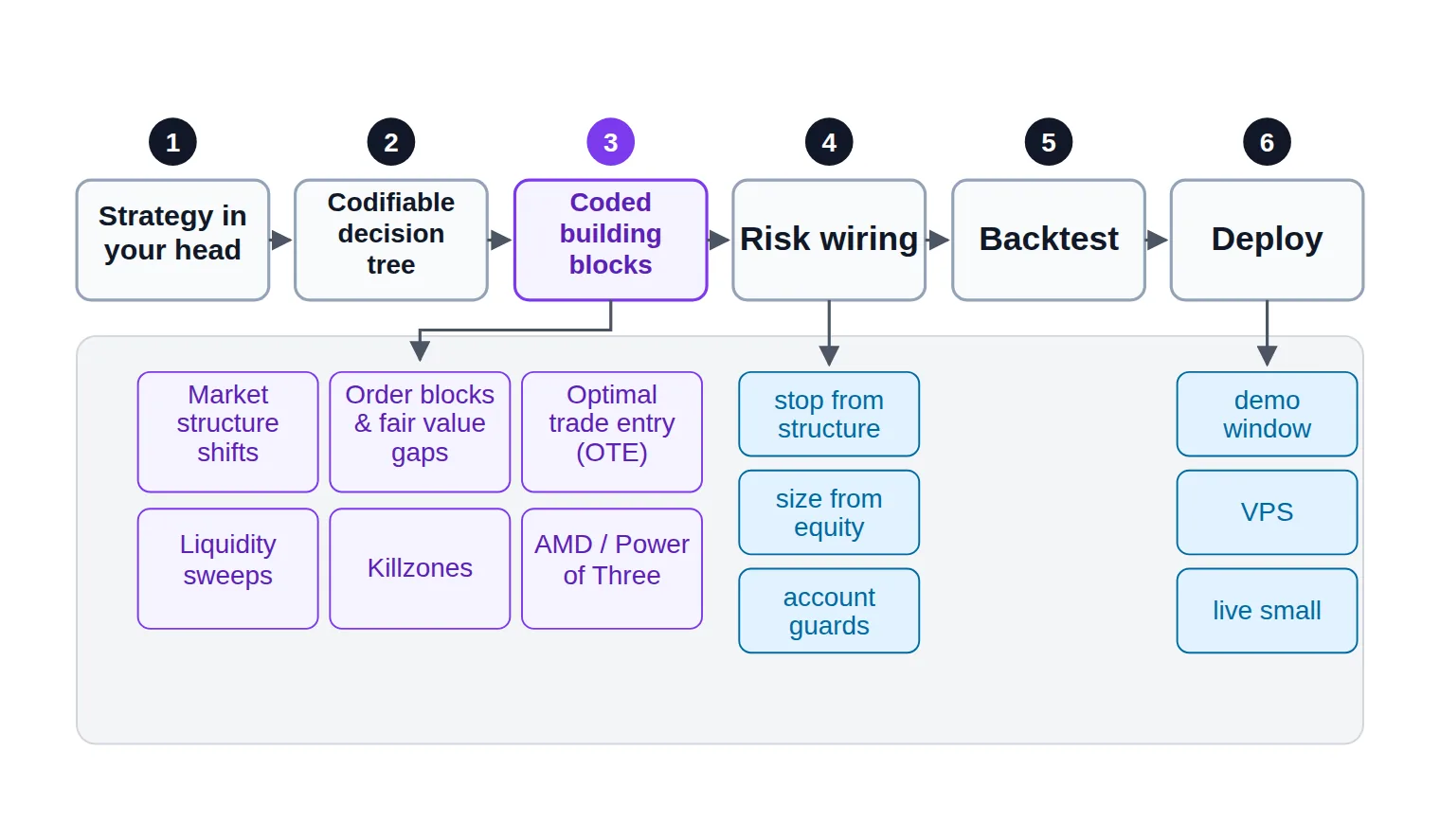
Building one runs through six stages, and they have to happen in this order:
The strategy as you currently trade it — imprecise, contextual, yours.
A codifiable decision tree — the same strategy with every vague word replaced by a test that returns yes or no.
The coded building blocks — the small functions that answer each of those tests.
The risk wiring — where the stop goes, how big the position is, when the EA is not allowed to trade at all.
The backtest — proof that the code trades what you meant it to trade.
Deployment — a demo window, a machine that never sleeps, then live.
The full build, stage by stage - your ICT knowledge covers exactly one of the six boxes.
The thing that surprises most traders who start this: only one of those six stages is about ICT at all. Stage three is where your order blocks and killzones live. The other five are engineering, and they are where builds actually fail. A perfectly coded fair-value-gap detector wired to a fixed 20-pip stop and a lot size someone picked because it felt right is a losing EA with excellent components.
It is worth naming what MetaTrader gives you and what it does not. It gives you the terminal, historical price data, order routing to your broker, a testing engine, and MQL5 — a C-like language with a large standard library for trading operations. It has no concept of an order block, a killzone, or displacement. Every ICT-shaped idea in your EA is one you define from raw price data yourself.
Set one more expectation now, because it saves a lot of frustration later. Your EA will trade a subset of what you trade manually — the part of your read you can state precisely enough to write down. That is not a defeat. It is the first honest measurement you have ever had of which part of your edge is mechanical. Whether the remaining part can ever be automated is a real debate, and a separate one from this build.
Step 1 — Turn your ICT rules into a codifiable decision tree
This is the step almost every guide skips, and skipping it is why so many half-finished EAs sit in people's Experts folder. The instinct is to open MetaEditor and start coding a fair value gap. Do not. You will code a definition of "fair value gap" that is not quite the one you trade, wire it to a trigger you never actually use, and spend three weekends debugging a program that faithfully implements a strategy nobody owns.
The translation happens on paper, and it takes about an hour.
Write the rule the way you would say it to another trader. One sentence, no hedging. For example: "In the London killzone, after a bullish structure shift, I buy the retest of the fair value gap left by the move that broke structure."
Underline every word that is not a number, a price, or a time. In that sentence: London killzone, bullish structure shift, retest, the move that broke structure. Each underlined phrase is a place where your eye is doing work your code cannot do. Those are the only things you have to define.
Replace each one with a test that returns yes or no. Not a description — a test. "London killzone" becomes is the server clock between these two times. "Bullish structure shift" becomes has price closed above the most recent swing high since the session opened. "Retest" becomes has price traded back into the zone's range without a close beyond its far edge. If you cannot write the test, you have found a genuinely discretionary part of your strategy, and you have two choices: define it crudely and accept the cost, or leave it out and trade that part by hand.
Order the tests from cheapest to most expensive. A time check costs nothing; scanning for an unfilled gap across three timeframes costs a lot. Put the gates that reject most bars first. Your EA will run this sequence on every qualifying bar for years — order matters more than it looks like it should.
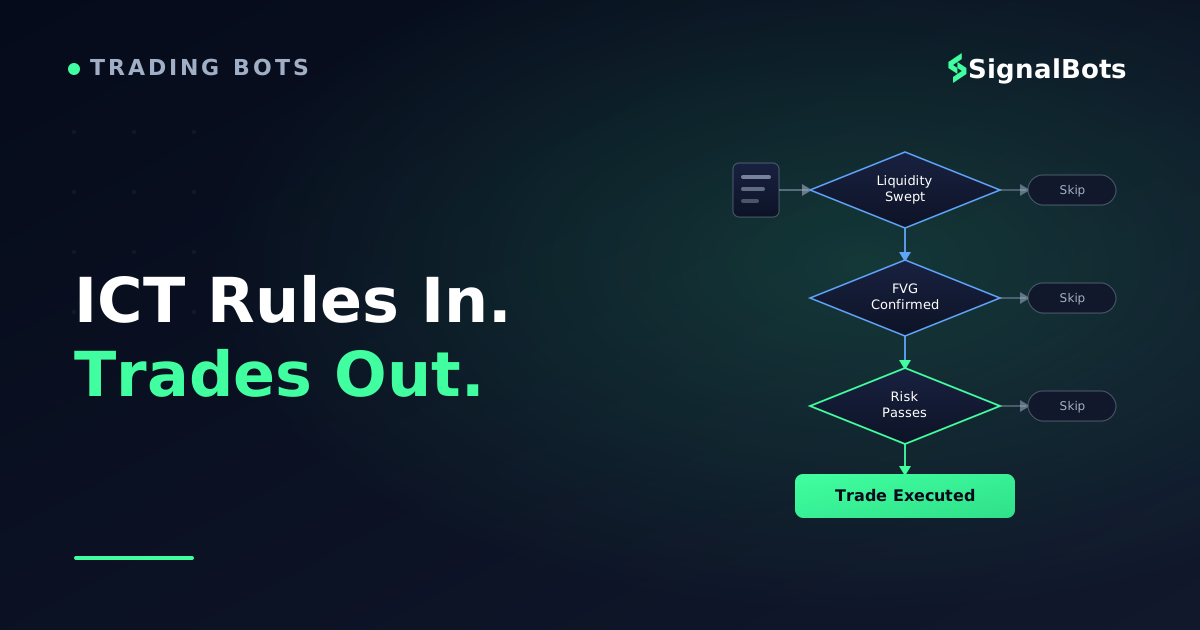
Define the else branch of every test. For each no, the EA does one of exactly three things: nothing (keep waiting), discard the setup permanently (it is invalidated), or stand down until a condition resets. Leaving an else undefined is how an EA ends up holding a setup it should have thrown away hours ago.
What you end up with is a tree, and the tree is the actual specification of your EA. Everything after this is typing.
One ICT rule, resolved into machine-checkable branches
Take itProceed with careSkip / stand aside
Every branch label is something MQL5 can evaluate on a closed bar - that is the bar the rule has to clear before any code gets written.
Notice what the tree gives you that prose does not: every leaf has an action, including the ones where the action is nothing. That completeness is the difference between a specification and a wish.
Step 2 — Set up MQL5 and MetaEditor
This part is genuinely short. If you have never opened the editor, here is the whole environment in one pass.
MetaEditor is the IDE that ships with MT5 — press F4 in the terminal, or use Tools → MetaQuotes Language Editor. Inside it, File → New → Expert Advisor (template) runs a short wizard asking for a name and any input parameters, then generates a skeleton file containing three empty functions. Those three are the entire contract between you and the platform:
OnInit() runs once when the EA is attached to a chart or the tester starts. Validate your inputs here and fail loudly if they are wrong.
OnTick() runs every time a new price arrives for the chart's symbol. This is where your decision tree lives.
OnDeinit() runs when the EA is removed or the terminal closes. Clean up here.
Press F7 to compile. A successful compile produces an .ex5 file in MQL5/Experts; errors appear in the Toolbox at the bottom of the editor with line numbers. Back in the terminal, the compiled EA shows up in the Navigator panel — drag it onto a chart, tick Allow Algo Trading in the dialog that opens, and make sure the Algo Trading button in the toolbar is switched on. A small face icon in the chart's top-right corner tells you the EA is loaded and permitted to trade; that global permission toggle is the algo trading permission every automated build depends on, and it silently blocks orders when it is off.
Two more things worth knowing before you write ICT logic specifically:
You do not have to write order-sending code from scratch.#include <Trade/Trade.mqh> gives you the CTrade class, whose Buy() and Sell() methods handle building and sending a properly-formed order request. Use it. Hand-rolling MqlTradeRequest structures is a rite of passage nobody needs.
Decide your account type before you design position handling. MT5 accounts are either netting (one net position per symbol) or hedging (independent positions that can coexist). The difference between a hedging and a netting account changes what "close the position" means in code, so confirm which one your broker gave you before writing anything that manages more than one trade.
Then watch the Experts and Journal tabs in the terminal's Toolbox. Every error your EA produces — rejected orders, invalid stops, bad volumes — is printed there, and reading them is how you debug for the rest of the build.
Step 3 — Build the modules your strategy needs
An EA is not one enormous if statement. It is a stack of small functions, each answering exactly one question, called in the order your decision tree fixed in step 1. Structuring it that way is not tidiness — it is what makes the thing testable, because you can prove one module correct at a time instead of debugging six interacting mistakes at once.
Here is the assembly view. Each ICT concept becomes one module, and each module returns a small structured answer rather than a bare true/false:
Market structure shifts — returns a direction and the swing level that was broken. The level matters later: it is a natural invalidation point.
Order blocks and fair value gaps — returns a zone (a high, a low, the bar it formed on) and whether that zone is still unfilled.
Optimal trade entry — returns a retracement band measured between two structural points your other modules already produced. It is arithmetic, not detection, once those points exist.
Liquidity sweeps — returns the level that was swept and the bar that swept it, so later logic can distinguish a sweep from a genuine break.
Killzones — returns a plain yes or no for "is the window open right now", evaluated on the broker's server clock. This is your trading session filter, and it is the cheapest gate you own.
The AMD / Power of Three cycle — returns which phase of the daily cycle price appears to be in, which mostly serves as a bias filter over the others.
How each of those modules actually detects its pattern is a deep topic per concept, and each one has its own dedicated treatment — this article is about wiring them together, not about the detection rules inside them.
Two design decisions apply to all six, and they matter more than the detection code:
Return levels, not booleans. A module that says "yes, there is a valid gap" is useless to your risk wiring. A module that says "yes, a valid gap, low 1.0822, high 1.0836, formed at 09:15" lets you place a stop beyond a real structural level instead of guessing a pip count. Design every module to hand back the numbers it found.
Evaluate on closed bars, not on every tick.OnTick() fires many times per bar. If your structure test runs on every tick it will flicker in and out of true as the current bar forms, and your EA will act on a shift that un-happens two seconds later. Detect a new bar once, then run the tree.
Assembly view
mql5ict_ea_skeleton.mq5
#include <Trade/Trade.mqh>
CTrade trade;

input int             InpMagic       = 20260101;  // this EA owns only its own trades
input double          InpRiskPercent = 0.5;       // equity risked per setup
input ENUM_TIMEFRAMES InpEntryTF     = PERIOD_M15;

struct Setup
  {
   bool   valid;         // did every gate pass?
   int    direction;     // +1 long, -1 short
   double entry;         // price we act at
   double invalidation;  // structural level the stop sits beyond
   double target;        // next liquidity pool
  };

void OnTick()
  {
   if(!IsNewBar(InpEntryTF))     return;  // closed bars only
   if(!InKillzone())             return;  // cheapest gate first
   if(HasOpenPosition(InpMagic)) return;  // one setup at a time

   Setup s = FindSetup();                 // structure -> zone -> trigger
   if(!s.valid) return;

   double lots = LotsForRisk(s.entry, s.invalidation, InpRiskPercent);
   if(lots <= 0.0) return;                // sizing refused: do not trade

   trade.SetExpertMagicNumber(InpMagic);
   if(s.direction > 0)
      trade.Buy(lots, _Symbol, 0.0, StopFor(s), s.target);
   else
      trade.Sell(lots, _Symbol, 0.0, StopFor(s), s.target);
  }
The whole strategy is five guard clauses and one call. Every ICT concept hides behind a named function, so each can be tested and replaced on its own.
Read the order of those guard clauses again — it is your decision tree, top to bottom, in code. When you later change your mind about the strategy, you change the order or the conditions here, not deep inside a detection routine.
Should you code each block yourself or reuse an indicator?
Some of these are worth writing from scratch and some are not, and the deciding factor is not difficulty — it is how personal the definition is. Anything where your version differs meaningfully from everyone else's should be yours. Anything that is mechanical arithmetic can be borrowed and verified.
Building block
What the EA needs it to return
Build or reuse?
Market structure shift
A direction plus the exact swing level that broke
Build - every library defines a valid swing differently
Order blocks & fair value gaps
Zone high, zone low, formation bar, still-unfilled flag
Reuse a detector, then re-verify its zones against your own charts
Optimal trade entry
A retracement band between two structural points
Build - it is arithmetic once the two points exist
Liquidity sweeps
The level taken and the bar that took it
Build - what counts as a sweep is personal to your read
Killzones / session windows
Yes or no, on the broker's server clock
Build - trivial code, and borrowed time-zone handling breaks quietly
AMD / Power of Three
Which phase of the daily cycle price is in
Reuse cautiously - phase labelling is interpretive, so treat it as a filter
Spend your coding hours where your definition differs from the crowd's; borrow the parts that are the same for everyone - then verify them anyway.
A practical sequencing tip: build the cheapest gate first and get it running end-to-end with a stub setup finder that always returns false. Attach it, watch the Journal, confirm the session window opens and closes when you expect. Then fill in one module at a time. An EA that does nothing correctly is a much better starting point than six modules that have never run together.
Step 4 — Wire in risk management and position sizing
This is the stage that separates an EA you can leave running from one you cannot, and it is the stage that published examples skim past fastest. A repository that caps risk at "2% per trade" without showing the arithmetic has told you nothing — the arithmetic is where the mistakes live.
Three pieces, in order.
The stop comes from structure, not from a pip count. This is why step 3 insisted your modules return levels. In an ICT-shaped strategy the stop belongs beyond the level that would prove the idea wrong — under the low of the zone you entered against, or under the low that was swept. A fixed stop-loss distance destroys the logic: on a tight zone it sits inside noise, on a wide one it risks four times what you intended for the same setup. Derive it, always, and add a small buffer for spread.
The target follows from the same map. The next liquidity pool above, the opposing structural level, or a fixed multiple of the stop distance — pick one and be consistent, because the reward-to-risk ratio it produces is what decides whether the win rate you observe is good enough to matter.
A structure-derived stop, sized off the zone - not off a round number
Long setup
Reward zone+0.0084
Risk zone−0.0028
TP 1.0934
Entry 1.0850
SL 1.0822
Reward-to-risk ratioYou aim for 3.00x what you risk
1 : 3.00
Risk (1R)
0.0028
Reward
0.0084
Break-even win rate
25.0%
Illustrative levels. The stop sits beyond the zone's far edge because that is where the idea is wrong; the reward-to-risk ratio - and the win rate it demands - falls out of that placement rather than being chosen.
The size follows from the stop. Once the stop distance exists, position size is not a preference, it is a division: the money you are willing to lose divided by what one point of movement costs you. Getting from "one point" to "money in my account currency" is where builds break, because tick value and point size are not the same thing and differ across FX pairs, metals and indices. Ask the symbol, never assume.
mql5position_sizing.mq5
double LotsForRisk(double entry, double invalidation, double riskPercent)
  {
   double stopPoints = MathAbs(entry - invalidation) / _Point;
   if(stopPoints <= 0) return(0.0);

   double tickValue = SymbolInfoDouble(_Symbol, SYMBOL_TRADE_TICK_VALUE);
   double tickSize  = SymbolInfoDouble(_Symbol, SYMBOL_TRADE_TICK_SIZE);
   if(tickValue <= 0 || tickSize <= 0) return(0.0);

   // what one point is worth, in the account currency, per 1.0 lot
   double valuePerPoint = tickValue * (_Point / tickSize);
   double riskMoney     = AccountInfoDouble(ACCOUNT_EQUITY) * riskPercent / 100.0;
   double lots          = riskMoney / (stopPoints * valuePerPoint);

   double step = SymbolInfoDouble(_Symbol, SYMBOL_VOLUME_STEP);
   double minL = SymbolInfoDouble(_Symbol, SYMBOL_VOLUME_MIN);
   double maxL = SymbolInfoDouble(_Symbol, SYMBOL_VOLUME_MAX);

   lots = MathFloor(lots / step) * step;   // round DOWN, never up
   if(lots < minL) return(0.0);            // too small to size honestly: skip it
   return(MathMin(lots, maxL));
  }
Note the two refusals: round down to the volume step, and return zero rather than trade the broker's minimum lot when the stop is too wide for the account.
Those two refusals are the whole point. Suppose your equity is $5,000 and your risk per trade is 0.5% — $25. A wide zone on a volatile session can easily produce a correct lot size below your broker's minimum. Trading the minimum anyway silently doubles or triples your intended risk on exactly the setups where the market is least predictable. Returning zero and skipping the trade is the correct behaviour. If you want to sanity-check the arithmetic by hand before you trust the function, run a few cases through a position size calculator and confirm your code agrees.
Above the per-trade layer sit the account-level guards, and an unattended EA needs all four:
A magic number stamped on every order, so the EA only ever reads and closes its own positions and never touches your manual trades or another EA's.
A maximum open trades limit, because a strategy that finds three valid setups in one killzone is a strategy about to triple its intended exposure.
A daily loss cap that acts as a kill switch — when the day's realised loss crosses the line, the EA stops evaluating until the next session, no exceptions.
A minimum-free-margin check before sending, so a rejected order never becomes a surprise.
Write all four before you write anything clever. They are the difference between a bad day and a bad week.
Step 5 — Backtest before you trust it
There are two completely different questions a backtest can answer, and mixing them up wastes weeks.
The first is "does my code trade what I meant it to trade?" That is this build's question, and it is answered fast. Open the Strategy Tester (Ctrl+R), pick your symbol and the timeframe your EA expects, choose visual mode, and watch it. Then take three or four of the trades it took, open those dates on a clean chart, and mark them by hand the way you would have on the day. If the EA entered where you would have entered, your translation is correct. If it entered somewhere you never would have, your decision tree has a branch you wrote wrong — fix the tree, not the parameters.
That comparison is the single most valuable hour in the whole build, and almost nobody does it.
The second question is "is this edge real?" — and that one is a discipline of its own. It involves tick modelling quality, realistic spread and commission, out-of-sample periods, forward runs on data the parameters never saw, and a hard-won suspicion of anything that looks too clean. The strategy tester offers several tick generation modes and a built-in forward-testing split precisely because the answer depends on how you test. Treat the full methodology as a separate exercise before you risk money.
One warning belongs here regardless. The faster your backtest results improve as you tweak inputs, the more likely you are looking at overfitting rather than an edge — a set of parameters memorising the exact history you tested on.
A backtested result is a description of the past, not a forecast. Read our risk warning before you treat any tester output as a promise about what the market will do next.
Step 6 — Deploy: demo validation, VPS, going live
A compiled EA that only runs while your laptop is open is not automated. It is a very elaborate alarm clock. Three things stand between a passing backtest and a live system.
Run it on demo, against a live feed, with pass criteria you wrote in advance. The demo window is not there to prove profitability — the backtest already gave you what it can. It is there to prove the EA survives reality: real ticks arriving out of order, weekend gaps, the daily rollover, spread widening around news, your broker's actual symbol names, and orders that occasionally get rejected. Decide before you start what "passed" means. A reasonable set: zero unexplained errors in the Journal, entries that match your own manual marking, lot sizes that match your own arithmetic, and not a single duplicate entry on the same setup.
This is a forward test in the strict sense — the code meets data it has never seen, in the order the market delivers it.
How long should the demo run before you go live?
Not a number of days — a number of events. The window is long enough when every module has fired several times, including the ones that fire rarely: a session where the structure shift never came, a zone that was invalidated before the retest, a day the kill switch tripped. If your EA has never once refused to trade, you have not tested the half of it that protects you.
Then move it off your desk. MetaTrader has virtual hosting built in — right-click your account in the Navigator and register a virtual server, choosing the location closest to your broker's servers to keep order round-trips short. Migration copies the EA and its settings across, and the terminal on your desk can then be closed. A third-party VPS for an EA works equally well; what matters is that the thing running your strategy is not the thing you close to go to bed. An EA that only runs while your machine is awake is an alarm clock, not an automated strategy. Go live small and change nothing else. Same EA, same inputs, smallest size your sizing function will accept. What you are watching for in the first handful of trades is not profit — it is divergence: fills that land worse than the tester assumed, orders rejected at the moment of entry, slippage on the sessions with the thinnest liquidity. If live and demo agree on behaviour, scale the risk percentage slowly. If they disagree, the answer is in the Journal, not in the parameters.
Common build mistakes that break an otherwise-correct EA
Every one of these ships in EAs whose detection logic is perfectly good.
Duplicate entries on one setup. The most common failure by a distance. The conditions stay true for several bars, so the EA opens a position on each one. The fix is not a counter — it is state. An EA needs to know which mode it is in, and a setup it has already acted on must be marked consumed so the same zone cannot fire twice.
The state an EA needs
stateDiagram-v2
    state "Waiting for the session" as Idle
    state "Scanning for a setup" as Scanning
    state "Setup armed" as Armed
    state "Position open" as InTrade
    state "Cooling down" as Cooldown
    state "Halted for the day" as Halted

    [*] --> Idle
    Idle --> Scanning: killzone opens
    Scanning --> Idle: killzone closes
    Scanning --> Armed: valid setup found
    Armed --> Scanning: zone invalidated first
    Armed --> InTrade: order filled
    InTrade --> Cooldown: position closed
    Cooldown --> Scanning: zone marked consumed
    Cooldown --> Idle: killzone closed
    Scanning --> Halted: daily loss cap hit
    InTrade --> Halted: daily loss cap hit
    Halted --> Idle: next trading day
The transition most builds leave out is Cooling down back to Scanning: without marking the zone consumed on the way through, the same gap gets re-traded on the very next bar.
Re-trading a zone that is already spent. Closely related, and it survives the duplicate-entry fix. Once price has traded through a gap, that gap is not a fresh opportunity on the next retest — but your detector will keep finding it. Give every zone a status and let the tree read it.
Trades that are not yours. Without a magic-number filter, position-counting logic sees your manual trades, another EA's trades, and its own as one pile. It will then close positions it did not open. Stamp and filter every time.
Assumptions about the symbol. Your broker may call it EURUSD.m or EURUSDpro, quote five digits where you assumed four, and set a different volume step than the one you tested on. Hard-coded symbol names and hard-coded digit maths are the reason an EA that worked in the tester does nothing at all on a live account — ask the terminal for every symbol property instead. This is the same symbol mapping problem that trips up any system moved between brokers.
Time-zone drift on any time-based gate. Your session windows are defined in one time zone; the broker's server runs in another, and both may observe daylight saving on different dates. A killzone filter written against your local clock will be an hour off for part of the year without ever throwing an error. Anchor time gates to a single explicit reference and convert once.
Silent failures.trade.Buy() returning false is not an exception — the program continues happily. Check the result of every trade operation and print the return code. An EA that logs why it did nothing is debuggable; one that does nothing quietly is not.
Fitting to one symbol on one timeframe. If the parameters that make it work on one pair make it fail on a similar one, you have tuned to noise rather than found structure. That is a testing-methodology problem more than a coding one, but it is worth naming while you are still choosing inputs.
Where to go deeper on each building block
You now have the shape of the whole build. The parts this guide deliberately did not teach — the detection rules inside each module, and the validation discipline around the whole thing — each deserve their own treatment:
Order block and fair value gap detection — the mechanical definitions an algorithm can actually apply to raw candles.
Automating the optimal trade entry (OTE) — turning the retracement band into an executable entry rule.
Coding liquidity sweeps (BSL/SSL) — how a bot distinguishes a stop raid from a genuine break.
Killzone session timing for your EA — the session-window filter done properly, time zones and all.
The AMD / Power of Three daily cycle — automating accumulation, manipulation and distribution as a bias layer.
Market structure shifts an EA can trade — the BOS and CHoCH rules that survive contact with code.
Start with one rule. Not your whole system — one rule, resolved into a tree, coded, sized, tested and deployed end to end. The first one takes a few weekends and teaches you the entire pipeline. The second takes an evening, because by then the only new part is the module in the middle.
FAQ
Do I need to know how to code to build an ICT EA?
You need to be willing to learn a small, specific slice of MQL5 — the three event handlers, a handful of price-data functions, and the CTrade class. That is far less than "learning to program". The harder skill is the one from step 1: stating your own rules precisely enough that a machine can check them. Traders who can do that usually get the code working; traders who cannot will struggle no matter how fluent their syntax becomes. If you would rather not write it yourself, hire a developer — but hand them the decision tree, not a paragraph of description, or you will pay twice.
Should I build my ICT EA on MT4 or MT5?
MT5 for a new build. MQL5 handles multi-timeframe data access more cleanly, which matters a great deal for ICT strategies that read structure on one timeframe and enter on another, and its testing engine supports higher-quality tick modelling and multi-symbol runs. MQL4 code does not compile as MQL5, so starting on MT4 means porting later.
How do I stop the EA from opening several trades on the same setup?
With state, not with a counter. The EA must track which mode it is in and mark each setup consumed once it has acted on it, so the same zone cannot re-arm on the following bar. Combine that with a maximum-open-positions check filtered by your magic number, and evaluate the tree on closed bars only rather than on every incoming tick.
Can the EA trade my strategy exactly the way I do?
It will trade the part you can state as tests. Anything your eye resolves by context — "this sweep looks convincing, that one does not" — either gets a crude proxy or gets left out. Most traders find the automatable subset is smaller than they expected and more profitable to measure than they expected, because for the first time the rules are fixed. Whether the remaining discretionary part can ever be encoded is a genuine and separate debate.
Do I really need a VPS, or is my laptop enough?
If the strategy trades sessions you are not awake for — which is usually the reason to automate ICT in the first place — you need something that stays on. A sleeping laptop, a dropped Wi-Fi connection, or a Windows update at the wrong moment means the EA misses the setup entirely, or worse, misses the exit. MetaTrader's own virtual hosting or any reliable third-party VPS solves it; the deciding factor is uptime and proximity to your broker's servers, not raw specifications.
Which chart and timeframe should I attach the EA to?
Attach it to the symbol you want traded, on the timeframe your entry logic uses — but do not let the chart's timeframe be an implicit input. Reference every timeframe your logic needs explicitly in code, so the EA behaves identically no matter which chart it happens to be sitting on. It is a common source of "it worked yesterday" confusion.
Sources & Further Reading
Want to go deeper? These independent, authoritative sources shaped this guide — each one is worth reading in full:
The Cross-Market Desk is the SignalBots editorial team for topics that span every market — platform connectors, copy trading, partnership and IB programs, and the general mechanics of trading automation. We research and write the guides that apply no matter what you trade.




Discussions 0
Leave a comment