Both brokers look fine in a review — but a bot doesn't care about the app. It cares about the connection method your strategy actually needs.
AT
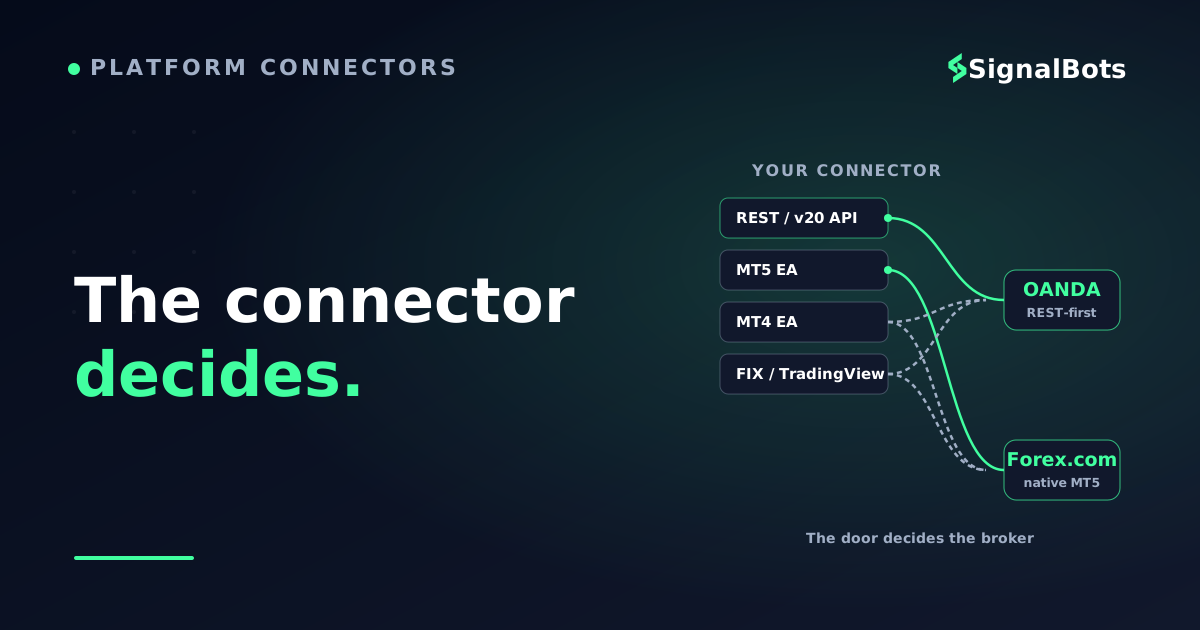
It depends on how your strategy connects— not on the headline spread
OANDA: v20 REST API + MT4, developer-first
Forex.com: MT4, MT5, TradingView + FIX
MT5 access is regional at OANDA
Match the broker to your connector
Decide by connector
Our take
#1OANDABest for REST API
#2Forex.comBest for MT5 EAs
Facts drawn from each broker's official platform and developer documentation.Jump to the comparison →
For automated trading, the connection method decides the broker — not the marketing.
You've read the reviews. Both Forex.com and OANDA are long-standing, well-regulated forex and CFD brokers that support automated trading, and both score within a rounding error of each other on the generic leaderboards. So the tie-breaker everyone reaches for — which app is prettier, whose headline spread is a fraction tighter — turns out to be the wrong question when you're building or running a bot.
An automated strategy never opens the trading app. It reaches the market through one specific door: a MetaTrader Expert Advisor (EA), a REST broker API, a FIX connection, or a webhook fired from a chart. Pick the broker whose door matches the way your strategy is built, and everything downstream gets easier. Pick on vibes, and you'll discover the mismatch the hard way — after you've funded the account.
This comparison is organized the way an automation trader actually decides: by connection method first, region second, cost third.
Key Takeaways
The right broker for a bot is decided by how your strategy connects — MT4/MT5 Expert Advisor, REST API, FIX, or a TradingView webhook — not by which app looks nicer.
OANDA leans on its well-documented v20 REST API (plus MT4, and MT5 only in select regions), which suits Python-scripted and custom automation.
Forex.com offers the broader native platform spread — MT4, MT5, TradingView and FIX — which suits MetaTrader EA traders who want MT5 without region gymnastics.
Availability is regional and account-type dependent, so confirm your connection method exists in your jurisdiction before you commit.
Table of Contents (17 min read)Contents
The only question that matters: how does your strategy connect?
Before you weigh either broker, name your connector. Automated forex strategies reach a broker through four common surfaces, and each broker supports a different subset.
MetaTrader EA (MQL4/MQL5). Your logic runs inside the terminal as an Expert Advisor. This is the default for the huge library of off-the-shelf robots and MQL-coded strategies.
The practical point: a broker that doesn't expose your connector is simply not a candidate, no matter how good its review score is. That single filter eliminates more "which is better" debates than any spread comparison ever will.
Connector coverage
Automation surface
OANDA
Forex.com
MetaTrader 4 (EA / MQL4)
Yes
Yes
MetaTrader 5 (EA / MQL5)
Select regions only
Yes
REST API (developer)
v20 REST, well documented
Available
FIX API
Yes
Yes
TradingView
Yes
Yes
Proprietary web/desktop platform
OANDA Trade
Proprietary web trader
Both cover the basics; the real fork is MT5 availability (regional at OANDA) versus OANDA's developer-first v20 REST API.
Read that table for your connector, not top to bottom. If your strategy is a Python script hitting a REST endpoint, the MT5 row is irrelevant and OANDA's documented v20 REST API does most of the talking. If your strategy is a compiled MQL5 EA, Forex.com's native MT5 is the shorter path.
OANDA for automation: the developer's broker
OANDA's reputation among automated traders rests on one thing: its v20 REST API. It is well-organized, thoroughly documented, and covers the core an algorithmic strategy needs — account state, real-time pricing, and order execution. There's an active ecosystem of community-maintained Python libraries around it, so wiring a custom bot to OANDA is a well-trodden path.
OANDA also offers MT4, a FIX API, and TradingView connectivity. The catch is MT5: it is available only through certain OANDA entities and regions — not universally, and not in the U.S. If your automation is a native MQL5 EA and you're in a region where OANDA doesn't offer MT5, that's a hard stop before you get to any other comparison.
Read also: not sure a broker API and an EA are the same thing? They aren't — see how a broker API differs from a terminal-resident Expert Advisor.
OANDA fits you if: you write your own automation in code, you prefer a documented REST endpoint over a black-box terminal, and you're comfortable maintaining the connection yourself. It's the choice biased toward developers and custom, non-MetaTrader strategies.
Forex.com for automation: the broad-platform broker
Forex.com's automation story is breadth. It offers a proprietary web trader, MT4, MT5, TradingView, and a FIX API — so the MetaTrader trader who specifically wants MT5 doesn't have to hunt for a region where it's offered. For the very large population of traders whose "bot" is an MQL5 EA bought or built for MetaTrader 5, that native MT5 access is the deciding convenience.
Both MT4 and MT5 run your strategy as an EA inside the terminal, scanning the market, placing orders, and managing risk from MQL code. MT4 and MT5 are not cross-compatible, though — an MQL4 EA won't run on MT5 without being rewritten — so match the platform to the code you already have, not to the higher version number.
Read also: if you'd rather bridge a MetaTrader terminal to signals or an external source, see how an MT4/MT5 connector sits between your platform and the trade flow.
Forex.com fits you if: your automation lives in MetaTrader — especially MT5 — and you want that platform natively without regional workarounds, plus TradingView and FIX on the same account for flexibility later.
Decide it in one pass
Instead of scoring the two brokers on a dozen attributes most bots never touch, walk the single decision that actually gates the choice: your connector, then your region.
The execution speed and reliability of whichever surface you pick matter far more to a bot's real-world results than a headline spread, because a strategy that fires hundreds of orders is exposed to slippage and fills on every one of them. And whichever platform you choose, confirm the account has automated trading enabled — the algo trading permission that lets an EA or API actually place live orders, which some account types or regions restrict.
Side by side
Forex.com vs OANDA for a bot, at a glance
OANDA
Well-documented v20 REST API
Strong community Python ecosystem
MT4 + FIX + TradingView
MT5 only in select regions
The developer-first pick for custom, coded automation.
VS
Forex.com
Native MT4 and MT5
TradingView + FIX on the same account
Proprietary web trader too
Broadest platform spread
The pick when your bot is a MetaTrader EA, especially MT5.
No universal winner — the right broker is the one that speaks your connector's language.
Don't let the headline spread decide it
Brokers compete loudly on the advertised spread because it's the number you see first. But a bot's real drag is the all-in round-turn cost — spread plus any commission plus financing on positions held overnight — multiplied across every trade it takes. A strategy that trades often can feel a wider effective cost far more than a discretionary trader who takes two positions a week.
Rather than trust either broker's marketing number, model your own. Plug in a realistic spread and commission for the account you're considering and see what the machine actually pays per round turn, and across a month of trades.
Try the numbers
All-in round-turn cost per trade
Estimate what your bot really pays each round turn — and across a month — once spread and commission are combined. Illustrative only; use your account's real figures.
Typical spread
pips
Pip value per lot
$
Commission per round turn
$
Trades per month
Spread cost per trade
—
All-in cost per round turn
—
Estimated monthly cost
—
A tighter headline spread can still lose to a lower all-in cost once commission and trade frequency are in the math.
Run that with both brokers' real figures for the exact account type and instruments you'll trade, and the "cheaper" broker often flips depending on whether you pay a raw spread plus commission or an all-in spread. Want to size positions against that cost? Our forex trading calculators cover pip value, lot size and margin so your bot's risk math lines up with its cost math.
Where SignalBots fits
Whichever broker you land on, the strategy still has to feed it. SignalBots sits upstream of the broker: our low-latency forex signals and MT4/MT5 connector tooling are broker-neutral, so a decision between Forex.com and OANDA doesn't lock you into one signal source. Pick the broker whose connector fits your automation, then route your signals into it — the two choices are independent, and keeping them that way is what stops a broker migration from breaking your whole stack.
You came in asking
“Forex.com or OANDA — which is better for my bot?”
and the honest answer is
whichever one speaks your connector's language.
There's no universal winner — there's your winner
SB
Keep your signal source broker-neutral
Choose the broker by connector — OANDA for REST-API automation, Forex.com for native MT5 EAs — then feed it with broker-neutral forex signals and a MetaTrader connector, so switching brokers later never breaks your automation.
Trading TradingView alerts instead? Route them through our forex signal feed regardless of which broker you pick.
Match the broker to your connector, keep your signals independent of it.
FAQ
Is Forex.com or OANDA better for automated trading?
Neither is universally better — it depends on how your strategy connects. OANDA suits custom, coded automation through its documented v20 REST API. Forex.com suits MetaTrader EA traders, especially those who want native MT5, thanks to its broader platform spread. Name your connector first, then the choice becomes obvious.
Do both brokers support MetaTrader Expert Advisors?
Both support MT4, so an MQL4 EA runs on either. MT5 (and MQL5 EAs) is offered natively by Forex.com, while OANDA provides MT5 only in select regions and entities. Since MQL4 and MQL5 are not cross-compatible, match the broker to the exact MetaTrader version your EA is written for.
Does OANDA have a trading API for bots?
Yes. OANDA's v20 REST API is well-documented and covers account management, real-time pricing, and order execution, with an active ecosystem of community-maintained Python libraries. OANDA also offers a FIX API and TradingView connectivity for other automation styles.
Can I run a TradingView strategy on either broker?
Both Forex.com and OANDA support TradingView connectivity, so a Pine Script alert can be relayed to open trades on either. If TradingView is your only connector, the choice comes down to cost, region, and instrument coverage rather than platform availability.
Should I choose the broker with the tighter spread?
Not on the headline number alone. A bot's real drag is the all-in round-turn cost — spread plus commission plus any overnight financing — multiplied across every trade. Model your own cost for the specific account type and trade frequency; a tighter advertised spread can still lose to a lower all-in cost.
Is MT5 available at OANDA in the United States?
No. OANDA does not offer MT5 to U.S. clients — MT5 is available only through certain OANDA entities and regions. Availability is regional and account-type dependent, so always confirm your connection method exists in your jurisdiction before funding.
Does my SignalBots setup depend on which broker I pick?
No. SignalBots' forex signals and MT4/MT5 connector tooling are broker-neutral by design, so they sit upstream of the broker. You can switch between Forex.com and OANDA without changing your signal source — keeping the two decisions independent is what stops a broker migration from breaking your automation.
Sources & Further Reading
Want to go deeper? These independent, authoritative sources shaped this guide — each one is worth reading in full:
The Forex Desk is the SignalBots editorial team responsible for our currency-market coverage. We research and write the guides, explainers and reference articles on how the majors, minors and crosses actually trade — sessions, spreads, swaps and the macro releases that move price.



Discussions 0
Leave a comment