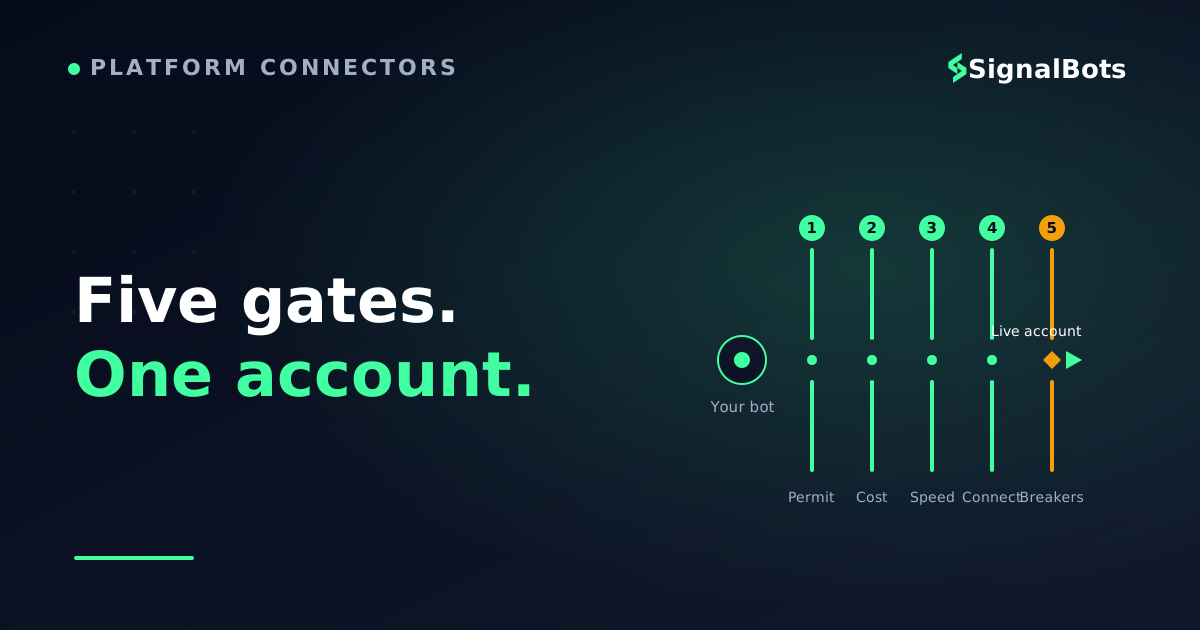
A bot judges a broker on five things, in order: is automation permitted on your account, what each trade costs, the execution model/speed, the connection point (MT4/MT5, cTrader, API), and the silent strategy-breakers.
The advertised spread is never the real bill — compare all-in cost (spread + commission + swap) against your strategy's average target, because a bot pays it on every trade.
The traps that pass every demo test and break live: a netting-vs-hedging mismatch with your EA, symbol names the bot doesn't recognise, and max-open-order caps.
Confirm every permission and plumbing detail with the broker in writing before you fund the account — a demo's permissions rarely match live.
Table of Contents (19 min read)Contents
The One Question That Decides Everything
What actually makes a broker safe to automate on?
Automation permission
Everything else is negotiable
The hard gateEA / API access on your account type
The repeat taxSpread + commission + swap per trade
The hidden trapNetting vs hedging position model
The connectionMT5, cTrader or a REST/FIX API
A bot is a different kind of client than a human. It doesn't care about a slick app or a welcome bonus — it cares whether it is allowed to trade, what each trade costs, and whether the account's plumbing matches its logic.
You picked a strategy, wired up a bot or a signal feed, ran a clean backtest — and then the broker quietly wrecked it. Trades opened at prices the backtest never saw. An EA that netted positions on your demo suddenly stacked duplicate ones live. A symbol the bot expected as EURUSD was listed as EURUSD.m and every order got rejected. None of that shows up on a broker's homepage.
This guide is about the criteria that actually matter when a machine, not you, is the one clicking buy and sell. We won't hand you a ranked leaderboard of "best brokers" — which broker style fits which automation style is a bigger decision that deserves its own page. Here, you'll learn how to read any broker against the five things automation cares about, and how to spot the silent strategy-breakers before they cost you a live account.
Criterion 1: Is Automation Even Allowed?
Before spreads, before platforms, before anything — confirm the account is actually permitted to run a bot. This sounds obvious and it is the single most common thing beginners miss, because many brokers offer MetaTrader but restrict automated order flow on specific account types.
There are three layers of permission, and all three have to be green:
Platform-level — the terminal itself has to have algo trading switched on (in MetaTrader, the "Algo Trading" toggle in the toolbar). This is your side of the switch.
Account-level — the broker has to allow algorithmic trading permission on the specific account you opened. Some ECN or "raw" accounts allow it freely; some cent or bonus accounts explicitly forbid EAs, scalping, or high-frequency order flow in the fine print.
Strategy-level — even where EAs are allowed, brokers may ban particular behaviours: scalping inside a few seconds, arbitrage across feeds, or holding through news. A bot that trips one of these can have its trades reversed after the fact.
The trap is that a demo account almost always allows everything. You build, you test, it works — then the live account rejects the exact same orders. The decision tree below is the check to run before you fund anything.
Is this broker safe to automate on?
Take itProceed with careSkip / stand aside
Run this before you deposit — not after your first rejected order.
Criterion 2: The Cost a Bot Pays on Every Single Trade
Here is what makes automation different from discretionary trading: a bot doesn't take five trades a week. It might take fifty a day. Every cost you pay per trade gets multiplied by that frequency, so a cost that's trivial for a human swing trader can quietly eat an automated strategy alive.
Three costs repeat on essentially every trade:
Spread — the gap between bid and ask you cross the moment you enter. On a scalping bot that closes for a few pips, the spread is most of your target.
Commission — a flat fee per lot on raw-spread / ECN accounts. Lower spread, explicit commission; it's a trade-off, not a discount.
Swap / rollover — the financing charge for holding a position overnight. A bot that carries trades across the daily rollover pays this every night, and on some pairs it's brutal.
The headline "0.0 pip spread" you see in an ad is only one segment of the real bill. The illustrative breakdown below shows why a raw-spread account isn't automatically cheaper — you have to add the commission back to compare honestly against an all-in-spread account.
The all-in cost of one automated round-turn (illustrative)
Spread
Commission
Overnight swap
0All-in cost
Spread3.5 USD
Commission3.5 USD
Overnight swap1.8 USD
Total cost per trade— USD
A hypothetical 1-lot trade held overnight. The tight 'raw' spread is only part of the bill — commission and swap are what a high-frequency bot pays again and again.
For a bot, the metric that matters isn't the advertised spread — it's the total round-turn cost divided by the strategy's average target. A strategy aiming for 8 pips can survive a 1-pip all-in cost; the same strategy dies at 4 pips of cost. Model this against your own numbers before you commit; our forex trading calculators let you plug in lot size and pip value to see the real drag.
Criterion 3: Execution Model and Speed
A bot reacts to a signal in milliseconds. If the broker takes hundreds of milliseconds to fill — or fills at a worse price than it quoted — that gap is a tax on every trade, and it's invisible in a backtest that assumes perfect fills.
Two things drive this: the broker's execution model and its raw speed.
The execution model is who is on the other side of your trade. An ECN broker (electronic communication network) routes your order to a pool of liquidity providers and other traders, so you get the market's price with no dealer in between. A market-maker broker takes the other side of your trade itself. Neither is automatically "bad," but for automation the ECN / no-dealing-desk model matters because it typically means fewer requotes and less interference with fast, frequent order flow — exactly the flow a bot generates.
Speed is the other half. Two effects hit automated strategies hardest:
Execution speed — the time from your bot sending an order to the broker confirming a fill. Slow fills mean the price has already moved by the time you're in.
Slippage — the difference between the price your bot expected and the price it actually got. A little is normal; consistent negative slippage on a market-maker feed is a red flag for an automated account.
This is also where a VPS for your EA earns its keep: a virtual private server sits physically close to the broker's servers and stays online 24/7, so your bot isn't fighting your home internet's latency or dropping offline mid-trade. Many automation-friendly brokers offer a free or subsidised VPS once you meet a volume threshold — a genuine signal that they expect automated clients.
Criterion 4: The Platform and Where Your Bot Plugs In
The four common connection points, and what each is for:
Connection point
Best for
What to confirm with the broker
MetaTrader 4 / 5
MQL Expert Advisors, the biggest EA ecosystem
Which build, hedging vs netting, EA allowed on your tier
cTrader
cAlgo bots, native depth-of-market, ECN feel
cTrader Automate enabled; FIX access if needed
Broker REST / FIX API
Custom Python / bespoke systems, no MetaTrader
Docs, rate limits, whether it's on retail accounts
Bridge / connector
Sending TradingView or signal alerts to MT5
WebRequest URL whitelisting for inbound alerts
If you're routing signals or TradingView alerts into MetaTrader rather than writing an EA from scratch, an MT4/MT5 connector is the bridge that turns an incoming alert into a real order on the broker — and it only works if the broker permits the WebRequest calls it depends on. If you'd rather skip broker-side coding entirely, a hosted MT4/MT5 connector for automated execution handles that bridge for you.
Prefer a fully custom system? Then the deciding feature is a documented broker API — a REST or FIX interface with real docs, sane rate limits, and (critically) availability on retail accounts, not just institutional ones. Many brokers advertise an API that turns out to be gated behind a minimum balance most retail automators never reach.
Criterion 5: The Silent Strategy-Breakers
Everything above is on the broker's spec sheet if you look. These next three are not — they're the plumbing details that pass every demo test and then break a live strategy in ways that look like the bot's fault. This is where most automated rollouts quietly fail.
Netting vs Hedging: the account model your EA assumes
Every MT5 account runs one of two position-accounting models, and an EA is almost always written for one specific model. The difference between a hedging vs netting account is simple but consequential:
Netting — one position per symbol. A new buy on a symbol you're already long adds to that single position; a sell reduces it. Common on stock-style and some ECN accounts.
Hedging — every trade is its own separate position. You can be long and short the same symbol at once, each managed independently. This is what most retail forex EAs expect.
Run a hedging EA on a netting account (or vice-versa) and it doesn't error politely — it miscalculates risk, closes the wrong trades, or stacks duplicate positions. The strategy that printed money on demo bleeds on live, and nothing in the code changed. Confirm the account's model before you deploy, and match it to what your EA was written for.
Symbol mapping: when EURUSD isn't EURUSD
Brokers name instruments however they like. Your bot expects XAUUSD; the broker lists it as GOLD or XAUUSD.raw or XAUUSD_i. If the bot's hardcoded symbol doesn't exactly match the broker's, every order is rejected — a completely silent failure that looks like the bot is broken. Before committing, check the broker's actual symbol names against what your automation expects, and confirm your connector or EA supports a symbol mapping layer to translate between them.
Max-open-order caps and other invisible limits
Some brokers cap the number of simultaneously open orders or positions per account, throttle order frequency, or impose a minimum time-in-trade to discourage scalping. A grid or martingale bot that expects to hold twenty positions will simply stop opening trades at the cap — and, again, look broken. If your strategy opens many concurrent positions or fires orders rapidly, ask the broker directly about position limits and order-rate throttling before you trust it with real money.
Your Pre-Signup Verification Checklist
You don't need to memorise all of this. You need to ask the broker's support these questions in writing before you fund the account — and keep their answers. Tick each item off as you confirm it:
Confirm before you deposit for automation
0 / 10
EAs / API orders are allowed on my specific account type — in writing.
My strategy style (scalping, news, arbitrage) is not restricted.
Live account permissions match what the demo allows.
I've compared all-in cost (spread + commission + swap), not just the headline spread.
Execution model (ECN vs market-maker) fits my order frequency.
The connection point matches my setup — MT4/MT5, cTrader, API or connector.
The account's netting-vs-hedging model matches what my EA expects.
Broker symbol names match my bot's symbols, or my connector can map them.
No max-open-order cap or order-rate throttle that my strategy would hit.
A VPS option exists so the bot stays online 24/7.
★
Checklist complete — you’re cleared to proceed.
Once a broker clears this list, you've done the hard part. The remaining question — which broker to actually pick, and which broker style suits your specific automation style — is where you compare the shortlist head-to-head against these same criteria.
FAQ
Can I run a trading bot on any forex broker?
No. Many brokers offer MetaTrader but restrict automated order flow on certain account types, and some ban specific behaviours like scalping or news trading even when EAs are technically allowed. Always confirm automation is permitted on your exact account tier, in writing, before funding.
Does a lower spread always mean lower cost for a bot?
Not on its own. A "raw" or "0.0 pip" spread account usually adds an explicit commission per lot, and any strategy holding trades overnight also pays swap. The number that matters for automation is the total round-turn cost relative to your strategy's average target — compare all-in, not headline spread.
What's the difference between a netting and a hedging account, and why does it matter?
Netting keeps one position per symbol; hedging lets each trade be its own position, so you can be long and short at once. An EA is written for one model — run it on the wrong one and it can close the wrong trades, misread risk, or stack duplicates. Match the account model to what your bot expects.
Do I need a VPS to trade automatically?
For anything that must stay online continuously, effectively yes. A VPS keeps your bot running 24/7 and sits close to the broker's servers to cut latency, so trades don't stall on your home connection or stop when your PC sleeps. Many automation-friendly brokers offer a free or subsidised VPS once you meet a volume threshold.
Is an ECN broker better for automated trading than a market maker?
For frequent, fast automated order flow, the ECN / no-dealing-desk model is generally friendlier: your orders route to a liquidity pool rather than to a dealer taking the other side, which typically means fewer requotes and less interference. A market maker isn't disqualifying, but watch for consistent negative slippage or requotes on an automated account.
You came in worried about
“a clean backtest a broker quietly wrecked”
and leave with
a five-point test any broker must pass to be automation-safe.
A bot judges a broker on plumbing, not polish
Automation permission, per-trade cost, execution model, connection point, and the silent breakers — that's the whole test. Clear those five and the choice of which broker becomes a shortlist comparison against the same yardstick, not a leap of faith. The pages below let you pressure-test your numbers and wire the connection.
The Forex Desk is the SignalBots editorial team responsible for our currency-market coverage. We research and write the guides, explainers and reference articles on how the majors, minors and crosses actually trade — sessions, spreads, swaps and the macro releases that move price.



Discussions 0
Leave a comment