"High leverage" is not the spec that matters for an EA — the account mode (hedging vs netting), the EA/strategy policy, and the stop-out level decide whether your bot survives, not the headline 1:500 or 1:1000 number.
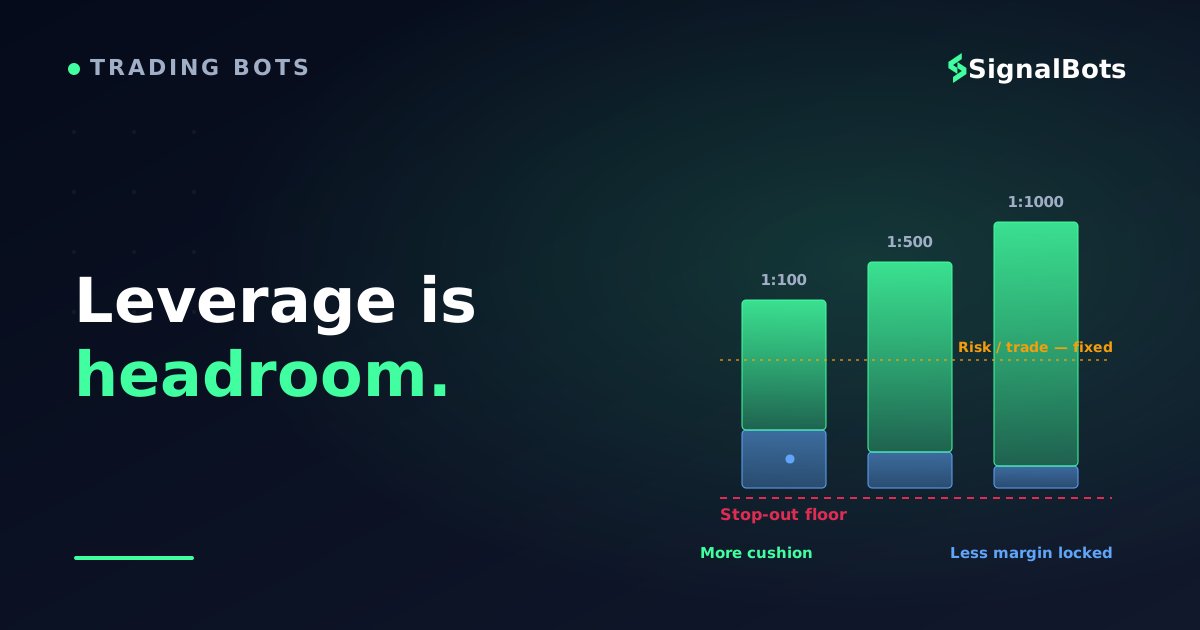
More leverage lowers required margin per lot; it does not change your risk per trade. Your stop-loss and position size set the loss — leverage only decides how much free margin the EA has to breathe before the broker force-closes it.
Verify three things on the broker's own site before you deploy: your strategy type is explicitly allowed, the account is hedging mode (for grid/hedging EAs), and the stop-out level leaves headroom — then forward-test on demo for weeks, not hours.
Table of Contents (21 min read)Contents
Why "High Leverage" Is the Wrong First Question for an EA
You are not shopping for the same thing a discretionary trader is. When a human searches for a high-leverage broker, they want a bigger position on the same deposit. When you deploy an Expert Advisor, leverage stops being about ambition and becomes about survival — specifically, how much free margin your bot has left before the broker force-closes its trades in the middle of a strategy.
That difference matters because an Expert Advisor does exactly what its code says, at machine speed, with no hesitation and no discretion. A grid EA will keep adding positions into a losing move. A hedging EA holds long and short on the same symbol at once. A martingale EA doubles down. Each of those behaviours consumes margin in a pattern a human never would — and the broker's margin engine, not your intent, decides when it all stops.
So the headline number — 1:500, 1:1000, 1:2000 — is genuinely the least useful thing on the broker's landing page. Two brokers can both advertise 1:1000 and behave completely differently under your EA because their account mode, their stop-out level, and their written policy on automated strategies are different. This article is about those three specs, and which real forex/CFD brokers get them right.
Leverage vs. Risk: The Distinction That Blows Up Bots
Here is the trap that ends most leveraged-EA accounts: traders treat "more leverage" as "more risk" and set their bot up accordingly. It is the opposite of how the mechanics actually work, and getting it backwards is what turns a survivable drawdown into a blown account.
Leverage sets your required margin, not your loss. Your loss on any single trade is decided by your stop-loss distance and your position size — full stop. If your EA opens a 0.10-lot EUR/USD trade with a 30-pip stop, that trade risks about the same dollar amount whether your account is 1:100 or 1:1000. What the higher leverage changes is how much of your deposit is locked as margin to hold that position — and therefore how much free margin is left as a cushion.
That cushion is the whole game for an EA. When free margin runs out, the broker doesn't call you — it hits the stop-out level and starts force-closing your bot's open trades, usually the losing ones first, often at the worst possible moment. A grid or hedging EA that was two candles away from recovering gets liquidated instead. So counter-intuitively, higher leverage can make an EA safer in one narrow sense: it frees up margin, giving the bot more headroom before that force-close — provided you did not use the freed margin to size up. The danger is never the leverage itself; it is using the extra headroom as an excuse to trade bigger.
Try the numbers
Free-margin headroom on a leveraged EA
See how leverage changes the margin locked per lot — and how much cushion your bot keeps before a stop-out. Notice your risk per trade barely moves; only the headroom does.
Account balance
$
Total open volume (lots)
Leverage (1:X)
Broker stop-out level
Margin locked (approx)
—
Free margin cushion
—
Equity buffer before stop-out
—
Illustrative: assumes a ~$100,000 contract per lot and ignores swaps/commissions. Same volume, higher leverage — the margin locked shrinks and the cushion grows, while your per-trade risk (set by your stop) is untouched.
If the mechanics of margin and stop placement are still fuzzy, work through the numbers on a dedicated forex margin and leverage calculator before you let an EA size positions for you. And keep the guardrail simple: however much leverage you have, keep your risk per trade fixed and small — leverage is headroom, not a licence to raise it.
The Three Specs That Actually Decide It
Every broker comparison you will read ranks on spreads, minimum deposit, and the leverage headline. For a leveraged EA, the three specs that decide whether your bot lives or dies barely appear on those lists. These are the ones to verify — on the broker's own account and platform documentation, not a review site's summary.
1. Account mode: hedging vs. netting
This is the single most common reason a working EA fails on a new broker. In a netting account, you can only hold one net position per symbol — a buy signal while you are short doesn't open a second trade, it reduces or closes the existing one. In a hedging account, long and short on the same symbol coexist as separate tickets. Grid EAs, hedging EAs, and many recovery systems are written for hedging mode; drop them onto a netting account and they either error out or silently do the wrong thing.
Adds layered positions in the same direction — netting collapses them into one
Hedging / recovery
Yes
Holds long + short at once by design; netting cancels one against the other
Single-position trend
No
One trade at a time — runs fine on either mode
Scalper (one symbol)
Usually no
Fine on netting unless it stacks partials or opposing tickets
Before you migrate an EA, know which mode it expects. Read the full explainer on the difference below.
If you are not sure which mode your strategy needs, our glossary breaks down the difference between a hedging and a netting account with worked examples — read it before you open a live account, because switching later usually means a new account entirely.
2. The written EA / strategy policy
A broker allowing MetaTrader is not the same as a broker allowing your strategy. Many brokers restrict or ban scalping (defined by minimum holding time), forbid arbitrage or latency EAs outright, or reserve the right to cancel trades they judge to exploit off-market pricing. High-leverage market-maker brokers are the most likely to have these clauses, because your leveraged scalper is their liability.
Do not infer the policy from a marketing page. Find the account terms or the FAQ and confirm, in writing, that your specific behaviour — scalping, hedging, grid, news trading — is permitted. If a broker is vague about it, treat that as a no. This is where a genuine ECN/STP broker beats a pure market-maker: when the broker isn't taking the other side of your trade, it has far less reason to interfere with an aggressive EA. That's why an ECN broker is the usual default for automated forex.
3. Stop-out level and margin headroom
The stop-out level is the equity-to-margin percentage at which the broker starts liquidating your positions. A 20% stop-out gives an EA far more room to survive a drawdown than an 80% stop-out — at 80%, a fairly ordinary adverse move can trip the force-close while your bot is still inside its normal operating range. High leverage lowers the margin your open trades lock, which raises your margin level and pushes you further from that stop-out line — but only if you didn't spend the freed margin on bigger size.
Margin headroom on a leveraged grid EA (illustrative)
Margin used620 / 2000 $
31% of limit usedLocked by open grid legs
Free-margin cushion1380 / 2000 $
69% of targetWhat absorbs the next adverse leg
Equity vs. stop-out floor1690 / 310 $
Target metForce-close triggers at 50% margin
Illustrative snapshot of a $2,000 account: the bot is comfortably clear of the stop-out floor. Watch how fast the cushion shrinks when a grid adds legs into a losing move — that shrinking cushion, not the leverage number, is what kills the account.
A Simple Rule for Picking the Right Broker
Put the three specs in order and the choice stops being about the leverage number at all. Walk your shortlist through this tree — the first broker that clears all three is your broker.
Is this high-leverage broker safe for your EA?
Take itProceed with careSkip / stand aside
Policy first, account mode second, stop-out third. The leverage number never enters the decision — it only sets how much cushion you get once the three real specs pass.
Named Forex/CFD Brokers Worth Shortlisting
The intent behind a "best high-leverage broker for EAs" search is a shortlist you can act on, so here are real forex/CFD brokers that combine high leverage with the automation conditions above. Everything below is a qualitative description of what each broker offers — platforms, account model, EA stance — verifiable on their own sites. None of it is a ranking, an endorsement, or a claim about spreads, latency, or returns; verify the current specifics yourself, because account types and regional entities change what leverage and rules actually apply to you.
Exness — known for very high leverage tiers on smaller accounts, which is exactly the deep-margin headroom a grid or martingale EA wants. Full MT4 and MT5 support. A strong candidate when your EA's whole problem is running out of free margin across many open legs.
IC Markets — a raw-spread ECN broker with MT4, MT5, and cTrader, widely used for automated and scalping strategies because the ECN model means the broker isn't the counterparty leaning against your bot. Offers server-side VPS options for low-latency EA hosting.
FP Markets — ECN pricing across MT4/MT5 with a hedging-capable MT5 setup and VPS availability; a common pick for traders who want raw fills plus explicit EA support.
FxPro — supports MT4, MT5, and cTrader, giving you a choice of automation platform (Pine-adjacent cAlgo on cTrader, or MQL on MetaTrader) alongside high-leverage entities for non-EU clients.
HFM (HotForex), Tickmill, XM, and Eightcap — all run full MetaTrader with high-leverage account tiers in their non-EU entities and generally EA-friendly conditions; worth adding to the shortlist and checking each one's scalping/hedging clause and stop-out level against the three specs above.
A note on regulation you cannot skip: the very high leverage tiers (1:500 and beyond) live in a broker's offshore or non-EU entity. EU/UK-regulated entities cap retail forex leverage far lower, and US rules are lower still. The same broker name can mean 1:30 or 1:1000 depending on which entity you sign up under — so confirm the entity, not just the brand, before assuming the leverage your EA was tuned for is even available to you.
Market integrity note: every broker above is a forex/CFD broker, because this is a forex/automation article. If your automation lives in another market, the account-mode and policy logic still applies, but the venue does not — crypto bots route to a crypto exchange, binary bots to a binary broker, never crossed.
Where SignalBots Fits Once You've Picked a Broker
Choosing the broker is step one; the reason you want high leverage and a clean EA policy is to run something on it. If you would rather feed a broker-agnostic signal into your own EA or connector than build a strategy from scratch, that is the gap our stack fills — you keep the high-leverage broker you just vetted and point the signal at it.
Our MT4/MT5 connector bridges a signal source to your MetaTrader account so an EA or a copier executes it on the broker you chose, and our forex trading signals give you the entries to run through it. Because the connector is broker-agnostic, none of the broker-selection work above is wasted — the same account mode, EA policy, and stop-out headroom rules apply whether the trades come from your own EA logic or from a signal feed. If you prefer alerts you act on manually first, the forex Telegram signal channel is the lower-commitment on-ramp before you automate.
And whatever you deploy, respect the one rule the leverage math keeps proving: size for the drawdown, not the average. Watch your worst-case exposure, keep the maximum drawdown an EA can inflict well inside your margin cushion, and treat every high-leverage account as something that rewards discipline and punishes the lack of it.
FAQ
Does higher leverage make my EA riskier?
Not by itself. Your risk per trade is set by your stop-loss and position size, which leverage does not change. Higher leverage lowers the margin locked per position, which increases your free-margin cushion before a stop-out. It becomes dangerous only when you treat the freed margin as permission to trade bigger — then you have genuinely raised your risk, and the leverage just enabled it.
What leverage should I run a forex EA at?
There is no universal number, because the safe level depends on how the specific EA sizes positions and how many it holds at once. The reliable approach is to fix your risk per trade at a small, constant percentage and let leverage only govern headroom — then confirm on a demo that the bot stays clear of the stop-out level through a realistic losing streak. An EA tuned and tested at 1:100 should be re-validated before you run it at 1:500 or higher.
Why did my EA break when I switched to a high-leverage broker?
The most common cause is the account mode: you moved from a hedging account to a netting one, and a grid or hedging EA that expects to hold long and short at once no longer can. Second most common is a strategy-policy clause — the new broker restricts scalping or cancels trades it deems off-market. Check the MT5 account's mode and the written EA policy before blaming the code.
Is a market-maker broker with 1:1000 leverage a problem for EAs?
It can be. A market maker takes the other side of your trade, so an aggressive leveraged EA — a scalper or an arbitrage bot — is a direct liability to them, and that is where trade cancellations and scalping bans come from. It is not automatically disqualifying, but you must read the EA policy carefully. An ECN/STP broker generally has less incentive to interfere, which is why automated forex traders lean that way.
Do I need a VPS to run an EA on a high-leverage account?
For any EA meant to run continuously — especially latency-sensitive scalpers on high leverage, where a delayed fill can be the difference between a profit and a liquidation — yes, a VPS near the broker's servers is strongly recommended so the bot keeps running when your computer is off and reacts with minimal delay. Many EA-friendly brokers offer a free or discounted VPS once you meet a volume threshold.
How do I test whether a broker is really safe for my EA before going live?
Forward-test on that broker's demo account for weeks, not hours, with the exact EA settings you plan to run live — same leverage, same lot sizing, same symbols. Watch the margin level through a genuine drawdown to confirm the bot stays clear of the stop-out. A backtest proves the logic; only a live-conditions forward test on the actual broker proves the account mode, execution, and stop-out level behave the way you need them to.
Sources & Further Reading
Want to go deeper? These independent, authoritative sources shaped this guide — each one is worth reading in full:
The Cross-Market Desk is the SignalBots editorial team for topics that span every market — platform connectors, copy trading, partnership and IB programs, and the general mechanics of trading automation. We research and write the guides that apply no matter what you trade.



Discussions 0
Leave a comment