MyFxBook AutoTrade mirrors a chosen provider's forex trades into your own MT4/MT5 account, scaled to your balance — no VPS or software to run yourself.
The multiplier is the one setting that decides your real risk: it scales the provider's lot size onto your account, so understand it before you subscribe.
Vet a provider by track-record length, drawdown depth, and reward-to-drawdown ratio — not by the headline gain number.
Test on a demo connection first, set a drawdown stop, and start with a multiplier below 1 until you trust the system.
Table of Contents (18 min read)Contents
What AutoTrade Actually Does
You have watched a forex strategy climb the MyFxBook leaderboards for months, and you want its trades in your own account without babysitting a chart all day. That is exactly the job MyFxBook AutoTrade does: it is a broker-side mirroring service that takes the trades of a signal provider you choose and copies them into your MetaTrader 4 or MetaTrader 5 account automatically, scaled to your balance.
This is a form of copy trading — you are not designing a strategy, you are subscribing to someone else's. The catch is that AutoTrade's setup hides its most important decision (how much risk you actually take on) inside a single multiplier field, and most beginners breeze past it. This guide walks the full setup end to end, then spends real time on the one setting that decides whether a good provider grows your account or drains it.
One thing to get straight up front: AutoTrade runs on MyFxBook's own servers, so you do not rent a VPS or leave your PC on. Once you subscribe, the mirroring happens whether your laptop is open or shut.
How the Mirroring Works Before You Touch Anything
Before the setup steps make sense, you need the mental model. AutoTrade is a one-to-many mirror trading relationship: one leader account (the provider) places a trade, and that same trade is replicated onto every subscriber's account — but resized to each subscriber's balance and chosen risk. You are not copying the provider's exact lot size; you are copying the proportional position.
That proportional scaling is the whole point, and it is where people misread their exposure. A provider trading 1.00 lot on a $50,000 account is risking a very different fraction than you would if that same 1.00 lot landed on your $3,000 account. AutoTrade solves this by scaling the trade to your balance automatically — so the risk percentage travels across, not the raw lot size.
The core idea
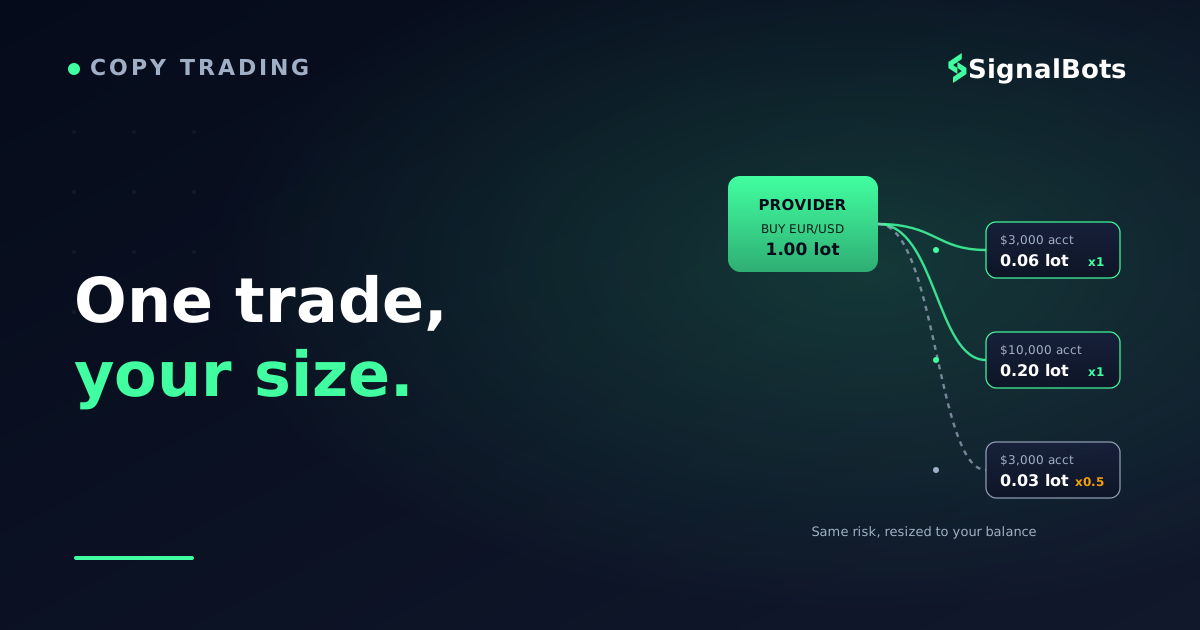
One provider trade, resized to each account
Provider (lead account)BUY EUR/USD - risks 2% - 1.00 lot on $50k
Mirrored to your account, by balance
Your account - $3,0000.06 lot - same 2% risk, multiplier 1
Your account - $10,0000.20 lot - same 2% risk, multiplier 1
Your account - $3,000, cautious0.03 lot - ~1% risk, multiplier 0.5
At multiplier 1 the provider's RISK crosses to your account, not their lot size. Turn the multiplier down and you take proportionally less of that risk.
AutoTrade copies the proportional position, then your multiplier scales it further.
Keep that picture in mind: everything in the setup that follows is really about whose trades to mirror and how hard to scale them onto your balance.
Step 1 — Open an Account With a Supported Broker
AutoTrade only works through brokers that have integrated with MyFxBook, so your first move is a live (or demo) MT4/MT5 account at one of them. Several of the brokers SignalBots works with as partners support the integration, including FP Markets, IC Markets, FXChoice, and others; you can also find the current supported list inside the AutoTrade dashboard itself.
When you open the account, you will get standard MetaTrader login credentials. AutoTrade needs the read-and-trade access, which on most integrated brokers is handled through a one-click authorization inside your broker's client area rather than by handing over a raw master password — an important distinction, because a plain read-only investor password could not place the trades AutoTrade needs to copy.
Market note: AutoTrade is a forex and CFD tool that lives in the MetaTrader ecosystem. If your interest is crypto exchange copying or binary-options automation, this is the wrong venue — those run on entirely different rails.
Step 2 — Connect Your Account to MyFxBook
With a broker account in hand, register a free MyFxBook account (username, email, password, the usual captcha and terms). Then, from the AutoTrade section, choose to connect your MT4/MT5 account. On integrated brokers this is often a Connect to MyFxBook button inside the broker portal that links the two with a single confirmation.
The whole connect-pick-configure-activate sequence looks like this:
The full flow
The AutoTrade setup, end to end
1
Link your MT4/MT5 account
Connect your supported-broker account to MyFxBook AutoTrade and authorize trade access.
2
Pick a system to copy
Browse the ranked systems, filter by track record and drawdown, and shortlist one provider.
3
Set your multiplier and limits
Choose the risk multiplier, max lot, max open trades, and a drawdown stop that protects your equity.
4
Confirm and activate
Accept the terms and switch the subscription on. Trades now mirror to your account server-side.
5
Monitor and adjust
Watch the first weeks on your own equity curve, then raise or lower the multiplier as trust builds.
Five steps: link, pick, size, activate, monitor. The sizing step is where your real risk is decided.
If you would rather test the mechanics before risking real money, connect a demo account first — AutoTrade supports demo subscriptions so you can watch the copying behave for a few weeks with virtual funds.
Step 3 — Pick a System Worth Copying
This is where most of your edge is won or lost. MyFxBook screens systems before they can be copied — a provider generally needs a multi-month verified history, a real trade count rather than a handful of lucky positions, a capped maximum drawdown, and a reward-to-drawdown ratio above a floor. Screening keeps out the obviously reckless, but it does not pick a good provider for you. That judgment is yours.
The dashboard lets you sort and filter systems by overall gain, monthly gain, drawdown, and subscriber count. The rookie mistake is sorting by gain and subscribing to whatever sits on top. A verified track record that shows a smooth, shallow-drawdown climb over a long window is worth far more than a spectacular gain built on deep, stomach-churning drawdowns you will not survive emotionally.
Here is the difference between a system worth your capital and one to skip:
Vetting a provider
What to check
Green flag
Red flag
Track-record length
Long, unbroken verified history
A few weeks of results
Max drawdown
Shallow and quick to recover
Deep, slow-healing equity dips
Reward vs drawdown
Gains clearly outpace worst dip
Gain only slightly beats risk
Trade count
Many trades across conditions
Thin sample, one lucky run
Style
Consistent, disciplined sizing
Martingale or grid recovery
Read a system by its worst drawdown and its consistency, not its headline gain. A martingale curve looks flawless right up until it isn't.
If you want a plain-English breakdown of what makes a signal provider trustworthy versus a red flag, that concept deserves its own read before you commit capital.
Step 4 — Size the Trades: The Multiplier Is Everything
Here is the setting that decides your fate, and the one the setup wizard treats as an afterthought. When you subscribe, you set a risk multiplier. A multiplier of 1 means AutoTrade aims to give you the same risk ratio as the provider — their 2% risk becomes your 2% risk, resized to your balance. A multiplier of 0.5 halves that; 2 doubles it. (AutoTrade caps the effective risk so you cannot set more than a full-risk mirror.)
The trade copier resolves your actual lot from a chain of ratios — your multiplier, the provider's lot, and the balance ratio between the two accounts. You do not need the exact internal formula, but you do need to feel how the multiplier moves the number that lands on your account. Plug in your own figures:
Try the numbers
What lot lands on your account?
See how the provider's trade resizes to your balance and multiplier. This mirrors the logic AutoTrade uses to scale a copied position onto your account.
Provider's lot size
lot
Provider account balance
$
Your account balance
$
Your risk multiplier
Your mirrored lot size
—
Share of provider's size
—
Drag the multiplier: at 1 you take the provider's full scaled risk; below 1 you take proportionally less. Note the 0.01-lot floor — tiny accounts still trade minimum size.
Two traps hide in that math. First, the minimum lot floor: if your scaled size rounds below 0.01 lot, AutoTrade uses 0.01 anyway — so on a very small account a single mirrored trade can carry more relative risk than the provider takes. Second, compounding of scale: a multiplier above 1 magnifies not just the wins but every drawdown the provider hits. Start below 1 and earn your way up.
Step 5 — Set Your Limits, Then Activate
Beyond the multiplier, AutoTrade's General Trading settings let you fence the strategy so a bad week cannot run away with your account. Configure these before you confirm:
Maximum lot size — a hard ceiling so no single mirrored trade exceeds a size you are comfortable with.
Maximum open trades — caps how many of the provider's positions you hold at once, limiting correlated exposure.
Drawdown stop % — the safety valve: if your equity falls by this percentage, AutoTrade halts copying so a provider's blow-up does not follow you to zero.
Symbols to ignore — exclude pairs you do not want to trade, or that carry costs you dislike.
Allowed trading hours — restrict copying to sessions you actually want exposure in.
Set a drawdown stop you can genuinely live with, tick the terms, and switch the subscription on. From that moment the copying runs server-side. You can pause, adjust the multiplier, or unsubscribe at any time — the relationship is not locked in.
Before you go live
AutoTrade vs Running Your Own Copier
AutoTrade is deliberately hands-off, and that is both its strength and its ceiling. Because it runs on MyFxBook's servers, you avoid the whole infrastructure headache — no VPS, no local terminal, no dropped connection at 3 a.m. The trade-off is that you copy only providers who have chosen to list on AutoTrade, and you inherit MyFxBook's screening and scaling rules rather than your own.
If you already receive signals from a source outside that ecosystem — a private forex desk, a Telegram channel, or a TradingView strategy — AutoTrade cannot mirror them. That is where a dedicated copier or a connector earns its place, bridging an external signal feed into MT5 on your own terms. For traders who want on-site forex calls rather than a mirrored account, our forex signals and forex Telegram channel cover that path, and the MT5 connectors handle the bridge when your signal source lives elsewhere.
Your Pre-Subscribe Checklist
Before you flip that subscription on, walk this list. If you cannot tick every box, you are not ready to commit live capital.
Pre-flight
Ready to activate AutoTrade?
0 / 7
My broker account is open and connected to MyFxBook AutoTrade.
I tested the connection on a demo account first.
I checked the provider's full drawdown history, not just their gain.
I understand my multiplier and what lot size it puts on my account.
I set a maximum lot and a maximum open-trades cap.
I set a drawdown stop % I can genuinely live with.
I am only mirroring capital I can afford to lose.
★
Checklist complete — you’re cleared to proceed.
Tick all seven before you subscribe. Skipping the demo test and the drawdown check is how good providers still ruin unprepared accounts.
Want to size your own trades away from a provider's scaling? Our forex position-size calculator lets you set risk per trade directly, which is useful for sanity-checking what any multiplier is really doing to your account.
FAQ
Do I need to keep my computer on for AutoTrade to work?
No. AutoTrade runs on MyFxBook's servers, so the copying continues whether your PC is on or off. This is the main convenience difference between AutoTrade and running a copier locally, where you would need a VPS or an always-on machine.
What does the multiplier actually change?
The multiplier scales the provider's risk onto your account. At 1, you aim for the same risk ratio the provider takes, resized to your balance. Below 1 you take proportionally less risk (and less reward); above 1 you take more of both. It is the single most important setting because it decides the lot size that lands on your account.
How do I choose a good system to copy?
Look past the headline gain. Prioritize a long verified history, a shallow and quick-to-recover maximum drawdown, a reward that clearly outpaces that drawdown, and a healthy trade count across different market conditions. Avoid systems that lean on martingale or grid recovery — their equity curve looks perfect until a single run wipes it out.
Can AutoTrade copy signals from a Telegram channel or TradingView?
No. AutoTrade only mirrors providers who list their systems on MyFxBook. To act on signals from an external source — a Telegram channel, a private desk, or a TradingView alert — you need a dedicated trade copier or an MT5 connector that bridges that feed into your terminal, which is a separate setup from AutoTrade.
Is my money safe if the provider has a bad month?
Your funds stay in your own broker account — the provider never touches them; they only trigger trades. But their losing trades are still mirrored to you, so a provider's bad month becomes your bad month. That is why the drawdown stop % matters: it halts copying once your equity falls by the amount you set, capping how far a provider's slump can drag your account.
Can I test AutoTrade without risking real money?
Yes. Connect a demo MT4/MT5 account instead of a live one and subscribe with virtual funds. Watching the copying behave on a demo for a few weeks is the safest way to understand how the multiplier and drawdown settings play out before you commit real capital.
Sources & Further Reading
Want to go deeper? These independent, authoritative sources shaped this guide — each one is worth reading in full:
The Forex Desk is the SignalBots editorial team responsible for our currency-market coverage. We research and write the guides, explainers and reference articles on how the majors, minors and crosses actually trade — sessions, spreads, swaps and the macro releases that move price.



Discussions 0
Leave a comment