You have three ways to mirror trades on MetaTrader. The rest of this guide sets up each one and shows which fits you.
You found a trader whose account you'd happily follow — a signal service, a friend on a funded account, or your own second terminal you want to trade in lockstep. The problem is the gap between watching those trades and having them appear on your account automatically, correctly sized, without you staring at the screen. That gap is exactly what copy trading on MetaTrader closes, and there is more than one way across it.
This guide walks the three real routes MetaTrader gives you, sets each one up, and — more importantly — shows you the two quiet things that make a copy drift out of sync so your mirror actually matches the source.
Key Takeaways
MetaTrader gives you three copy routes: the built-in MT5 Signals marketplace, an investor-password feed into a copier, and a dedicated trade copier you run yourself — each fits a different level of control.
The built-in service is the fastest to start but locks you into MetaTrader's marketplace; a trade copier is more work to wire up but copies any account you can see, on your own risk rules.
The part that breaks silent copies is not the copier — it's symbol mapping and clock/latency between two terminals, so map every symbol and test on a demo before you go live.
Copying inherits the leader's risk, not just their wins: size the mirror to your account, and keep a manual kill-switch you can reach.
Table of Contents (19 min read)Contents
What "copy trading" means on MetaTrader
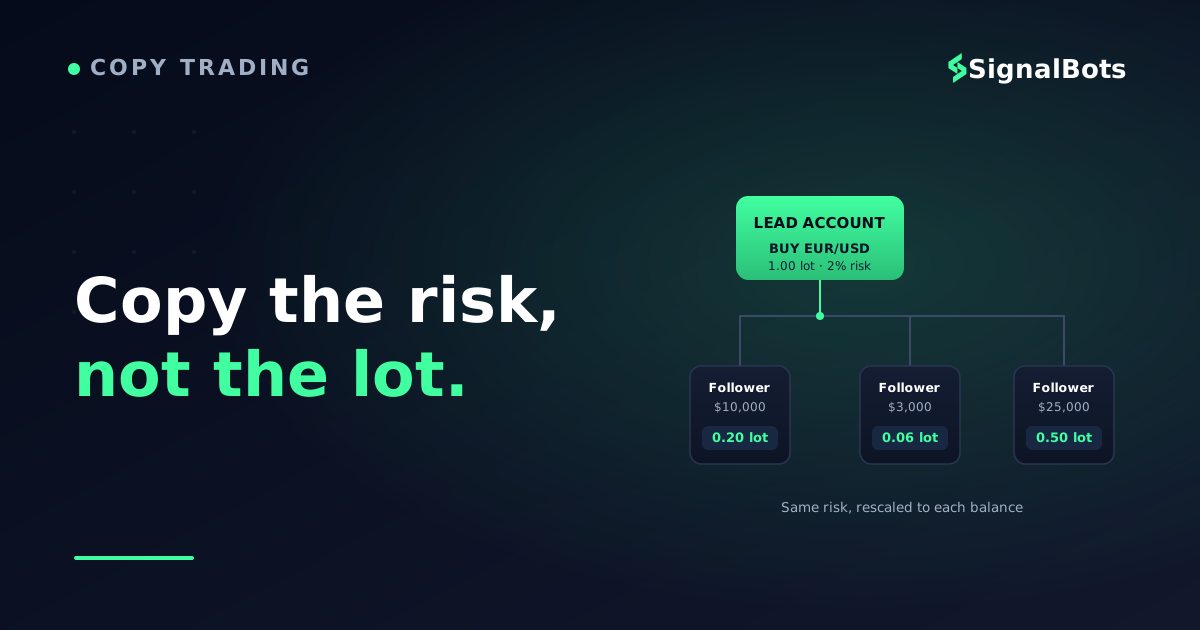
Copy trading means one account (the leader, master, or strategy account) places a trade, and that same trade is reproduced on one or more follower accounts — automatically, scaled to each follower's own balance and risk. It is sometimes called mirror trading, and the distinction that matters most is the one people skip: a copy is not a photocopy. The leader's 1.00-lot order does not land as 1.00 lots on a $3,000 account — a good copy setup rescales it.
Here is the shape of the relationship, so the rest of the setup makes sense:
One trade, mirrored and rescaled to each follower
Lead / strategy accountBUY EUR/USD - 1.00 lot, 2% risk on $50k
Mirrored to your accounts
Follower - $10,0000.20 lot - same 2% risk, scaled down
Follower - $3,0000.06 lot - same 2% risk, scaled down
Follower - $25,0000.50 lot - same 2% risk, scaled down
The same signal becomes a different lot size on every account, because it is scaled to each balance. Copy the risk, not the raw lot.
Every route below produces that picture. What changes between them is who runs the copying engine, what you have to trust, and how much control you keep over sizing and risk.
The three routes, side by side
Before any setup, decide which route you're building. They are genuinely different products, not three names for one thing.
The built-in MT5 Signals service — MetaTrader's own subscription marketplace, baked into the MT5 terminal. You browse strategy providers, subscribe, and MetaTrader copies their trades to your account. Zero extra software.
The investor-password route — a signal provider (or your own other account) hands you a read-only investor password. You log a second terminal into that account in view-only mode, and a copier reads its trades and reproduces them on yours.
A dedicated trade copier — a standalone trade copier tool (two Expert Advisors, a source EA on the master and a receiver EA on the follower, or a bridge app) that you install and configure yourself. It copies between any two terminals you can run.
What matters to you
MT5 Signals service
Investor-password copier
Dedicated trade copier
Setup effort
Lowest - subscribe and go
Medium - two terminals
Highest - install + wire EAs
Works on MT4?
MT5 (MT4 legacy only)
MT4 and MT5
MT4, MT5, even cross-platform
Who you can copy
Only marketplace providers
Anyone who shares an investor password
Any account you run a terminal for
Control over your sizing
Basic (deposit-load %)
Full - your copier's rules
Full - lot multiplier, filters
Runs while your PC is off
Yes (MetaTrader-hosted VPS)
Only on your own VPS
Only on your own VPS
Best when
You want it running in minutes
You follow a specific provider
You need your own risk rules
Notice the trade-off running down that table: the easier a route is to start, the less it lets you shape the copy to your own account. The built-in service is a two-minute setup that hands MetaTrader the wheel; a dedicated copier is an afternoon of wiring that hands you the wheel. Pick by how much control the trades actually need.
Route 1 — the built-in MT5 Signals service
This is the shortest path, and it lives entirely inside MetaTrader 5. If you are with one of the brokers that support copy trading on MT5, and you're happy copying a provider from MetaTrader's own marketplace, you can be live before you finish your coffee.
Subscribe to a signal provider inside MT5
1
Open the Signals tab
In MT5, go to the Toolbox panel and click the Signals tab. This is MetaTrader's built-in provider marketplace.
2
Vet the provider, not the headline
Sort by growth and drawdown, not just the top return. A steady equity curve beats a spiky one you can't survive.
3
Set your copy ratio
Under signal settings, cap the deposit load and equity used so one provider can't commit your whole account.
4
Subscribe and enable copying
Confirm the subscription, tick 'Copy trades by subscription', and MT5 begins mirroring the provider's positions.
The convenience is real, but so are the limits. You can only copy providers who list themselves in the marketplace — not a friend, not your own second account, not a Telegram signal. Your sizing controls are coarser than a dedicated copier's. And because it's tied to MetaTrader's hosting, keeping it running around the clock nudges you toward MetaTrader's paid virtual server.
MT4 users are largely out of luck here: the modern Signals experience is an MT5 feature, and if you're on MetaTrader 4 you'll almost always drop to Route 2 or 3.
Route 2 — copy from an investor password
This route is the workhorse when you want to follow a specific account — a signal provider you trust, a mentor, or your own master account — rather than a marketplace listing. It hinges on one credential most beginners misuse.
Every MetaTrader account has two passwords. The master password can trade and withdraw. The investor password is read-only: log in with it and you can watch every position and order, but you cannot place, modify, or close a trade, and you cannot touch the money. That read-only property is the whole point — a provider can safely hand it out, because it exposes the trades without exposing the account.
Rule of thumb: you receive a provider's investor password to copy them; you never hand out — or ask for — a master password.
The setup is a two-terminal arrangement: one terminal logged into the source account with the investor password (read-only), and a copier that reads those trades and fires matching orders on your live account in a second terminal.
Wire an investor-password feed into your account
1
Get the read-only investor password
Ask the provider for the account number, server, and investor (read-only) password - never the master password.
2
Log a second terminal into the source
Open a spare MT4/MT5 terminal and log into the source account with the investor password, in view-only mode.
3
Point a copier at both terminals
Run a trade copier that reads the source terminal's trades and reproduces them on your live account's terminal.
4
Scale to your balance, then test
Set a lot multiplier or fixed-risk rule so the copy fits your account, and dry-run it on a demo first.
The key advantage over Route 1: you own the risk rules. The copier — not the provider — decides how big your positions are, which symbols to accept, and when to stop. The catch is that the investor password only gives you the trades; the copying engine is still Route 3's job, which is where we go next.
Route 3 — a dedicated trade copier
A dedicated copier is the most flexible and the most hands-on. It's the engine behind Route 2, and it's what you use to copy between two accounts you both control — a master and a follower, MT4 to MT5, or even one strategy account fanning out to several followers. If you've ever wanted a Telegram-to-MT5 copier or an MT5 feed driven by an external signal source, this is the machinery underneath.
Most copiers are a pair of Expert Advisors: a source EA on the master terminal that broadcasts each trade, and a receiver EA on the follower terminal that listens and executes. The install is mechanical; the configuration is where the thinking happens.
Install and configure a two-EA trade copier
1
Install the matching EA versions
Put the correct MT4 or MT5 build of the copier on each terminal - source EA on the master, receiver EA on the follower.
2
Allow algo trading on both
Enable auto/algo trading and let the EAs write to the shared file or channel they use to pass trades.
3
Map every symbol name
If the two brokers name symbols differently (EURUSD vs EURUSD.m), map each pair so a trade never lands on the wrong instrument.
4
Set sizing: multiplier or fixed risk
Choose a lot multiplier or a percent-of-equity rule so the follower's size fits its balance, not the master's.
5
Test with pending orders on demo
Fire a few test trades on a demo pair before going live, and confirm each one copies at the right size and symbol.
This is the same category of tool as an MT4/MT5 connector — software that bridges an external source of trades into a MetaTrader terminal. The difference is only the source: a copier's source is another trading account, while a connector's source is a broker chart or a signal feed. If bridging an outside signal into MetaTrader is your real goal, our MT5 connectors do exactly that job without you assembling two EAs by hand.
Choosing your route
"Which one should I use" has a clean answer once you know two things: what you're copying, and how much you need to reshape it. Follow the branches.
Which copy-trading route fits you?
Take itProceed with careSkip / stand aside
Copying a marketplace listing on MT5? The built-in service wins. Copying a specific account, or needing your own risk rules? A copier wins.
The two things that quietly break a copy
Here's what the setup guides rarely stress: once a copier is installed, it almost never fails loudly. It fails quietly — the mirror keeps running but stops matching the source. Two culprits cause nearly all of it.
Symbol mismatch. Brokers name the same instrument differently — EURUSD on one, EURUSD.m or EUR/USD on another. If your copier doesn't know they're the same, a copy either rejects or, worse, lands on the wrong instrument. Every serious copier has a symbol mapping table; fill it in for every pair you'll trade, don't assume defaults.
Latency and downtime. A copier only works while both terminals are running and reachable. Close your laptop and the copy stops; a slow connection and the follower fills seconds after the master, at a worse price. This is why serious copiers run on a VPS for EAs — an always-on virtual server sitting close to the broker — rather than a home PC that sleeps.
A copied trade also inherits the leader's risk appetite, not yours. If the source risks 5% per trade and you mirror it raw, you've adopted a risk level you never chose. Size the copy to your own account, and keep a manual override — a way to flatten everything if the source goes rogue.
Before you go live
Run this the first time you turn a copy on — and again whenever you switch source, broker, or terminal. Most copy disasters trace back to a box on this list nobody ticked.
Copy-trading pre-flight check
0 / 7
You used the read-only investor password for any account you don't own - never the master password.
Every symbol you'll trade is mapped between the two terminals, including suffixes like .m or .pro.
Copy sizing is set to a lot multiplier or percent-of-equity rule that fits YOUR balance, not the master's.
You ran at least a few test trades on a demo and confirmed size, symbol, and direction copied correctly.
Both terminals run on an always-on VPS if you need copying while your PC is off.
You have a manual kill-switch - a way to close all copied positions instantly if the source misbehaves.
You've capped total exposure so one source can't commit your whole account.
★
Checklist complete — you’re cleared to proceed.
Tick every box and the copier does what you actually hired it to do: reproduce a good decision, sized to your account, without you watching the screen. Skip one and it quietly reproduces the wrong thing all day.
FAQ
Can you copy trade on MT4, or is it MT5 only?
Both. The built-in Signals marketplace is an MT5 feature, so MT4 users usually can't use Route 1. But the investor-password route and dedicated trade copiers work on MT4 and MT5 alike — most copiers even copy MT4-to-MT5. If you're on MT4 and want to copy an account, use Route 2 or 3.
Is the investor password safe to give out?
Giving out your investor password is safe in the sense that it's read-only — the holder can watch your trades but cannot place trades or withdraw funds. What you should never share is the master password. When you receive an investor password from a provider, that's the correct credential to use, because it lets a copier read their trades without giving you (or your copier) the ability to trade on their account.
Do I need to keep my computer on for copy trading to work?
For the built-in MT5 Signals service, you can use MetaTrader's hosted virtual server so it runs while your PC is off. For an investor-password feed or a dedicated copier, copying only happens while both terminals are running, so most traders rent a VPS — an always-on virtual server near the broker — instead of relying on a home PC that sleeps or loses connection.
Why did a trade fail to copy or land on the wrong pair?
Almost always a symbol-mapping problem. Two brokers name the same instrument differently — EURUSD versus EURUSD.m, say — and if the copier doesn't map them, the trade rejects or hits the wrong symbol. Fill in the copier's symbol map for every pair before going live, and confirm each one with a demo test.
Will copy trading make the same profit as the account I'm copying?
Not necessarily. Your fills happen a moment later and possibly at a slightly different price, your broker's spread and swap differ, and your position is scaled to your balance. A copy tracks the source closely but rarely matches it to the cent — and it inherits the source's losses just as faithfully as its wins, which is why sizing to your own risk matters more than chasing a headline return.
You came in
“watching a good trader's account with no way to follow their trades automatically”
and now you can
mirror any account you can see, sized to your own balance and risk.
Pick the route that matches what you're copying
The built-in MT5 Signals service is the fastest way to copy a marketplace provider; the investor-password route follows a specific account read-only; a dedicated trade copier gives you full control and copies MT4 to MT5. Whichever you choose, the copy lives or dies on symbol mapping and uptime — map every pair, run on a VPS, and keep a kill-switch. If your real goal is feeding an outside signal into MetaTrader rather than copying another account, a connector does that job directly.
The Cross-Market Desk is the SignalBots editorial team for topics that span every market — platform connectors, copy trading, partnership and IB programs, and the general mechanics of trading automation. We research and write the guides that apply no matter what you trade.



Discussions 0
Leave a comment